


 Top Rated Course

We may not have the course you’re looking for. If you enquire or give us a call on +36 18508731 and speak to our training experts, we may still be able to help with your training requirements.
The Ultimate Guide to SERP Features and How to Optimise for Them
James Smith 03 January 2026SERP Features are special elements on a Search Engine Results Page (SERP) that go beyond standard blue links to enhance visibility and User Experience. These include featured snippets, knowledge panels, people also-ask sections and more. It provides quick, relevant answers and increases click-through rates for well-optimised content.

Training Outcomes Within Your Budget!
We ensure quality, budget-alignment, and timely delivery by our expert instructors.
Table of Contents

The first impression is the best one indeed! No matter how many times you appear in front of a person, it is always your first impression that strongly gets imprinted on their subconscious mind. People tend to forget a few days or moments you have been with them, but this is not the case with your first meeting. Are you wondering why the first impression is being focused here and What are SERP Features?
You'll eventually get to know when you finish reading this blog. But before that, here is a hint for you! SERP Features deal with the strategy of first impression and attraction for your website. In this blog, we will delve into What are SERP Features and how to optimise for them.
Table of Contents
1) What are SERP Features?
2) Why are SERP Features Important?
3) 15 Key SERP Features and How to Rank in Them
4) Ways to Identify Your Competitors SERP Features
5) Tracking Your Site’s Performance in Google SERP Features
6) Conclusion
What are SERP Features?
Search Engine Results Page (SERP) Features are different kinds of elements that appear on the search results page. They are not a part of organic results, but they appear on the same results page. They are the additional factors in search results aimed at providing exact, relevant, and related information. These features help users quickly find answers to their queries with direct answers. It becomes the first point of interaction with the users, thereby enhancing the User Experience (UX).
The users can see the information without clicking on your website when you appear in SERP Features. If they want to know more or would like to see what’s on your website, then they will click and check. This is the reason why first impressions matter a lot here.

Why are SERP Features Important?
The SERP Features are important for users to notice. Since they are natured to provide direct answers, users are tempted to read them instead of clicking the website to read the full content and find what fits them. So, the fact here is not to worry if you’re not enlisted in the organic trafficking results page. Be concerned about being listed in any of the SERP Features!
If you observe any search result pages, you can see that half of the page would have been occupied by SERP Features. With Brand SERP Optimisation and the right keywords and content, you’ll obviously get all the website traffic, brand recognition, and visibility.
15 Key SERP Features and How to Rank in Them
To help you better, here is a list of 15 key SERP Features that generally appear over a search and a little tip to know how to rank in them. Are you ready to know what would fit your style and elevate it? Read along!
1) Featured Snippet
Featured snippets provide a quick, direct, and relevant answer to the search of the users. Mostly, they appear at the top of the search result pages with the link to their source. These snippets are generated with keyword searches. Since they are up to the point or idea, they don’t require the users to click the link to know their answer.
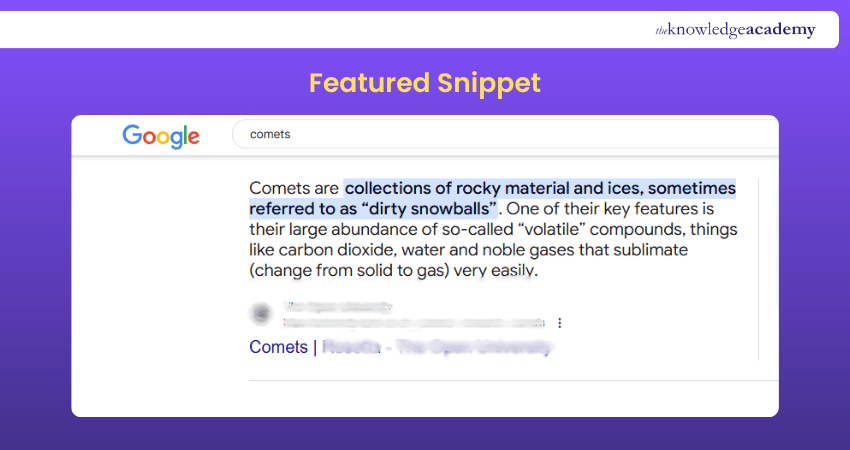
In general, featured snippets come in three forms:
1) Paragraph snippets
2) Number lists or bulletins
3) Tables
The paragraph format of snippets is the most common one. It provides brief and concise information. The number lists or bulletins are used when the users search for steps or procedures. Table formats are shown for comparisons or data-driven answers.
Elevate your optimising strategy to impress your targeted audience by registering for our SEO Course anytime!
2) Rich Snippets
Rich snippets or rich results are focused on providing more details compared to featured snippets. It includes additional details like images, star ratings, reviews, prices, and so on. This extra information makes the result page more appealing and detail-oriented.
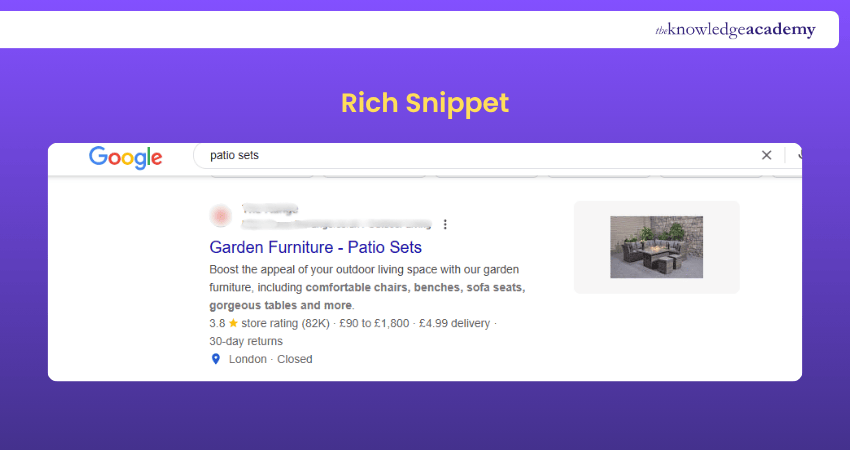
Here are lists of common types of rich snippets:
1) Review Snippets: Results of aggregated ratings and reviews for a product, service, company or organisation.
2) Event Snippets: Focus on information like event details, date, time, place, and even availability of tickets.
3) Product Snippets: Particular about product description like its specifications, price, image, reviews, availability and similarities.
4) Recipe Snippets: Provides details of a recipe, including the ingredients, cooking time, nutritional value, instructions, and images.
3. Local Pack
Local Pack, also known as the Map Pack, refers to the group of business listings that appear near the top of a search results page when someone searches for a local service or place. This feature typically includes a map, showing the locations of relevant businesses near the user, along with key details like their name, address, contact number, business hours, ratings, and sometimes images or website links.
For example, if a user searches for “library near me,” the Local Pack will show a map and a list of the top nearby libraries, along with helpful information to easily locate and contact them.

4) Image Pack
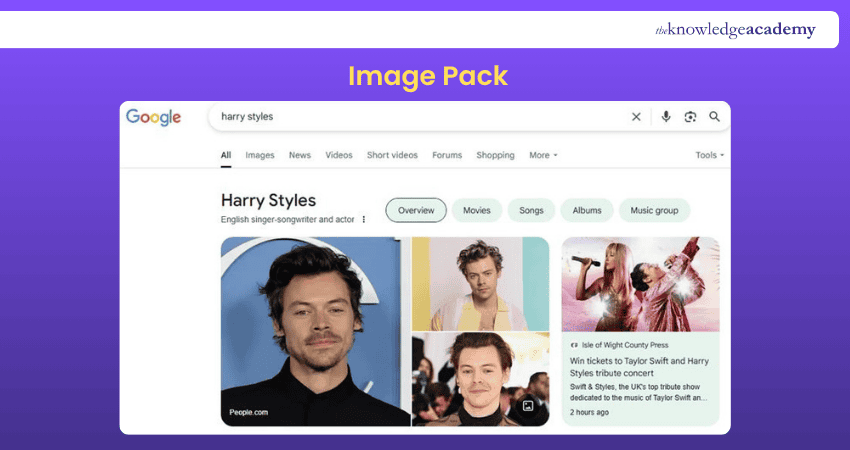
Image packs or image results are a cluster of images presented to you when you search for something. It is one of the earliest features of SERP, and it is effective today. The images will appear either at the top or in the middle of the results page. You can optimise the images with proper alt text so that it will appear on the results page.
5) Knowledge Panel
A knowledge panel or knowledge graph appears on the right side of a search results page, featuring details like collected information and images about the search from various websites and databases. It offers a quick look over the key details and links to websites for the users.

6) AdWords (Top)
In a SERP, there are other factors than SERP Features. Those include paid ads and organic trafficking of websites. In those paid ads, there are two categories: ads that appear on the top and on the bottom. AdWords, which are now referred to as Google Ads, play a significant role in the visibility of your website.
AdWords’ top results usually appear above the organic results on a results page. These ads are listed based on the user's search results. Since they are mostly paid ads, they work on the Pay-per-click (PPC) strategy.
Uplift your website with remarkable marketing ideologies by joining our Digital Marketing Tools Training today!
7) AdWords (Bottom)
Google Ads or AdWords appear not only at the top of a results page but also at the bottom of a SERP. They will be either labelled as “Ads” or “Sponsors” for users to identify. Though they appear at the bottom, they also have higher SERPs Visibility among other sources.
8) Getting Sitelinks
Sitelinks involve the process of displaying certain other multiple links to a specific website. Those links will be relevant to the user’s search. It helps them to find relevant or supporting links directly without navigating to the website or finding them.
9) Video Carousels
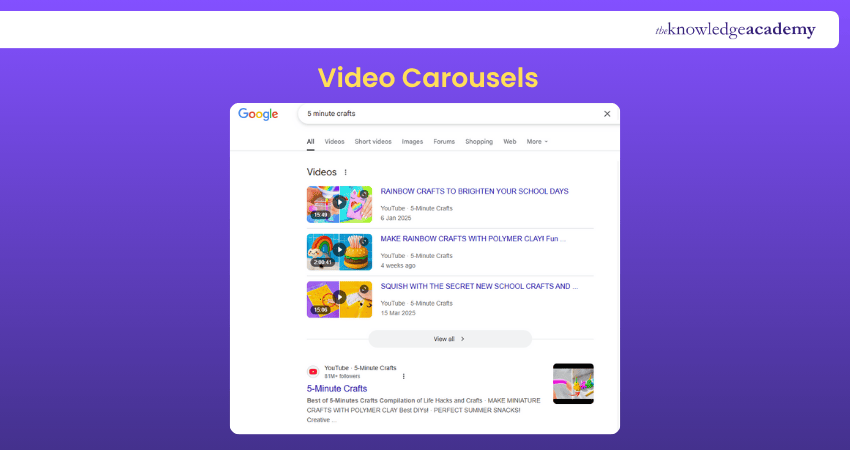
Video carousels are the video results that are relevant to the search query. They will be present either horizontally or vertically. It will have links to the videos so that the users can directly watch the videos.
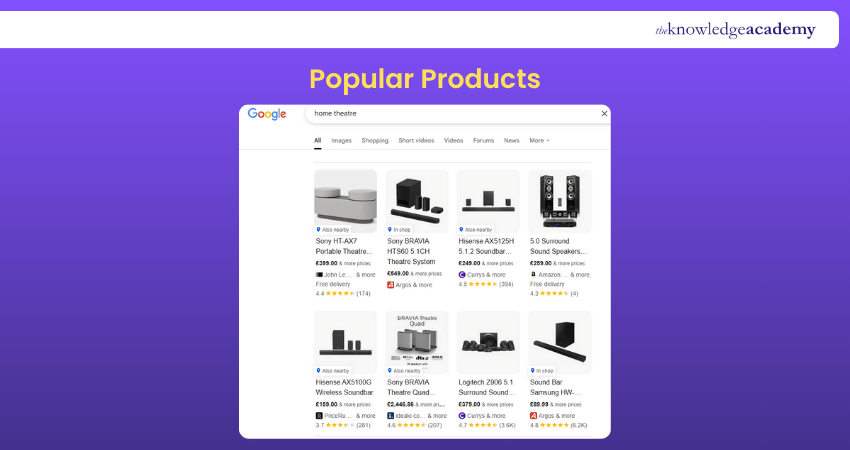
10) Popular Products
Popular products feature the details of products related to a search. It often includes details related to the products, like their image, price, review, ratings, and links to their website.
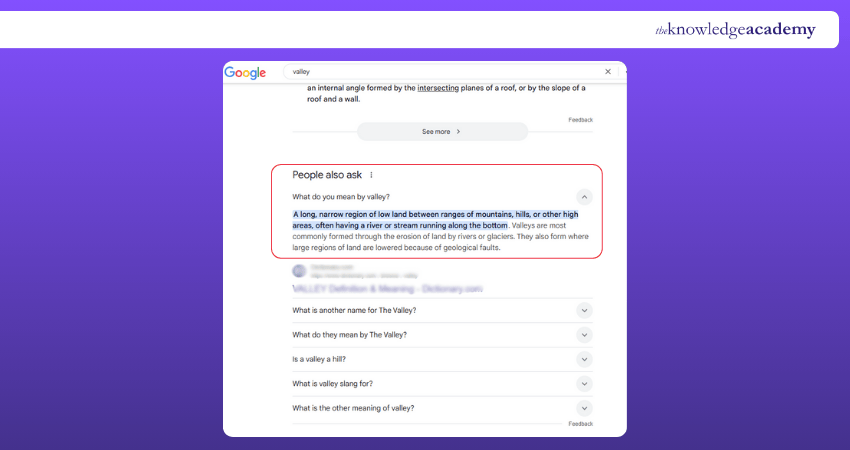
11) People Also Ask
The People Also Ask (PAA) section is a set of questions related to the initial search. It aims to provide exact information as featured snippets section. But the difference is PAA appears in a separate section, whereas the featured snippet appears directly. When you click the question, it will give you brief information that answers the question with a link to its website.
12) Reviews
Reviews in SERP refer to the search results particularly focusing on ratings and reviews of a product, service, company, or organisation. It helps users to know the details before visiting the website.
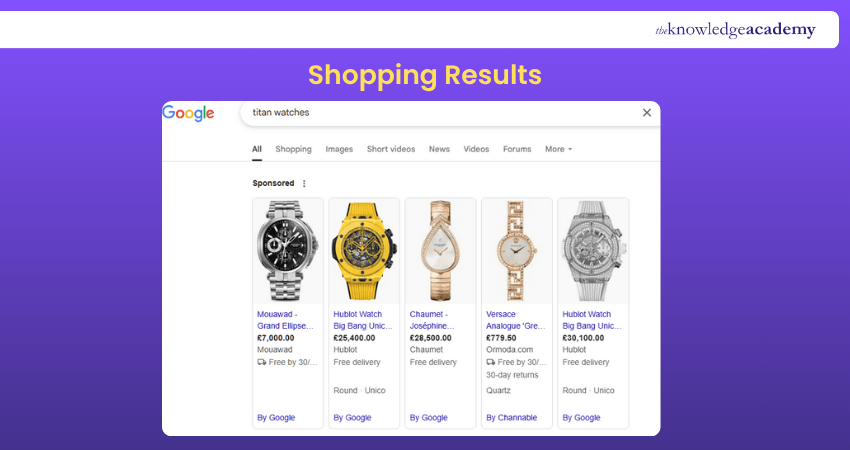
13) Shopping Results
Shopping results often provide details of the products as popular products feature. However, shopping results are entirely based on shopping websites or shops. It includes details like images, prices, store locations, links to the website, ratings, and reviews. These results can be both paid ads and free, which is based on Google Merchant Centre.
14) In-depth Article
In-depth articles are a form of long content published by writers or research individuals. They provide extended information regarding the topic of search, often involving high research and data accuracy. These articles are broad topics, and they appear additional to the organic results on a results page.
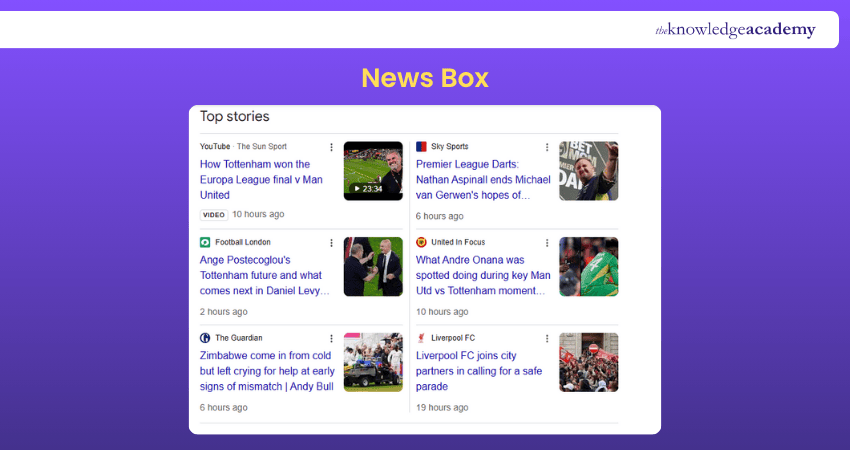
15) News Box
The news box or “Top stories” is a section dedicated to offering news related to user’s searches. It may show trending news, popular news, or breaking news. The search algorithm takes news from reputable news sources only, thereby maintaining the relevance and authenticity of the content.
Ways to Identify Your Competitors SERP Features
Knowing how your competitors are ranking high with their varied types of SERP Features will help you improve the features of your website. It is not wrong to learn a tip to enhance your activity and presence in search results. Monitoring SERP Volatility alongside keyword research tools can help you identify which keywords drive their rankings, while a manual analysis of their website and content would also be helpful.
Are you looking for impactful content crafting? Sign up for our Content Marketing Course to learn how!
Tracking Your Site’s Performance in Google SERP Features
To get an idea of how well your website and content are performing in Google SERP, you can track it with available online tools. It will provide a detailed analysis of where you need extra care to appear in SERP Features.
Such techniques include using Google Search Console, Search Engine Optimisation (SEO) tools, or any SERP tools to track your website’s performance. If you customise those tools with SERP Features, it will provide a detailed analysis of where your visibility is not seen or comparatively low. With these practices, you can check and improve your website for more visibility.
Conclusion
Mastering SERP Features isn’t just about rankings, it’s about visibility, engagement, and smart strategy. Now that you know What are SERP Features and how to optimise for them, it’s time to turn insights into action. Keep testing, keep adapting, and soon your content will shine brighter than ever on the search results page. Let Google work for you!
Explore the marketing trends and research methodologies with our Marketing Research Training – join now!
Frequently Asked Questions
What is an Example of a SERP?

An example of SERP is the search result page that you will be directed to when you search for something on search engines like Yahoo, Google, or Bing.
What is the Difference Between SEO and SERP?
The difference between SEO and SERP is that SERP is the page that you will see after you enter your query into a search engine. On the other hand, SEO is a technique you use to appear on the results page of a search query.
What are the Other Resources and Offers Provided by The Knowledge Academy?
The Knowledge Academy takes global learning to new heights, offering over 3,000 online courses across 490+ locations in 190+ countries. This expansive reach ensures accessibility and convenience for learners worldwide.
Alongside our diverse Online Course Catalogue, encompassing 19 major categories, we go the extra mile by providing a plethora of free educational Online Resources like News updates, Blogs, videos, webinars, and interview questions. Tailoring learning experiences further, professionals can maximise value with customisable Course Bundles of TKA.
What is The Knowledge Pass, and How Does it Work?
The Knowledge Academy’s Knowledge Pass, a prepaid voucher, adds another layer of flexibility, allowing course bookings over a 12-month period. Join us on a journey where education knows no bounds.
What are the Related Courses and Blogs Provided by The Knowledge Academy?
The Knowledge Academy offers various Digital Marketing Courses, including Search Engine Marketing (SEM) Training, SEO Course and Digital Marketing Tools Training. These courses cater to different skill levels, providing comprehensive insights into Product Branding.
Our Digital Marketing Blogs cover a range of topics related to Search Engine Result Pages, offering valuable resources, best practices, and industry insights. Whether you are a beginner or looking to advance your Digital Marketing skills, The Knowledge Academy's diverse courses and informative blogs have got you covered.

James Smith


Digital Marketing Manager and Trainer
James Smith is a digital marketing professional with over a decade of experience in SEO, content strategy, paid media and analytics. He has supported both SMEs and global brands in transforming their digital presence. James’s writing and training are rooted in results-driven tactics and the latest marketing trends.
View Detail
Upcoming Digital Marketing Resources Batches & Dates
Date
 Search Engine Marketing (SEM) Training
Search Engine Marketing (SEM) Training
Fri 21st Aug 2026
Search Engine Marketing (SEM) Training
Fri 11th Dec 2026

 If you wish to make any changes to your course, please


