


 Top Rated Course

We may not have the course you’re looking for. If you enquire or give us a call on +852 2592 5349 and speak to our training experts, we may still be able to help with your training requirements.
How to Rename a Branch in Git: A Complete Guide
Richard Harris 28 April 2026Renaming a branch in Git is essential for correcting typos, aligning with naming conventions, and improving clarity. Renaming a branch in Git ensures better Project Management and avoids confusion. This comprehensive blog covers How to Rename a Branch in Git, ensuring project organisation and clarity both locally and remotely.

Training Outcomes Within Your Budget!
We ensure quality, budget-alignment, and timely delivery by our expert instructors.
Table of Contents

Ever found yourself in a situation where you need to change the name of a Git branch but aren't sure how? Whether correcting a typo or improving clarity, learning How to Rename a Branch in Git is crucial. Git is an incredibly powerful tool, but it can be daunting if you're not familiar with all the commands and procedures.
In this blog, we’ll walk you through the entire process of renaming both local and remote Git branches. By the end of this blog, you'll not only know How to Rename a Branch in Git but also how to update your local and remote repositories seamlessly. So, let's dive in and master this essential Git skill!
Table of Contents
1) What is a Git Repository?
2) What is a Git Branch?
3) How to Rename a Git Branch?
4) How to Remove a Remote Git Branch?
5) Conclusion
What is a Git Repository?
A Git repository, or repo, is a storage space for project files and their version histories. It enables you to track changes, revert to previous states, and manage development branches. It acts as a logbook of your project's progress, aiding both solo and team-based development.
Repositories can be local, on your computer, or remote, on servers like GitHub, GitLab, or Bitbucket. Local repos support individual development and offline work, while remote repos facilitate collaboration and act as backups. This combination ensures efficient Project Management and seamless teamwork, making Git essential for modern Software Development.

What is a Git Branch?
In Git, a branch is an independent line of development that lets you diverge from the main codebase to work on new features, bug fixes, or experiments without impacting the main branch, typically called "main" or "master." Branches provide a way to isolate your work, ensuring that ongoing development does not interfere with the stable code.
Once the work on a branch is complete and tested, it is able to be remerged into the main branch, integrating the changes. This process helps maintain a clean and organised workflow, supporting efficient and collaborative development.
Unlock your potential with our Git & GitHub Fundamentals Course - join now and master GitHub!
How to Rename a Git Branch?
Renaming a Git branch can be essential for maintaining clarity and avoiding issues. Let’s explore how to rename both local and remote branches:
Rename a Local Git Branch
a) Select the Branch: In your command line, choose the Git branch you want to rename using “git checkout old-name". You’ll receive confirmation that you’ve switched to the correct branch (e.g., “Switched to branch ‘old-name’”).
b) Perform the Rename: Execute the actual rename with “git branch -m new-name".
Alternatively, you can rename the branch via the master branch:
a) Switch to Master: Use “git checkout master” to switch to the master branch.
b) Rename the Branch: Execute “git branch -m old-name new-name".
c) Verify: Confirm the successful rename by checking the branch status with “git branch –a".
Renaming a Remote Git Branch
There are two different ways to rename a remote branch in Git. Let’s explore them below:
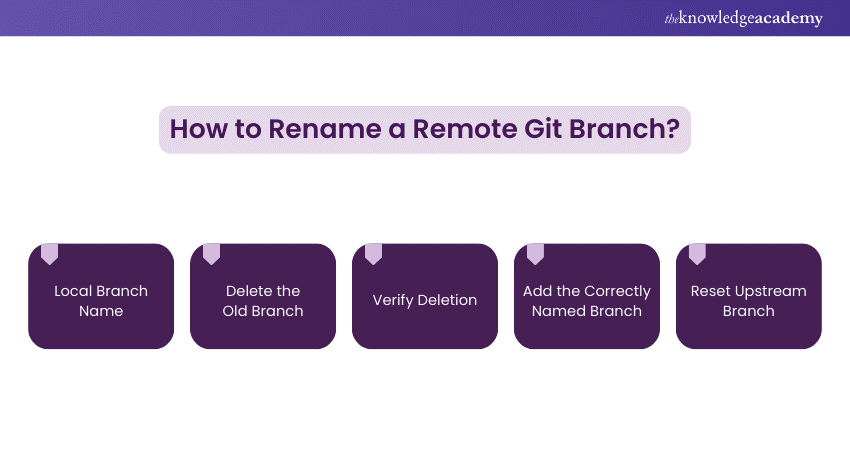
Method 1
a) Local Branch Name: Ensure that the local branch has the correct new name (use “git branch –a”).
b) Delete the Old Branch: Remove the branch with the incorrect name from the remote repository using “git push origin --delete old-name".
c) Verify Deletion: Confirm that the old branch has been deleted properly. Learn How to Delete a Branch in Git and ensure that the removal was successful.
d) Add the Correctly Named Branch: Add the branch with the desired name using “git push origin -u new-name".
e) Reset Upstream Branch: Perform a reset of the upstream branch to apply the changes effectively.
Method 2
For a concise one-command option to rename a remote Git branch:
a) Use “git push origin :old-name new-name".
Updating A Local Clone After Branch Name Changes
When a branch name changes in the remote Git repository, updating your local clone is essential. Follow these steps to ensure synchronisation:

a) Fetch New Data: Use “git fetch
b) Review Changes: Run “git log -p –graph" to examine commits and compare between repositories (e.g., staging vs. production). Customise with flags like “--author="John Doe"” or “--since="last week"”.
c) Remove Local References: Delete local references to prevent merge errors. Execute “rm -rf .git/refs remotes/
d) Update Tracking Info: Set tracking info for the renamed branch using “git remote set-head
e) Checkout and Push: Locally, check out the renamed branch and push to origin: “git checkout
f) Validate Changes: Confirm success with “git status”. Review local files and related change sets.
g) Tag Versions: If needed, tag versions locally and remotely using “git tag -a
Kickstart your journey in App & Web Development Training -register today and thrive!
How to Remove a Remote Git Branch?
To remove a remote Git branch, follow these steps:
a) Delete the Remote Branch: Execute the following command to remove the remote branch:
|
“git push origin --delete branch-name" |
b) Verify the Deletion: Confirm the removal by fetching updates from the remote repository:
|
“ git fetch origin git branch –r " |
Elevate your career with mobile app development skills- join our Mobile App Development Course now!
Conclusion
Knowing How to Rename a Branch in Git is crucial for maintaining project organisation and clarity. Whether correcting typos or aligning with conventions, this blog ensures you can manage branch renaming efficiently, both locally and remotely. Additionally, understanding Git Rebase can help streamline your commit history, making it easier to integrate changes cleanly. This prevents confusion and improves workflow. Master this skill to enhance your development process further.
Master UX/UI design essentials with our expert-led UI UX Design Course - register now to get started!
Frequently Asked Questions
Is it Possible to Rename a Branch Using Git GUI Tools?

Yes, it is possible to rename a branch using Git GUI tools. Many popular Git GUIs, like GitKraken or Sourcetree, provide an easy interface for renaming branches.
Can I Rename a Branch That has Unmerged Changes?
Yes, you can rename a branch that has unmerged changes. Renaming a branch doesn't affect its content or commit history, so unmerged changes will remain intact after the rename.
What are the Other Resources and Offers provided by The Knowledge Academy?
The Knowledge Academy takes global learning to new heights, offering over 3,000 online courses across 490+ locations in 190+ countries. This expansive reach ensures accessibility and convenience for learners worldwide.
Alongside our diverse Online Course Catalogue, encompassing 19 major categories, we go the extra mile by providing a plethora of free educational Online Resources like Blogs, eBooks, Interview Questions and Videos. Tailoring learning experiences further, professionals can unlock greater value through a wide range of special discounts, seasonal deals, and Exclusive Offers.
What is The Knowledge Pass, and How Does it Work?
The Knowledge Academy’s Knowledge Pass, a prepaid voucher, adds another layer of flexibility, allowing course bookings over a 12-month period. Join us on a journey where education knows no bounds.
What are Related Courses and Blogs Provided by The Knowledge Academy?
The Knowledge Academy offers various blogs on App and Web Development Training, including Git & GitHub Fundamentals, UI UX Design Course, Mobile App Development Course and more. These courses cater to different skill levels, providing comprehensive insights into Benefits Of Drupal.
Our Programming and DevOps Blogs cover a range of topics related to GitHub, offering valuable resources, best practices, and industry insights. Whether you are a beginner or looking to advance your Programming skills, The Knowledge Academy's diverse courses and informative blogs have you covered.

Richard Harris


Senior Full Stack Developer and Technology Educator
Richard Harris is a highly experienced full-stack developer with deep expertise in both frontend and backend technologies. Over his 12-year career, he has built scalable web applications for startups, enterprises and government organisations. Richard’s writing combines technical depth with clear explanations, ideal for developers looking to grow in modern frameworks and tools.

Upcoming Programming & DevOps Resources Batches & Dates
Date
 Git & GitHub Fundamentals
Git & GitHub Fundamentals
Fri 3rd Jul 2026
Git & GitHub Fundamentals
Fri 30th Oct 2026

 If you wish to make any changes to your course, please


