


 Top Rated Course

We may not have the course you’re looking for. If you enquire or give us a call on 800600725 and speak to our training experts, we may still be able to help with your training requirements.
Linux Interview Questions and Answers for Beginners
The Knowledge Academy 22 April 2026The frequently asked Linux Interview Questions cover a wide range of topics to help you prepare for your Linux job interviews with confidence. The roles in this field can range from Junior Admin to Senior Engineer, which is why these questions cover everything from technical aspects to legal aspects of open-source OS.
Training Outcomes Within Your Budget!
We ensure quality, budget-alignment, and timely delivery by our expert instructors.
Table of Contents

From servers and smartphones to supercomputers and smart TVs, there's one powerhouse that drives it all: Linux. It's an Operating System (OS) that boasts speed, security and customisability in spades, making it the go-to choice for tech pros. Whether you are aiming for a System Admin role or breaking into DevOps, mastering the Linux essentials is key. This blog featuring more than 40 Linux Interview Questions will serve as your roadmap in achieving that.
From your basic understanding of Linux to your advanced technical know-how, this selection of Linux Interview Questions and answers will set the tone for a successful interview. So read on and seal the deal in one shot!
Table of Contents
1) Basic Linux Interview Questions and Answers
a) What is Linux?
b) What are the basic components of Linux?
c) What is BASH?
d) What are shells used in Linux?
e) What is CLI and GUI?
f) What is the ‘ls’ command in Linux?
g) What are the Linux Directory Commands?
h) What are the types of file permissions in Linux?
i) What is swap space?
j) What is pipe?
2) Advanced Linux Interview Questions and Answers
3) Conclusion
Basic Linux Interview Questions and Answers
Here are the basic Linux Interview Questions with answers to get you started. These are some of the most frequently asked Linux Interview Questions that will help you gets your Linux basics right:
What is Linux?

Linux is an open-source Operating System that is used to manages hardware and software. It’s known for being stable, secure and highly customisable. It’s used in everything from servers and desktops to mobile devices and embedded systems. Think of it as the engine behind a lot of modern tech.

What are the basic components of Linux?
Linux architecture is built around these four essential components:
1) Kernel: It forms the core of Linux. It manages system operations by enabling communication between the hardware and software.
2) Shell: It acts as an interface between user and kernel. It helps us execute commands, programs and scripts.
3) System Utilities: These tools help users manage and configure system resources.
4) Applications: These are user-focused programs for performing specific tasks or functions.
What is BASH?
BASH stands for Bourne Again Shell. It’s a command-line interface used in Linux to interact with the system. We can run commands, write scripts and automate tasks through it. It’s one of the most common shells and useful for everyday Linux tasks.
What shells are used in Linux?
A shell in Linux is a command-line interface that interprets user commands and communicates with the kernel. Linux provides support for multiple shells, each tailored for different needs. Common examples include:
1) BASH: It’s the default shell on most Linux distributions.
2) Z Shell (Zsh): It’s default on Kali Linux and macOS and offers advanced features.
3) Korn Shell (Ksh): It’s a powerful shell with programming capabilities.
4) C Shell (Csh): It’s inspired by the C programming language.
5) Tenex C Shell (Tcsh): It’s an enhanced version of C Shell with additional functionality.
What is CLI and GUI?
CLI stands for Command Line Interface, where the user types commands to interact with the system. GUI stands for Graphical User Interface, which is characterised by icons, windows, and buttons. Linux supports both. CLI is great for speed and automation, while GUI is more user-friendly for beginners.
What is the ‘Is' command in Linux?
The ls command lists files and directories. It’s like peeking into a folder. Use options like ls -l for details or ls -a to include hidden files. It’s one of the first commands most Linux users learn. It’s simple but very useful.
What are the Linux Directory Commands?
Linux directory commands help navigate and manage folders. ls lists files, cd changes directories, mkdir creates folders, and rmdir removes them. The user can also use pwd to see the current location and tree to view the structure in a visual way.
What are the types of file permissions in Linux?
There are three types of file permissions in Linux:
1) read (r)
2) write (w)
3) execute (x)
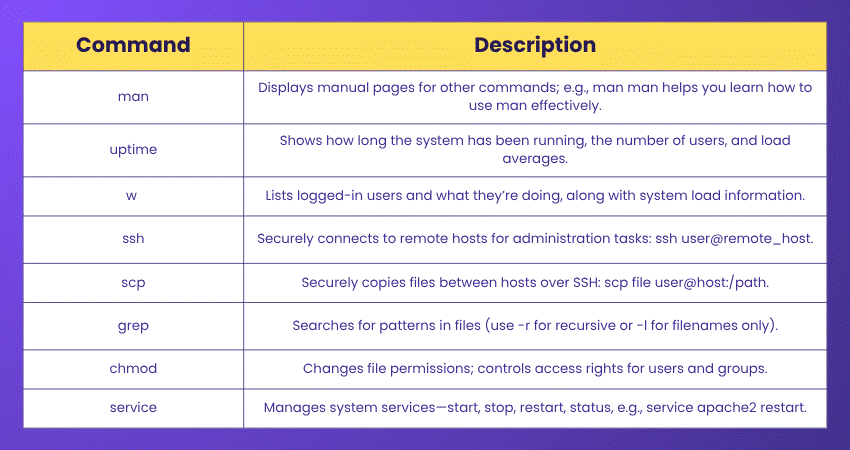
These apply to three user groups: owner, group, and others. Permissions control who can view, change, or run files. They’re managed using chmod, chown, or symbolic notations like rwxr-xr--.
What is swap space?
Swap space acts like extra RAM. When the physical memory gets full, Linux uses swap space on the hard drive to keep things running smoothly. It’s slower than RAM but helps prevent crashes when the system is under heavy load.
Shine bright in the tech world with our comprehensive Solaris Shell Programming Training - Register now!
What is pipe?
A pipe (|) is used to pass output of one command as input to another. It’s a great way to combine commands. For example, ps aux | grep apache filters running processes for anything related to Apache. It makes command chaining super-efficient.
What is the SED command used for in Linux?
SED is a stream editor used to search, find, replace, insert, or delete text in files. It’s especially powerful for automating edits across many files. For instance, sed 's/foo/bar/g' replaces “foo” with “bar” throughout a text. Great for scripting changes.
What is the difference between Linux and Unix?
Linux is open-source and runs on a wide range of devices. Unix is primarily proprietary and is commonly used in enterprise servers. Unix inspired Linux, so they’re similar, but Linux is more accessible for personal and community use, while Unix stays in niche systems.
How do you write the output of a command to a file?
I can redirect command output using >. For example, ls > files.txt saves the list of files into a file named files.txt. To append instead of overwriting, use >>. It’s great for logging results or saving data for later review.
How would you sort the entries in a text file in increasing order?
It’s simple. I'd just use the sort command. For example, sort filename.txt will list all lines alphabetically. If I want to sort by numbers or reverse order, I can use options like -n or -r. It’s a powerful command with minimal effort.
How to rename a file in Linux?
I use the mv command! For example, mv oldname.txt newname.txt renames the file. It also moves files if I give it a different path. So, it’s a dual-purpose command, both for moving and renaming files or directories. Quick and straightforward.
What's the way to copy files to a Floppy Disk?
Use the cp command like this: cp file.txt /media/floppy. First, make sure the floppy is mounted. The mount point might vary depending on the system. It’s rare nowadays, but Linux still supports floppy access for archival and legacy purposes.
Join our Alpine Linux Training and scale the heights of DevOps excellence with ease- Sign up now!
Differentiate between DOS and BASH
Disk Operating System (DOS) is a command-line system used in Windows, while BASH is a Unix/Linux shell. DOS has fewer features and scripting capabilities, whereas BASH is more powerful as it allows loops, conditionals, and automation. BASH is also case-sensitive, unlike DOS.
What is a root account?
The root account is the superuser in Linux that has got full access to every file and command. Since it’s powerful, it is used carefully to prevent unintentional damage. Think of it as the Admin account with zero restrictions who can do literally anything on the system.
What command can be used to find out how much memory Linux is using?
I will use the free -h command to check memory usage in a human-readable format. It shows total, used, and available memory. I could also try top or htop to get real-time memory and process info.
What are the advantages and disadvantages of open-source?
Open-source gives the flexibility, community support and no licensing costs. The user can modify and share the software freely. But on the downside, it may lack official support, and user-friendliness can vary. Users rely more on forums and personal expertise for troubleshooting.
What is the key difference between hard links and soft links?
Hard links are like extra names for the same file data. They point directly to the file’s contents. Soft links (symlinks) are shortcuts pointing to another file’s path. If the original file is deleted, the hard links stay intact, but soft links break.
Unlock the true power of UNIX Shell Scripting in our UNIX Shell Programming Course and master the language of OS - Sign up now!
Name the Linux that’s designed by Sun micro system
That would be Solaris. It’s a Unix-based operating system developed by Sun Microsystems. While it’s not exactly Linux, it shares a lot of similarities when it comes to their features. After Oracle acquired Sun, Solaris became more proprietary but it was once widely respected for its scalability and performance.
Advanced Linux Interview Questions and Answers
This section covers the more challenging questions asked in advanced Linux interviews. These advanced Linux Interview Questions will deepen your understanding of Linux internals. Let's dig in:
Is it legal to edit Linux Kernel?
Yes, it’s completely legal. Linux gets released under the GNU General Public License. This means anyone can view, modify and even distribute the kernel’s source code. However, it is important that the licensing terms are followed when distributing a modified version.
What are the major differences between Linux and Windows?
The primary difference is that Linux is open-source and Windows is proprietary. Linux offers more control and is used in servers and development. Windows dominates desktops. Additionally, Linux uses commands more heavily while Windows is more GUI-focused. While most Linux distributions are free, Windows usually comes with licensing costs.
What is the main Difference Between Terminal, Console, Shell, and Command Line?
The key differences are as follows:
|
Term |
Definition |
Example/Usage |
|
Terminal |
A software program (emulator) that provides a window to interact with the shell. |
GNOME Terminal, Konsole, xterm |
|
Console |
Originally a physical device (keyboard + monitor); now refers to a text-only system interface. |
Virtual consoles accessed with Ctrl+Alt+F1–F6 in Linux |
|
Shell |
A command interpreter that processes user input and communicates with the kernel. |
BASH, Zsh, Fish, Ksh |
|
Command Line |
The actual text area where commands are typed and executed inside the shell. |
Typing ls -l or pwd on the command line to execute tasks |
What is LILO?
LILO stands for Linux Loader. It’s a boot loader that is used to start Linux when the computer turns on. Although it’s older and not used as much now (GRUB is more common), LILO was once a key part of getting Linux up and running.
Turn commands into industry-boosting credentials. Sign up for our Linux Certification now!
How do you troubleshoot network connectivity issues in Linux?
To troubleshoot network issues in Linux, I take the following steps:
1) I check the connection with `ping` to see if the system can reach other devices.
2) I use `ifconfig` or `ip a` to view network interface details.
3) I check routes with `ip route` and DNS settings in `/etc/resolv.conf`.
4) If needed, I restart the network service or use `systemctl` to manage it.
5) Tools like `traceroute`, `netstat`, or `nmcli` also help me find where things are breaking.
What is a Zombie Process?
A zombie process is nothing but a process that is terminated. It happens when the parent process has not read the child’s exit status. These processes do not consume the system resources like CPU or memory. However, they do occupy a slot in the process table. The accumulation of zombie processes can lead to exhaustion of available process slots. They are generally cleaned up when the parent process eventually reads the exit status or terminates itself.
What is RAID in Linux?
Redundant Array of Independent Disks (RAID) helps the user to manage multiple hard drives for better performance or fault tolerance. Linux supports software RAID through mdadm. Different RAID levels, such as 0, 1, 5, and 10, offer varying balances of speed, redundancy, and storage.
What is strace command?
strace is a debugging tool that lets us trace system calls made by a process. It’s extremely helpful when something isn't working, as it reveals which files are accessed, what errors occur, and how the program interacts with the Linux kernel behind the scenes.
Explain a Latch
A latch is a temporary storage mechanism used in electronics or low-level Programming to store a bit of data. In Linux-related contexts, it may arise in hardware-level discussions or when working with kernel modules, device drivers, or embedded systems.
Describe your Linux development process, from gathering requirements to deployment
I begin by understanding requirements, usually through stakeholder meetings. Next, I plan the architecture and write clean, modular code. Testing and code review follow. Then I automate deployment via scripts or CI/CD pipelines. I ensure logging, rollback options, and monitoring are set before final delivery.
Command, control and configure like a pro. Start your Linux Admin journey with our Administering Linux Systems Course - Sign up now!
What is the difference between UDP and TCP?
Transmission Control Protocol (TCP) is a connection-based and reliable protocol, ensuring that all packets arrive in order. User Datagram Protocol (UDP) is a connectionless protocol, faster but less reliable. It’s used when speed matters more than accuracy, such as in case of online gaming or video streaming. TCP is better for tasks like file transfers or web browsing.
What is load average in Linux?
Load average showcases the average number of processes waiting to run over 1, 5, and 15 minutes. I can view it using the top or uptime command. A load higher than the CPU cores means the system is likely overloaded.

What is SMTP?
SMTP stands for Simple Mail Transfer Protocol. It’s used to send emails between servers. Linux uses SMTP with tools such as sendmail or Postfix. While it handles sending, receiving is usually managed by POP or IMAP protocols.
What is a Microprocessor?
A microprocessor is the central chip that processes instructions in a computer system. It’s basically the brain of a device, handling calculations and control tasks. In Linux systems, it's what executes the kernel’s instructions and keeps everything running behind the scenes.
What is LVM in Linux?
LVM stands for Logical Volume Manager. It lets the user manage disk space more flexibly than traditional partitioning. They can resize, move or combine the partitions easily. It’s ideal for managing servers where storage needs change frequently and downtime must be minimised.
What are Regular Expressions?
Regular expressions or Regex are patterns used to match text. In Linux, they’re super handy with tools like grep, sed, and awk. For example, I can search for lines containing an email address or filter out unwanted data quickly using just a short pattern.
What are the challenges of using Linux?
Some challenges include a steeper learning curve, limited software compatibility, and driver issues, especially with new hardware. Plus, many tasks require command-line usage. However, once it’s comfortable to use, it’s powerful, stable, and ideal for Developers, Sysadmins, and anyone who values control over their system.
Looking for Fedora training for the next-Gen Admin? Sign up for our Fedora Linux Training now!
What is umask?
umask sets default file permissions when a new file or directory is created. It subtracts permission bits from the system default. For instance, a umask of 022 means new files get 644 permissions. It’s a handy way to manage security defaults.
Explain daemons
Daemons are background processes that run without user interaction. They usually start at boot and handle services like networking, printing, or scheduled tasks. Examples include sshd, cron, and httpd. They’re the silent workers that keep the Linux system ticking behind the scenes.
What are Process Management System Calls?
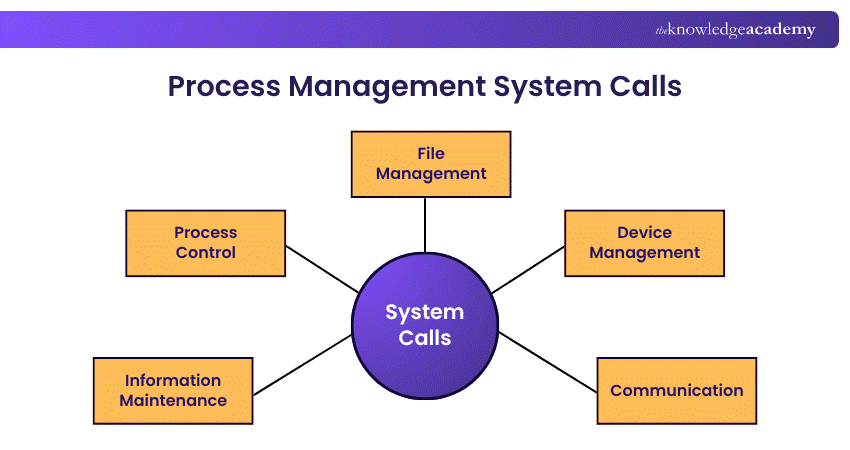
These are kernel-level calls that manage processes, like fork() to create a new process, exec() to run a program, and wait() to pause for child processes. They form the backbone of multitasking in Linux and let the system run multiple programs smoothly.

The Knowledge Academy


Global Training Provider
The Knowledge Academy is a world-leading provider of professional training courses, offering globally recognised qualifications across a wide range of subjects. With expert trainers, up-to-date course material, and flexible learning options, we aim to empower professionals and organisations to achieve their goals through continuous learning.


 If you wish to make any changes to your course, please


