


 Top Rated Course

We may not have the course you’re looking for. If you enquire or give us a call on +33 805638382 and speak to our training experts, we may still be able to help with your training requirements.
What is a Trojan Horse Malware?
The Knowledge Academy 10 February 2026Trojan Horse Malware is a corrupt program that poses as trustworthy software while quietly installing malicious code to breach systems and steal data.

Training Outcomes Within Your Budget!
We ensure quality, budget-alignment, and timely delivery by our expert instructors.
Table of Contents
Have you ever downloaded a “free” app, clicked on an email attachment, or noticed strange behaviour on your computer? Chances are, you may have fallen victim to a Trojan Horse Malware. True to the Greek mythology Trojan Horse, this malware masquerades as legitimate software to sneakily access your device and cause chaos.
In this blog, we’ll discuss What is a Trojan Horse Malware, how it operates, common types to look out for, and how you can protect your data and device from this deceptive cyber malware.
Table of Contents
1) Understanding Trojan Malware
2) History of the Trojan Horse
3) How Does a Trojan Horse Work?
4) Different Types of Trojan Horses
5) Examples of Trojan Horse Virus Attacks
6) How to Identify Trojan Horse Virus?
7) How to Safeguard Against Trojan Horse Virus?
8) Conclusion
Understanding Trojan Malware
What is a Trojan? A Trojan or Trojan Horse is a sneaky form of malware. It looks like safe software, but it causes harm after installation. Trojans do not copy themselves like viruses, they use Social Engineering to trick users.
Trojans steal your personal information, watch what you do, or control your computer from far away. They do this by pretending to be fake emails or updates. To get rid of this bad software, don’t download anything if you are not sure what it is. Always keep your Antivirus updated, and use strong passwords, too.
History of the Trojan Horse
This malware gets its name from ancient Greek history, where soldiers from Greece hid inside a big wooden horse to get into the city of Troy. People inside the city of Troy thought the horse was a present. They took it inside the city, but this caused Troy's downfall.
In computers, Trojan malware works the same way. It pretends to be safe software so it can sneak past your strong walls and control your computer. And once it’s inside, it can open the gates for even more threats.
How Does a Trojan Horse Work?
Trojan Horses Virus is a malware that looks like a normal app or file. When you open or install it, it quietly starts damaging your computer, like stealing personal information or slowing down the system.
This virus mostly comes through fake emails, pop-up messages, or free downloads. People think that the file is safe, but there is malware hidden in it. When it gets installed, the hacker can get access to your device.
Trojan works secretly in the background. Even Antivirus software cannot catch it. It can leak your data, change security settings, or weaken your system. To avoid this, always download from trusted sources and keep your system updated.
Become a Certified Cyber Security Professional with our Certified Cyber Security Professional (CCS-PRO) Course. Sign up now!
Different Types of Trojan Horses
Like there are different Types of Computer Viruses, there are types of Trojan Horses Virus too. There are many forms, and each type has its own unique impact. Understanding the common types below will help you make better Cyber Security decisions.

1) Backdoor Trojans
The Backdoor Trojan Virus secretly creates a path inside your system. Through this, the attacker can take remote access, make your system a part of a botnet, or download malware. All this happens secretly without the user knowing.
2) DDoS Trojans
DDoS Trojans give the attacker control to create a botnet that sends requests to a server at the same time. This can crash the website or network. The Trojan Virus remains mostly unnoticed until the attack starts.
3) Rootkit Trojans
Rootkits hide inside the system and prevent other malware from being detected. They bypass system processes, logs, and Antivirus. Their main goal is to keep malicious activity hidden for a long time.
4) Banking Trojans
The Banking Trojan Virus targets online banking users. It steals bank account credentials through fake login pages or phishing emails. Its goal is to commit financial fraud or unauthorised transactions.
5) Dropper/Downloader Trojans
Dropper Trojans already come with a malware package, while downloader Trojans bring additional malware from the network. After entering the system, these Trojans also install viruses like ransomware or spyware.
6) Ransom Trojan
This Trojan encrypts your system files or locks the device. Then, it demands ransom from you to give them back access. Mostly, it is used in ransomware attacks and causes financial loss.
7) Game-thief Trojan
This Trojan targets online gamers and steals their game account login details, passwords, and in-game assets. Attackers can then sell these on the black market or lock out the user.
8) Infostealer Trojan
Trojan-IM steals user data from instant messaging apps such as WhatsApp, Telegram, Skype, and Facebook Messenger. It steals sensitive information such as personal data and login credentials.
9) Trojan-Spy
Trojan-Spy silently monitors your system activity. Like keylogging (what you are typing), taking screenshots, or stealing login details. It can give attackers full access to your private data.
Develop advanced fraud detection strategies with our Fraud Analytics Course. Sign up today!
Examples of Trojan Horse Virus Attacks
Trojan Horse Malware has been present for a long time, and Trojans were used in some of the most well-known cyber attacks. Here are some prominent examples:
1) Rakhni Trojan
Rakhni Trojan is a dangerous malware that installs ransomware or cryptocurrency mining tools on the device. This Trojan slows down the user's system and secretly mines crypto.
2) Tiny Banker
Tiny Banker, also known as Tinba, is used to steal financial data. This Trojan was first discovered when it hacked the data of customers of 20+ U.S. banks.
3) Zeus or Zbot
Zeus Trojan is a malware toolkit that allows hackers to create their own custom Trojan. It logs keystrokes and extracts sensitive information from login forms, especially banking details.
4) CryptoLocker
CryptoLocker was a ransomware Trojan that demanded ransom by encrypting users' files. It locked thousands of systems and did not allow access to files until the ransom was paid.
5) Dyre/Dyreza
The Dyre or Dyreza Trojan was designed to steal banking credentials. It spread through fake emails and targeted financial institutions, mostly Windows systems.
Advance your skills in cyber defence and protection with our Cyber Security Training – Sign up now!
How to Identify Trojan Horse Virus?
Before identifying Trojan Horses Virus, you should have a clear understanding of Malware vs Virus. If you have a Trojan Virus in your system, you can find some symptoms like slowing down of your system, unknown pop-ups, or your Antivirus solution suddenly shutting down. Sometimes, some apps get installed by themselves, or some setting gets changed without your permission.

How to Safeguard Against Trojan Horse Virus?
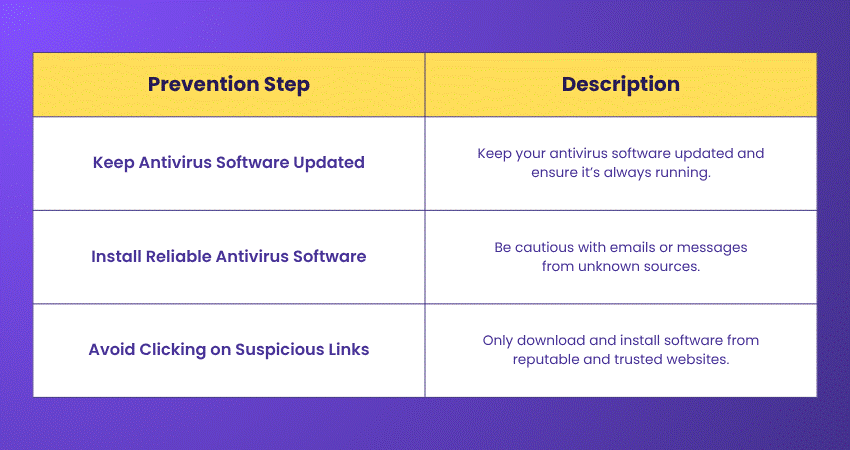
To avoid Trojan Horse Virus, download files only from trusted websites, use strong antivirus software, and stay away from spam emails or fake links. Regularly updating the system is also important for security.
Conclusion
Trojan Horse Malware can be tricky because it seems safe at first. But once it gets into your computer, it can do a lot of damage. The best way to stop a Trojan Horse is with awareness and caution. Always check before you click or download anything on your computer. Even people who know a lot about computers can be fooled by these viruses, but smart people know how to protect themselves.
Protect your organisation from cyber attacks with our Cyber Security Awareness Course – Join today!
Frequently Asked Questions
What is the Difference Between a Trojan Horse Virus and a Regular Computer Virus?

A Trojan Horse Virus appears to be safe software, but it is harmful because users often install it by mistake. A regular virus spreads on its own to other files and systems without needing any user action.
How to Get Rid of a Trojan Horse Virus?
To remove a Trojan, use trusted antivirus software to scan your computer and delete the threat. If it persists, you may need to reset your computer or seek assistance from a tech expert.
What are the Other Resources and Offers Provided by The Knowledge Academy?
The Knowledge Academy takes global learning to new heights, offering over 3,000+ online courses across 490+ locations in 190+ countries. This expansive reach ensures accessibility and convenience for learners worldwide.
Alongside our diverse Online Course Catalogue, encompassing 19 major categories, we go the extra mile by providing a plethora of free educational Online Resources like Blogs, eBooks, Interview Questions and Videos. Tailoring learning experiences further, professionals can unlock greater value through a wide range of special discounts, seasonal deals, and Exclusive Offers.
What are the Other Resources and Offers Provided by The Knowledge Academy?
The Knowledge Academy’s Knowledge Pass, a prepaid voucher, adds another layer of flexibility, allowing course bookings over a 12-month period. Join us on a journey where education knows no bounds.
What are the Related Courses and Blogs Provided by The Knowledge Academy?
The Knowledge Academy offers various Cyber Security Courses, including Malware Analysis Training, Certified Cyber Security Professional (CCS-PRO), Cyber Security Awareness, Fraud Analytics Training Course. These courses cater to different skill levels, providing comprehensive insights into Computer Worms.
Our IT Security & Data Protection Blogs cover a range of topics related to Malware Analysis, offering valuable resources, best practices, and industry insights. Whether you are a beginner or looking to advance your Cyber Security skills, The Knowledge Academy's diverse courses and informative blogs have got you covered.

The Knowledge Academy


Global Training Provider
The Knowledge Academy is a world-leading provider of professional training courses, offering globally recognised qualifications across a wide range of subjects. With expert trainers, up-to-date course material, and flexible learning options, we aim to empower professionals and organisations to achieve their goals through continuous learning.

Upcoming IT Security & Data Protection Resources Batches & Dates
Date
 Malware Analysis Training
Malware Analysis Training
Fri 1st May 2026
Malware Analysis Training
Fri 21st Aug 2026
Malware Analysis Training
Fri 20th Nov 2026

 If you wish to make any changes to your course, please


