


 Top Rated Course

We may not have the course you’re looking for. If you enquire or give us a call on 0800 446148 and speak to our training experts, we may still be able to help with your training requirements.
20+ Essential SQL Commands Every Beginner Must Know
Richard Harris 14 July 2026SQL Commands are used to communicate with relational databases to retrieve, update, and manage data, helping users learn the five main types with examples. These commands help users query data, update records, and manage access efficiently. Understanding them improves overall database handling and accuracy significantly.

Training Outcomes Within Your Budget!
We ensure quality, budget-alignment, and timely delivery by our expert instructors.
Table of Contents
You’re working on a project and need to pull last month’s sales data; but the spreadsheet is a mess, and manual sorting takes ages. Now imagine telling the database, “Show me all sales from April,” and it delivers the results instantly. That’s the power of SQL Commands. In case you are managing customer records, updating product info, or generating reports, these commands help you get the job done fast and accurately.
With SQL Commands, you can take control and make your database work for you, not the other way around. In this blog, we’ll explore those commands with easy examples you can start using today. Want to make data handling smoother, smarter, and less stressful? Let’s get started.
Table of Contents
1) What are SQL Commands?
2) 20+ SQL Commands with Examples
a) SELECT Commands
b) AS Command
c) WHERE Command
d) AND Command
e) OR Command
f) BETWEEN Command
g) LIKE Command
h) IN Command
i) IS NULL Command
j) IS NOT NULL Command
3) Important SQL Commands
4) What are the Most Common SQL Commands?
5) What are the 4 types of SQL Commands?
6) Conclusion
What are SQL Commands?
Structured Query Language (SQL) Commands are important tools that are used to manage databases efficiently. They are structured into different types based on what they do for running code. Examples are creating and changing data, retrieving information, or managing user access. These types include:
1) Data Definition Language (DDL)
2) Data Manipulation Language (DML)
3) Data Control Language (DCL)
4) Data Query Language (DQL)
5) Transaction Control Language (TCL)

20+ SQL Commands with Examples
Here is a detailed list of the essential basic SQL Commands you must be familiar with.

SELECT Commands
The SELECT command is the most used statement in Structured Query Language (SQL) by Database Engineers and Administrators who execute them for data queries in databases. The commands help define the data they want their query to return. Here are some SELECT commands:
a) SELECT: The most basic use of the SELECT command is to select a column from a table. For example, you can select the 'department' column from a table labelled ‘teachers’ in the following way:

b) SELECT *: This variant used in conjunction with the ‘*’ symbol returns every column from the table being queried in this way:

c) SELECT DISTINCT: This variant only returns the distinct data, which means that in case of duplicate data records, the command will return simply one copy. This variant is typed in the following way:

d) SELECT INTO: This command copies user-specified data from one table into another in the following way:

e) SELECT TOP: This command only returns the top ‘x’ percent or numbers from a table in the following way:

AS Command
This ‘command renames the table or its column with a user-defined alias or pseudonym. For example, you may rename the ‘name’ column as ‘last_name’ using the following command:

This command specifies the table from which the user retrieves data and is written as follows:

WHERE Command
The ‘WHERE’ command enables the user to filter their query to return the results that match the defined condition. This command can be used with conditional operators such as < , > , = , >= , <=, and so on. It is written as:

AND Command
The ‘AND’ command helps developers merge multiple conditions into a single query. All the conditions must be satisfied to return a result and are written as:

OR Command
The ‘OR’ command in SQL merges two or more conditions into a single query. However, only one of the conditions must be satisfied to return a result. It is written as:

BETWEEN Command
The ‘BETWEEN’command in SQL lets the user filter their query to return the results which fit their specified range. It is written as:

LIKE Command
Unsure when to use TRUNCATE or DELETE? Explore the key differences in SQL Truncate vs Delete!
The ‘LIKE’ command in SQL lets the user search for specified patterns in the column. It is written as:

The LIKE command can be used with other SQL Operators for more precise filtering such as:
a) %x – selects all the values which start with x
b) %x% - selects all the values that contain x
c) x% - selects all the values which end with x
d) x%y - selects all the values that start with x and end with y
e) _x% - selects all the values which contain x as their second character
f) x_% - selects all the values which start with x and are at least two characters long. Users can add more characters to extend the length, e.g. x__%
Learn how to create tables in SQL and SQL Server debugger by joining our Advanced SQL Course.
IN Command
The ‘IN’ command in SQL allows users to specify multiple values they want to retrieve when executing the ‘WHERE’ command. It is written as:

IS NULL Command
The ‘IS NULL’ command in SQL returns the rows containing a NULL value. It is written as:

IS NOT NULL Command
The ‘IS NOT NULL’ command in SQL works opposite to the ‘IS NULL’ command. It returns the rows without a NULL value.

CREATE DATABASE Command
The ‘CREATE DATABASE’ command in SQL creates a new database for the user, assuming they have the required administrative rights. It is written as:

CREATE TABLE Command
The ‘CREATE TABLE’ command in SQL is used when creating a database in SQL to establish a new table for the user within the database. It can be written with the variables ‘int’ and ‘varchar(255)’, as follows:

Say goodbye to messy data - Learn MySQL Introduction to MySQL Course today.
CREATE INDEX Command
The ‘CREATE INDEX’ command in SQL generates a table index, which users use to retrieve the required data faster.

CREATE VIEW Command
The ‘CREATE VIEW’ command in SQL generates a virtual table created from the result data set of an SQL statement. A view is a normal table on which a user can perform queries, but it cannot be saved like a permanent table in the database. It is written as:

DROP Command
The DROP statement in SQL can be used to remove a whole database, index or table. Administrators should take care to execute the DROP command with caution. The variants of the DROP statement are as follows:
a) DROP DATABASE:
The ‘DROP Database’ command erases the entire database, including its data. This is a command that users must use judiciously. It is written as:

b) DROP TABLE:
The ‘DROP TABLE’ command deletes the table and its data. It is written as:

c) DROP INDEX:
The ‘DROP INDEX’ command deletes the index from within the database. It is written as:

UPDATE Command
The ‘UPDATE’ statement updates the data in a table. For example, the code below will update the age of the teacher named ‘Benedict’ in the teacher’s table to 61.

DELETE Command
The ‘DELETE’ Command removes all the rows from a table using the ‘WHERE’ clause to erase the rows which satisfy the specific condition. It is written as:

The ‘ALTER TABLE’ command lets users add or remove columns from the table. Below are two codes that users can follow the structure of, to add and remove a column for ‘surname’. The text varchar (255) specifies the column’s datatype. The code snippets can be written as follows:
a) Add a Column:

b) Remove a Column:

Aggregate Functions
The Aggregate functions in SQL are COUNT, AVG, SUM, MIN and MAX. These functions let the user perform calculations on values and return a single result. The aggregate functions in SQL can be written as follows:
Learn advanced techniques for optimising database performance and data integrity with our PostgreSQL Administration Training – Join today!
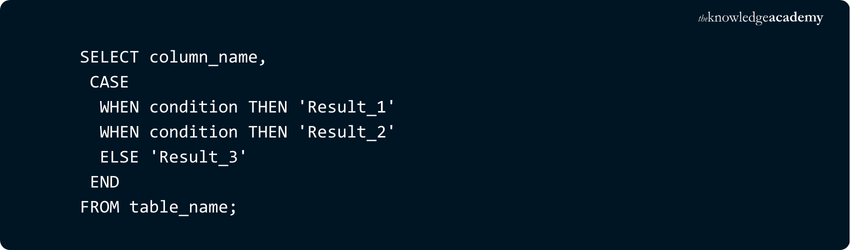
a) CASE: CASE statements are used in SQL to show different results based on conditions, usually in a SELECT query. It's like using "if-then" logic—SQL checks each condition and returns a value depending on which one is true.
b) COUNT: The count function returns the rows matching the user-specified criteria. Users can refer to the code structure as shown below, using the * symbol to return the row count for teachers.

c) SUM: The SUM function returns the sum of a numeric column to the user, written as follows:

d) AVG: The AVG function returns the average value of a numeric column to the user, written as follows:

e) MIN:The MIN function returns the smallest value of the numeric column, written as follows:

f) MAX: The MAX function returns the largest value of the numeric column, written as follows:

g) GROUP BY: The group by statement collects rows containing the same values into summary rows. This statement is generally used with aggregate functions. For example, the code below displays the average age for every name appearing in the ‘teacher’s’ table.

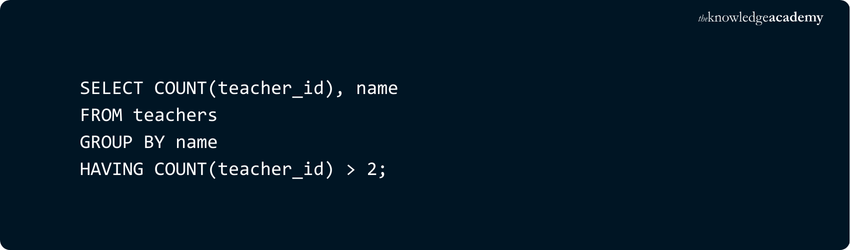
h) HAVING: This statement performs the same action as the ‘WHERE’ clause. The ‘having’ function is used for the aggregate functions, and the ‘WHERE’ clause does not work with them. Written below is an example that returns the number of rows for every name, specifically the ones related to more than two records:
i) ORDER BY: This statement lets the administrator fix the order of the returned results, where the order will be in an ascending fashion. The code can be written as follows:

j) DESC: This statement returns the result to the user in a descending order. The code can be written as follows:

k) OFFSET: This statement works in the same query with the ORDER BY statement. It basically specifies the number of rows to be skipped before returning the rows from the query. The code can be written as follows:
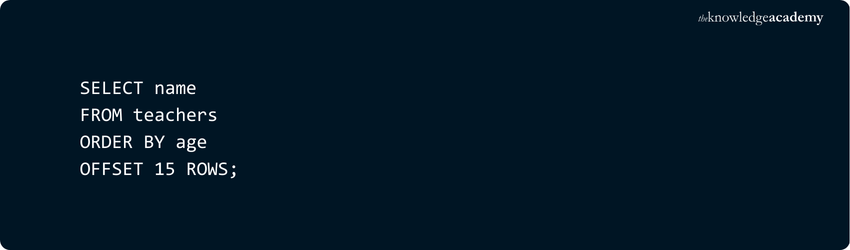
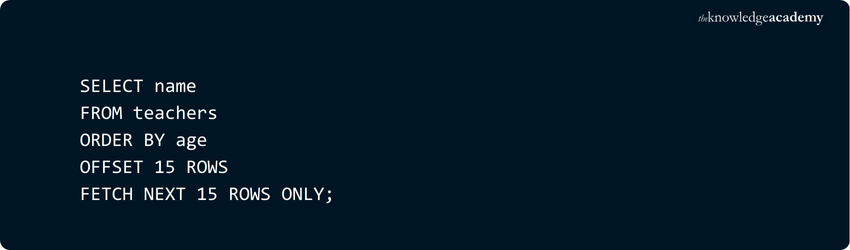
l) FETCH: This statement is used when the user wants to specify the number of rows to be returned after the ‘OFFSET’ clause has been executed. The clause is mandatory, whereas the FETCH statement is an optional clause. The code can be written as:
Learn how to design and create a report by using SQL Server reporting by joining our SQL Server Reporting Services (SSRS) Coursenow!
JOINS
The Join clause in SQL is used to merge the rows from two or more tables in a database. The JOIN clause comprises four types are INNER JOIN, LEFT JOIN, RIGHT JOIN AND FULL JOIN (or FULL OUTER JOIN). Here are code snippet examples for each join:
a) INNER JOIN: The inner join selects the records which have matching values in both the tables. Below is a code snippet example:

b) LEFT JOIN: The left join selects the records from the first table which match the records from the second table. Below is a code snippet example, where the first table is ‘teachers’:

c) RIGHT JOIN: The right join selects the records from the second table that match the records from the first table. Below is a code snippet example, where the second table is ‘subjects’:

d) FULL JOIN: The full join, also called the ‘full outer join’ selects the records that match from the first and second table. Below is a code snippet example:

GRANT Command
The grant command in SQL allows specific users access to the SQL database objects like tables, the database or views. Below is a code snippet example using the ‘SELECT’ command with the ‘GRANT’ command in a single query:

COMMIT Command
The commit command in SQL allows users to save their transactions to the database. The command will remove the active save points, followed by the statement’s execution. At this point, the user cannot roll back the transaction. Below is a code snippet using the ‘COMMIT’ command:

ROLLBACK Command
The rollback command in SQL lets users undo the executed transactions. The condition for the rollback is that the transaction should not be saved to the database. The command can be used only to undo executions for transactions since the last ROLLBACK or COMMIT command. SQL also allows users to roll back to the most recent SAVEPOINT. The command can be written as follows:

TRUNCATE Command
The truncate command erases all the data records from a table in the database. The table and its structure are still retained. This command is like the DELETE command. The command can be written as follows:

Ready to optimise your SQL queries? Grab the MySQL Cheat Sheet now!
Important SQL Commands
1) SELECT: Gets data from a database
2) INSERT: Adds new data into a table
3) UPDATE: Changes existing data in a table
4) DELETE: Removes data from a table
5) CREATE TABLE: Builds a new table in the database
6) ALTER TABLE: Changes the structure of an existing table (like adding or removing a column)
7) DROP TABLE: Completely deletes a table from the database
8) WHERE: Filters the data to show only rows that meet certain conditions
9) ORDER BY: Sorts the results in either ascending or descending order
10) JOIN: Combines data from two or more tables using a common column they share
What are the Most Common SQL Commands?
The most common SQL commands include SELECT, INSERT, UPDATE, DELETE, CREATE, and DROP. These are used to retrieve data, modify records, manage database structures, and control access to information within relational databases.
What are the 4 types of SQL Commands?
The 4 essential types of SQL commands are as follows:
1) DML (Data Manipulation Language): SELECT, INSERT, UPDATE, DELETE
2) DDL (Data Definition Language): CREATE, ALTER, DROP
3) DCL (Data Control Language): GRANT, REVOKE
4) TCL (Transaction Control Language): COMMIT, ROLLBACK, SAVEPOINT
Conclusion
Mastering the Basic SQL Commands outlined in this blog is essential for anyone handling databases and SQL users of all competency levels. From selecting data to updating or deleting records, these commands form the backbone of database management. Understanding the Types of Keys in SQL further enhances your database skills, as keys play a crucial role in structuring and organising data.
Get ahead in your data career with our SQL Courses! Gain real-world skills, hands-on experience, & certifications that matter
Frequently Asked Questions
What are the Five Types of SQL Commands?

The five types of SQL Commands are grouped by their role in managing databases. DDL defines database structure, DML handles data changes, DQL retrieves data, DCL manages user permissions, and TCL controls transactions, ensuring data consistency and integrity across operations.
What are the Seven Constraints in SQL?
The seven SQL constraints, NOT NULL, UNIQUE, PRIMARY KEY, FOREIGN KEY, CHECK, DEFAULT, and CREATE INDEX, are used to enforce data integrity and consistency. They ensure valid data entry, maintain relationships between tables, and improve query performance across the database.

Richard Harris


Senior Full Stack Developer and Technology Educator
Richard Harris is a highly experienced full-stack developer with deep expertise in both frontend and backend technologies. Over his 12-year career, he has built scalable web applications for startups, enterprises and government organisations. Richard’s writing combines technical depth with clear explanations, ideal for developers looking to grow in modern frameworks and tools.


 If you wish to make any changes to your course, please


