


 Top Rated Course


We may not have the course you’re looking for. If you enquire or give us a call on +1800812339 and speak to our training experts, we may still be able to help with your training requirements.
Kubernetes Architecture: How to Build Scalable Cloud Systems
Lily Turner 28 April 2026Kubernetes Architecture includes control planes and compute nodes, creating a flexible framework for container orchestration and service discovery. The architecture of Kubernetes covers scheduling, networking, and security components. It ensures reliable deployment, scaling, and management of containerised applications in cloud setups.

Training Outcomes Within Your Budget!
We ensure quality, budget-alignment, and timely delivery by our expert instructors.
Table of Contents

But what really happens behind the scenes of this orchestration magic? Have you ever wondered how companies like Google, Spotify, or Airbnb manage thousands of software containers running at the same time without everything falling apart? The secret lies in Kubernetes Architecture - a powerful system that keeps containerised applications organised, scalable, and secure. In this blog, we’ll explore how Kubernetes Architecture makes all of this possible and why it has become the backbone of modern application management.
Table of Contents
1) What is Kubernetes Architecture?
2) High-level Overview
3) Anatomy of a Kubernetes Cluster
4) Components in Detail: What Powers Kubernetes?
5) Security Features in Kubernetes
6) What are Kubernetes Architecture Best Practices?
7) Where are Kubernetes Add-ons Typically Deployed?
8) What is CoreDNS in Kubernetes?
9) Conclusion
What is Kubernetes Architecture?
The Architecture of Kubernetes is a powerful system used to manage container-based applications. Containers are small, standalone units that hold everything needed to run a piece of software. They are fast and easy to start but managing many of them at once can be difficult.
Kubernetes helps by handling these containers automatically. It can start, stop, and organise them based on your needs. This is what makes Kubernetes so useful for businesses running large applications.
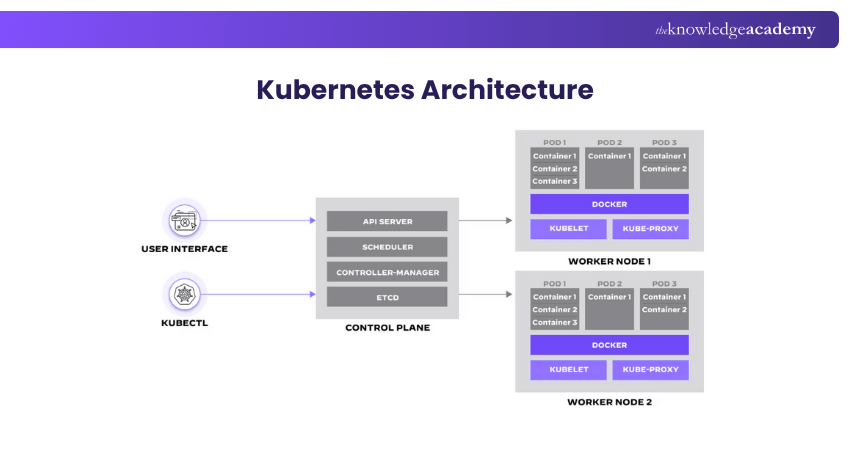
The architecture of Kubernetes has three main parts:
1) Control Plane: This is the main brain. It watches over the system and decides what should happen, like where to run containers and how to respond if something goes wrong.
2) Worker Nodes (Data Plane): These do the actual work. They follow the Control Plane’s instructions and run the applications.
3) Storage Layer: This keeps your data safe and available, even if containers are restarted or moved.
Kubernetes also uses Namespaces to divide resources into smaller groups. This makes it easier to manage different teams or projects in one system.
In short, Kubernetes Architecture is designed to keep things running smoothly, even when dealing with hundreds or thousands of containers.

High-level Overview
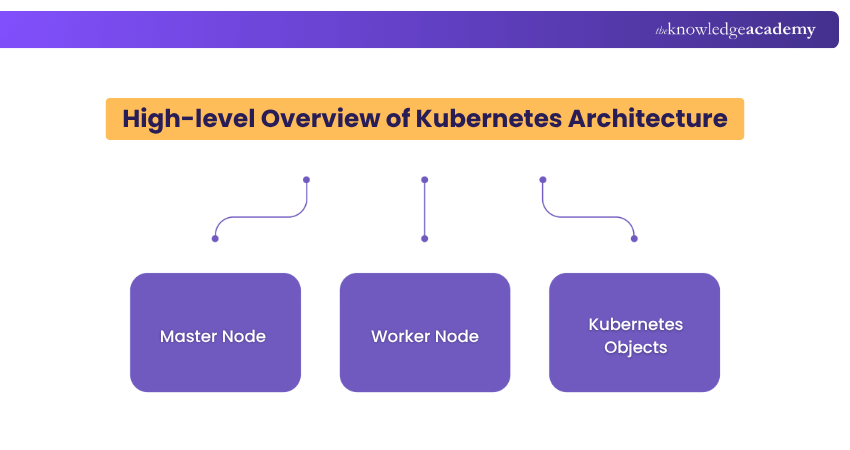
The Kubernetes Architecture has three primary building blocks: the Master node, the Worker nodes, and Kubernetes objects. Let's take a closer look at each of these elements to understand their roles and functionalities in this Kubernetes Architecture overview.
Master Node
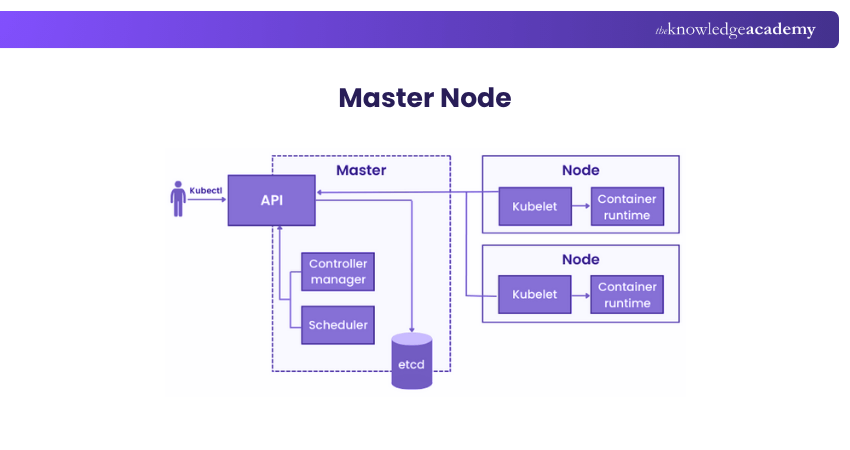
The Master node is the orchestrating powerhouse of a Kubernetes cluster, coordinating all activities as the command centre. Think of it as the conductor of an orchestra, setting the tempo and cues for all other instruments, the Worker nodes.
It deals with the cluster's overall management. For instance, it determines which node should run a particular container. It balances the workloads across Worker nodes, ensuring optimal utilisation. The Master node looks after the health of the cluster. If a Worker node fails, it reallocates the tasks to another Worker. This ensures high availability and fault tolerance.
Another critical role is its interaction with the user. Whether it's through CLI, API, or a dashboard, the Master node receives your input. It parses your commands and translates them into actionable tasks. These are then dispatched to the appropriate Worker nodes.
Worker Node
While the Master node is the brains, the worker nodes are the muscles. These units do the actual work assigned by the Master node. They run containers, which are instances of your applications. Each Worker node has its own local environment. This is essential for running containers. It includes necessary elements like the OS, a container runtime, and a special Kubernetes agent called Kubelet.
Kubelet is the liaison between a Worker node and the Master node. It ensures the containers are running as expected. Kubelet receives instructions from the Master node and implements them locally. Worker nodes also handle networking between containers. This involves routing, DNS handling, and load balancing. These functions enable smooth communication between different parts of an application. The image below will help you understand high-level architecture clearly.
Kubernetes Objects
Kubernetes objects are the high-level abstractions over your containerised applications. They define the state of your cluster, specifying how applications should deploy and run. A Kubernetes object is a manifestation of your desired state. When you create one, you inform the Master node of your expectations. For example, specify the number of replica Pods or define a service to expose the app to the internet.
Among the basic objects, Pods are the most elemental. A Pod wraps one or more containers, encapsulating storage resources, a unique network IP, and management policies. Services are another crucial object. They help in accessing Pods and can distribute network traffic among them.
ConfigMaps and Secrets are special objects that store configuration data and sensitive information. They allow you to manage configurations separately from container images, making your applications more portable and secure.
Become familiar with the workings of configuration integration and Jenkins. Join our Jenkins Training For Continuous Integration now!
Anatomy of a Kubernetes Cluster
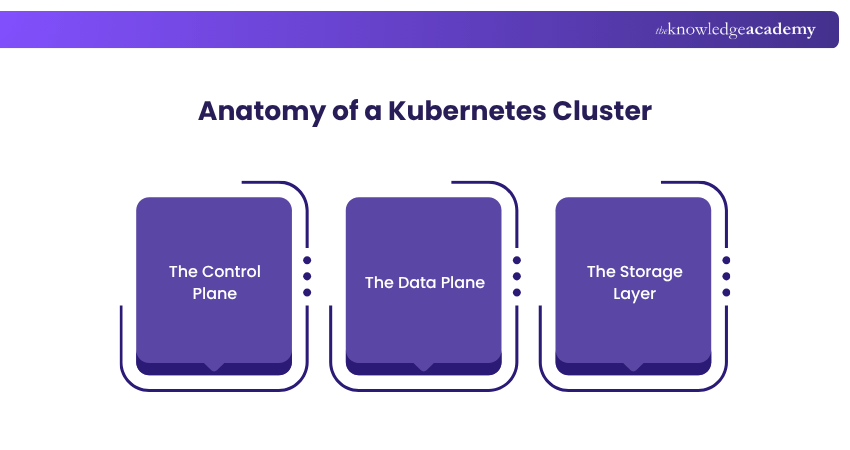
Unpacking the complexities of Kubernetes Architecture involves getting into its cluster anatomy. The cluster structure consists of three main layers: The control plane, the Data plane, and the Storage layer components. By understanding these layers, we can gain a deeper understanding of how Kubernetes maintains its resilience, scalability, and manageability.
The Control Plane
The Control Plane is the core part of a Kubernetes cluster that manages how the system operates. Running on the Master node, it makes all major decisions, from scheduling Pods to responding to system changes. It keeps the cluster running smoothly by constantly checking and adjusting its state.
Key Components Include:
1) API Server: Acts as the main access point, handling and validating all requests to the cluster.
2) etcd: A reliable key-value store that saves all cluster data, ensuring the system can recover after failures.
3) Scheduler: Chooses the best Worker node for each new Pod, based on available resources and defined rules.
4) Controllers: Monitor the cluster and make changes as needed to maintain the desired state (e.g., Node Controller, Replication Controller).
The Data Plane
The Data Plane is where your applications actually run. It operates mostly on the Worker nodes. A key part of this layer is the Kubelet, a small program on each node that checks if the containers in a Pod are running properly. It helps keep things stable by starting, stopping, or restarting containers when needed.

Another important part of the Data Plane is Kube-proxy, which handles all the networking inside the Kubernetes cluster. It manages things like IP addresses, load balancing, and routing. Kube-proxy makes sure that data reaches the right containers and that services can be accessed from outside the cluster when needed.
There’s also the container runtime, which is the tool that actually runs your containers. Docker is a popular option, but Kubernetes also works with others like containerd. The runtime follows the instructions in the container image to start and run the application properly.
The Storage Layer
The Storage Layer in Kubernetes handles how data is stored and accessed by applications running in the cluster. It ensures that your apps have reliable space to store important data like files or databases, even if containers stop or move. This layer helps keep your data safe, accessible and well-managed.
Key Elements Include:
1) Persistent Volumes (PVs): Independent storage that keeps data safe even when Pods are deleted or restarted.
2) Persistent Volume Claims (PVCs): Requests made by Pods to access storage resources from the cluster.
3) Storage Classes: Templates that define how storage should be created, including type (local or cloud) and access methods.
Gain proficiency in managing containerised applications with our Kubernetes Training – Register today!
Components in Detail: What Powers Kubernetes?
Kubernetes is a tightly integrated collection of components working in harmony. Understanding these individual elements provides insights into how Kubernetes operates. From its frontend API server to its backend data storage mechanisms, each component has its own specialised role. In this section, we go deep into the nitty-gritty of these components.
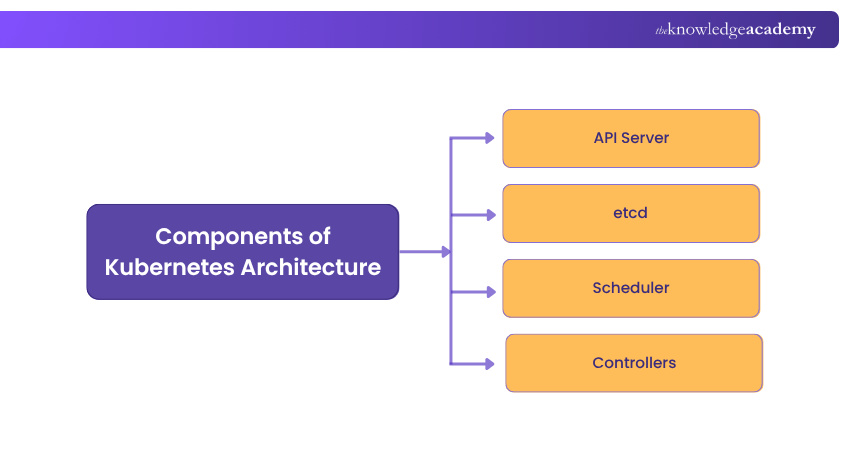
Kubernetes Control Plane Components
The Control Plane is the part of Kubernetes that manages how the whole cluster works. It keeps track of what’s happening and makes decisions to keep the system running properly. It acts as the command centre, ensuring all components are working together as expected. Here are the main components of the Control Plane:
1) API Server
Often seen as the 'front door' to the Kubernetes Control plane, the API Server is a critical component. It serves as the interface between users and the backend Control plane. It receives all RESTful API calls, whether they come from a human operator or another internal component.
After receiving these requests, the API Server performs authentication and authorisation checks. It also validates if the request format meets the expected schema. Once a request passes these checks, the API Server processes it, coordinating with other components like the ‘etcd’ and Scheduler.
2) etcd
Think of etcd as the memory of the Kubernetes cluster. It’s a dependable, distributed key-value store that keeps track of all important data, including configurations, secrets, and the status of Pods. Whenever something changes in the cluster, like a Pod being created or removed, etcd, it is updated. Its main job is to ensure all parts of the cluster see the same information at the same time, helping maintain stability and high availability.
3) Scheduler
In the Kubernetes Architecture, the Scheduler acts like a highly efficient traffic cop. It decides where to run new Pods based on several factors. These factors include resource availability, user-defined constraints, and other policies. The Scheduler scans through all available nodes to find the most suitable fit for each Pod. Once it makes a decision, it instructs the API Server to update the ‘etcd’ database. The selected Worker node then receives the new Pod for execution.
4) Controllers
Controllers are key parts of the Kubernetes Control Plane. They help keep the system running smoothly by checking what's happening in the cluster and making sure it matches what you want. If something isn’t right, controllers step in and fix it automatically. Each controller looks after a specific task, helping Kubernetes stay stable and reliable.
Here are some important types of controllers in Kubernetes:
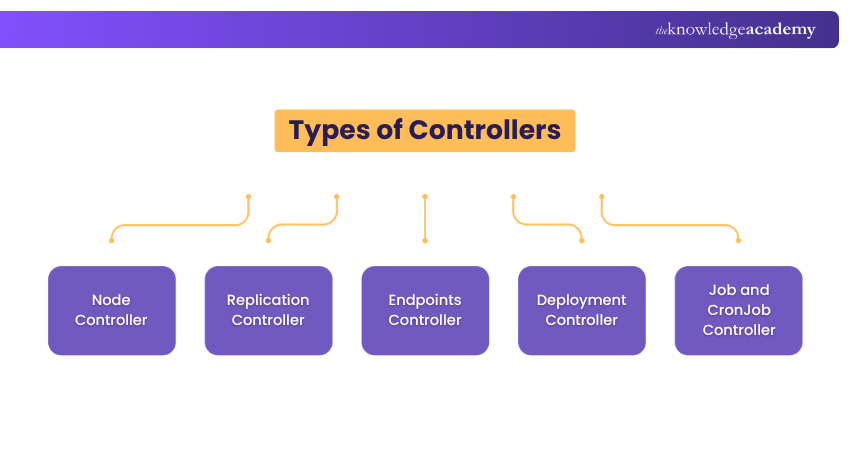
Node Controller:
1) Role: Watches over the health of nodes in the cluster.
2) What it Does: Notices when a node goes offline or has problems and reacts accordingly.
3) Why it Matters: Prevents scheduling on failed nodes and moves workloads if needed.
Replication Controller:
1) Role: Keeps the right number of identical Pods running.
2) What it Does: Adds or removes Pods to match the number you’ve set.
3) Why it Matters: Make sure your apps are always available.
Endpoints Controller:
1) Role: Handles network endpoints inside the cluster.
2) What it Does: Matches services to the right Pods by updating their IP addresses.
3) Why it Matters: Keeps network connections working smoothly.
Deployment Controller:
1) Role: Manages updates to your apps.
2) What it Does: Uses ReplicaSets to handle changes like scaling, rolling updates, or rollbacks.
3) Why it Matters: It makes updating apps easier and safer.
Job and CronJob Controller:
1) Role: Runs one-time or scheduled tasks.
2) What it Does: Starts jobs and makes sure they finish or repeat as planned.
3) Why it Matters: Helps with tasks like backups or report generation.
Kubernetes node components
Each Node in a Kubernetes cluster is a worker machine where your application runs. It can be a physical server or a virtual machine. Every node has a set of components that make sure the containers are running properly. These components report to the Control Plane and follow its instructions.
The main components found on a Kubernetes node are:
1) Kubelet
Located on every Worker node, the Kubelet is the bridge between the Master and Worker nodes. Its main task is to ensure that all containers in a Pod are running smoothly. Kubelet does this by frequently checking the health status of the containers. It communicates with the Master node, specifically the API Server, to report the health status or to receive new instructions. If a container becomes unresponsive or crashes, the Kubelet takes corrective actions, like restarting the container.
2) Kube-proxy
Networking is a critical function within a Kubernetes cluster, and Kube-proxy serves as its backbone. It runs on each Worker node, handling all networking tasks. Kube-proxy manages service discovery, load balancing, and routing. It reads services and endpoints information from the ‘etcd’ store to dynamically update its rules. This ensures that network requests reach the right services and Pods. Kube-proxy can work in different modes, including User Space, iptables, and IPVS, each with its own set of capabilities and limitations.
3) Container Runtime
Executing containers is the fundamental operation in Kubernetes, and that’s the job of the container runtime. Different runtimes like Docker, containerd, and CRI-O can be plugged into Kubernetes, offering insights into the Kubernetes vs Docker debate for container orchestration.

No matter your choice, the container runtime handles pulling images, unpacking them, and running them as containers. It interacts closely with the Kubelet, which instructs it to start, stop, or restart containers based on the desired state.
Learn the foundational principles of integrating security within DevOps. Join our DevSecOps Foundation Certification today!
Storage & Networking Components
1) Persistent Volumes (PVs) and Persistent Volume Claims (PVCs)
Data storage in Kubernetes is managed through Persistent Volumes (PVs) and Persistent Volume Claims (PVCs). PVs are like long-term storage units that exist independently of any Pod lifecycle. PVCs, on the other hand, are requests for these storage units. When a Pod requires persistent storage, it uses a PVC to claim specific storage space from a PV. This mechanism allows for data persistence across Pod restarts, ensuring data integrity and availability.
2) Networking in Kubernetes
Networking is a cornerstone in Kubernetes Architecture. It performs an important role in communication between Pods, services, and the external world. Given its complexity, understanding Kubernetes networking can be challenging. This section aims to simplify it by breaking down its core elements.
3) Pod-to-Pod Communication
It’s role, mechanism and significance are discussed below:
a) Role: Enables direct communication between Pods, making it the basic unit of networking in Kubernetes.
b) Mechanism: Utilises a flat network namespace, which allows every Pod to see all other Pods without NAT.
c) Significance: Facilitates smooth intra-application communication, which is essential for microservices-based applications.
4) Service Networking
It’s role, mechanism and significance are discussed below:
a) Role: Manages the exposure of applications, allowing them to be accessible within the cluster or from the internet.
b) Mechanism: Uses a Service object in Kubernetes to provide a single DNS name and load balances traffic to application Pods.
c) Significance: Provides a stable endpoint for applications, decoupling the consumer from the individual Pod IPs.
5) Ingress and Egress
It’s role, mechanism and significance are discussed below:
a) Role: Controls how external users and systems interact with services running inside the Kubernetes cluster.
b) Mechanism: Ingress controllers manage incoming traffic based on routing rules. Network Policies govern what outgoing traffic is permitted.
c) Significance: Enables application exposure to the internet, ensuring proper routing and security controls.
6) Network Policies
It’s role, mechanism and significance are discussed below:
a) Role: Dictates what kind of communication is permitted between Pods or between Pods and other network endpoints.
b) Mechanism: Implemented via Network Policy objects, these rules can be set to control both incoming and outgoing traffic.
c) Significance: Enhances security by controlling which Pods communicates with each other, preventing unwanted or insecure access.
7) DNS and Name Resolution
It’s role, mechanism and significance are discussed below:
a) Role: Aids in the discovery of services within the Kubernetes cluster, making it easier for developers and systems to interact.
b) Mechanism: Uses CoreDNS or similar in-cluster DNS providers to map service names to their corresponding IP addresses.
c) Significance: Allows for more human-friendly communication, eliminating the need to remember or hard-code specific IP addresses.
8) Strategies for Achieving High Availability
Ensuring constant access to critical applications and services is crucial for achieving high availability. Implementing strong strategies reduces time without operation and boosts system trustworthiness.
1) Multiple Master Nodes
Having several master nodes in a Kubernetes cluster guarantees increased availability as it removes any potential single points of failure. In the event of a single master node failure, alternative nodes can step in to assume control of the cluster, ensuring continuous operation and reducing downtime. This repetition is essential for ensuring reliable cluster management.
2) Load Balancing
Efficiently distributing incoming traffic across multiple nodes or pods within a cluster through load balancing prevents overwhelming any single component. This guarantees efficient use of resources, improves performance, and enhances the overall stability and availability of applications.
3) Horizontal and Vertical Scalability
Increasing the capacity of Kubernetes horizontally means adding extra nodes or pods to manage larger workloads, whereas vertical scalability boosts the capabilities of current nodes or pods. Both methods guarantee that the cluster can effectively adjust to changing needs, preserving both performance and availability.
4) Auto-scaling Mechanisms
Auto-scaling for pods and nodes ensures that the cluster can adjust to changing workloads automatically. This is essential to uphold high availability, particularly when dealing with sudden increases in traffic. In Kubernetes, tools such as Horizontal Pod Autoscaler (HPA) and Cluster Autoscaler are crucial for efficient auto-scaling.
5) Pod Scaling
Pod scaling automatically increases or decreases the number of running pods in response to the current workload, guaranteeing the application's ability to manage sudden increases in traffic while sustaining performance levels. The ability to scale dynamically is crucial for efficient resource management and ensuring high availability in Kubernetes setups.
6) Cluster Federation
Cluster federation connects multiple Kubernetes clusters, increasing redundancy and allowing for workload distribution in various regions to enhance availability and performance. Federated clusters enable global failover tactics, allowing a different cluster to assume control if one is unavailable.
7) Monitoring and Alerting
Consistent observation of cluster elements and workloads is crucial for maintaining high availability. Monitoring tools provide immediate information on the health and performance of clusters. When combined with a strong, alert system, monitoring enables quick reaction to possible problems before they escalate
8) Disaster Recovery Planning
Having a disaster recovery plan is essential for ensuring high availability, which includes routinely backing up data and quickly recovering operations in the event of a significant failure. Frequent testing of disaster recovery protocols guarantees their efficiency and enables the team to perform well in stressful situations.
Attain in-depth knowledge of DevOps principles and practices. Join our DevOps Foundation Certification now!
Security Features in Kubernetes
Kubernetes has several built-in features to help keep the cluster and applications secure. These features protect the Control Plane and the workloads running inside the cluster. Below are some key parts of Kubernetes security:

1) Role-Based Access Control (RBAC):
RBAC helps control who can do what inside the cluster. It allows you to set clear rules for which users or groups can access certain resources. This reduces the risk of unauthorised actions. The two main parts are Roles, which define the permissions, and RoleBindings, which assign those permissions to users.
2) Security Contexts:
Security contexts set rules for how Pods and containers run. For example, you can make sure a container doesn’t run as the root user or restrict the actions it can perform on the system. These settings can be applied to a whole Pod or to individual containers, depending on what you need.
3) Network Policies:
Network policies act like firewalls within the cluster. They control which Pods can talk to each other and to the outside world. This helps stop unwanted or harmful traffic and keeps communication safe and controlled.
4) Secrets Management:
Kubernetes provides a way to manage sensitive information like passwords, tokens, and keys through Secrets. These are stored securely and shared with containers as needed either as environment variables or mounted files, so you don’t need to hardcode them into your applications.
5) API Server Authentication and Authorisation:
The API server controls access to the Kubernetes cluster, so it must be protected. Kubernetes supports different ways to check who’s trying to connect, from basic methods like token files to more advanced ones like OpenID Connect. Once users are verified, Kubernetes checks if they have permission to perform the requested actions.
These features work together to provide a strong foundation for securing Kubernetes clusters and the applications they run.
What are Kubernetes Architecture Best Practices?
When building a Kubernetes platform, it’s important to follow best practices that focus on security, monitoring, storage, networking, and managing containers effectively. These practices help keep your system safe, efficient, and easy to manage.
Here are some simple and useful best practices for setting up Kubernetes clusters:
1) Always use the latest stable version of Kubernetes
2) Provide proper training for both developers and operations teams
3) Set up clear rules and policies for how the system should be managed
4) Make sure all tools and vendors you use work well with Kubernetes
5) Add security checks, like image scanning, during both the build and run stages
6) Be careful when using open-source code from websites like GitHub
7) Use RBAC (Role-Based Access Control) across the whole cluster
8) Follow the least privilege and zero-trust principles to limit access
9) Run containers as non-root users and use read-only file systems when possible
10) Avoid using default settings to prevent mistakes and improve clarity
11) Keep container images small for faster downloads and less storage use
12) Let apps crash and restart rather than trying to prevent every error
13) Automate your CI/CD pipeline to reduce manual work during deployment
Where are Kubernetes Add-ons Typically Deployed?
Kubernetes add-ons are tools like monitoring, logging, and dashboards that enhance cluster performance, security, and visibility. They typically run as Pods within the cluster, often in the kube-system namespace, allowing them to interact with resources and support real-time operations efficiently.
What is CoreDNS in Kubernetes?
CoreDNS is the default DNS service in Kubernetes. It helps Pods and services communicate by translating names into IP addresses. Running as a Pod, it handles internal DNS requests and ensures smooth service discovery. CoreDNS is flexible and can be extended with plugins for added functionality like load balancing.
Conclusion
Kubernetes Architecture is designed for efficiency, scalability, and security. By understanding its core components Control Plane, Node components, storage, and networking you can better manage containerised applications. Following best practices and using built-in security features ensures a stable, secure environment, making Kubernetes a powerful choice for modern application deployment and operations.
Learn how to streamline software delivery with DevOps best practices with our Certified DevOps Professional (CDOP) Course – Register now!
Frequently Asked Questions
What is Kubernetes Storage Architecture and how Does it Work?

Kubernetes Storage Architecture is responsible for overseeing the storage and access of data within a cluster. Persistent Volumes (PVs) and Persistent Volume Claims (PVCs) are used to separate storage from pods, enabling adaptable, expandable, and durable data storage options that can extend past pod durations.
What is the Main Purpose of Kubernetes?
Kubernetes is primarily used to automate the deployment, scaling, and management of containerised applications. It coordinates containers on a group of machines, ensuring optimal use of resources, availability, and simplified management, allowing developers to easily handle intricate applications.
What are the Other Resources and Offers Provided by The Knowledge Academy?
The Knowledge Academy takes global learning to new heights, offering over 3,000+ online courses across 490+ locations in 190+ countries. This expansive reach ensures accessibility and convenience for learners worldwide.
Alongside our diverse Online Course Catalogue, encompassing 17 major categories, we go the extra mile by providing a plethora of free educational Online Resources like Blogs, eBooks, Interview Questions and Videos. Tailoring learning experiences further, professionals can unlock greater value through a wide range of special discounts, seasonal deals, and Exclusive Offers.
What is The Knowledge Pass, and How Does it Work?
The Knowledge Academy’s Knowledge Pass, a prepaid voucher, adds another layer of flexibility, allowing course bookings over a 12-month period. Join us on a journey where education knows no bounds.
What are the Related Courses and Blogs Provided by The Knowledge Academy?
The Knowledge Academy offers various DevOps Certification, including the DevOps Foundation Certification Course, Kubeflow Training, and the Jenkins Training for Continuous Integration. These courses cater to different skill levels, providing comprehensive insights into Kubernetes Tools.
Our Programming & DevOps Blogs cover a range of topics related to Kubernetes, offering valuable resources, best practices, and industry insights. Whether you are a beginner or looking to advance your DevOps skills, The Knowledge Academy's diverse courses and informative blogs have got you covered.

Lily Turner


Senior AI/ML Engineer and Data Science Author
Lily Turner is a data science professional with over 10 years of experience in artificial intelligence, machine learning, and big data analytics. Her work bridges academic research and industry innovation, with a focus on solving real-world problems using data-driven approaches. Lily’s content empowers aspiring data scientists to build practical, scalable models using the latest tools and techniques.
View Detail

 If you wish to make any changes to your course, please


