


 Top Rated Course


We may not have the course you’re looking for. If you enquire or give us a call on + 1-866 272 8822 and speak to our training experts, we may still be able to help with your training requirements.
13 Best Sketchup Alternatives for Design Enthusiasts
Richard Harris 26 December 2025SketchUp alternative is any 3D modeling software that offers similar or advanced design features. Popular options include Blender, AutoCAD, and FreeCAD. These platforms cater to beginners and professionals alike, making them ideal for architectural, engineering, and creative design projects.

Training Outcomes Within Your Budget!
We ensure quality, budget-alignment, and timely delivery by our expert instructors.
Table of Contents

SketchUp has always been the quickest and most intuitive 3D modelling solution, but still, many professionals see it now as a limiting tool, especially in terms of cooperation, workflow speed, and file formats. As the project requirements become more complicated, users start to look for tools with higher precision and flexibility.
In this blog, we are going to explore the 13 top SketchUp Alternatives sorted by features and user preferences. If you are looking for either parametric precision or visually rich design capabilities, there will be one superior tool that will enhance your workflow.
Table of Contents
1) What is Sketchup?
2) 13 Best Sketchup Alternatives
3) Do SketchUp Alternatives Support Plugins and Add-ons?
4) Can SketchUp Alternatives be Used for 3D Scanning Workflows?
5) Conclusion
What is Sketchup?
SketchUp is one of the most commonly used 3D modelling tools developed by @last software in 1999. It is an easy-to-use software with the capability of the 'Push/Pull' feature, which allows users to quickly and effortlessly create and change objects. It works on both 2D and 3D designs, thus users can design anything from a simple floor plan to a comprehensive architectural model.
The software's collaborative traits and simplicity made it suitable for both beginners and professionals. Access to a large model library and a wide variety of plugins from the Extension Warehouse means that SketchUp can easily be used in different fields. It has been chosen by architects, designers, engineers, and hobbyists as an efficient tool for idea prototyping.

13 Best Sketchup Alternatives
Here is a list of the top applications and tools which can be used in place of SketchUp:
1) Blender
Blender is a free and open-source 3D creation suite that supports the entirety of the 3D pipeline, including modelling, rigging, animation, simulation, rendering, compositing, and motion tracking. Its comprehensive toolset, constant updates, and support for Blender Python Animation make it a versatile and future-proof choice for 3D design.
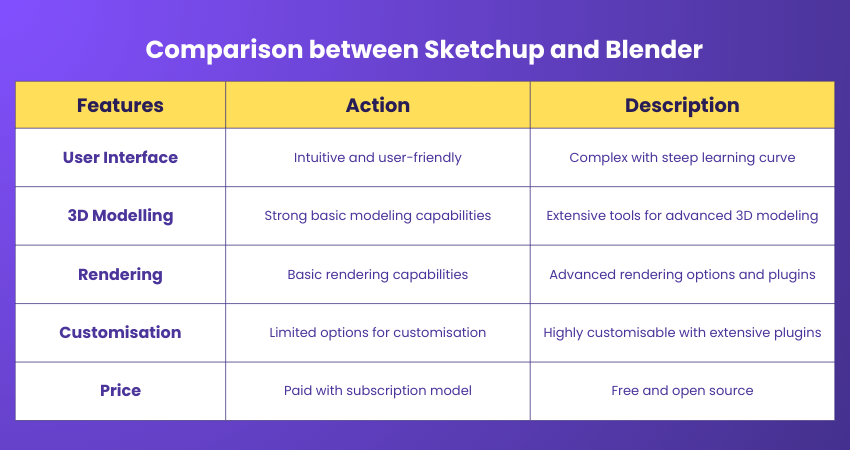
Features:
a) Comprehensive 3D modelling tools
b) Built-in rendering engine with real-time viewport preview
c) Full animation support with rigging and skinning
d) Node-based material and compositing system
e) Extensive community and third-party extensions
Pros:
a) Completely free
b) Regular updates
c) Large community
d) Cross-platform compatibility
e) Wide range of features
Cons:
a) Less intuitive for beginners
b) Varies in professional acceptance
c) Can be resource-intensive
2) FreeCAD
FreeCAD is an open-source parametric 3D modeler made primarily for designing real-life objects of any size. It is a highly customisable and scriptable software that also serves as a stepping stone into the world of 3D modelling for newcomers. FreeCAD is suitable for various uses in engineering and architecture, offering tools for mechanical engineering, product design, and more.
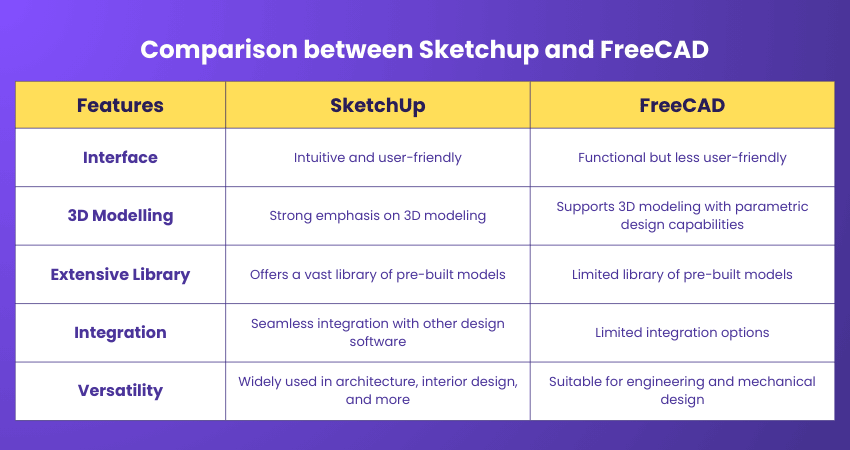
Features:
a) Parametric Modelling allows for easy edits
b) Modular architecture for plugin extensions
c) Sketcher with constraint-solver for 2D shapes
d) Built-in Python interpreter for scripting
e) Support for various file formats for import and export
Pros:
a) Free and open-source
b) Highly customisable
c) Active development community
d) Cross-platform support
e) Suitable for educational purposes
Cons:
a) Not as intuitive as commercial software
b) Limited documentation
c) Less suited for artistic modelling
3) TinkerCAD
TinkerCAD is a 3D design tool that is entirely free and can be used through a browser, thus eliminating the inconvenience of installing software. It is perfectly suited for making basic models and getting STL files, particularly when SketchUp seems too heavy for simple educational or 3D printing activities.
Features:
a) Web-based access with no installation required
b) Simple drag-and-drop modelling
c) Easy STL export for 3D printing
d) Built-in learning tutorials for beginners
e) Block-based modelling is ideal for education
Pros:
a) Completely free to use
b) Extremely beginner-friendly
c) No technical setup required
d) Quick learning curve with guided lessons
e) Great for classrooms and hobby projects
Cons:
a) Limited tools for advanced modelling
b) Not suitable for professional workflows
c) Lack complex features available in SketchUp
4) Rhino + Grasshopper
Together, Rhino and Grasshopper form an impressive parametric modelling system that goes beyond SketchUp in every aspect. The NURBS-based freeform modelling of Rhino allows very intricate designs, which SketchUp cannot handle.
Features:
a) Grasshopper’s visual programming for advanced parametric workflows
b) NURBS modelling for organic and complex surfaces
c) Automation tools to eliminate manual repetitive steps
d) Wide plugin ecosystem integrated into one unified platform
e) High precision modelling for architecture, engineering, and fabrication
Pros:
a) Extremely powerful for complex and computational design
b) Ideal for architects, product designers, and engineers
c) Highly customisable workflows
d) Handles large and intricate models with ease
e) Reduces reliance on third-party plugins
Cons:
a) Steeper learning curve than SketchUp
b) Requires powerful hardware for heavy models
c) Not ideal for beginners seeking simple modelling tools
5) BricsCAD BIM
BricsCAD BIM unconditionally surpasses the primary modelling stage of SketchUp in the sense that it not only supports but also exports the data-rich conceptual designs in IFC format.
Features:
a) Data-rich conceptual to detailed BIM workflows
b) AI-powered automation for repetitive tasks
c) Native DWG support for 2D/3D workflows
d) IFC and OpenBIM compliance
e) Smooth transition from AutoCAD-based environments
Pros:
a) Strong automation with AI/ML
b) Highly interoperable with CAD/BIM tools
c) Supports full BIM lifecycle
d) Reduces dependency on plugins
e) Ideal for professional construction workflows
Cons:
a) Steeper learning curve than SketchUp
b) Higher pricing for advanced modules
c) Requires BIM familiarity for full benefits
6) LibreCAD
LibreCAD is a free, open-source 2D CAD application for Windows, Apple, and Linux. It is a brilliant tool for creating floor plans, technical drawings, and schematics. While it doesn’t support 3D modelling, LibreCAD is an excellent choice for users who need a straightforward and reliable 2D drafting tool, making it one of the most efficient SketchUp Alternatives.
Features:
a) Layer management and object snapping
b) Advanced 2D drawing tools with customisation
c) Support for plugins and community contributions
d) Cross-platform compatibility
e) Active community and user support
Pros:
a) Completely free to use
b) Lightweight and fast
c) Active user community
d) Easy to learn
e) Regular updates
Cons:
a) No native 3D modelling
b) Limited advanced features
c) Smaller user base than competitors
7) Autodesk Revit
Autodesk Revit is one of the most important BIM (Building Information Modelling) tools that allows professionals in the architecture, engineering, and construction fields to work together and create designs that are model based, hence integrated, uniform, and comprehensive.
Features:
Parametric building modelling
Collaborative workflows with multiple users
Architectural design, MEP, and structural engineering tools
High-quality construction documentation
Integrated analysis for sustainability and performance
Pros:
a) Improved project coordination
b) Efficient design process
c) Accurate documentation
d) Sustainable design analysis
e) Large library of components
Cons:
a) Steep learning curve for BIM
b) Performance dependent on project size
c) Primarily for architectural use
8) Shapr3D
SolidWorks is a comprehensive CAD and CAE software solution, extensively utilised across sectors like aerospace, automotive, manufacturing, and product design. SolidWorks is a cornerstone in professional design environments, enabling the creation of detailed and dependable 3D models and assemblies.
Features:
a) Intuitive direct modelling with Apple Pencil
b) High-resolution mesh and solid modelling
c) Compatibility with major CAD file formats
d) Easy-to-use interface for quick learning
e) Advanced tools for professionals
Pros:
a) Portable and tactile design experience
b) Intuitive user interface
c) Precision modelling with Apple Pencil
d) Easy to learn
e) Integration with professional workflows
Cons:
a) Limited to iPad users
b) Subscription model
c) May lack some advanced features
9) SolidWorks
SolidWorks is a solid modelling computer-aided design (CAD) and computer-aided engineering (CAE) software program. It is widely used in aerospace, automotive, manufacturing, and product design industries.
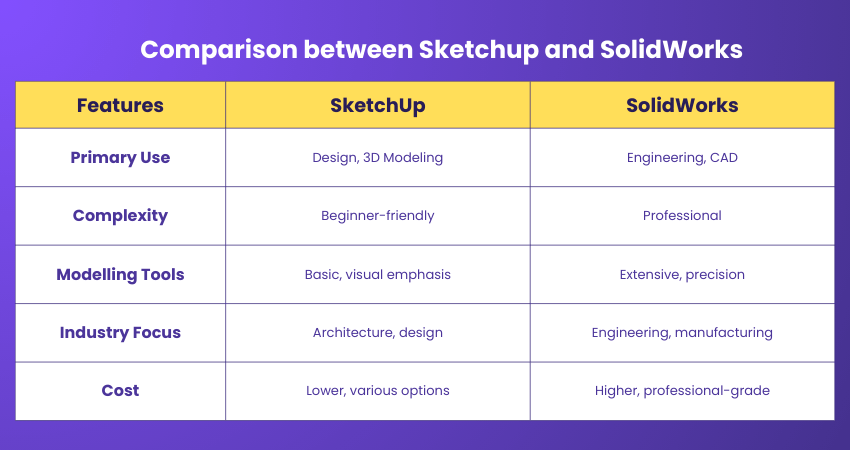
Features:
a) Parametric and direct modelling capabilities
b) Simulation suite for performance analysis
c) Significant design and engineering community
d) Data management and collaboration tools
e) Customisable toolsets for industry-specific workflows
Pros:
a) Intuitive design interface
b) Robust feature set
c) Strong support and resources
d) Industry-standard in engineering
e) Integrated solution for product development
Cons:
a) Can be expensive for individuals
b) Windows only
c) Resource-intensive on complex projects
10) Foyr Neo
Foyr Neo is a cloud-based interior design software that offers a streamlined workflow for professionals and enthusiasts alike. It is considered as one of the best SketchUp Alternatives by many users. With its AI-powered automation and an extensive library of customisable 3D models, Foyr Neo simplifies the design process that allow users to create stunning visuals and realistic renderings easily.
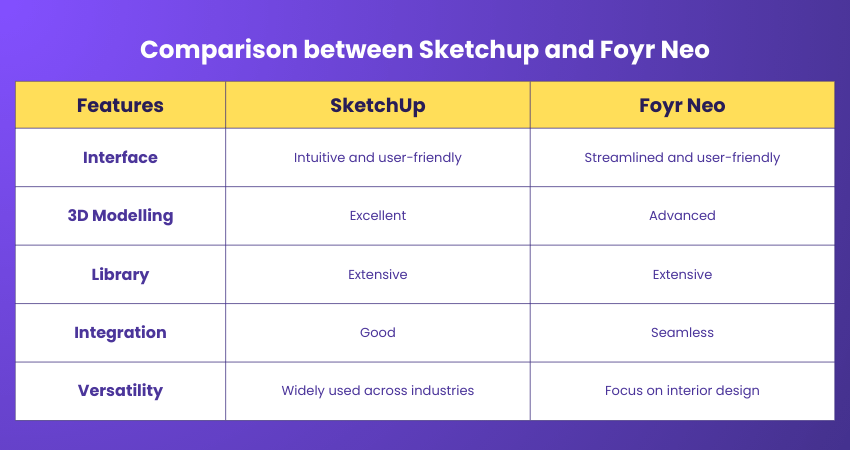
Features:
a) AI-powered design automation
b) Extensive 3D model library
c) High-quality rendering capabilities
d) User-friendly interface
e) Cloud-based collaboration tools
Pros:
a) Streamlines design process
b) No installation required
c) High-quality visuals
d) Accessible to non-professionals
e)Supports Virtual Reality
Cons:
a) Internet-dependent
b) Subscription-based pricing
c) Limited to interior design
11) Apple Pencil
The Apple Pencil is not a software, but a stylus designed for precision and integration with the iPad. It offers a natural and fluid drawing experience, making it an efficient SketchUp Alternatives for designers who prefer to work on a tablet.
Features:
a) Pressure sensitivity and tilt detection
b) Low latency for a natural drawing experience
c) Seamless integration with iPad and design apps
d) Palm rejection for comfortable use
e) Double-tap feature to switch tools
Pros:
a) Natural drawing experience
b) Seamless integration with iPad
c) High precision and control
d) Comfortable ergonomic design
e) Supports various apps
Cons:
a) Only compatible with iPad
b) Can be misplaced easily
Additional cost to iPad
12) Autodesk Maya
Autodesk Maya is a leading 3D computer graphics software for creating interactive 3D applications, including video games, animated films, TV series, or visual effects. Maya is known for its advanced features in character creation, 3D editorial, and keyframe animation.
Features:
a) Complex character animation and rigging
b) Integrated Arnold renderer for high-quality previews and renders
c) Dynamic simulation for realistic environmental effects
d) Extensive motion graphics and 3D editorial
e) Comprehensive pipeline integration with scripting and API support
Pros:
a) Industry-standard for animation
b) Robust toolset for professionals
c) High-quality output
d) Good pipeline integration
e) Strong technical support
Cons:
a) Expensive licensing
b) Complex for new users
c) Resource-heavy application
13) Autodesk 3DS Max
Autodesk 3ds Max is a professional-grade 3D modelling, Animation and rendering software widely used by architects, interior designers, visualisation experts, and game developers. Known for its advanced modelling capabilities and high-end graphics tools, it offers far greater depth than SketchUp for detailed, photo-realistic projects.
Features:
a) Advanced polygon, spline, and NURBS modelling
b) Industry-leading photorealistic rendering (Arnold Renderer)
c) Professional animation and simulation tools
d) Vast library of materials, textures, and modifiers
e) Strong interoperability with Autodesk ecosystem (AutoCAD, Revit)
Pros:
a) Extremely powerful modelling and rendering engine
b) Ideal for high-end architectural visualisation
c) Strong support for animation and VFX
d) Deep customisation with scripts and plugins
e) Used widely in professional studios
Cons:
a) Steep learning curve for beginners
b) Significantly more complex than SketchUp
c) Expensive subscription cost
d) Requires high-end hardware
e) Not ideal for quick conceptual modelling
Bring your Unity projects to life and create game-ready assets with our Blender 3D Modelling for Unity Course- Sign up today!
Do SketchUp Alternatives Support Plugins and Add-ons?
One clear benefit of SketchUp is its support for extensions and plugins, which really help to increase its core capabilities. Such plugins not only add new functions but also improve the current ones, providing the users with a very flexible workflow in terms of customisation. In addition to this, SketchUp's 3D modelling power has been a major factor in its acceptance in the architectural and construction industries.
Can SketchUp Alternatives be Used for 3D Scanning Workflows?
Many SketchUp Alternatives have been introduced, which not only accept 3D scanning but also have the ability to take the scanned data and create accurate models. Among other tools, Blender, Rhino, and AutoCAD, to name a few, deal with point clouds, mesh reconstruction, and surface editing, which makes them appropriate for reverse engineering, architectural restoration, and product design.
Conclusion
While SketchUp remains a popular choice for quick and intuitive 3D modelling, a growing number of alternatives offer advanced capabilities, better interoperability, and specialised workflows. From parametric design to 3D scanning and BIM integration, these tools cater to professionals and beginners seeking more flexibility and precision. Exploring the right alternative can elevate your design process, streamline collaboration, and unlock new creative possibilities.
Excel in your project and unlock creativity with our Animation and Design Training- Join today!
Frequently Asked Questions
How do I Choose the Right SketchUp Alternative?

To choose the right SketchUp Alternative, consider your specific design needs, budget, and the software’s compatibility with your hardware. The blog provides a comparison of the top alternatives, helping you make an informed decision based on features, usability, and cost.
Can I Collaborate with a Team Using Sketchup Alternatives?
Yes, most contemporary SketchUp Alternatives bring in teamwork cooperation as a feature, such as project sharing based on the cloud, simultaneous editing, and file handling all in one place. With this, different people can simultaneously do the tasks, see the modifications, and bring together their ideas even if they are in different places.
What are the Other Resources and Offers Provided by The Knowledge Academy?
The Knowledge Academy takes global learning to new heights, offering over 3,000+ online courses across 490+ locations in 190+ countries. This expansive reach ensures accessibility and convenience for learners worldwide.
Alongside our diverse Online Course Catalogue, encompassing 19 major categories, we go the extra mile by providing a plethora of free educational Online Resources like Blogs, eBooks, Interview Questions and Videos. Tailoring learning experiences further, professionals can unlock greater value through a wide range of special discounts, seasonal deals, and Exclusive Offers.
What is Knowledge Pass, and how does it work?
The Knowledge Academy’s Knowledge Pass, a prepaid voucher, adds another layer of flexibility, allowing course bookings over a 12-month period. Join us on a journey where education knows no bounds.
What are related courses and blogs provided by The Knowledge Academy?
The Knowledge Academy offers various Animation and Design Training, including the Sketchbook Essential Training, Blender 3D Modelling for Unity Training and the Inkscape Training. These courses cater to different skill levels, providing comprehensive insights into 3D Modelling.
Our Office Applications Blogs cover a range of topics related to SketchUp tool, offering valuable resources, best practices, and industry insights. Whether you are a beginner or looking to advance your 3D Designing skills, The Knowledge Academy's diverse courses and informative blogs have got you covered.

Richard Harris


Senior Full Stack Developer and Technology Educator
Richard Harris is a highly experienced full-stack developer with deep expertise in both frontend and backend technologies. Over his 12-year career, he has built scalable web applications for startups, enterprises and government organisations. Richard’s writing combines technical depth with clear explanations, ideal for developers looking to grow in modern frameworks and tools.


 If you wish to make any changes to your course, please


