


 Top Rated Course


We may not have the course you’re looking for. If you enquire or give us a call on 01344 203999 and speak to our training experts, we may still be able to help with your training requirements.
Revit vs AutoCAD: Which Design Software Is Right for You?
Richard Harris 21 February 2026Revit is built for BIM with intelligent 3D models and AEC collaboration, while AutoCAD focuses on precise 2D drafting and flexible 3D design across industries. Revit is ideal for integrated design, whereas AutoCAD offers flexibility for detailed drafting. Choosing between them depends on project complexity and workflow preferences.

Training Outcomes Within Your Budget!
We ensure quality, budget-alignment, and timely delivery by our expert instructors.
Table of Contents
Revit and AutoCAD are two giants in the world of architecture and design. One helps you sketch with unmatched precision, while the other breathes life into buildings with data-rich models. Both these tools can shape skylines, yet their strengths lie in different stages of creation. From drafting detailed plans to managing entire building lifecycles, understanding the major differences between Revit vs AutoCAD is essential for any Designer.
This blog sheds light on the key Revit vs AutoCAD differences. Here you'll explore how each tool is used, highlight the key advantages, and help you pick the right solution for your next project. So read on and shape the future of design and your career!
Table of Contents
1) What is Revit?
2) What is AutoCAD?
3) Key Differences Between Revit and AutoCAD
4) Advantages and Disadvantages of Revit
5) Advantages and Disadvantages of AutoCAD
6) Revit or AutoCAD: Which Software Should You Choose?
7) Can AutoCAD and Revit be Used Together?
8) Conclusion
What is Revit?
Revit, created by Autodesk, is a powerful Building Information Modelling (BIM) software widely used across the Architecture, Engineering, and Construction (AEC) sector to develop intelligent three-dimensional (3D) building models. It is capable of automatically updating drawings, schedules, and documentation whenever the model changes.
Revit embeds rich data into every element of the model, providing information about a building’s design, materials, construction stages, and long-term operation. This allows Architects, Engineers, and Designers to work together in real time, improving coordination and reducing errors.

What is AutoCAD?
AutoCAD, developed by Autodesk, is yet another highly trusted Computer-aided Design (CAD) software widely used across the AEC industry. It is widely used for creating precise 2D drawings and detailed drafting work. These technical visuals are essential for communicating architectural layouts, engineering concepts, and construction details clearly and professionally.

A key advantage of AutoCAD is its comprehensive set of drafting and editing tools, which make it easy to create, refine, and share complex drawings. It supports popular file formats such as DWG, DXF, and PDF, ensuring smooth collaboration within different workflows. Whether used for architectural plans or detailed construction drawings, AutoCAD delivers the precision and flexibility required to bring design ideas to life.

Key Differences Between Revit and AutoCAD
Revit vs AutoCAD are two distinct software programs developed by Autodesk. Both of these solutions serve distinct purposes and address specific requirements within the architecture, engineering, and construction industries. Here are the key differences between Revit vs AutoCAD:
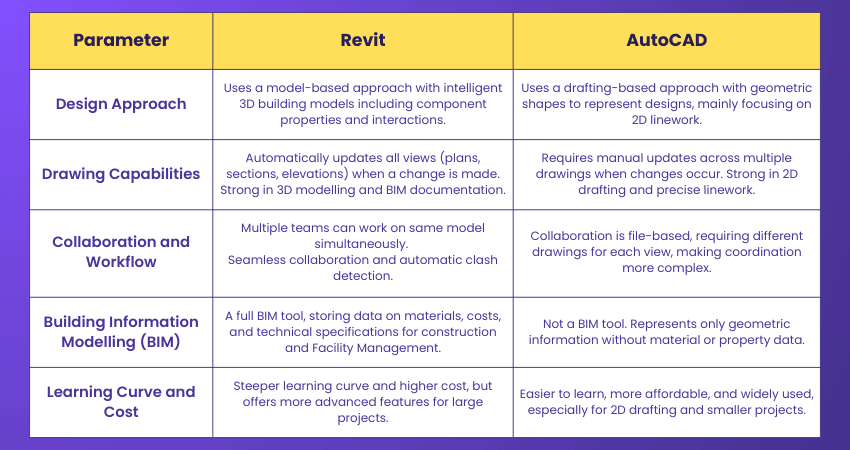
Both Revit and AutoCAD are design tools that are developed by Autodesk, yet they are designed to serve purposes with different objectives. Each software can be able to support a certain need in the architecture, engineering, and construction industry. In the following sections, the main features of the difference between Revit and AutoCAD regarding their approach, functionality, and use are explained:
1) Design Approach
Revit is a BIM-based design approach. It involves the application of parametric modelling to create intelligent 3D models, which hold data on materials, systems, and their connection. In comparison, AutoCAD follows a rather traditional model of CAD, in which designs are developed as 2D drawings or simple 3D geometry without inbuilt building intelligence.
2) Drawing Capabilities
Revit is focused on parametric elements of 3D modeling, implying that any changes to the model are automatically reflected in the relevant views. AutoCAD, on the other hand, is very good at detailed drawings of 2D and 3D, providing fine control over lines, layers and dimensions, which is suitable for technical and construction drawings.
Streamline your 2D design workflow like never before. Register for our AutoCAD LT Training and draft like a pro!
3) Collaboration and Workflow
Revit is designed for collaborative project delivery, enabling Architects, Engineers, and Contractors to work simultaneously within a shared model. This supports real-time coordination and clash detection. AutoCAD uses a drawing-based workflow where teams work on separate files, and coordination typically requires manual checks.
4) Building Information Modelling (BIM)
Revit is a complete BIM system dedicated to the storage of detailed information concerning design, construction, and building operations. It assists in activities like scheduling, quantity take-offs and lifecycle management. AutoCAD is not a BIM tool because it is more oriented to the drawing of geometry without project data built in.
5) Learning Curve and Cost
Revit has a steeper learning curve because it can be used to address entire BIM processes, and it offers advanced features, which may demand additional investment in training. AutoCAD is also more accessible in learning especially to those who have experience in drafting and is generally cheaper to acquire by an individual and smaller group.
Streamline your 2D design workflow like never before. Register for our AutoCAD LT Training and draft like a pro!
Advantages and Disadvantages of Revit
Revit is a powerful BIM platform widely used across industries, but like any software, it comes with strengths and limitations. Understanding its advantages and disadvantages can help teams determine whether it is the right choice for their project needs, workflow demands, and technical requirements.
Advantages of Revit
1) BIM-driven Design: Revit provides intelligent 3D modelling with embedded data, improving accuracy and coordination.
2) Collaborative Workflow: Multiple team members can work in the same model, reducing errors and boosting efficiency.
3) Parametric Components: Easy adjustments to dimensions and elements help maintain consistency and speed up revisions.
4) Automation: Changes update across all views, schedules, and sheets automatically.
5) Improved Project Coordination: Ideal for large and complex projects requiring detailed, fully integrated designs.
Disadvantages of Revit
1) Steep Learning Curve: Revit requires time and training to enhance skills, especially for beginners.
2) High System Requirements: Complex models can be demanding on hardware.
3) Less Suitable for Simple Drafting: Overpowered for small projects needing quick 2D drawings.
4) Limited Flexibility in Freeform Design: Not ideal for highly organic or conceptual shapes compared to other tools.
Advantages and Disadvantages of AutoCAD
AutoCAD remains one of the most widely used CAD tools. Its precision and versatility make it a trusted choice for drafting, but it also has limitations compared to modern BIM-focused software. Being aware of its advantages and disadvantages helps users decide when AutoCAD is the most effective option for their projects.
Advantages of AutoCAD
1) Highly Accurate Drafting: Excellent for precise 2D drawings and technical documentation.
2) Versatile Tools: Supports a wide range of industries, from architecture to mechanical and electrical design.
3) Flexible Layer Management: Strong control over line weights, colours, and visibility.
4) Broad File Support: Works with DWG, DXF, PDF, and more, ensuring compatibility across platforms.
5) Easy for Quick Drafting: Ideal for simple or legacy projects that require straightforward 2D work.
Disadvantages of AutoCAD
1) Not BIM-based: AutoCAD lacks the intelligent data integration found in Revit.
2) Manual Updates: Changes must be updated across drawings manually, increasing the chances of errors.
3) Less Efficient for Large Projects: Can become time-consuming for complex, high-detail projects.
4) Basic 3D Capabilities: Not as powerful for 3D modelling compared to Revit or other BIM tools.
Learn AutoCAD in our comprehensive AutoCAD Course and become the Architect of innovation – Sign up now!
Revit or AutoCAD: Which Software Should You Choose?
When deciding between Revit vs AutoCAD, the choice ultimately depends on your particular needs and the nature of your projects. Consider the following criteria to make an informed decision:
1) Project Type: Study what types of projects you usually take on. AutoCAD can be a good option if you mostly do 2D drafting, particularly if you create technical drawings, floor plans, and elevations. Its elegant drafting features and tools make it especially suitable for creating striking 2D drawings.
2) BIM Requirements: If your building projects are complex in design and need group efforts such that stakeholders from multiple departments are involved, then Revit is a suitable option.
3) Total Budget: Budget is an important factor when choosing between Revit and AutoCAD. Revit usually costs more because it includes advanced BIM features. This makes it great for complex projects. AutoCAD is more affordable and works well for smaller projects or firms mainly focused on 2D drafting.
4) Collaboration Needs: Revit is designed for teamwork as it offers shared central files, Cloud-based collaboration and real-time updates. While AutoCAD also supports collaboration, it often requires more manual coordination among team members. So, choose based on your collaboration needs.
5) Learning Curve: AutoCAD is widely used and supported by extensive tutorials and resources, making it easier for beginners to learn. Revit, though more advanced, may need additional training due to its BIM-focused environment.
6) Cost: Cost is an important factor in your budget consideration. Revit generally costs more due to its advanced features, while AutoCAD may be more budget friendly. Always check Autodesk’s official website for up-to-date pricing information.

Can AutoCAD and Revit be Used Together?
Yes, they can be used together and they often are even though there is always a Revit vs AutoCAD difference. AutoCAD and Revit are designed in a way that teams can integrate detailed CAD drawings into a BIM workflow. For example, Architects might draft precise 2D plans or parts of a design in AutoCAD. Then they can import or link those into a Revit project to build upon them in a richer, data-driven BIM context.
There are two key ways to bring AutoCAD content into Revit:
1) Importing a DWG file directly into the model. You can choose this when you need the content embedded in your project, but any changes made in the original file won’t automatically be reflected.
2) Linking a DWG file instead, which is generally the preferred approach. Linking maintains a live connection, meaning if the source DWG file is updated externally, you can reload it to see the changes in Revit.
Conclusion
Revit and AutoCAD are powerful tools where each play a big role in design and construction. They offer unique strengths for different project needs. AutoCAD delivers precision in drafting, while Revit drives collaboration and intelligent modelling. The right choice between Revit vs AutoCAD depends on your goals, workflow and project scale. Mastering both is the best way to go if you want to ensure flexibility and innovation in every stage of design.
Master Revit MEP and engineer the future of building systems. Register for our Revit MEP Course now!
Frequently Asked Questions
Can Revit Replace AutoCAD?

Revit can improve architectural processes and teamwork with BIM, but it may not completely substitute AutoCAD. AutoCAD is still necessary for 2D drafting and various engineering duties.
Do Architects use BIM or CAD?
Architects frequently utilise both BIM and CAD in their work, as BIM allows for sophisticated modelling and collaboration features, while CAD provides conventional drafting tools for intricate designs and documentation.
What are the Other Resources and Offers Provided by The Knowledge Academy?
The Knowledge Academy takes global learning to new heights, offering over 3,000+ online courses across 490+ locations in 190+ countries. This expansive reach ensures accessibility and convenience for learners worldwide.
Alongside our diverse Online Course Catalogue, encompassing 19 major categories, we go the extra mile by providing a plethora of free educational Online Resources like Blogs, eBooks, Interview Questions and Videos. Tailoring learning experiences further, professionals can unlock greater value through a wide range of special discounts, seasonal deals, and Exclusive Offers.
What is The Knowledge Pass, and How Does it Work?
The Knowledge Academy’s Knowledge Pass, a prepaid voucher, adds another layer of flexibility, allowing course bookings over a 12-month period. Join us on a journey where education knows no bounds.
What are the Related Courses and Blogs Provided by The Knowledge Academy?
The Knowledge Academy offers various AutoCAD Courses, including Revit Structure Course, Mudbox Training, AutoCAD Electrical Training and AutoDesk Maya Training. These courses cater to different skill levels, providing comprehensive insights into Parametric Modelling.
Our Office Applications Blogs cover a range of topics related to Revit and Autocad, offering valuable resources, best practices, and industry insights. Whether you are a beginner or looking to advance your designing skills, The Knowledge Academy's diverse courses and informative blogs have you covered.

Richard Harris


Senior Full Stack Developer and Technology Educator
Richard Harris is a highly experienced full-stack developer with deep expertise in both frontend and backend technologies. Over his 12-year career, he has built scalable web applications for startups, enterprises and government organisations. Richard’s writing combines technical depth with clear explanations, ideal for developers looking to grow in modern frameworks and tools.


 If you wish to make any changes to your course, please


