


 Top Rated Course


We may not have the course you’re looking for. If you enquire or give us a call on + 1-866 272 8822 and speak to our training experts, we may still be able to help with your training requirements.
Top 25 CSS Tricks Every Developer Should Know
Richard Harris 03 February 2026CSS plays a crucial role in shaping the aesthetics and functionality of a website, allowing developers to build visually appealing and user-friendly interfaces. This blog will explore CSS Tricks and creative techniques that improve web design, helping developers build visually appealing and user-friendly websites.

Training Outcomes Within Your Budget!
We ensure quality, budget-alignment, and timely delivery by our expert instructors.
Table of Contents
Cascading Style Sheets (CSS) is like the secret sauce that brings web pages to life. Whether you're a newbie or a seasoned developer, there's always something new to learn in the world of styling. From fancy text effects to smooth animations, CSS is filled with hidden gems. In this blog, we'll explore 25 CSS Tricks that will take your new skills to the next level. Get ready to add some magic to your code!
Table of Contents
1) Best CSS Tricks and Tips
a) Document Layout
b) Custom Cursors
c) Image-Filled Text
d) Initial Letter
e) Feature Query
f) Text Emphasis
g) Drop Cap Styling
h) Scroll Snapping
i) Variable Fonts
2) What are the Key CSS Tricks Every Developer Should Know?
3) How can Mastering CSS Tricks Benefit my Web Development?
4) Conclusion
Best CSS Tricks and Tips
Let us look at some of the best CSS Website tricks you can use as a developer to enhance website design and User Interface (UI) elements.
1) Document Layout
Think of your webpage as a house. The HTML is the structure, and CSS is the interior design. One of the most effective ways to manage layouts in CSS is by using CSS Grid and Flexbox. Grid is great for creating complex, two-dimensional layouts, while Flexbox shines in one-dimensional spacing. Together, they help you arrange your content seamlessly.

2) Custom Cursors
Want to add a unique touch to your website? Try customising the cursor. You can make it an image, an emoji, or even an animated icon. This is great for adding fun and interactivity, especially for gaming or portfolio websites.

3) Image-filled Text
Ever wanted to fill your text with an image? CSS makes this possible using background-clip.

This effect is great for creating eye-catching headlines and banners with dynamic textures.
Learn cutting-edge technologies for versatile web solutions with our App & Web Development Training – Sign up Now!
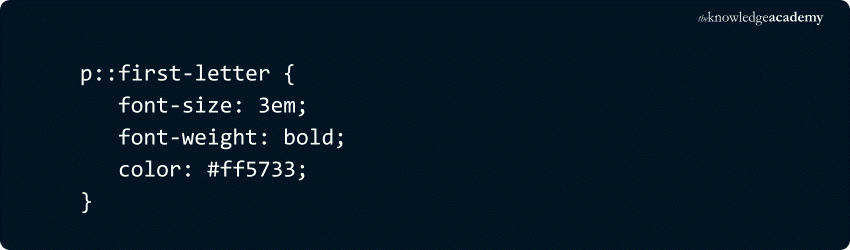
4) Initial Letter
Make the first letter of a paragraph pop, just like in fancy magazine layouts. This trick adds a stylish touch to blog posts and storytelling websites.
5) Feature Query
Want to apply styles only if a feature is supported? Use @supports.
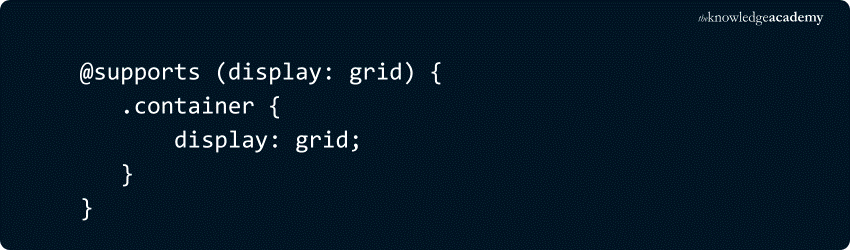
This ensures that older browsers gracefully degrade without breaking your design.
Learn web design principles and techniques with our HTML And CSS Course – Sign up now!
6) Text Emphasis
Highlight text in a stylish way with text-emphasis. This works well for educational websites, where marking important terms is crucial.

7) Drop Cap Styling
Similar to initial letters but more refined. This gives your content a newspaper-like aesthetic, adding elegance and readability.

8) Scroll Snapping
Create a smooth scrolling experience with scroll-snap-type. It’s especially useful for image galleries and one-page websites.

9) Variable Fonts
Use a single font file with multiple styles. This saves bandwidth and improves loading times without sacrificing typography variety.

10) Rainbow Animations
Who doesn’t love colours? This effect is great for playful websites and engaging user experiences.

11) CSS Nesting
Similar to SCSS, but native! It helps in organising styles in a more structured way, reducing repetition.

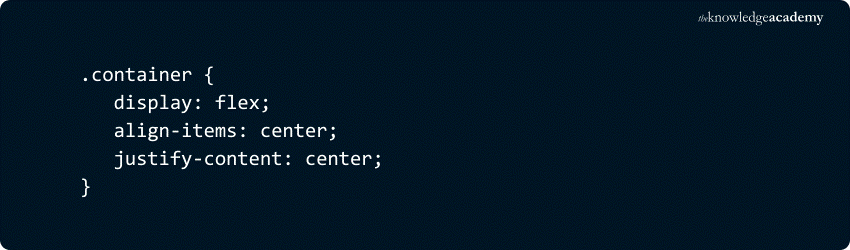
12) Vertical Alignment With Flexbox
Center anything with ease. This is a lifesaver when dealing with dynamic content in responsive designs.
13) SVG Icons and Logos
Scale without quality loss. Scalable Vector Graphics (SVGs) are perfect for responsive designs since they stay sharp at any resolution.

14) CSS Gradients
Forget boring backgrounds! Use gradients to create vibrant colour transitions that add depth and aesthetics to your site.

15) Animations
With CSS Animation, you can bring elements to life without relying on JavaScript—perfect for creating subtle hover effects or smooth full-page transitions.

16) Hover Zoom
Make images pop when hovered over. This effect is perfect for portfolios and e-commerce product displays.

17) Google Fonts
Easily import stylish fonts. Google Fonts provides a vast collection of free, high-quality typefaces.

18) Alter Writing Mode
Great for creative layouts. Vertical text orientation works well for branding elements and artistic websites.
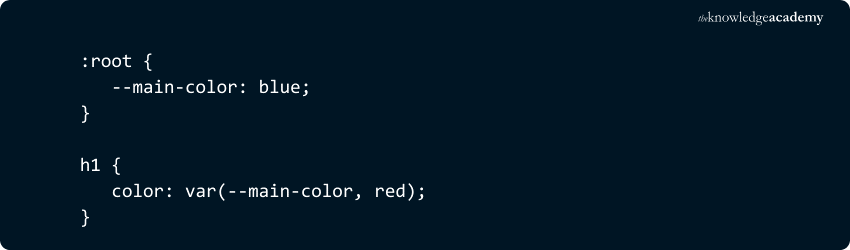
19) Variable Fallbacks
Set default values for variables. This ensures a smooth experience even if some styles don’t load.
20) CSS Blend Modes
Mix images and backgrounds in creative ways. Perfect for dynamic overlays and artistic effects.

21) Clipping
Shape elements with clip-path. This enables unique layout designs beyond the standard rectangular look.

22) Masking Techniques
Hide or reveal parts of elements. Use it to create visually appealing transitions and reveals.

23) Shape Outside Effects
Text can wrap around custom shapes. This is useful for designing elegant layouts with images.

24) Text Stroke Effects
Create bold outlines around text. It helps in making headings more prominent.

25) Paused Pseudo-class
Pause animations on hover. A useful trick for user interaction control.

What are the Key CSS Tricks Every Developer Should Know?
Some essential CSS Tricks include using Flexbox and Grid for effective layout management, CSS transitions and animations for smoother user interactions, custom properties (CSS variables) for better code organisation, and pseudo-classes like :hover and :nth-child to add dynamic effects to your designs.
Learn coding fundamentals for responsive web layouts with Website Design Course – Join now!
How can Mastering CSS Tricks Benefit my Web Development?
Mastering CSS Tricks can boost your productivity, enhance the user experience, and optimise your code. By learning advanced techniques such as responsive design, animations, and layout enhancements, you can create cleaner, more adaptable, and visually striking Websites that perform well on any device.
Preparing for a front-end role? Master these essential CSS Interview Questions!
Conclusion
CSS is a powerhouse of creativity, enabling developers to craft beautiful and engaging websites. Whether you're animating text, refining layouts, or experimenting with blend modes, CSS Framework can also offer an efficient approach to streamline your development process. So go ahead, play around with these CSS Tricks, and let your designs shine!
Understand front-end and back-end development with our Web Development Training – Join Now!
Frequently Asked Questions
How do I Improve my CSS Skills?

Improve your CSS skills by practicing regularly, studying modern frameworks, experimenting with animations, understanding Flexbox and Grid, following industry trends, and building real-world projects.
What are the Four CSS Rules?
The four main CSS rules are selectors (target elements), properties (define styling), values (specify styles), and declarations (property-value pairs within rules).
What are the Three CSS Methods?
The three CSS methods are inline CSS (applied directly in HTML elements), internal CSS
What are the Other Resources and Offers Provided by The Knowledge Academy?
The Knowledge Academy takes global learning to new heights, offering over 3,000 online courses across 490+ locations in 190+ countries. This expansive reach ensures accessibility and convenience for learners worldwide.
Alongside our diverse Online Course Catalogue, encompassing 19 major categories, we go the extra mile by providing a plethora of free educational Online Resources like Blogs, eBooks, Interview Questions and Videos. Tailoring learning experiences further, professionals can unlock greater value through a wide range of special discounts, seasonal deals, and Exclusive Offers.
What is The Knowledge Pass, and How Does it Work?
The Knowledge Academy’s Knowledge Pass, a prepaid voucher, adds another layer of flexibility, allowing course bookings over a 12-month period. Join us on a journey where education knows no bounds.
What are the Related Courses and Blogs Provided by The Knowledge Academy?
The Knowledge Academy offers various App & Web Development Training, including the MEAN Stack Web Development Training, HTML and CSS Course, and UX / UI Design Jumpstart Course. These courses cater to different skill levels, providing comprehensive insights into What is HTML.
Our Programming & DevOps Blogs cover a range of topics related to CSS Tricks, offering valuable resources, best practices, and industry insights. Whether you are a beginner or looking to advance your Programming skills, The Knowledge Academy's diverse courses and informative blogs have got you covered.

Richard Harris


Senior Full Stack Developer and Technology Educator
Richard Harris is a highly experienced full-stack developer with deep expertise in both frontend and backend technologies. Over his 12-year career, he has built scalable web applications for startups, enterprises and government organisations. Richard’s writing combines technical depth with clear explanations, ideal for developers looking to grow in modern frameworks and tools.


 If you wish to make any changes to your course, please


