


 Top Rated Course

We may not have the course you’re looking for. If you enquire or give us a call on +43 720 115337 and speak to our training experts, we may still be able to help with your training requirements.
What is QuickBooks Accountant? Complete Guide for Accountants
Olivia Taylor 07 March 2026QuickBooks Accountant lets professionals manage multiple clients from one dashboard with secure sharing, reporting, batch actions, and practice tools. It simplifies daily accounting work across multiple clients and workflows. It also supports faster collaboration and more efficient client management processes overall.

Training Outcomes Within Your Budget!
We ensure quality, budget-alignment, and timely delivery by our expert instructors.
Table of Contents
Accountants constantly juggle multiple clients, tight deadlines, and complex financial tasks, making workload management an ongoing challenge. This is where QuickBooks Accountant steps in, highlighting its growing importance in modern accounting workflows. Let’s explore how it simplifies daily work while improving accuracy, efficiency, and overall productivity.
Table of Contents
1) What is QuickBooks Accountant?
2) How Does QuickBooks for Accountants Work?
3) Key Features of QuickBooks Accountant
4) How to Make the Best Use of QuickBooks Accounting Software?
5) Benefits of Using QuickBooks Accountant
6) QuickBooks Accountant and ProAdvisor
7) Who Should Use QuickBooks Accountant?
8) What Does a QuickBooks Accountant do?
9) QuickBooks Accountant Online Pricing
10) Conclusion
What is QuickBooks Accountant?
QuickBooks Accountant is designed for Accountants and Bookkeepers who manage multiple clients. It focuses on simplicity, collaboration, and ease of use. Instead of juggling different projects, you can access financial data, manage transactions, create reports, and work with clients on one platform.
Features like batch transactions and custom fields make tasks faster and more efficient. With smoother communication and streamlined workflows, you save time while delivering accurate, timely results. This makes QuickBooks Accounting softwares a valuable tool for managing client needs effectively.
How Does QuickBooks for Accountants Work?
QuickBooks for accountants provides a cloud-based platform that allows professionals to oversee several client accounts from a single central dashboard. Clients permit access to their documents, thereby making it possible to collaborate, report, and receive financial support constantly in real-time.
Key Features of QuickBooks Accountant
QuickBooks Accountants and Bookkeepers manage multiple clients efficiently thanks to a range of features. The best of its QuickBooks Features includes the following:
a) Single Dashboard Management: Manage and connect with multiple clients from one place, switch between accounts easily, and access advanced reporting, roles, and permissions.
b) Secure Data Sharing: Share financial data and files securely with clients, send multiple transactions at once, and reduce errors with the Client Data Review feature.
c) Accountant’s Toolbox: Access powerful tools for reclassifying transactions, fixing client errors, and making journal entries to streamline processes and keep records accurate.
d) Working Trial Balance: View real-time financial positions, verify accuracy, and make adjustments quickly to maintain reliable records.
e) Accountant Centre: Use a centralised dashboard for quick access to tools, reports, and client accounts.
f) Cloud-based Platform: Collaborate in real time with clients, access financial data from anywhere, and provide timely advice through cloud technology.
g) Additional Tools: It’s got features like direct access to clients’ QuickBooks accounts and tax returns, project and Task Management, full-scale billing, real-time progress tracking, Inventory Management, and QuickBooks Self-Employed integration.
h) Security and Support: It offers bank-level security, multiple user restrictions and free dedicated tech support, which ensures data safety and peace of mind.
How to Make the Best Use of QuickBooks Accounting Software?
QuickBooks aids in the organisation of accounting by making day-to-day financial activities effective through invoicing, expense tracking, and bank reconciliation of financial accounts easier. Manual work and errors can also be minimised by using the built-in automation capabilities.
Workflows, reports, and settings should be personalised to business trends to achieve optimal results. Accuracy, compliance, and overall productivity may also be enhanced with the help of regular use of support tools and expert guidance.
Benefits of Using QuickBooks Accountant
Here are the benefits of using QuickBooks Accountant:
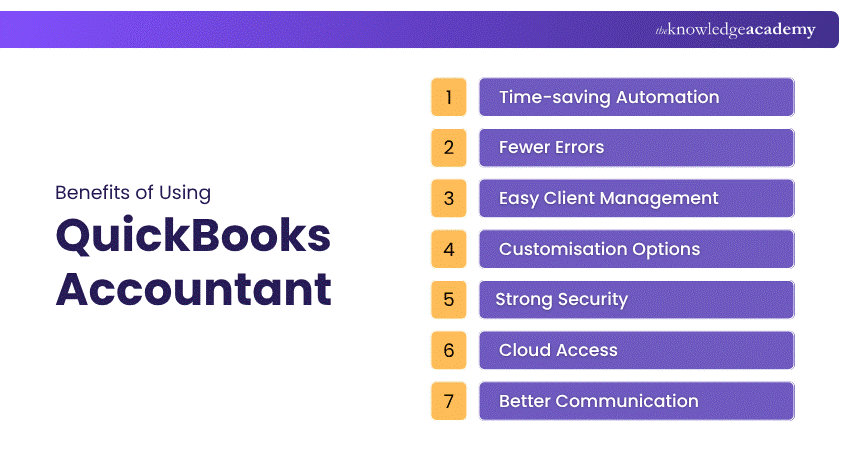
Key Benefits of Using QuickBooks Accounting Tool:
1) Time-saving Automation: Handles repetitive tasks like data entry and reporting automatically.
2) Fewer Errors: Real-time updates and smart tools help reduce mistakes in financial records.
3) Easy Client Management: Seamlessly switch between multiple client accounts in one place.
4) Customisation Options: Tailor settings and reports to match each client’s specific needs.
5) Strong Security: Protects data with encryption and regular backups.
6) Cloud Access: Work from anywhere and collaborate with clients in real-time.
7) Better Communication: Share financial updates instantly for quicker and smarter decisions.
Attain knowledge of the charts of accounts and effective with categorisation our Wave Accounting Training join today!
QuickBooks Accountant and ProAdvisor
A QuickBooks Accountant helps with money tasks like keeping records, sending invoices, running payroll, and creating reports using QuickBooks. This keeps your business organised, compliant, and clear about its finances.
A QuickBooks ProAdvisor has completed special training and passed a test. They know the software well and can help set it up, fix issues, and customise it for your business. Whether you run a small shop or a growing business, a QuickBooks Accountant or ProAdvisor can save you time, reduce errors, and let you focus on running your business.
Who Should Use QuickBooks Accountant?
QuickBooks Accountant is invaluable for various professionals in the accounting and bookkeeping industry. The following are some of the professions where it plays a vital role:
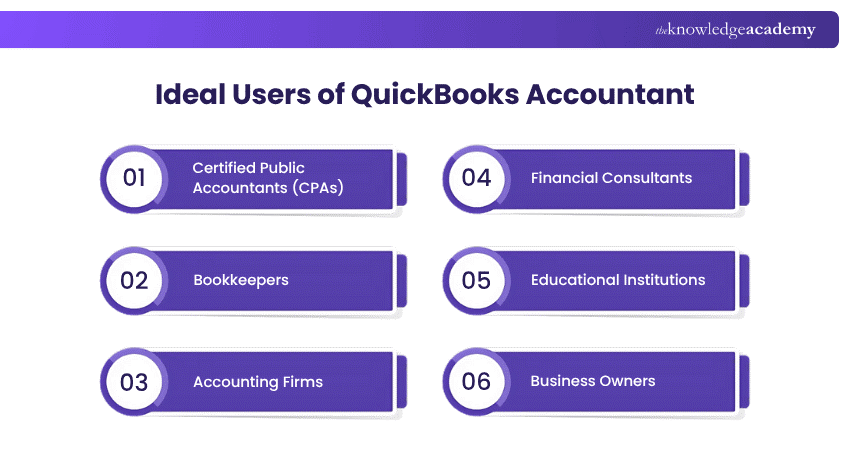
a) Certified Public Accountants (CPAs): It helps them manage client records, audits, and tax services efficiently.
b) Bookkeepers: QuickBooks Accountant helps them simplify daily tasks and keep client data organised.
c) Accounting Firms: It enables Accounting firms to handle multiple clients with diverse needs from one platform.
d) Financial Consultants: QuickBooks Online Accountant helps these professionals analyse data, create reports and provide financial advice.
e) Educational Institutions: These institutions can use QuickBooks Accountant to provide students with hands-on training in industry-standard software.
f) Business Owners: It helps business owners organise finances, generate reports and track business health.
What Does a QuickBooks Accountant do?
A QuickBooks Accountant uses QuickBooks to help manage a business’s finances. They handle Bookkeeping, payroll, invoicing, and reporting. They also set up the software, fix issues, and guide business owners to keep accounts accurate and up to date.
QuickBooks Accountant Online Pricing
QuickBooks offers flexible online pricing plans tailored for Accountants and small businesses. QuickBooks Online Accountant is free for accounting firms and includes features like Client Management, Accountant-only tools, and easy access to multiple accounts, helping professionals work faster and support more clients.
QuickBooks Online Accountant pricing is as follows:
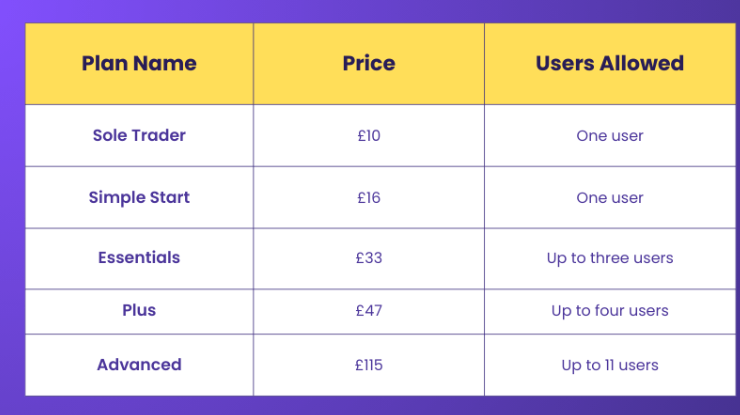
Clients can choose from paid plans such as Sole Trader, Simple Start, Essentials, Plus, and Advanced, depending on their needs like payroll, billing, or Inventory tracking. Accountants often receive discounts when adding clients through their dashboard, making it a cost-effective way to deliver better service.
Conclusion
QuickBooks Accountant provides lucidity, productivity, and power over present-day accounting processes, thus making client management and organisation much easier. We hope that this blog has been able to convey its worth and possible uses to you and that it has given you the courage to see its role in your accounting practice for the future.
Improve accuracy and streamline your financial processes effectively with our Accounting Software Training join now!
Frequently Asked Questions
Is QuickBooks Accounting Easy to Learn?

Yes, QuickBooks Accounting is easy to learn because it's designed with a user-friendly interface. With built-in tutorials and online support, most users can quickly understand its features and manage finances effectively.
Is QuickBooks Better Than Spreadsheets?
Yes, QuickBooks is better than spreadsheets as it automates calculations, reduces errors, and tracks income, expenses, and taxes in real time, saving time and improving accuracy.
What are the Other Resources and Offers Provided by The Knowledge Academy?
The Knowledge Academy takes global learning to new heights, offering over 3,000+ online courses across 490+ locations in 190+ countries. This expansive reach ensures accessibility and convenience for learners worldwide.
Alongside our diverse Online Course Catalogue, encompassing 17 major categories, we go the extra mile by providing a plethora of free educational Online Resources like Blogs, eBooks, Interview Questions and Videos. Tailoring learning experiences further, professionals can unlock greater value through a wide range of special discounts, seasonal deals, and Exclusive Offers.
What is The Knowledge Pass, and How Does it Work?
The Knowledge Academy’s Knowledge Pass, a prepaid voucher, adds another layer of flexibility, allowing course bookings over a 12-month period. Join us on a journey where education knows no bounds.
What are the Related Courses and Blogs Provided by The Knowledge Academy?
The Knowledge Academy offers various Accounting Software Courses, including the QuickBooks Training, Tally Training, and Xero Training. These courses cater to different skill levels, providing comprehensive insights into Accounting Software.
Our Accounting and Finance Blogs cover a range of topics related to QuickBooks Accountant, offering valuable resources, best practices, and industry insights. Whether you are a beginner or looking to advance your Accounting and Finance skills, The Knowledge Academy's diverse courses and informative blogs have got you covered.

Olivia Taylor


Chartered Accountant and Financial Training Specialist
Olivia Taylor is a qualified chartered accountant with over a decade of experience in financial management, auditing and corporate reporting. Having worked with leading firms in both the public and private sectors, Olivia brings clarity to complex financial topics. Her writing focuses on helping professionals build confidence in key areas of accounting, compliance and financial planning.
View Detail
Upcoming Accounting and Finance Resources Batches & Dates
Date
 QuickBooks Training
QuickBooks Training
Fri 27th Mar 2026
QuickBooks Training
Fri 8th May 2026
QuickBooks Training
Fri 26th Jun 2026
QuickBooks Training
Fri 18th Sep 2026
QuickBooks Training
Fri 4th Dec 2026

 If you wish to make any changes to your course, please


