


 Top Rated Course

We may not have the course you’re looking for. If you enquire or give us a call on +971 8000311193 and speak to our training experts, we may still be able to help with your training requirements.
Virtual Prototyping: Definition, Benefits and Drawback
Richard Harris 22 April 2026Virtual Prototyping uses digital simulations to design, test, and refine products, reducing costs, improving performance, and accelerating development. It helps detect design flaws early and supports better collaboration among teams. By testing products virtually, businesses can deliver high-quality results faster and more efficiently.
Training Outcomes Within Your Budget!
We ensure quality, budget-alignment, and timely delivery by our expert instructors.
Table of Contents
Related Courses
Turning an idea into a successful product isn’t easy; it takes time, testing, and investment. But with Virtual Prototyping, you can design, test, and refine products digitally before making a single physical model. It’s like having a crystal ball for your design process, saving you money and accelerating development.
In this blog, we’ll cover everything you need to know about Virtual Prototyping, including how it works, when to use it, and its pros and cons. We’ll also explain how to create one using Ocean Software and compare it with Physical Prototyping.
Table of Contents
1) What is Virtual Prototyping?
2) How Does Virtual Prototyping Work?
3) The Benefits of Virtual Prototyping
4) Drawbacks of Virtual Prototyping
5) How to Generate a Virtual Prototype with Ocean?
6) Difference Between Physical and Virtual Prototyping
7) Conclusion
What is Virtual Prototyping?
Virtual Prototyping is a digital process that uses computer simulations to design, test, and refine products before any physical version is built. It relies on tools such as Computer-Aided Design (CAD) and Computer-Aided Engineering (CAE) to create a digital twin of the product, enabling engineers to predict how it will perform in real-world conditions.
This approach saves time and reduces costs by identifying design flaws early, improves productivity, and allows testing under various environmental conditions using virtual sensors. As a result, companies can deliver higher-quality products more efficiently.
How Does Virtual Prototyping Work?
Virtual Prototyping combines 3D modelling, simulation, and visualisation tools to replicate real-world scenarios. The general process includes:
Creating a 3D Model: Designers build a detailed digital representation of the product using CAD Software.
Defining Material Properties: Materials are assigned attributes such as density, elasticity, and strength.
Simulating Real-world Scenarios: The model is tested under different conditions such as pressure, temperature, or impact.
Analysing Results: Engineers evaluate the model’s performance, detect weaknesses, and make improvements.
By repeating this process, teams can refine designs until they are ready for production.
The Benefits of Virtual Prototyping
Virtual Prototype helps to save money and speed up Product Development by using digital simulations and allowing quick design changes. Here are the key benefits:
1) Early Software Development
Teams can start developing software even before hardware is ready. For instance, embedded systems can be tested on virtual hardware, reducing delays in production.
2) Hardware/Software Integration
Virtual Prototypes allow simultaneous testing of hardware and software, ensuring compatibility and reducing integration issues later.
3) Global Development
With virtual models, teams across the globe can work on the same design in real time, making collaboration smoother and faster.
4) Debuggability
Design flaws can be found and fixed early in the development cycle, minimising costly reworks after manufacturing.
5) Compatibility
Virtual Prototypes ensure that different components work together as intended before production, reducing failures during assembly.
Drawbacks of Virtual Prototyping
While Virtual Prototyping is powerful, it has some limitations:
1) Inadequate Evaluation
Simulations may not fully replicate real-world conditions, leading to gaps between the virtual model’s performance and physical reality.
2) Ambiguity Among Users
Different teams might interpret simulation results differently, which can cause confusion.
3) User Goals Misinterpreted
If user needs aren’t clearly understood, Virtual Prototypes may not accurately reflect intended functionality.
4) Excess Production Time
Creating detailed digital models can sometimes take longer than expected, especially for highly complex products.
Explore techniques for optimising 3D models for game development with our Blender 3D Modeling for Unity Course now!
How to Generate a Virtual Prototype with Ocean?
Here’s a simple step-by-step process to create a Virtual Prototype using Ocean™ software:
1) Import 3D Model in Ocean
Upload your 3D product model into the Ocean™ software to start creating the Virtual Prototype. Make sure the file format works with the software. This step prepares your design for the next stages.
2) Input Material Optical Properties
Add details about the materials in your design, like colour, transparency, and reflectivity. These settings help Ocean™ show how light behaves on different surfaces. Accurate details make the model look more realistic.
3) Validate & Simulate with Ocean
Run a ray-tracing simulation to see how light interacts with your product. This helps you check the accuracy of the model and find any issues early. The results also show how the product will look in real life.
4) Lighting Analysis & Visualisation
Use Ocean™ to study how light spreads on your product. The software creates realistic images of the design under different lighting conditions. This helps you understand the final look and feel of the product.
Start your AutoCAD journey today — develop technical drafting skills for success by registering in our AutoCAD Courses today.
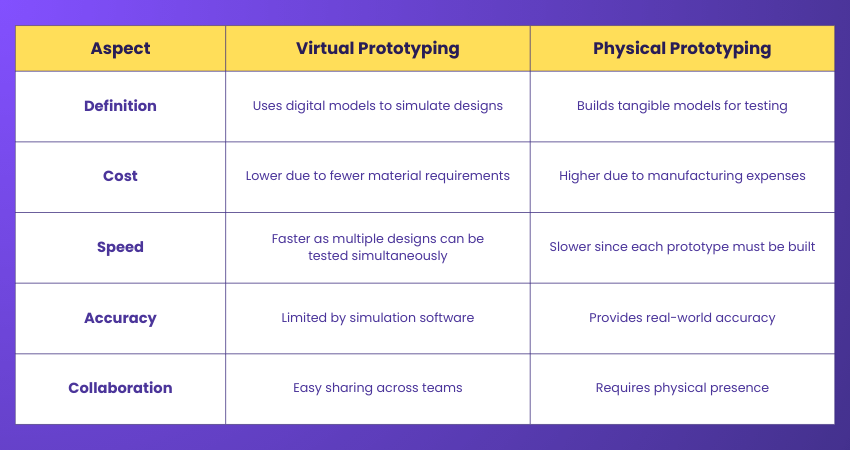
Difference Between Physical and Virtual Prototyping
While Virtual Prototype has many benefits, it’s important to see how it differs from Physical Prototyping. The table below shows the main differences between Physical and Virtual Prototyping:
Conclusion
Virtual Prototyping is a powerful approach that helps businesses design, test, and improve products efficiently using digital simulations. It saves time, reduces costs, and allows teams to refine designs before creating physical models. By combining virtual and physical testing, companies can achieve higher-quality products and speed up development cycles. This makes using digital prototyping an essential tool in modern product design.
Start your journey with Animation and Design Training - unleash your creative potential.
Frequently Asked Questions
What is Visual Prototyping?

Visual Prototyping involves creating a non-functional model of a product to showcase its appearance, design, and layout. It helps designers and stakeholders visualise the final look, including size, shape, colour, and style, before starting full-scale development.
What is Wireframing and UI Prototyping?
Wireframing is creating simple, static blueprints that focus on layout, content, and basic functions. UI prototyping adds interactivity and visual design to simulate the final user experience, from simple click-throughs to detailed simulations.
What is Wireframing and UI Prototyping?
The Knowledge Academy takes global learning to new heights, offering over 3,000+ online courses across 490+ locations in 190+ countries. This expansive reach ensures accessibility and convenience for learners worldwide.
Alongside our diverse Online Course Catalogue, encompassing 17 major categories, we go the extra mile by providing a plethora of free educational Online Resources like Blogs, eBooks, Interview Questions and Videos. Tailoring learning experiences further, professionals can unlock greater value through a wide range of special discounts, seasonal deals, and Exclusive Offers.
What is The Knowledge Pass, and How Does it Work?
The Knowledge Academy’s Knowledge Pass, a prepaid voucher, adds another layer of flexibility, allowing course bookings over a 12-month period. Join us on a journey where education knows no bounds.
What are the Related Courses and Blogs Provided by The Knowledge Academy?
The Knowledge Academy offers various Animation and Design Training, including 3D Printing Course, Design Patterns Training and Blender 3D Modeling for Unity Course. These courses cater to different skill levels, providing comprehensive insights into 3D Modelling.
Our Programming & DevOps Blogs cover a range of topics related to Virtual Prototyping, offering valuable resources, best practices, and industry insights. Whether you are a beginner or looking to advance your Programming & DevOps skills, The Knowledge Academy's diverse courses and informative blogs have got you covered.

Richard Harris


Senior Full Stack Developer and Technology Educator
Richard Harris is a highly experienced full-stack developer with deep expertise in both frontend and backend technologies. Over his 12-year career, he has built scalable web applications for startups, enterprises and government organisations. Richard’s writing combines technical depth with clear explanations, ideal for developers looking to grow in modern frameworks and tools.

Upcoming Batches & Dates
Date


 If you wish to make any changes to your course, please


