


 Top Rated Course

We may not have the course you’re looking for. If you enquire or give us a call on +44 1344 203 999 and speak to our training experts, we may still be able to help with your training requirements.
Top Excel Skills: Formulas Every Expert Needs to Know
The Knowledge Academy 29 April 2026Microsoft Excel skills including formulas, pivot tables, charts, data analysis, dashboards, advanced reporting, data visualisation, and productivity tools. Gain practical knowledge to organise, interpret, and present data effectively. Improve accuracy, automate tasks, and make smarter business decisions with confidence.

Training Outcomes Within Your Budget!
We ensure quality, budget-alignment, and timely delivery by our expert instructors.
Table of Contents

What would it feel like to fulfill a mastery of only some basic methods which might entirely alter your data handling approach? Advanced Excel Skills are vital whether you are finding ways of creating budgets or for analysing trends that will enable you to make wiser decisions that optimise productivity.
Excel gives the ability to automate work, automate tasks, and discover insights easily, which was previously done almost exclusively through the use of formulae. Now let us discuss and understand the skills that can work with Excel to your advantage.
Table of Contents
1) What Are the Top Excel Skills for Professionals?
2) Advanced Excel Skills
3) Why Excel Skills are Important in the Job Market?
4) How Many Rows and Columns are in Excel?
5) How Do I Freeze a Row in Excel?
6) Conclusion
What Are the Top Excel Skills for Professionals?
Whether you're a data analyst, marketer, or business professional, mastering the basic Excel Skills can dramatically improve your efficiency and decision-making. Below are the top Excel featuring every professional should know to work smarter and get more done with less effort.
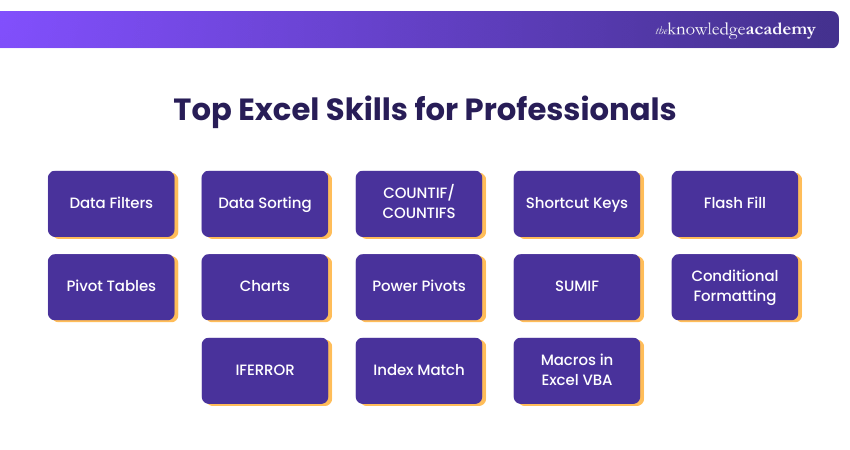
1) Data Filters
Data Filters allow users to display only rows that meet specific criteria, hiding irrelevant data. This feature is essential for analysing large datasets efficiently, enabling users to focus on subsets of data without altering the original structure or content.

2) Data Sorting
Sorting is used to organise data in excel in a logical order either ascending or descending, based on the chosen column. It is easy to sort out text, numbers, or dates in order to identify trends and insights. By structuring data this way, users can interpret patterns more clearly and make well-informed decisions.
3) COUNTIF/COUNTIFS
A simple method of analysing trends in your data would be to use COUNTIF in Excel, which allows you to count the number of cells within a range that meet one condition, e.g. values over a specific number, etc. COUNTIFS builds upon this, letting you filter by a number of different criteria in one or more ranges--such as including or excluding entries based on both category and date--so you can more intuitively draw conclusions without complex hand calculations.
4) Shortcut Keys
Excel shortcut keys improve efficiency by allowing users to perform frequent tasks quickly without using the mouse. From basic actions like copying and pasting to advanced navigation and formatting, mastering shortcuts significantly speeds up workflow and reduces repetitive strain.
5) Flash Fill
Flash Fill automatically detects patterns in data entry and completes the remaining cells accordingly. It’s especially useful for formatting names, splitting or combining text, and cleaning data, eliminating the need for complex formulas or manual input in repetitive tasks.
Excel in data automation through Microsoft Excel VBA and Macro Training- join today!
6) Pivot Tables
PivotTables in the excel sheet are a powerful tool that assists you in summarising, filtering and reporting large volumes of data within a short period of time without distorting the original dataset. They simplify the process of grouping and comparing values by organising information into interactive views to enable a clear and structured presentation of insights to managers or other senior colleagues.
7) Charts
Charts transform raw data into visual representations like bar graphs, pie charts, and line graphs. They help users identify trends, compare values, and communicate insights clearly. Excel’s charting tools support customisation for better storytelling and data-driven presentations.
8) Power Pivots
Power Pivot extends Excel’s capabilities by allowing users to work with large datasets from multiple sources. It supports advanced data modeling, relationships between tables, and complex calculations using DAX, making it ideal for business intelligence and in-depth analysis.
Optimise bookkeeping skills using Excel- sign up for our Excel for Accounting Course today!
9) SUMIF
The SUMIF function in Excel totals only the values that satisfy a given condition, such as adding sales for a specific region or product category. By automatically calculating conditional sums, it helps you analyse data more efficiently and make informed decisions without manual effort
10) Conditional Formatting
Conditional Formatting changes the appearance of cells based on rules or conditions. It highlights important data, trends, or anomalies using colors, icons, or data bars, making spreadsheets more visually intuitive and helping users quickly interpret key information.
11) IFERROR
IFERROR handles errors in formulas by returning a custom result instead of an error message. It improves spreadsheet readability and prevents issues like #DIV/0! or #N/A from disrupting analysis, ensuring smoother user experience and cleaner data presentation.
12) Index Match
INDEX MATCH is a flexible and powerful alternative to VLOOKUP. MATCH finds the position of a value, and INDEX retrieves the value at that position. Together, they allow for dynamic, accurate lookups across rows and columns in large datasets.
13) Macros in Excel VBA
Macros automate repetitive tasks using Excel’s built-in programming language, VBA (Visual Basic for Applications). Users can record actions or write custom scripts to streamline workflows, reduce manual effort, and enhance productivity in complex or frequently updated spreadsheets.
Transform data into data-driven strategies- kickstart your Business Analytics with Excel Course today!
Advanced Excel Skills
The following are some key advanced skills that help elevate Excel proficiency and productivity:
1) Complex Data Analysis
More complex tools, such as What-If Analysis, the Solver, and statistical capabilities, can be used to investigate, analyse, and model broad data sets to gain a deeper understanding than just the formula.
2) Advanced Macros and VBA
In addition to the simple recording of macros, the higher level of writing and editing VBA code that can be used to automate some complex, usually repetitive functions through large workbooks, exceeding the potential of regular office automation.
3) Power Query
Power Query is an efficient tool enabling users to import, clean, transform, and reshape data of various external sources prior to analysis and make data preparation much more efficient.
4) Power Pivot and Data Models
Power Pivot allows you to build powerful data models through the importation of large volumes of data, the establishment of relationships between tables and the creation of DAX formulas to produce more complex calculations and summaries.
5) Dynamic arrays
Dynamic arrays also support formulas with multiple output, that is, they automatically spill the output in the surrounding cells, and allow using functions such as UNIQUE, FILTER, SORT and others in flexible and efficient calculations.
Why Excel Skills are Important in the Job Market?
If someone is applying for a data-related job, then it is important to have skills and experience related to Excel. Excel is used in a variety of jobs and helps a person to complete his daily tasks.
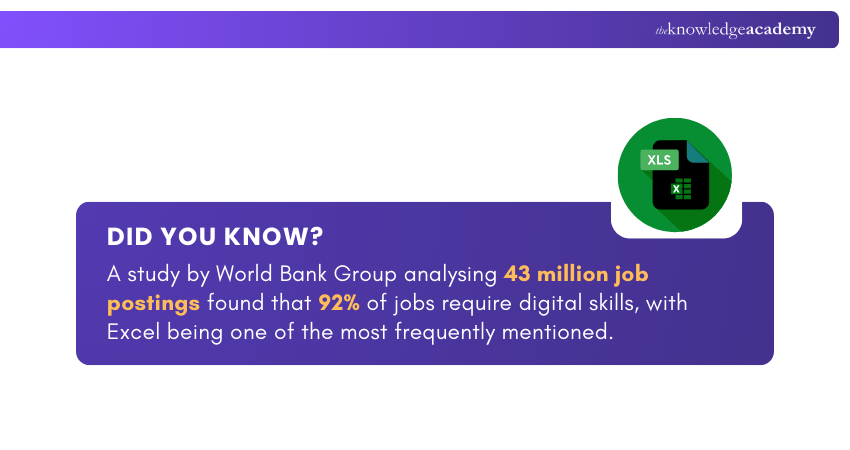
It is one of the best spreadsheet software programs in the market and can perform a variety of tasks at once. According to the Microsoft Excel Formulas Guide, Office clerks and Administrative Assistants depend on this software, as it is one of the most crucial tools in their toolbox.
Excel is often used in education for administrative purposes, such as tracking student performance, organising schedules, and analysing data. Not just this, Excel has a wide scope, and it's crucial to include Basic Excel Skills on your resume, as it is also extensively used by Financial Analysts, Investment Bankers, and other businesses.
How Many Rows and Columns are in Excel?
In recent editions of Microsoft Excel (Excel 2007 and above), a single worksheet can host a maximum of 1,048,576 rows and 16,384 columns, and the column labels are labeled with letters starting with A up to XFD. The increased grid size also provides the user with the power to operate with very large datasets to be analysed and maintained without structural constraints.
How Do I Freeze a Row in Excel?
To freeze a row in Excel, go to the View tab on the Ribbon, click Freeze Panes, and then choose Freeze Top Row to keep the first row visible as you scroll. If you want to freeze a different row, select the row below it first, then click Freeze Panes. This is helpful when working with large spreadsheets.
Conclusion
In an era where decisions grow out of data, learning basic Excel Skills enables one to work smarter as opposed to becoming harder. These skills will enable you to gain quicker wisdom and become more efficient. Begin honing your skills today in order to compete well since individuals who invest in these skills get to be the solution providers that are sought within the circle they own.
Streamline your project visualisation with our Excel Training with Gantt Charts - Register today!
Frequently Asked Questions
How to Explain Excel Skills in an Interview?

When explaining basic Excel Skills in an interview, you must highlight your proficiency with tools like PivotTables, VLOOKUP, or VBA Macros. You should also mention practical applications, which can range from analysing large datasets to creating detailed financial reports.
What Jobs Can You Get With Excel Skills?
Excel Skills can help to pursue roles like Data Analyst, Financial Analyst, Accountant, Project Manager, and HR Specialist. These jobs often require tasks like analysing data, creating financial models, and managing reports. By gaining proficiency in this vital MS Office application, you can add value across industries.
What are the Other Resources and Offers Provided by The Knowledge Academy?
The Knowledge Academy takes global learning to new heights, offering over 3,000+ online courses across 490+ locations in 190+ countries. This expansive reach ensures accessibility and convenience for learners worldwide.
Alongside our diverse Online Course Catalogue, encompassing 17 major categories, we go the extra mile by providing a plethora of free educational Online Resources like Blogs, eBooks, Interview Questions and Videos. Tailoring learning experiences further, professionals can unlock greater value through a wide range of special discounts, seasonal deals, and Exclusive Offers.
What is The Knowledge Pass, and How Does it Work?
The Knowledge Academy’s Knowledge Pass, a prepaid voucher, adds another layer of flexibility, allowing course bookings over a 12-month period. Join us on a journey where education knows no bounds.
What are the Related Courses and Blogs Provided by The Knowledge Academy?
The Knowledge Academy offers various Microsoft Excel Courses, including Microsoft Excel Course, Microsoft Excel VBA and Macro Training, and Excel Training with Gantt Charts. These courses cater to different skill levels, providing comprehensive insights into the Use of Excel in Business Analysis.
Our Office Applications Blogs cover a range of topics related to Microsoft Office tools, offering valuable resources, best practices, and industry insights. Whether you are a beginner or looking to advance your Excel and Office skills, The Knowledge Academy's diverse courses and informative blogs have got you covered.

The Knowledge Academy


Global Training Provider
The Knowledge Academy is a world-leading provider of professional training courses, offering globally recognised qualifications across a wide range of subjects. With expert trainers, up-to-date course material, and flexible learning options, we aim to empower professionals and organisations to achieve their goals through continuous learning.

Upcoming Office Applications Resources Batches & Dates
Date
 Microsoft Excel Course
Microsoft Excel Course
Fri 3rd Jul 2026
Microsoft Excel Course
Fri 6th Nov 2026

 If you wish to make any changes to your course, please


