


 Top Rated Course

We may not have the course you’re looking for. If you enquire or give us a call on +44 1344 203999 and speak to our training experts, we may still be able to help with your training requirements.
Top 20 Product Management Tools to Boost Team Productivity
The Knowledge Academy 25 December 2025Product management tools like Jira, Aha, Slack, and Canny help teams plan roadmaps, manage tasks, collaborate, and collect user feedback efficiently. Product Management Tools make this process easier by helping teams plan, track progress, and collaborate, ensuring products are successfully developed.

Training Outcomes Within Your Budget!
We ensure quality, budget-alignment, and timely delivery by our expert instructors.
Table of Contents

Building a successful product requires more than creativity; it demands structured planning, teamwork, and the right tools. Product Management tools help teams stay organised, track progress, and transform ideas into reality. They simplify workflows, encourage collaboration, and ensure projects stay on schedule.
Whether it’s managing tasks, collecting feedback, or planning new features, these tools make Product Management more efficient and transparent. In this blog, we explore the top tools that empower teams to work smarter, enhance productivity, and deliver exceptional results.
Table of Contents
1) What are Product Management Tools
2) Top features to Look Out for in Product Management Software
3) 20 Best Product Management Tools
4) Emerging Trends in Product Management Tools
5) Conclusion
What are Product Management Tools
Product Management Tools are software applications designed to help teams plan, develop, and manage products efficiently throughout their lifecycle. These tools centralise tasks such as idea tracking, roadmap planning, collaboration, and performance analysis, making it easier for teams to align their efforts and achieve goals.
They serve as a single platform where Product Managers, Designers, Developers, and Stakeholders can communicate, prioritise features, and track progress in real time. By using the right product management software, organisations can streamline workflows, enhance productivity, and deliver products that better meet user needs and business objectives.

Top Features to Look Out for in Product Management Software
When selecting a Product Management Tool, it’s important to focus on features that enhance productivity, collaboration, and efficiency. The right tool should streamline workflows, support flexibility, and adapt to your team’s evolving needs.
Extensive Feature Set
A strong product management tool should cover the entire product lifecycle, including planning, tracking, analysis, and reporting. Having all key functions in one platform helps teams stay organised and make data-driven decisions.
User-Friendly Interface
Ease of use is vital for adoption and productivity. Choose tools with simple layouts, intuitive dashboards, and clear navigation so teams can focus on managing products rather than learning the software.
Customisation
Every team has its own processes and priorities. Customisable workflows, dashboards, and reports allow users to tailor the tool to match their product development needs, improving efficiency and alignment.
Third-Party Integrations
Integration with other business tools ensures smooth collaboration and data consistency. Your chosen platform should connect easily with CRMs, communication tools, analytics systems, and design software to support cross-functional teamwork.
Collaboration Features
Seamless collaboration is key to successful product management. The tool should enable real-time communication, document sharing, and feedback collection, allowing teams to work together effectively regardless of location.
20 Best Product Management Tools
Managing a product effectively requires the right tools to streamline processes and keep projects on track. Here are the 20 best Product Management Tools to help product teams stay organised and make better decisions.
1) Jira
Jira helps teams track tasks and manage projects easily. It is popular among software teams for planning and organising work. Teams can use it to assign tasks and follow progress. Jira makes it easy to identify and fix problems quickly.
a) Tracks tasks, bugs, and projects in one place
b) Helps teams work using Agile and Scrum methods
c) Simplifies reporting and progress tracking
2) Aha!
Aha! is a product roadmap tool that helps teams plan strategies and visualise goals. It aligns product development with business objectives and customer needs, ensuring a clear vision for every release.
a) Builds detailed product roadmaps
b) Prioritises ideas and features easily
c) Tracks progress across multiple teams
3) Slack
It is a messaging tool that allows teams to communicate easily. Product teams can create dedicated channels for feature development, user feedback, and sprint planning. It helps teams share updates instantly, reducing delays in product development.
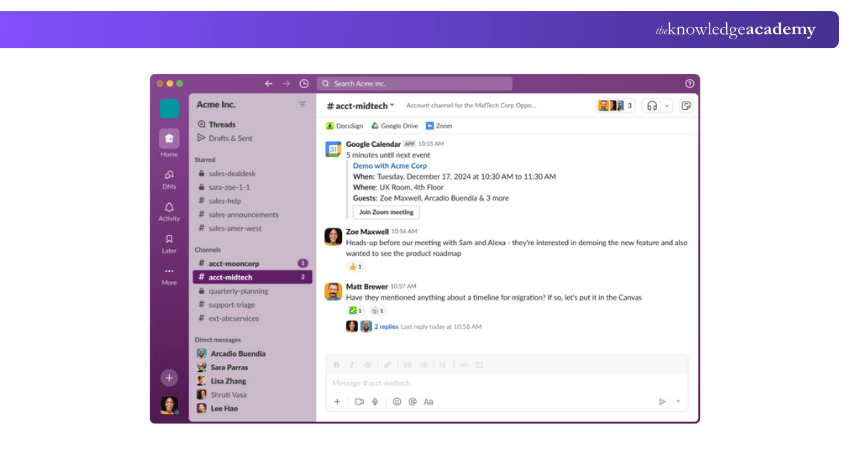
a) Quick messaging for teams and groups
b) File sharing for documents and images
c) Connects with other apps like Jira and Zoom
4) Monday.com
This tool helps product teams plan, track, and execute projects efficiently. It provides a visual way to organise tasks, assign responsibilities, and monitor progress. With automation features, teams can reduce manual work and focus on product development.
a) Drag-and-drop task management
b) User-friendly dashboard for planning work
c) Integrates with tools like Slack and Zoom
5) Asana
Asana helps manage projects, tasks, and team responsibilities in one place. It improves visibility and keeps everyone on schedule.
a) Organises projects with task dependencies
b) Enables collaboration through comments and updates
c) Provides visual tracking with boards and timelines
6) Productboard
It helps Product Managers collect customer feedback, prioritise features, and plan product roadmaps. It centralises insights from multiple sources, making it easier to align product decisions with user needs. Teams can track feature requests and ensure they deliver the right solutions.
a) Gathers customer feedback in one place
b) Helps teams plan new features and updates
c) Creates clear roadmaps for future projects
7) Wrike
It helps product teams streamline Project Management by providing task tracking, workload distribution, and collaboration features. It allows teams to monitor progress through Kanban boards, lists, and Gantt charts, ensuring work stays on schedule.
a) Task tracking with clear deadlines
b) Different project views like lists and boards
c) Integrates with Google Drive and Microsoft Teams
8) Canny
Canny helps teams collect and analyse user feedback to guide product decisions. It simplifies managing feature requests and updates.
a) Captures and prioritises customer feedback
b) Links feedback to product roadmaps
c) Enhances transparency with public changelogs
9) Maze
Maze is a rapid testing tool that provides user feedback during the design phase. It helps improve usability before launch.
a) Conducts usability and concept testing
b) Integrates with Figma and Adobe XD
c) Delivers actionable insights quickly
10) Figma
Figma is a collaborative design platform that allows teams to create and prototype interfaces in real time.
a) Enables live collaboration on designs
b) Offers cloud-based access across devices
c) Supports feedback and version control
11) Notion
Notion is an all-in-one workspace for notes, documentation, and project planning. It helps teams organise ideas and collaborate efficiently.
a) Combines notes, tasks, and databases
b) Customisable layouts for flexible planning
c) Ideal for documentation and team wikis
12) Loom
Loom allows users to record quick video messages for easier communication. It’s great for explaining tasks or sharing updates visually.
a) Records video walkthroughs instantly
b) Enhances remote collaboration
c) Saves time by replacing long meetings
13) Amplitude
Amplitude is an analytics tool that helps teams understand user behaviour and measure product performance.
a) Tracks user journeys and engagement metrics
b) Supports product growth with data insights
c) Enables data-driven feature development
14) Zoom
Zoom is used for online meetings and video calls. It helps product teams collaborate, discuss roadmaps, and align on goals, even if they work in different locations. Teams can share screens to review designs, features, and updates in real-time.
a) High-quality video and audio meetings
b) Screen sharing for better discussions
c) Works on laptops, phones, and tablets
15) Pendo
It helps product teams understand how users interact with their products. It provides insights into user behaviour, helping teams make data-driven improvements. With in-app messaging and guides, Pendo also helps educate users about new features.
a) Tracks how users interact with products
b) Provides insights for better decision-making
c) Helps create in-app guidance and tips
Learn effective management of product backlogs with our SAFe® Agile Product Management Training – Join today!
16) Airtable
It is a flexible tool that helps product teams organise data, track feature requests, and manage product roadmaps while leveraging essential Product Manager Skills. It merges the simplicity of a spreadsheet with the power of a database, enabling teams to customise workflows effectively.
a) Customisable templates for different projects
b) Easy drag-and-drop editing for organising tasks
c) Works well with other tools like Slack and Trello
17) Pivotal Tracker
It is an Agile Project Management tool designed for software development teams. It helps teams break down work into stories, track progress, and stay aligned on priorities. By following Agile principles, teams can iterate quickly and improve efficiency.
a) Uses Agile workflow for better planning
b) Helps teams track and complete tasks on time
c) Provides insights into project progress
18) Roadmunk
It allows Product Managers to create and share product roadmaps easily. It enables teams to visualise upcoming features, align with company goals, and communicate plans with stakeholders. Roadmunk also helps teams prioritise initiatives based on customer needs while incorporating Product Breakdown Structure for better project planning.
a) Builds easy-to-understand product roadmaps
b) Prioritises features based on customer feedback
c) Helps teams share plans with stakeholders
19) Craft.io
It is a platform that helps teams define, develop, and manage product strategy. It provides end-to-end tools for roadmap planning, feature prioritisation, and user feedback analysis, ensuring product decisions align with business goals.
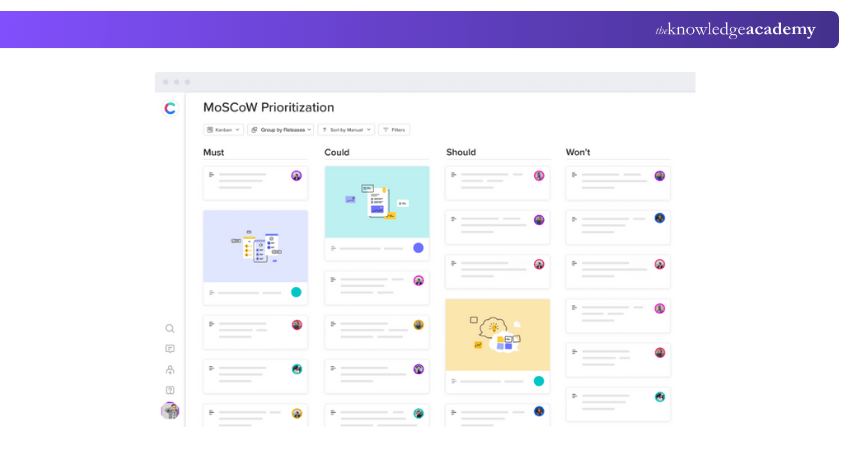
a) Creates product roadmaps and strategies
b) Organises product ideas in one place
c) Works well with Jira and Slack
20) Confluence
It is a documentation tool that helps product teams store and share important information. It allows teams to create product plans, feature documentation, and meeting notes in a centralised space. Confluence improves collaboration by keeping all knowledge accessible in one place.
a) Stores and organises company documents
b) Allows teams to collaborate on projects
c) Works with Jira for better project tracking
Emerging Trends in Product Management Tools
Product management tools are evolving with AI, automation, and no-code technology. These innovations help teams make smarter decisions, accelerate development, and enhance collaboration in a fast-changing digital environment.
AI-Driven Product Decisions
Artificial Intelligence and Machine Learning are transforming product management by enabling more data-driven decision-making. AI automates customer insights, analyses usage patterns, and predicts feature success. This allows product managers to focus on strategy and innovation rather than manual analysis.
No-Code/Low-Code Platforms
No-code and low-code tools are simplifying the product development process by enabling faster prototyping and iteration. Product managers can test ideas and build functional models without deep technical skills, encouraging experimentation and reducing dependency on engineering teams.
Product-Led Growth (PLG)
Product-led growth is becoming a key strategy where the product itself drives customer acquisition and retention. Product managers are focusing on creating intuitive, self-serve experiences that deliver value quickly and encourage user advocacy and organic growth.
Learn how to implement inventory planning with our Supply Chain Management Training – join today!
Conclusion
In Product Management, the right tools can greatly improve collaboration, productivity, and overall success. Beyond using the best Product Management Tools, understanding the functions of facilities management is equally important. A safe, organised, and well-supported workspace enables teams to maximise the value of these tools.
By combining efficient tools with strong workplace management, organisations can streamline product development, enhance teamwork, and deliver better results. This synergy drives innovation, customer satisfaction, and long-term business growth.
Learn sustainability practices with our Facilities Management Training – Join today!
Frequently Asked Questions
What are the Benefits of Product Management Tools?

Product Management Tools improve planning, collaboration, and execution across teams. They streamline workflows, enhance communication, and track progress efficiently. These tools also help prioritise tasks, manage feedback, and align product goals with business objectives for better decision-making and faster delivery.
How do Product Management Tools Differ From Project Management Tools?
Product Management Tools focus on the entire product lifecycle, from ideation to launch and feedback analysis. Project Management Tools, on the other hand, manage timelines, resources, and specific deliverables. Product tools emphasise strategy and vision, while project tools ensure task execution.
What are the Other Resources and Offers Provided by The Knowledge Academy?
The Knowledge Academy takes global learning to new heights, offering over 3,000+ online courses across 490+ locations in 190+ countries. This expansive reach ensures accessibility and convenience for learners worldwide.
Alongside our diverse Online Course Catalogue, encompassing 19 major categories, we go the extra mile by providing a plethora of free educational Online Resources like Blogs, eBooks, Interview Questions and Videos. Tailoring learning experiences further, professionals can unlock greater value through a wide range of special discounts, seasonal deals, and Exclusive Offers.
What is The Knowledge Pass, and How Does it Work? of Product Management Tools?
The Knowledge Academy’s Knowledge Pass, a prepaid voucher, adds another layer of flexibility, allowing course bookings over a 12-month period. Join us on a journey where education knows no bounds.
What are the Related Courses and Blogs Provided by The Knowledge Academy?
The Knowledge Academy offers various Industry Training, including the Facilitation Skills Training and the Facilities Management Training. These courses cater to different skill levels, providing comprehensive insights into the Methods of Demand Forecasting.
Our Business Skills Blogs cover a range of topics related to Product Management, offering valuable resources, best practices, and industry insights. Whether you are a beginner or looking to advance your Product Management skills, The Knowledge Academy's diverse courses and informative blogs have got you covered.

The Knowledge Academy


Global Training Provider
The Knowledge Academy is a world-leading provider of professional training courses, offering globally recognised qualifications across a wide range of subjects. With expert trainers, up-to-date course material, and flexible learning options, we aim to empower professionals and organisations to achieve their goals through continuous learning.

Upcoming Business Skills Resources Batches & Dates
Date
 Product Management Training
Product Management Training
Fri 10th Apr 2026
Product Management Training
Fri 22nd May 2026
Product Management Training
Fri 31st Jul 2026
Product Management Training
Fri 20th Nov 2026

 If you wish to make any changes to your course, please


