


 Top Rated Course

We may not have the course you’re looking for. If you enquire or give us a call on +44 1344 203999 and speak to our training experts, we may still be able to help with your training requirements.
Azure Dashboard: Essential Guide to Customisation and Usage
The Knowledge Academy 20 February 2026Explore the Azure Dashboard, your centralised hub for monitoring, managing, and visualising Azure resources, providing insights for efficient cloud operations. It provides a customisable, consolidated view of Azure services and resources, enabling users to monitor, analyse, and manage their cloud environment from a single interface.

Training Outcomes Within Your Budget!
We ensure quality, budget-alignment, and timely delivery by our expert instructors.
Table of Contents
Related Courses
- Retired : Designing and Implementing Enterprise-Scale Analytics Solutions Using Microsoft Azure and Microsoft Power BI DP500
- Microsoft Azure Administrator AZ104
- Retired: Data Engineering On Microsoft Azure DP-203 Certification
- Microsoft Azure Security Technologies AZ500
- Designing And Implementing Microsoft DevOps Solutions AZ400

Picture a scenario; you log into your cloud environment, but instead of scrambling through multiple tabs and menus, everything you need is right in front of you. No distractions, no wasted time. That’s exactly what a well-customised Azure Dashboard can do. But are you using it to its full potential? This default dashboard might give you the basics, but it won’t match your workflow.
With the right setup, this can turn into your personal command centre for efficiency. So, how do you build an Azure Dashboard that truly works for you? In this blog, we’ll break down everything you need to know; from smart customisation to practical usage, so you can take control of your Azure experience like never before.
Table of Contents
1) What is Azure Dashboard?
2) Steps to Creating an Azure Dashboard
3) Features of Microsoft Azure Dashboards
4) Azure Dashboards Walk-through
5) Benefits of the Azure Dashboard
6) How do I Download Azure Dashboard?
7) What is the Difference Between Grafana and Azure Dashboard?
8) Conclusion
What is Azure Dashboard?
The Microsoft Azure Dashboard serves as a central hub for managing and monitoring Azure resources. Its unified and customisable interface brings together key insights from various services and subscriptions, providing a comprehensive view of your cloud environment.
What sets it apart? Complete flexibility. Build dashboards that fit your workflow, integrating charts, graphs, metrics, and real-time data widgets for instant insights. With multi-dashboard functionality, you can effortlessly switch between different views to focus on specific projects or operational needs.
To enhance your dashboards further, integrate Azure Data Factory for seamless data orchestration and workflow automation. Be it for tracking performance, managing resources, or optimising cloud usage, the Azure Dashboard keeps you informed and in control; efficiently and intuitively.
Steps to Creating an Azure Dashboard
You can create a new private Azure Dashboard by following these steps:
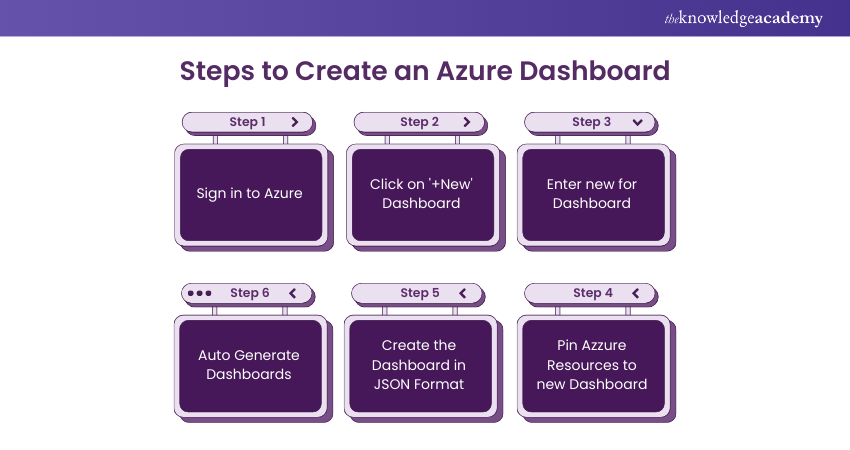
a) Sign in to the Azure portal, and from the menu, select Dashboard
b) Click on the ‘+New’ dashboard tab at the top
c) In the ‘Tile’ gallery, select tiles you can arrange on an empty grid
d) To change the dashboard's name, click ‘My Dashboard’ and enter the desired name
e) Once you're done customising, click on Done customising in the page header
f) The dashboard view will now display your newly created dashboard
Additionally, Azure offers various methods to create and customise dashboards. This is how you can do it:
a) Utilise the dashboard editor
b) Pin Azure resources to your dashboard
c) Create a dashboard in JSON format that represents it programmatically
d) Auto-generate dashboards for quick setup
Whether through the Graphical User Interface (GUI) or JavaScript Object Notation (JSON), users have flexibility in creating and managing their Dashboard to effectively suit their monitoring and management needs.
Features of Microsoft Azure Dashboard
This dashboard offers endless functionalities that help you effectively monitor and manage your Azure resources and services. These include:
Tailored Dashboards
Azure Dashboards are highly adaptable, enabling you to construct custom dashboards that showcase the metrics and data most pertinent to your needs. This allows for a personalised experience, ensuring that the most relevant information is always at your fingertips.
Live Data Updates
One of Azure Dashboard’s key features is its ability to display real-time data. This means you can actively monitor the performance and status of your resources and services as events unfold, allowing for timely responses and adjustments as necessary.
Secure your cloud like a pro – register for our Microsoft Azure Security Technologies AZ500 Training!
Engaging and Interactive Widgets
Azure Dashboard come equipped with interactive widgets, such as charts and tables. These tools allow you to explore your data more deeply, providing more comprehensive insights into the performance and usage of your resources and services. This feature enhances your understanding and control over your Azure environment.
To further automate and extend the capabilities of your dashboards, you can integrate Azure Functions to create serverless workflows and custom triggers based on your data insights.
Cross-Resource Data Queries
Azure Dashboard also supports cross-resource queries. This powerful feature lets you pull data from multiple resources and services and display it in a single, unified dashboard. This holistic view can significantly enhance your understanding and management of your Azure ecosystem.
Integration With Azure
Azure Dashboard can be integrated with Azure Alerts. This allows you to set up alerts and notifications based on the data displayed in your dashboard. This proactive approach ensures you are always informed of significant events or changes in your Azure environment.
In addition to these features, Azure Dashboard supports collaboration, allowing multiple users to view and interact with the same dashboard. This makes it a good tool for teams working together on complex projects. To further enhance your collaborative efforts and access numerous of tools and solutions, explore the Azure Marketplace for additional resources and integrations.
Furthermore, Azure Dashboard are designed with a user-friendly interface, making it easy for beginners to navigate and utilise its features effectively. Overall, it is a comprehensive tool for managing and monitoring your Azure resources and services.
Azure Dashboard walk-through
Azure Dashboard are your mission control for cloud resources! Whether you're monitoring performance, spotting anomalies, or just keeping an eye on costs, a well-crafted dashboard can save you time and headaches. In this walkthrough, we’re diving into Virtual Machines (VMs); the workhorses of Cloud Computing.
Imagine having a fleet of VMs running your business-critical apps, and you need real-time insights on performance, usage, and security. Instead of jumping between multiple reports and portals, thiscustom gives you a single-pane-of-glass view. Let’s explore how!
Master cloud administration with our hands-on Microsoft Azure Administrator AZ104 Course – join us now!
Virtual Machines
Visibility is everything when it comes to managing virtual machines in Azure. Whether you're handling a single VM or an army of them, having a centralised dashboard can help you track health, optimise costs, and avoid downtime.
Think of it as checking your car’s dashboard while driving. Would you rather see a clear fuel gauge, speedometer, and engine warning light in one place or dig through a manual while cruising down the motorway? The same applies to your VMs; the right dashboard keeps everything in check without unnecessary detours.
Summary
Azure VM Dashboards bring together critical data, offering:
a) Performance Monitoring: Keep an eye on Central Processing Unit (CPU), memory, and disk usage so your VMs don’t hit bottlenecks.
b) Cost Tracking: Understand which VMs are racking up the biggest bills and optimise accordingly.
c) Security Insights: Stay on top of vulnerabilities and compliance risks before they become a problem.
d) Availability Checks: Quickly spot outages or underperforming instances and take action.
For example, imagine you’re running an e-commerce platform, and one of your VMs suddenly spikes in CPU usage. A well-designed dashboard would alert you instantly, letting you diagnose whether it’s a genuine traffic surge or a runaway process gobbling up resources.
By using Azure Monitor, Log Analytics, and Workbooks, you can tailor your dashboard to match your specific needs; whether you’re a sysadmin who loves deep-dive logs or a business leader who just wants a high-level health overview.
At the end of the day, a great Azure VM dashboard isn’t just about data; it’s about actionable insights. Because what’s the point of seeing a problem if you can’t fix it fast?
Azure Functions
Azure Functions act as on-demand problem-solvers in the cloud, running small bits of code only when needed; without the hassle of managing servers. They’re ideal for automating tasks, processing data, and connecting services efficiently.
Think of a coffee shop barista; they don’t make coffee all day but start working only when an order comes in. Once done, they move on, using only the necessary resources. Azure Functions work the same way; triggered when needed and shutting down afterwards, saving time and costs.
This dashboard comes in handy to keep track of these functions. They let you monitor performance, detect errors, and ensure everything runs smoothly; all in one place.
Summary
A well-designed Azure Functions Dashboard helps you stay in control by:
a) Monitoring Performance: Track execution speed and spot delays.
b) Detecting Failures: Get instant alerts when something goes wrong.
c) Managing Resources: Keep an eye on memory and execution time to avoid extra costs.
d) Analysing Trends: Identify usage patterns to scale efficiently.
If an online store’s confirmation email function fails, customers won’t get receipts, causing confusion. A dashboard instantly flags the issue, allowing a quick fix before it affects them.
With Azure Monitor, Application Insights, and Log Analytics, you can customise your dashboard for detailed logs or a simple health check.
In short, an Azure Functions dashboard keeps automation smooth, so you can focus on innovation, not troubleshooting!
Acquire essential skills and unlock new possibilities – join our Microsoft Azure AI Fundamentals AI-900 Training!
Benefits of the Azure Dashboard
The many benefits of the Azure Dashboard comprise the following:
a) Microsoft Azure empowers users to craft personalised dashboards.
b) The Azure Dashboard becomes invaluable When managing multiple services in the Azure portal.
c) This feature is a compilation of shortcuts to Azure resources, simplifying access, organisation, and visualisation.
d) Azure Dashboard provides direct access to preferred resources tailored to individual preferences.
e) Crafting a custom dashboard facilitates swift consumption of pertinent data, aids in issue identification, and streamlines navigation.
How do I Download Azure Dashboard?
To download an Azure Dashboard, follow these steps:
a) Open the Azure portal and go to Dashboard
b) Select the dashboard you want to download
c) Click Share, then choose Download
d) The dashboard will be saved as a JSON file
e) Only shared dashboards can be downloaded
f) You can back up, share, or re-import the downloaded file as needed
What is the Difference Between Grafana and Azure Dashboard?
Grafana and Azure Dashboard both visualise data but serve different needs. Grafana offers more customisation, multi-source integration, and advanced visualisation, ideal for cross-platform monitoring. Azure Dashboard, built into the Azure portal, provide native insights into Azure services, focusing on resource monitoring and management.
Conclusion
The Azure Dashboard is more than just a control panel; it’s your command centre for smarter cloud management. By customising it to fit your workflow, you turn scattered data into clear insights and routine monitoring into effortless efficiency. So, take charge, tailor it your way, and let your dashboard do the heavy lifting!
Kickstart your cloud journey by joining our Microsoft Azure Fundamentals AZ-900 Certification!
Frequently Asked Questions
How do I Share my Azure Dashboard to the Public?

To share a dashboard publicly, open the Azure portal, go to Dashboard, and select your Dashboard. Click Share, then choose Publish to make it accessible to others. Use Access Control (IAM) to manage permissions. Note that it can only be shared within an organisation and cannot be made fully public.
What is the Difference Between Azure Workbook and Dashboard?
Azure Workbooks and Azure Dashboard both visualise data but serve different purposes. Workbooks offer interactive, detailed reports with custom queries, ideal for deep analysis. Dashboards, however, provide a quick, real-time overview of key metrics.
What are the Other Resources and Offers Provided by The Knowledge Academy?
The Knowledge Academy takes global learning to new heights, offering over 3,000+ online courses across 490+ locations in 190+ countries. This expansive reach ensures accessibility and convenience for learners worldwide.
Alongside our diverse Online Course Catalogue, encompassing 19 major categories, we go the extra mile by providing a plethora of free educational Online Resources like Blogs, eBooks, Interview Questions and Videos. Tailoring learning experiences further, professionals can unlock greater value through a wide range of special discounts, seasonal deals, and Exclusive Offers.
What is The Knowledge Pass, and How Does it Work?
The Knowledge Academy’s Knowledge Pass, a prepaid voucher, adds another layer of flexibility, allowing course bookings over a 12-month period. Join us on a journey where education knows no bounds.
What are the Related Courses and Blogs Provided by The Knowledge Academy?
The Knowledge Academy offers various Microsoft Azure Certification including the Microsoft Azure Fundamentals AZ-900 Course and Microsoft Azure Administrator AZ104 Course, and the Microsoft Azure Security Technologies AZ500. These courses cater to different skill levels, providing comprehensive insights into Azure Cosmos DB.
Our Microsoft Technical Blogs cover a range of topics related to Microsoft Azure, offering valuable resources, best practices, and industry insights. Whether you are a beginner or looking to advance your Microsoft 365 skills, The Knowledge Academy's diverse courses and informative blogs have got you covered.

The Knowledge Academy


Global Training Provider
The Knowledge Academy is a world-leading provider of professional training courses, offering globally recognised qualifications across a wide range of subjects. With expert trainers, up-to-date course material, and flexible learning options, we aim to empower professionals and organisations to achieve their goals through continuous learning.

Upcoming Microsoft Technical Resources Batches & Dates
Date
 Microsoft Azure Fundamentals AZ-900 Certification
Microsoft Azure Fundamentals AZ-900 Certification
Fri 3rd Jul 2026
Microsoft Azure Fundamentals AZ-900 Certification
Fri 23rd Oct 2026

 If you wish to make any changes to your course, please


