


 Top Rated Course

We may not have the course you’re looking for. If you enquire or give us a call on +44 1344 203 999 and speak to our training experts, we may still be able to help with your training requirements.
Xero vs QuickBooks: What’s the Difference?
Olivia Taylor 07 January 2026Xero vs QuickBooks comes down to your business needs. Pick QuickBooks for its simple interface, reliable support, and features ideal for beginners. It suits small teams with limited accounting experience. Get started faster with clear dashboards, guided tools, and reports that make every day finance tasks easy to manage.

Training Outcomes Within Your Budget!
We ensure quality, budget-alignment, and timely delivery by our expert instructors.
Table of Contents

Choosing the appropriate accounting software can bring a revolution in your financial management. In this blog, you will know about Xero vs QuickBooks and which platform aligns best with your objectives. Let's analyse the main differences that will assist you in making the correct choice.
Table of Contents
1) What is Xero and How Does it Work?
2) What is QuickBooks and How Does it Work?
3) Difference Between Xero and QuickBooks
4) Benefits and Drawbacks of Xero
5) Pricing and Value Comparison: Xero vs QuickBooks
6) Can I Migrate my data if I Change From Xero to QuickBooks?
7) How Hard is it to set up Xero?
8) Conclusion
What is Xero and How Does it Work?
Xero, an accounting software based on the cloud and founded in New Zealand, is a solution designed for small to medium businesses to manage their finances online. It connects with your banks to upload the transactions and features for invoicing, expenses, payroll, and reporting.
There is a free 30-day trial for Xero, and then the user can select one of the tiered plans that best fit their requirements, with both Mac and Windows devices available for access.
What is QuickBooks and How Does it Work?
QuickBooks is a product of Intuit, and it is a software for accounting that is based on the cloud. It is a complete solution for businesses to handle billing, payables, payroll, and tax. It connects to the bank accounts to import transactions and generate reports automatically.
After being offered initially as software for the desktop, QuickBooks UK users now have the option to use it fully online and thus it is accessible from anywhere with an internet connection. It presents a variety of plans from which to choose along with a free trial period of 30 days to try out the features.
Improve reporting accuracy and streamline daily accounting tasks. Join our QuickBooks Training now!
Difference Between Xero and QuickBooks
Xero and QuickBooks are both great tools for managing business finances. Here’s a simple comparison between Xero and QuickBooks:

1) Bank Feed Functionality
Xero and QuickBooks can connect to your bank so transactions appear automatically. QuickBooks is faster and works with more banks, which makes matching transactions easier. Xero can also do this, but for some banks you might need to set it up manually. A faster bank feed means you spend less time checking transactions. It also helps keep your accounts more accurate.
2) Recording Transactions
QuickBooks makes adding transactions easy with automatic sorting, batch uploads, and quick matching to bank records. Xero can do similar things but it may take a little more time and manual work. Less manual work means you can focus more on running your business. This also reduces the chances of making mistakes.
3) Reporting Capabilities
QuickBooks has strong reporting tools, including industry-specific reports and advanced customisation. You can make detailed reports and track important numbers. Xero’s reports are clear and useful, but have fewer advanced options. Detailed reports in Xero and QuickBooks help you understand your business performance better and make it easier to plan for the future.
4) Initial Cost
Xero is usually cheaper at the start and offers good value for its main plans. QuickBooks has more pricing levels but it can cost more, especially if you want advanced features like payroll or custom reports. A lower starting cost can be helpful for new or small businesses. However, you should also think about what features you need before deciding.
5) Handling Sales Tax Returns
Both can handle sales tax, but QuickBooks has more built-in tools for tax reports. It can work out taxes automatically based on location and has ready-to-use forms. Xero also has tax tools, but you may need to set up some parts manually or use extra apps. Automated tax tools in Xero and QuickBooks save time during busy filing periods and lower the risk of errors in your tax returns.
6) Comprehensive Accounting Features
QuickBooks has more advanced tools for bigger businesses, like job costing and industry-specific options. Xero has strong accounting features too, but may not go as deep in these areas. Advanced tools can be important if your business has complex needs. For smaller or simpler businesses, Xero’s features may be enough.
7) Management of Inventory
QuickBooks is better for tracking stock, with detailed reports, automatic updates, and links to sales platforms. Xero has basic stock tracking, which is fine for smaller businesses but not as detailed for complex needs. Better inventory tools mean you can track what’s selling and what’s not. This can help you manage stock levels and avoid running out.
8) Customer Support Services
QuickBooks has more support options, including phone and live chat, but phone help can be slow at busy times. Xero has good support and live chat, too, but fewer urgent help options. Quick support can save you time when you have a problem. It also means less downtime for your business.
9) Payroll Functionality
QuickBooks has a complete payroll system, including tax calculations, direct deposit, and Benefit Management. Xero also has payroll, but in fewer regions and with fewer advanced features. A strong payroll system can save hours of work each month. It also makes sure your staff are paid correctly and on time.
Learn advanced techniques for seamless bank reconciliation efficiently. Join our Wave Accounting Training now!
Benefits and Drawbacks of Xero
Here is an outline of the benefits and setbacks that typically accompany keeping tabs on the financial state of one's enterprise using Xero software.
The Advantages of Using Xero
a) Since it is a cloud-based application, Xero is compatible with both Mac and Windows and is usually more cost-effective with its competitive pricing plans.
b) Small to medium-sized businesses with limited accounting knowledge will find the automation features and simple design of this product a strong selection.
The Disadvantages of Using Xero
a) A new user might find most parts of Xero’s interface more complicated than expected at first.
b) Some plans do not offer live phone support, which could mean that immediate assistance in case of issues is limited.
Benefits and Drawbacks of QuickBooks
The following is an overview of advantages and disadvantages of using Quickbooks to manage the finances of business:
The Advantages of QuickBooks
a) The daily accounting tasks can be easily performed using the straightforward and user-friendly interface.
b) The customer service is very good, as live chat and phone assistance are both available.
The Disadvantages of QuickBooks
a) It can cost more than other services, particularly at top levels.
b) Other tools may possess advanced features that are not available in QuickBooks.
Gain knowledge of Cash Flow Management and forecasting techniques. Join our Sage 50 Accounts Training now!
Pricing and Value Comparison: Xero vs QuickBooks
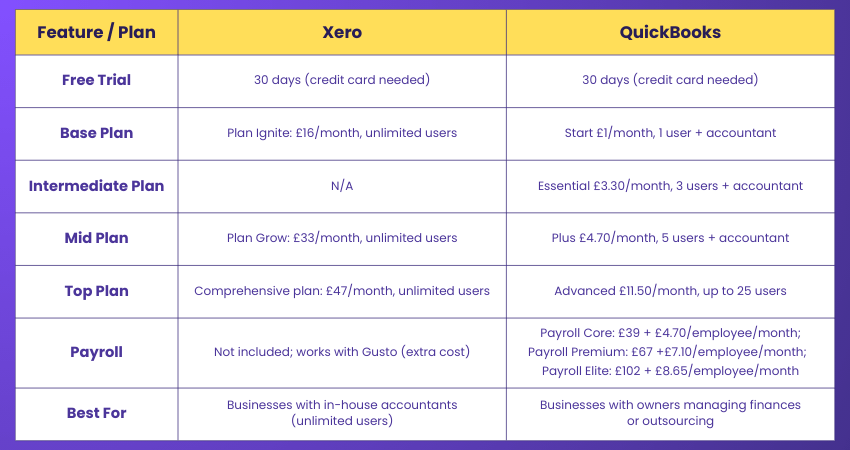
In terms of pricing and value, both Xero and QuickBooks have different structures and focus areas, albeit offering tiered plans. QuickBooks' pricing levels get higher as the customer gets more user accesses and advanced features along with it.
On the other hand, Xero's plans are presented with easier pricing that is frequently cost-effective for non-complex businesses. In the end, selecting the best one depends on your financial limits and the features your company prioritises.
Can I Migrate my Data if I Change from Xero to QuickBooks?
When switching from Xero to QuickBooks, there is a possibility of data migration, but it is not a completely automatic process. The majority of users export important records and import them either with the help of built-in tools or through migration services.
Verifying that all data has been transferred correctly is vital for maintaining accurate accounts. A lot of enterprises prefer to hire an accountant or a specialist to make the transition painless.
How Hard is it to set up Xero?
Setting up Xero is relatively easy, thanks to its user-friendly interface and guided setup process. Most small businesses can get started quickly, though some may require assistance for more complex features like payroll or tax settings.
Conclusion
Choosing the right accounting software is about finding what fits your workflow, goals, and budget. This blog on Xero vs QuickBooks has shown how each platform supports growing businesses in different ways. Now you can move forward with confidence and pick the solution that truly supports your success.
Learn to efficiently manage financial transactions and reporting. Join our Accounting Software Training now!
Frequently Asked Questions
Which Industry Uses QuickBooks the Most?

QuickBooks is widely used across various industries, with accounting, retail, and construction being the most prominent. Its versatility makes it suitable for businesses in finance, hospitality, manufacturing, and professional services.
Can Xero and Quick Books be Customised for Industry Specific Needs?
You can customise the two software applications, Xero and QuickBooks, through their integrations and add-ons to suit your business. It is wise to ensure that the tools necessary for your sector are provided first before making a decision on the platform.
What are the Other Resources and Offers Provided by The Knowledge Academy?
The Knowledge Academy takes global learning to new heights, offering over 3,000+ online courses across 490+ locations in 190+ countries. This expansive reach ensures accessibility and convenience for learners worldwide.
Alongside our diverse Online Course Catalogue, encompassing 19 major categories, we go the extra mile by providing a plethora of free educational Online Resources like Blogs, eBooks, Interview Questions and Videos. Tailoring learning experiences further, professionals can unlock greater value through a wide range of special discounts, seasonal deals, and Exclusive Offers.
What is The Knowledge Pass, and How Does it Work?
The Knowledge Academy’s Knowledge Pass, a prepaid voucher, adds another layer of flexibility, allowing course bookings over a 12-month period. Join us on a journey where education knows no bounds.
What are the Related Courses and Blogs Provided by The Knowledge Academy?
The Knowledge Academy offers various Accounting Software Courses, including the QuickBooks Training, Tally Training, and Wave Accounting Training. These courses cater to different skill levels, providing comprehensive insights into Equity Market.
Our Accounting and Finance Blogs cover a range of topics related to Xero vs QuickBooks, offering valuable resources, best practices, and industry insights. Whether you are a beginner or looking to advance your Accounting and Finance skills, The Knowledge Academy's diverse courses and informative blogs have got you covered.

Olivia Taylor


Chartered Accountant and Financial Training Specialist
Olivia Taylor is a qualified chartered accountant with over a decade of experience in financial management, auditing and corporate reporting. Having worked with leading firms in both the public and private sectors, Olivia brings clarity to complex financial topics. Her writing focuses on helping professionals build confidence in key areas of accounting, compliance and financial planning.
View Detail
Upcoming Accounting and Finance Resources Batches & Dates
Date
 QuickBooks Training
QuickBooks Training
Fri 27th Mar 2026
QuickBooks Training
Fri 8th May 2026
QuickBooks Training
Fri 26th Jun 2026
QuickBooks Training
Fri 18th Sep 2026
QuickBooks Training
Fri 4th Dec 2026

 If you wish to make any changes to your course, please


