


 Top Rated Course

We may not have the course you’re looking for. If you enquire or give us a call on 44 1344 203 999 and speak to our training experts, we may still be able to help with your training requirements.
Korn Shell vs Bash: A Detailed Breakdown
Richard Harris 27 March 2026Korn Shell (ksh) and Bash (Bourne Again Shell) are powerful Unix/Linux shell environments widely used for scripting and command-line operations. The primary Korn Shell vs Bash difference lies in their syntax, features, and usage, although both serve as Unix shells. Bash is considered the top choice for scripting.

Training Outcomes Within Your Budget!
We ensure quality, budget-alignment, and timely delivery by our expert instructors.
Table of Contents

Korn Shell and Bash are the two Unix shell powerhouses that have shaped the command-line experience for decades. Both are powerful, versatile and deeply rooted in System Administration and automation. It's no wonder these two giants steal the spotlight when it comes to scripting in the Unix world. But in what aspects do Korn Shell vs Bash differ?
This blog explores the key distinctions between Korn Shell vs Bash, by comparing their features, performance and quirks. This comprehensive comparison will help Developers, System Administrators and learners to determine which one truly reigns supreme for their needs. So read on and choose the right shell for your workflow!
Table of Contents
1) What is Korn Shell?
2) What is Bash?
3) Differences Between Korn Shell vs Bash
a) Korn Shell vs Bash: Speed
b) Korn Shell vs Bash: Portability
c) Korn Shell vs Bash: Use Cases
d) Korn Shell vs Bash: Availability
e) Korn Shell vs Bash: History Management
f) Korn Shell vs Bash: Customisation
g) Korn Shell vs Bash: Performance
h) Korn Shell vs Bash: User Experience
i) Korn Shell vs Bash: Syntax & Compatibility
j) Korn Shell vs Bash: Open Source Licensing
4) Conclusion
What is Korn Shell?
Korn Shell, commonly called ksh, is a Unix shell created by David Korn in the early 1980s. It was built to offer a more advanced, flexible, and interactive experience compared to the traditional Bourne Shell (sh), which dominated Unix systems during that period.
Key Features of Korn Shell includes:
1) Improved scripting capabilities with robust built-in commands.
2) Command-line editing using Emacs or Vi-style shortcuts.
3) Better performance due to faster execution of scripts.
4) Advanced variable handling and arithmetic operations.
5) Job control features similar to those in modern shells.
6) Alias and function support for efficient command reuse.
7) Command history for easy retrieval and rerunning of past commands.

What is Bash?
Bash, short for “Bourne-Again Shell”, is a free, open-source Unix shell created by Brian Fox for the GNU Project in the late 1980s and officially released in 1989. It quickly became the default login shell for most Linux distributions and remains the most widely used shell across Unix-like systems today. It's compatible with the Bourne Shell and has the following features:
1) Command history with easy navigation and recall.
2) Tab completion for commands, file names, and directories.
3) Powerful scripting support with functions, loops, and conditional statements.
4) Brace expansion, wildcards, and globbing for efficient command execution.
5) Customisable prompts using environment variables.
6) Job control for managing background and foreground tasks.
7) Aliases to simplify frequently used commands.
8) Input/output redirection for flexible handling of data streams.
Your first step to enterprise mastery starts here. Sign up for our AIX Fundamentals Training and handle system environment with confidence!
Differences Between Korn Shell vs Bash
Here are the key differences between Korn Shell vs Bash:
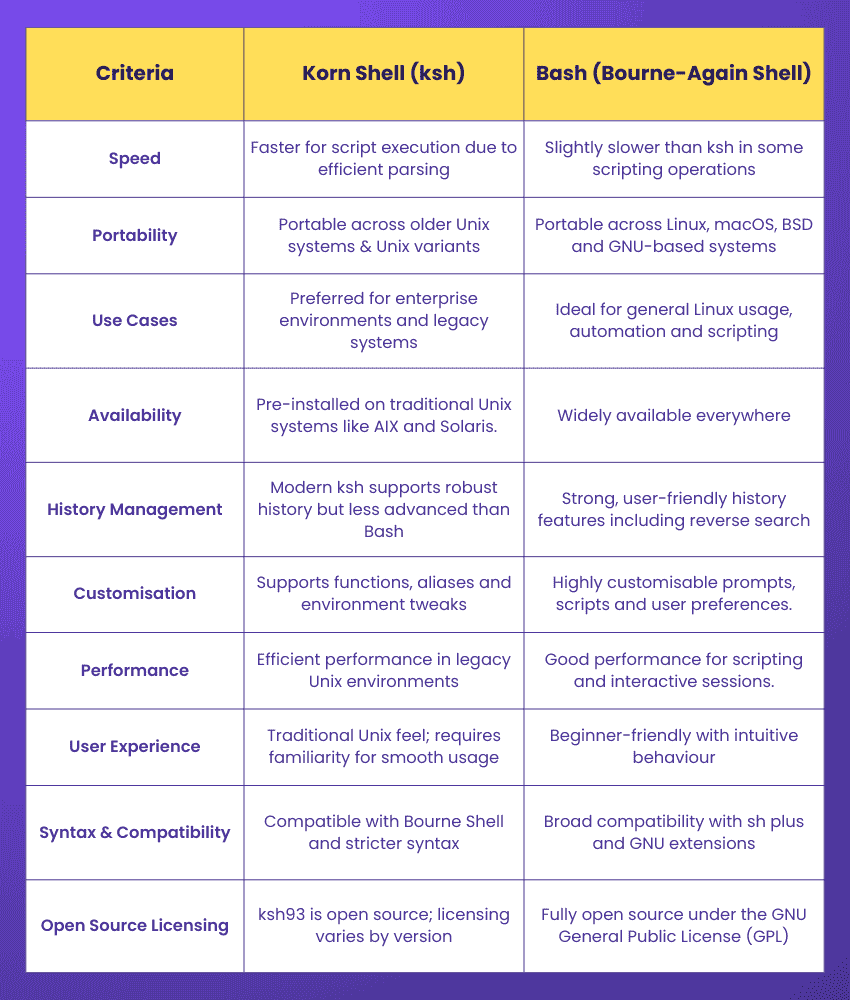
1) Korn Shell vs Bash: Speed
1) Korn Shell is designed with strong optimisation, which allows it to execute scripts quickly using its powerful built-in capabilities. Additionally, ksh’s streamlined parsing improves performance.
2) In comparison, Bash can be slightly slower, particularly when handling larger or more complex operations. Bash prioritises user-friendly features, which can add minimal overhead.
2. Korn Shell vs Bash: Portability
1) Korn Shell scripts may require adjustments when moved between systems due to challenges like limited default availability on many Linux platforms, non-portable advanced features and differing versions with varying licensing conditions.
2) Bash offers excellent portability because it's the default shell on most Linux distributions and macOS. Its widespread adoption means Bash scripts usually run smoothly across various platforms with minimal or no modification.
3) Korn Shell vs Bash: Use Cases
1) In terms of adoption and practical usage, Korn Shell is commonly chosen in traditional corporate Unix environments where stability, legacy compatibility and high performance are essential.
2) Bash, however, remains the top choice for Linux users, DevOps Engineers and System Administrators. Additionally, Bash is widely used in automation pipelines and modern scripting workflows.
4) Korn Shell vs Bash: Availability
1) In terms of default presence, Korn Shell is frequently included on traditional Unix systems but is not consistently pre-installed on modern Linux distributions.
2) On the other hand, Bash is the standard default shell across most Linux platforms. Additionally, Bash is bundled with numerous GNU-based tools, thus ensuring broader availability and easier access for users.
Write smarter scripts and automate like a pro with our AIX Shell Programming Course - Register now!
5) Korn Shell vs Bash: History Management
1) Bash stores command history in the .bash_history file. Users can easily navigate through past commands using the arrow keys or search for them with shortcuts like Ctrl+R. Bash also allows customisation of history behaviour.

This command displays the list of previously executed commands.
2) Korn Shell manages history in a less intuitive manner. Although users can view, edit and recall commands with shortcuts, the configuration options are more limited, and the behaviour varies depending on the ksh version being used.

We can use the fc -l command to list the command history.
6) Korn Shell vs Bash: Customisation
1) Bash offers powerful customisation through the .bash_profile and .bashrc files. Users can adjust shell behaviour, define environment variables, modify prompts and set up aliases or functions. For example:

This command creates a shortcut for listing files in long format, thus improving convenience and typing speed.
2) Korn Shell also supports customisation features such as prompt adjustments, aliases and behavioural settings. For example:

This sets up a simple alias that prints a message. While both shells support similar options, the style and configuration processes may vary slightly depending on the version.
7) Korn Shell vs Bash: Performance
1) Bash is known for its stable and reliable performance, making it suitable for everyday command-line work and general scripting. It manages routine operations smoothly and supports essential features like loops, functions and conditionals.
2) Korn Shell often outperforms Bash in more complex scripting scenarios. It excels in areas requiring higher efficiency, such as handling large datasets, performing advanced mathematical operations, and executing process substitution.
8) Korn Shell vs Bash: User Experience
1) From a user experience standpoint, Korn Shell offers simple command-line editing and basic history features but misses many of the conveniences users expect today.
2) Bash, on the other hand, provides tab completion, extensive customisation options and an overall more intuitive interface. Additionally, Bash’s widespread community support makes troubleshooting and learning far easier for new users.
9) Korn Shell vs Bash: Syntax & Compatibility
1) In terms of syntax and compatibility, Korn Shell provides strong scripting features such as floating-point support and associative arrays.
2) Bash offers similar capabilities but amplifies the usability with better debugging tools, error handling and wider compatibility across modern platforms. Additionally, Bash’s GNU extensions make complex scripting tasks more flexible for Developers.
10) Korn Shell vs Bash: Open Source Licensing
1) Bash is fully open source and distributed under the GNU General Public License. Its open nature has vastly contributed to its global popularity and integration across countless systems.
2) Korn Shell exists in multiple versions, each governed by different licensing terms. While ksh88 is freely available, ksh93 comes with more restrictive conditions that can limit flexibility and redistribution.
11) Korn Shell vs Bash: Task Management
1) Bash provides intuitive job-control features that simplify managing running processes. Commands like jobs, fg, and bg make it easy to view active tasks and switch their execution state. For example:
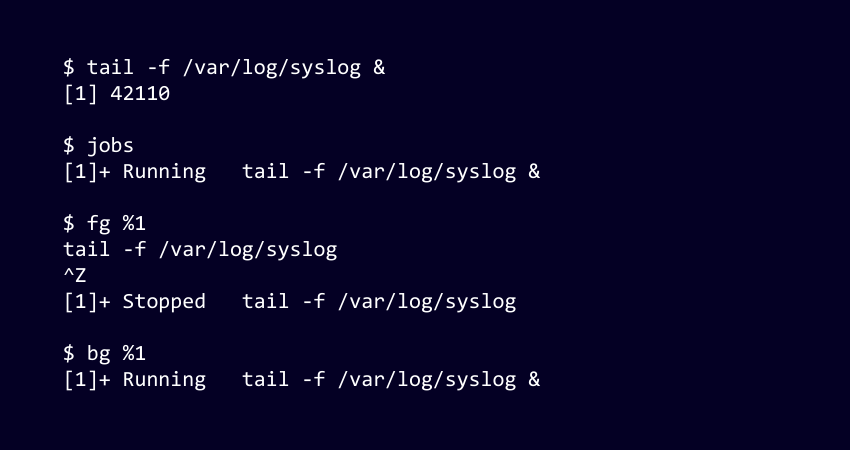
Here, a log monitoring command is sent to the background. jobs confirm it’s active, fg %1 brings it forward, Ctrl+Z pauses it and bg %1 resumes it in the background.
2) Korn Shell includes comparable job-control functionality, allowing users to move tasks between the foreground and background seamlessly.
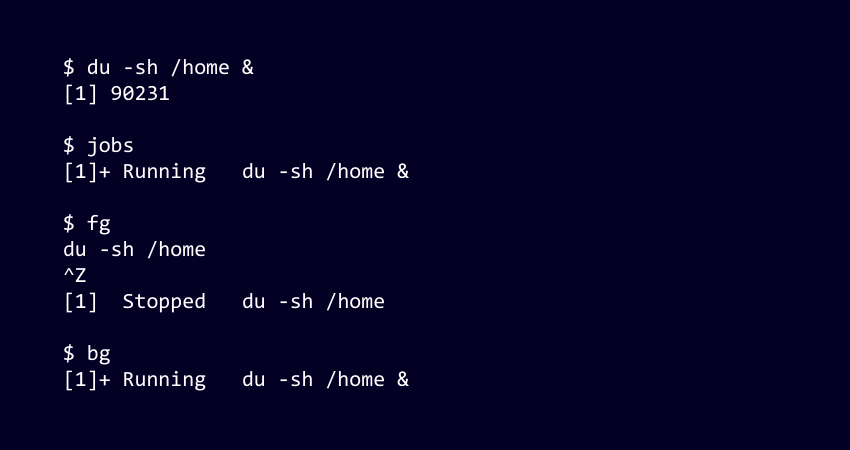
Here, a directory size calculation starts in the background. jobs show it’s running, fg brings it to the foreground, Ctrl+Z halts it and bg resumes it again in the background.
Conclusion
Korn Shell and Bash each bring unique strengths to the command-line world, balancing performance, flexibility and usability in different ways. Understanding the Korn Shell vs Bash differences can help you choose the shell that aligns best with your workflow and scripting style. Whether you value speed or versatility, both remain powerful companions for productive and enjoyable command-line experiences.
Your gateway to enterprise-class computing awaits. Sign up for our comprehensive AIX Training now!
Frequently Asked Questions
Is Korn Shell Still Used?

Yes, Korn Shell is still used, especially in enterprise Unix environments like AIX and Solaris. Many organisations continue to rely on ksh for its speed, stability and compatibility when it comes to long-running production scripts.
Is ksh Better than Bash?
Neither is universally better. It all comes down to the use case. ksh excels in performance-heavy, enterprise scripting, while Bash is more beginner-friendly and widely supported across Linux systems. Each shell has strengths suited to different workflows.
What are the Other Resources and Offers Provided by The Knowledge Academy?
The Knowledge Academy takes global learning to new heights, offering over 3,000+ online courses across 490+ locations in 190+ countries. This expansive reach ensures accessibility and convenience for learners worldwide.
Alongside our diverse Online Course Catalogue, encompassing 17 major categories, we go the extra mile by providing a plethora of free educational Online Resources like Blogs, eBooks, Interview Questions and Videos. Tailoring learning experiences further, professionals can unlock greater value through a wide range of special discounts, seasonal deals, and Exclusive Offers.
What is The Knowledge Pass, and How Does it Work?
The Knowledge Academy’s Knowledge Pass, a prepaid voucher, adds another layer of flexibility, allowing course bookings over a 12-month period. Join us on a journey where education knows no bounds.
What are the Related Courses and Blogs Provided by The Knowledge Academy?
The Knowledge Academy offers various AIX Courses, including the AIX Korn Shell Programming Training, AIX Fundamentals Training and the AIX Shell Programming Course. These courses cater to different skill levels, providing comprehensive insights into AIX Administrator Salary.
Our Programming & DevOps Blogs cover a range of topics related to Korn Shell vs Bash, offering valuable resources, best practices, and industry insights. Whether you are a beginner or looking to advance your AIX skills, The Knowledge Academy's diverse courses and informative blogs have got you covered.

Richard Harris


Senior Full Stack Developer and Technology Educator
Richard Harris is a highly experienced full-stack developer with deep expertise in both frontend and backend technologies. Over his 12-year career, he has built scalable web applications for startups, enterprises and government organisations. Richard’s writing combines technical depth with clear explanations, ideal for developers looking to grow in modern frameworks and tools.

Upcoming Programming & DevOps Resources Batches & Dates
Date
 AIX Shell Programming
AIX Shell Programming
Thu 24th Sep 2026
AIX Shell Programming
Thu 10th Dec 2026

 If you wish to make any changes to your course, please


