




We may not have the course you’re looking for. If you enquire or give us a call on 01344203999 and speak to our training experts, we may still be able to help with your training requirements.
Top Workforce Planning Tools for Organisations
ByNaveena VenkatesanLast updated on: 30 October 2026
The right workforce planning software can bring workforce data into one place and help teams assess various planning scenarios. This blog explores eight tools, their benefits, and the key factors to consider when making a selection.
In This Blog
1) Explore eight workforce planning tools used for staffing, analytics, and resource planning.2) Understand how different tools support budgeting, skills planning and workforce insights.>3) Learn the key benefits of workforce planning tools.4) Explore practical factors and a checklist to help evaluate potential tools.
Every organisation depends on having the right people, skills, and capacity to meet its objectives. However, changing business priorities, employee turnover, technological advancements, and evolving skill requirements can make workforce decisions challenging. A structured workforce plan helps organisations anticipate and respond to these changes.
To support this process, workforce planning tools provide capabilities such as data analysis, forecasting, skills assessment, and scenario planning. In this blog, we explore key workforce planning tools, their benefits, and how to choose the right solution.
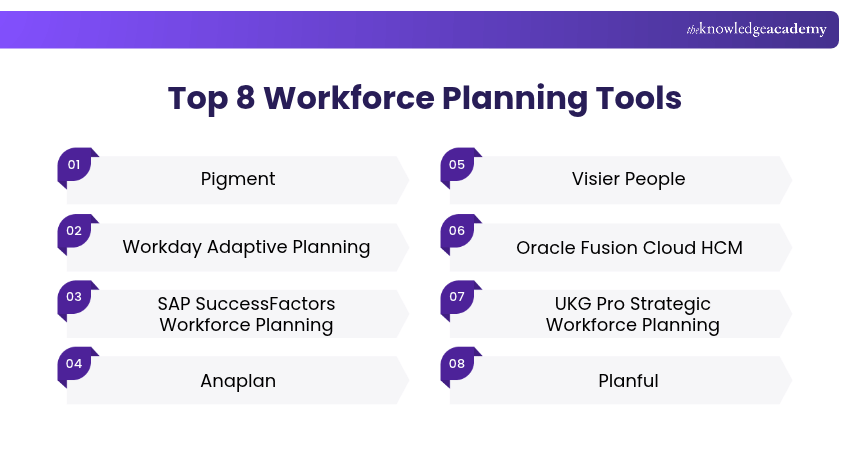
Top 8 Workforce Planning Tools
Many workforce planning tools are available, offering features such as headcount planning, people analytics, workforce forecasting, and scenario modelling. Here are the top eight options to consider:
1) Pigment
Pigment supports workforce planning through headcount forecasting, scenario planning and workforce cost analysis. HR and finance teams can use it to explore changes in hiring, compensation and capacity alongside wider business plans.
Value: Helps organisations assess workforce scenarios and connect people-related decisions with financial plans.

2) Workday Adaptive Planning
Workday adaptive planning supports strategic workforce planning, headcount planning, compensation planning, skills planning, talent planning, and scenario modelling. It allows HR, finance, and business teams to build workforce plans collaboratively and assess the impact of hiring, transfers, retention, and workforce costs.
Value: Helps organisations connect workforce requirements, skills, headcount, and costs with business priorities.
3) SAP SuccessFactors Workforce Planning
SAP SuccessFactors workforce planning supports strategic workforce planning by helping organisations forecast workforce needs, identify skills gaps and model future scenarios. SAP Analytics Cloud can also support operational workforce planning using workforce data from SAP SuccessFactors and other sources.
Value: Helps organisations align long-term workforce requirements with workforce and headcount planning.
4) Anaplan
Anaplan supports connected workforce planning by bringing HR, finance, and business planning together. Organisations can use it to plan headcount, workforce costs, hiring requirements, and different staffing scenarios.
Value: Helps teams coordinate workforce and financial plans using shared planning data.
5) Visier People
Visier People provides people analytics and workforce insights that help organisations understand trends across areas such as headcount, turnover, skills, and workforce movement. These insights can support workforce planning and people-related decisions.
Value: Helps organisations turn workforce data into insights for planning and decision-making.
6) Oracle Fusion Cloud HCM
Oracle Workforce Planning supports headcount, staffing, workforce costs, and compensation planning as part of broader enterprise planning. It enables organisations to model workforce changes and assess how staffing decisions affect financial plans.
Value: Helps connect workforce plans with budgeting and wider organisational planning.
7) UKG Pro Strategic Workforce Planning
UKG Pro strategic workforce planning supports workforce forecasting and long-term capacity planning. Organisations can use it to assess potential gaps between current staffing levels and future workforce requirements.
Value: Helps organisations use workforce information to support staffing and resource decisions.
8) Planful
Planful supports workforce planning alongside financial planning by connecting headcount, compensation, hiring assumptions, and workforce-related costs. HR and finance teams can use it to evaluate how workforce changes affect organisational budgets.
Value: Helps link workforce decisions directly with financial planning and budgeting.
Benefits of Workforce Planning Tools
Workforce planning tools support organisations in making more structured and informed workforce decisions. The key benefits include:
1) Data-informed Decision-making: Helps organisations use workforce data to identify trends and support evidence-based decisions.
2) Future Skill Planning: Helps identify emerging skill requirements and guide recruitment or development priorities.
3) Resource Optimisation: Supports better allocation of people by highlighting workforce shortages, surpluses, and capacity needs.
4) Talent Retention: Helps identify patterns in turnover, workload, and workforce movement that may require attention.
5) Workforce Cost Management: Supports budgeting by showing the financial impact of staffing and resourcing decisions.
6) Scenario Modelling: Helps assess how different business conditions could affect future workforce requirements.
7) Strategic Alignment: Connects workforce planning with broader organisational goals and priorities.
Build effective talent development and retention strategies with our Talent Management Training – Join today!
How to Choose the Right Workforce Planning Tool?
Choosing a workforce planning tool should begin with the workforce problem the organisation is trying to solve rather than with the software itself. Here is how you can choose the right tool:
1) Define the Workforce Planning Need
Identify whether the main requirement involves forecasting, skills, headcount, succession, workforce costs, or scenario planning. This helps narrow the options to tools that address the most relevant planning challenge.
2) Identify Who Will Use the Tool
Consider which stakeholders will use the tool and what information they need. This can include HR teams, finance professionals, operational leaders, and senior decision-makers.
3) Assess Data Availability and Quality
Check whether reliable workforce data is available to support meaningful analysis. Incomplete or inconsistent information can reduce the accuracy and usefulness of planning outputs.
4) Check Integration Requirements
Determine whether the tool can connect with existing HR, payroll, finance, recruitment, or workforce management systems. Strong integration can reduce duplication and improve data consistency.
5) Evaluate Usability and Implementation
Assess how easily users can understand the tool, generate reports, and use its outputs in existing planning processes. Consider the effort required for implementation, training, and adoption.
6) Compare Cost and Organisational Value
Review licensing, implementation, support, training, and maintenance costs against the value the tool is expected to provide. Choose an option that fits both workforce planning needs and available budgets.
7) Test Relevant Workforce Scenarios
Where possible, test the tool against realistic workforce planning situations before wider implementation. This helps confirm whether its outputs are practical, relevant, and easy to apply.
Workforce Planning Tool Checklist
Before selecting a tool, ask:a) Does it address a clearly defined workforce-planning requirement?b) Can it work with the workforce data currently available?c) Does it integrate with relevant HR and business systems?d) Can decision-makers easily understand its outputs?e) Can it support different workforce scenarios?f) Can it adapt as organisational requirements change?g) Does its expected value justify the implementation effort and cost?

Naveena Venkatesan is a Content Editor with 2+ years of experience in content writing, editing and linguistic quality assurance. Her research, fact-checking and editorial experience enable her to develop accurate, accessible resources across Business Skills, Human Resources, and Accounting and Finance.
View Detail

 If you wish to make any changes to your course, please


