




We may not have the course you’re looking for. If you enquire or give us a call on 01344203999 and speak to our training experts, we may still be able to help with your training requirements.
Top Product Management Tools
ByThe Knowledge AcademyLast updated on: 27 October 2026
Explore the top product management tools that help teams plan product roadmaps, prioritise features, manage tasks and collaborate effectively. Discover how these tools support product development and help Product Managers make informed decisions throughout the product lifecycle.
Key Learnings
1. Product management tools support activities such as roadmap planning, customer research, feature prioritisation and product analytics.2. Aha!, Productboard and Craft.io focus on product strategy, planning and prioritisation.3. Jira, Linear and Asana help teams organise work and monitor product delivery.4. Amplitude, Mixpanel and Pendo provide insights into product usage and customer behaviour.5. The right tool depends on team requirements, integrations, usability and available budgets.
Have you ever had a promising product idea but struggled to organise the feedback, priorities and tasks needed to bring it to life? Product teams frequently manage changing customer expectations, competing feature requests and tight delivery schedules. Without the right systems, even simple decisions can become complicated.
That is where product management tools become useful. From planning roadmaps and testing ideas to analysing user behaviour, these platforms help teams manage different stages of product development. But with so many options available, how can you identify the right one? This blog explores 20 product management tools, their features and how to choose software that fits your needs. Let's get started!
Top Product Management Tools
Choosing the right product management tool depends on the activities your team needs to manage. The following 20 platforms support different areas of product management, including strategic planning, development, customer research, analytics and collaboration. The following overview highlights suitable tools for different product management needs:
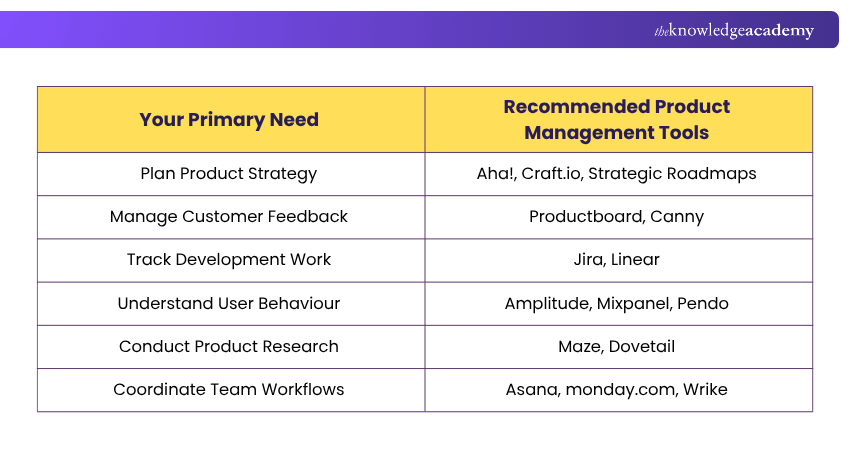
Now, let's check the tools in detail:
1) Aha!
Aha! is a product development software suite that supports product strategy, roadmap planning and idea management. It helps teams connect business objectives with product initiatives and communicate priorities to stakeholders.
Key Features:
a) Product Roadmaps: Create visual plans showing upcoming initiatives, releases and product goals.
b) Idea Management: Collect, evaluate and prioritise product ideas.
c) Strategic Planning: Connect product initiatives with business objectives and development priorities.
Best Suited for: Product teams that need structured strategy, detailed roadmaps and stakeholder alignment.

2) Productboard
Productboard helps Product Managers collect customer insights, prioritise features and plan product development. It brings customer feedback into the planning process so teams can identify opportunities that support user needs.
Key Features:
a) Feedback Management: Organise customer requests and product insights from different sources.
b) Feature Prioritisation: Evaluate potential features based on customer needs and product objectives.
c) Roadmap Planning: Create and share product roadmaps with relevant stakeholders.
Best Suited for: Customer-focused product teams managing feedback and feature prioritisation.
Trainer’s Insight: Prioritise Customer Needs
The most frequently requested feature is not necessarily the most valuable. Product teams should consider customer feedback alongside business goals, development effort and expected outcomes before deciding what to build.
3) Craft.io
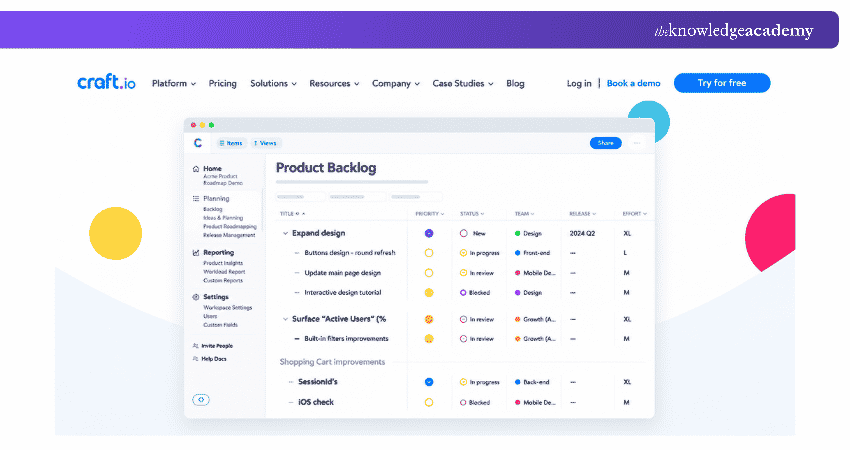
Craft.io is a product management platform designed to support product strategy, prioritisation and roadmapping. It helps teams organise product ideas, manage backlogs and connect development activities with strategic goals.
Key Features:
a) Roadmap Management: Create visual roadmaps to communicate product direction.
b) Feature Prioritisation: Evaluate initiatives using structured prioritisation methods.
c) Product Planning: Organise product requirements, ideas and strategic objectives in one workspace.
Best Suited for: Product Managers seeking structured planning and product operations support.
4) Strategic Roadmaps by Tempo
Strategic Roadmaps, formerly known as Roadmunk and now part of Tempo, helps teams develop and communicate product roadmaps. It supports visual planning, idea management and the alignment of product initiatives with organisational objectives.
Key Features:
a) Visual Roadmaps: Create timeline and swimlane views to present product plans.
b) Idea Prioritisation: Collect and assess product ideas before adding them to the roadmap.
c) Stakeholder Alignment: Share product direction and communicate dependencies across teams.
Best Suited for: Organisations that need clear product roadmaps and effective communication of strategic priorities.
5) Canny
Canny is a customer feedback management platform that helps product teams understand user requests and organise product improvements. It enables teams to collect suggestions, identify popular requests and communicate product updates.
Key Features:
a) Feedback Collection: Gather feature requests and suggestions from customers.
b) Feature Voting: Allow users to express interest in proposed improvements.
c) Product Changelogs: Communicate updates and recently released features.
Best Suited for: Product teams that want a structured system for collecting and managing feature requests.
6) Jira
Jira is a work management and issue-tracking platform widely used by software development teams. It helps teams organise backlogs, monitor development activities and track issues throughout product delivery.
Key Features:
a) Issue Tracking: Create, assign and monitor development tasks, bugs and other work items.
b) Agile Boards: Organise work using Scrum and Kanban boards.
c) Reporting: Review sprint progress, workload and delivery information.
Best Suited for: Software development and Agile teams managing product delivery.
Pro Tip
If your team uses separate platforms for roadmapping and development, consider integrating them. Connecting product priorities with delivery tasks can improve visibility and reduce duplicate updates.
7) Linear
Linear is a product development platform that helps software teams organise issues, projects and development workflows. It provides structured planning and tracking capabilities for teams managing product delivery.
Key Features:
a) Issue Management: Organise bugs, improvements and development tasks.
b) Project Planning: Track product initiatives and development progress.
c) Cycle Management: Plan and review work within recurring development cycles.
Best Suited for: Software product teams looking for focused development planning and issue tracking.
8) Monday.com
Monday.com is a work management platform that allows teams to organise projects, monitor responsibilities and automate workflows. Product teams can use it to manage development activities, coordinate departments and track progress.
Key Features:
a) Customisable Workflows: Create boards that reflect team processes.
b) Workflow Automation: Automate selected repetitive actions and notifications.
c) Visual Dashboards: Monitor tasks, deadlines and project information.
Best Suited for: Cross-functional teams requiring flexible planning and workflow coordination.
9) Asana
Asana is a work management platform that helps teams establish clear responsibilities, organise project timelines and coordinate cross-functional activities. It allows team members to track assigned work, share updates and maintain accountability throughout product-related projects.
Key Features:
a) Task Management: Assign responsibilities, establish deadlines and track progress.
b) Project Views: Organise work using lists, boards and timelines.
c) Team Collaboration: Share updates, comments and project information.
Best Suited for: Teams managing product-related projects and cross-functional activities.
10) Wrike
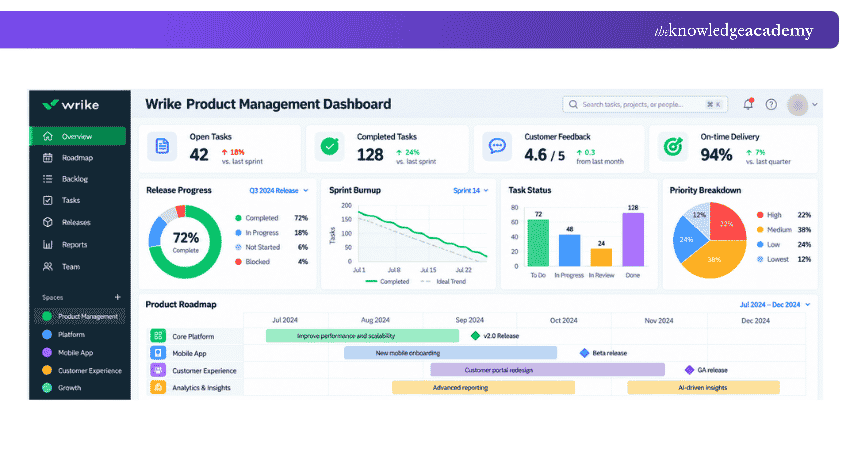
Wrike is a work management platform that helps organisations plan projects, allocate resources and monitor progress. Product teams can use it to coordinate activities across departments and manage complex delivery schedules. The following image shows a sample Wrike dashboard:
Key Features:
a) Task Tracking: Monitor assignments, deadlines and project progress.
b) Workload Management: Review team capacity and resource allocation.
c) Project Visualisation: Use dashboards, boards and Gantt charts to understand progress.
Best Suited for: Teams handling multiple projects, resource requirements and interconnected workflows.
Increase efficiency, reduce bottlenecks, and improve project outcomes with Wrike Training – Register today!
11) Maze
Maze is a product research platform that helps teams collect user feedback and evaluate digital experiences. It supports research activities that can inform design and product decisions throughout the product lifecycle, from early discovery to post-launch validation.
Key Features:
a) Usability Testing: Evaluate how participants interact with designs and prototypes.
b) Surveys and Research: Collect feedback about user needs and experiences.
c) Research Insights: Review findings to identify usability concerns and improvement opportunities.
Best Suited for: Product and UX teams conducting user research and usability testing.
Real-world Scenario: Testing a Feature Before Development
Imagine a product team planning a new checkout process. Before committing development resources, the team creates a prototype and tests it with users through Maze. The research reveals that participants struggle to find the final payment confirmation button.The team can then refine the design and test it again before development begins. This example shows how early research can help identify usability issues and guide product decisions.
12) Figma
Figma is a collaborative design platform used to create digital interfaces and interactive prototypes. It enables designers, Product Managers and other stakeholders to review concepts and provide feedback during product development.
Key Features:
a) Interface Design: Create layouts and visual designs for digital products.
b) Interactive Prototyping: Build prototypes that demonstrate user interactions.
c) Real-time Collaboration: Review designs, share comments and collaborate in a shared workspace.
Best Suited for: Product design teams developing and reviewing digital product experiences.
Launch your product management career from anywhere with the Online Product Manager Course – Sign up now!
13) Amplitude
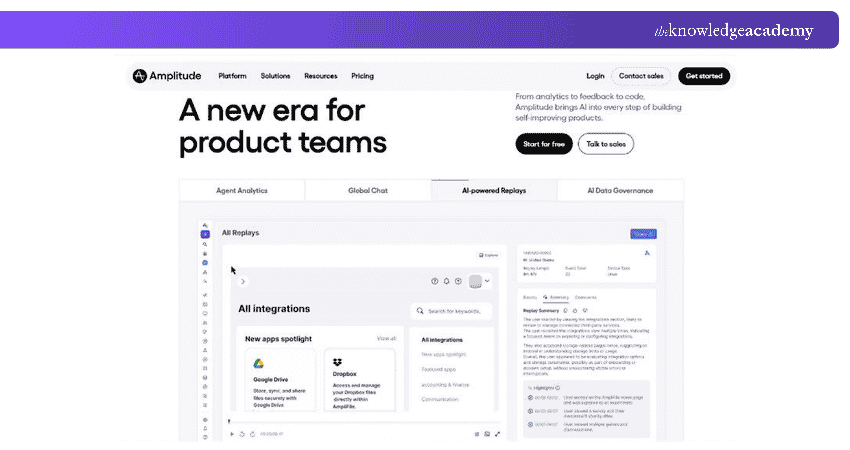
Amplitude is a digital analytics platform that helps organisations understand how users interact with their products. It enables product teams to analyse behaviour, measure engagement and evaluate changes to the user experience.
Key Features:
a) Feature Engagement Analysis: Measure how frequently users interact with specific product features and assess adoption patterns.
b) Funnel Analysis: Identify where users leave important journeys.
c) Retention Analysis: Understand patterns in repeat usage and engagement.
Best Suited for: Product teams using behavioural data to evaluate and improve digital experiences.
Trainer’s Insight: Turn Product Data into Decisions
Collecting analytics is only the first step. Product teams should connect user behaviour data with specific questions, such as why customers abandon a process or which features encourage repeat usage. This makes analysis more useful for product improvement.
14) Pendo
Pendo is a product experience platform that helps teams analyse user behaviour and improve product adoption. It combines product analytics with tools for delivering guidance within digital applications.
Key Features:
a) Product Analytics: Review usage patterns and feature engagement.
b) In-app Guidance: Provide walkthroughs, tips and onboarding information.
c) Feedback Management: Collect and organise customer feedback through Pendo Listen to identify improvement opportunities.
Best Suited for: Digital product teams focusing on onboarding, adoption and user experience.
15) Mixpanel
Mixpanel is a product analytics platform that enables teams to examine user actions through event-based tracking. It helps Product Managers understand how users navigate digital products, investigate conversion patterns and make decisions based on behavioural data.
Key Features:
a) Event Analytics: Analyse specific user actions and interactions.
b) Funnel Reports: Identify where users abandon important processes.
c) Retention Tracking: Examine repeat usage and customer engagement over time.
Best Suited for: Product teams that need detailed behavioural analytics and engagement insights.
16) Notion
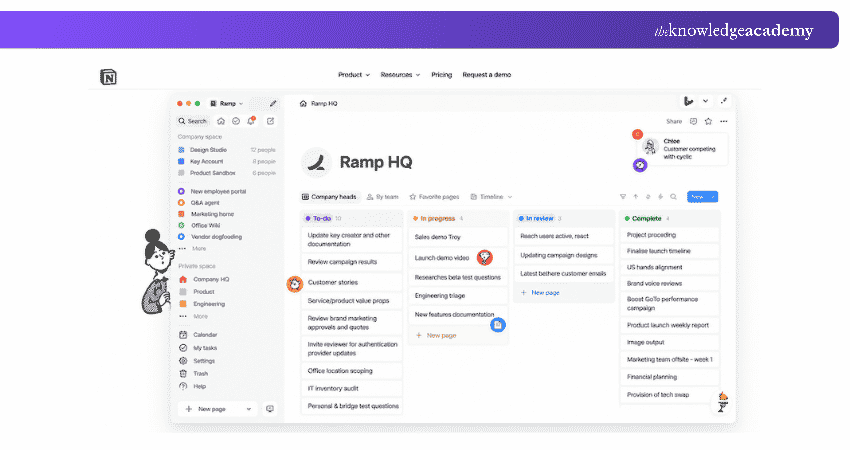
Notion is a flexible workspace for documentation, knowledge sharing and project planning. Product teams can use it to organise meeting notes, product requirements, research findings and planning information.
Key Features:
a) Documentation: Create and maintain product specifications and team knowledge.
b) Databases: Organise information using customisable databases and views.
c) Team Collaboration: Share documents, tasks and updates across departments.
Best Suited For: Teams seeking flexible documentation and lightweight product planning.
Create customised workspaces that boost productivity with Notion Training – Sign up soon!
17) Confluence
Confluence is a knowledge management and collaboration platform. It helps teams create, organise and share documents related to product development.
Key Features:
a) Centralised Documentation: Maintain product requirements, specifications and meeting notes.
b) Collaborative Editing: Allow team members to contribute to shared documents.
c) Jira Integration: Connect relevant documentation with development work.
Best Suited for: Teams requiring structured documentation, especially those already using Atlassian products.
18) Airtable
Airtable is a flexible platform that combines database-style information management with spreadsheet-like interfaces. Product teams can use it to organise feature requests, maintain backlogs and manage custom planning workflows.
Key Features:
a) Customisable Databases: Organise product information using different fields and views.
b) Workflow Management: Create processes for tracking ideas, tasks and requests.
c) Automation and AI: Automate routine actions and use AI features to summarise or categorise records.
Best Suited for: Teams that need highly customisable product tracking and information management.
19) ClickUp
ClickUp is a work management platform that supports tasks, documentation, dashboards and workflow coordination. Product teams can use it to organise development activities and monitor progress across projects.
Key Features:
a) Task Management: Organise responsibilities, priorities and deadlines.
b) Multiple Work Views: Manage projects using lists, boards and other visual layouts.
c) Dashboards and Automation: Monitor selected performance indicators and automate routine workflow actions.
Best Suited for: Teams looking to manage several product-related workflows within one platform.
20) Dovetail
Dovetail is a customer intelligence and research platform that helps teams bring together customer feedback, research findings and other customer insights from multiple sources. It supports AI-assisted analysis to identify recurring themes, understand customer needs and inform product decisions.
Key Features:
a) Research Repository: Store and organise interviews, notes and other research materials.
b) Insight Analysis: Identify themes and patterns across customer research.
c) Knowledge Sharing: Make research findings accessible to relevant stakeholders.
Best Suited for: Product teams that regularly conduct customer research and need to share insights.
Quick Snapshot: Emerging Trends in Product Management Tools
1. AI Assistance: Faster summarisation and analysis of product information.2. Automation: Reduced manual effort in recurring workflows.3. Integrated Workflows: Better connections between planning and delivery.4. Customer Insights: Greater emphasis on feedback and behavioural data.5. Deeper Collaboration: Improved visibility across product, design and development teams.6. No-Code/Low-Code Platforms: They simplify the product development process by enabling faster prototyping and iteration.
Key Features to Look for in Product Management Tools
Choosing a product management tool requires more than comparing the number of available features. The software should address your team's actual needs and fit its existing workflows. Here are five important capabilities to consider:
1) Roadmapping and Prioritisation
Look for tools that allow teams to create and update product roadmaps, visualise planned initiatives and communicate priorities. Prioritisation features should help teams assess ideas based on customer needs, business value, development effort and available resources.
2) Customer Feedback and Research
Tools that collect customer feedback and support user research can help teams understand problems before developing solutions. These capabilities are particularly valuable when deciding which features deserve attention.
3) Integration and Collaboration
Product teams often use multiple platforms for development, design, documentation and communication. Suitable integrations help information flow between systems and reduce the need for repeated manual updates.
4) Product Analytics and Reporting
Analytics capabilities help teams understand product usage, feature adoption and customer engagement. Reports and dashboards can also make important information more accessible to stakeholders.
5) Ease of Use and Customisation
A tool should be straightforward enough for relevant team members to use effectively. Customisable workflows and reporting options can be valuable, but excessive complexity may slow adoption.
So, each platform serves a different purpose, from strategic roadmapping and customer research to analytics and task management. Rather than selecting software based solely on popularity or features, organisations should consider their workflows, existing systems and long-term requirements. The most effective choice is the one that helps a team solve its most important product management challenges.
Gain hands-on experience in developing product strategies with SAFe® Agile Product Management Training – Join now!

The Knowledge Academy develops accessible learning content across Project Management, IT, Cybersecurity, Data Science, Business Analysis, HR, Accounting and Finance, Leadership and Health and Safety. Its resources combine subject research with clear explanations to help professionals build practical knowledge across a wide range of disciplines.
View Detail

 If you wish to make any changes to your course, please


