


 Top Rated Course

We may not have the course you’re looking for. If you enquire or give us a call on + 1-866 272 8822 and speak to our training experts, we may still be able to help with your training requirements.
What is a Trojan Horse? Types, Detection & Prevention
John Davies 25 February 2026The Trojan Horse was a deceptive wooden structure used by the Greeks to infiltrate Troy, marking one of history’s most iconic war strategies. Symbolising trickery and infiltration, it now represents hidden threats in modern contexts like Cyber Security and cultural references across literature and media. Read ahead to know more!

Training Outcomes Within Your Budget!
We ensure quality, budget-alignment, and timely delivery by our expert instructors.
Table of Contents

A Trojan Horse isn’t just ancient myth; it’s a modern-day cyber threat. It looks like safe software but hides harmful intent, sneaking into your system to steal data or spy on you. These threats rely on tricking users into letting them in, often hiding in emails or downloads. In this blog, we’ll explore What is a Trojan Horse, its types, red flags to watch for, and simple ways to keep your devices secure.
Table of Contents
1) What is a Trojan Horse?
2) History of the Trojan Horse
3) How Trojan Horses Work?
4) Types of Trojan
5) How to Detect Trojan Horses?
6) Notable Trojan Horse Examples
7) How Does Trojan Horses Spread?
8) Conclusion
What is a Trojan Horse?
A Trojan Horse Virus is a rank of malware that saturates a computer by disguising itself as a legitimate program. Attackers often use Social Engineering tactics to embed malicious code within seemingly harmless software, aiming to gain unauthorised access to users' systems.
In simple terms, a Trojan Horse Malware that typically hides as an email attachment or a free-to-download file. Once downloaded, it executes its intended malicious function, such as granting attackers backdoor access to corporate systems, spying on users’ online activities, or stealing sensitive data.
Signs of an active Trojan on a device may include unexpected changes to computer settings or other unusual activities.
History of the Trojan Horse
The story of the Trojan Horse comes from two ancient books: the Aeneid by Virgil and the Odyssey by Homer. In the tale, enemies of Troy tricked the Trojans into giving them a giant wooden horse as a gift. But inside the horse were hidden soldiers. Once the horse was inside the city, the soldiers came out at night, opened the gates, and let in the rest of their army.
This story explains why “Trojan Horse” is a fitting name for specific Cyberattacks:
a) The horse was a clever way to break through Troy’s strong defences after 10 years of failed attacks. In the same way, a Trojan virus can sneak past strict computer security.
b) The horse looked like a harmless gift. Likewise, a Trojan virus seems like safe software.
c) The hidden soldiers took control of Troy. Similarly, a Trojan virus can take control of your computer and leave it open to more threats.

How Trojan Horses Work?
Trojan Malware disguises itself as valid files or applications to gain access to an individual’s computer system. Consider these points to understand how it spreads:
1) Trojans mainly use Social Engineering to enter systems by tricking users.
2) Common tactics include phishing emails and fake software updates that can nudge users to install the malware.
3) Trojan malware can also be spread through malicious websites or hidden inside innocent-looking applications.
4) Once inside, Trojans stay hidden while carrying out harmful actions in the background.
5) They may create backdoors to let attackers access the system later.
6) Some Trojans change security settings to avoid being detected by antivirus tools.
7) They can also steal data secretly without alerting the user.
Stand tall and resilient in the expanding landscape of Cyber attacks! Sign up for our comprehensive Cyber Security Training - Sign up now!
Types of Trojan
Trojan Horses come in various forms, each designed for specific malicious purposes. Understanding these Types of Malware is important in recognising and combating these digital threats. Here are some prominent categories:
Downloader Trojan
a) A Downloader Trojan is designed to download and install other harmful software like rootkits, ransomware, or keyloggers.
b) Ransomware often spreads through a “dropper,” a Downloader Trojan that triggers the attack.
c) The dropper is usually the first step in a more significant attack that involves multiple stages.
d) After the dropper is installed, another Trojan may be added to the system to help attackers stay inside.
e) For example, the dropper can place a backdoor Trojan on a crucial server, giving Hackers long-term access.
Backdoor Trojan
a) A Backdoor Trojan creates a hidden communication path between the infected device and the attacker’s Command & Control (C&C) centre.
b) It allows Hackers to control the device remotely, giving them access to perform various actions.
c) Attackers can steal data, monitor user activity, or install more harmful software using the backdoor.
Spyware
a) Spyware is a kind of software that secretly watches what users do on their devices.
b) It collects sensitive information such as login details or banking information.
c) The stolen data is sent back to the attacker without the user’s knowledge.
d) Spyware is often disguised as helpful software, making it hard to detect.
e) Due to its hidden behaviour, spyware is usually considered a type of Trojan.
Rootkit Trojans
a) Rootkit Trojans give attackers admin-level access to the infected machine.
b) They start running with the operating system or sometimes even before it boots.
c) This early launch makes them very hard to detect using standard security tools.
d) They are also challenging to remove, as they deeply embed themselves into the system.
DDoS Attack Trojan (Botnet)
a) A DDoS Trojan turns the victim’s device into a “zombie”, which becomes part of a more extensive network called a botnet.
b) Attackers collect many such infected devices to use them for harmful activities.
c) The device owner usually has no idea their system is being used this way.
d) These botnets flood servers with fake traffic, causing a Distributed Denial of Service (DDoS) attack.
How to Detect Trojan Horses?
Trojan Horses often masquerade as legitimate system files. This makes their detection and removal challenging for conventional virus and malware scanners. Identifying and eliminating these discreet Trojan Horses usually requires specialised software tools.
However, it is possible to detect the presence of a Trojan Horses by observing unusual behaviours exhibited by the computer. These anomalies may include:
1) Alterations to the computer's display, like changes in colour or resolution. There might also be unexpected upside-down screen flips.
2) Excessive influx of pop-up ads offering solutions to various errors, enticing users to click on them.
3) Spontaneous movement or freezing of the computer mouse, with the mouse buttons' functions possibly reversed.
4) Changes in the browser, such as a modified homepage or consistent redirection to an unintended website, are common signs of infection. These sites are often laden with offers that, if clicked, lead to further malware installation.
5) Disabling antivirus and antimalware programs prevents users from taking the necessary steps to remove malware.
6) The appearance of mysterious messages and abnormal graphic displays.
7) Unfamiliar programs are running in the task manager.
8) Altered appearance or disappearance of the taskbar.
9) Changes to the computer's desktop wallpaper, desktop icons, and application formats.
10) The user's email service sends spam messages to contacts, potentially spreading the Trojan Horses to other computers.
Notable Trojan Horse Examples
Trojan attacks represent a category of malware that camouflages itself as a legitimate program or file. The intention is to deceive users into installing it on their computer systems.
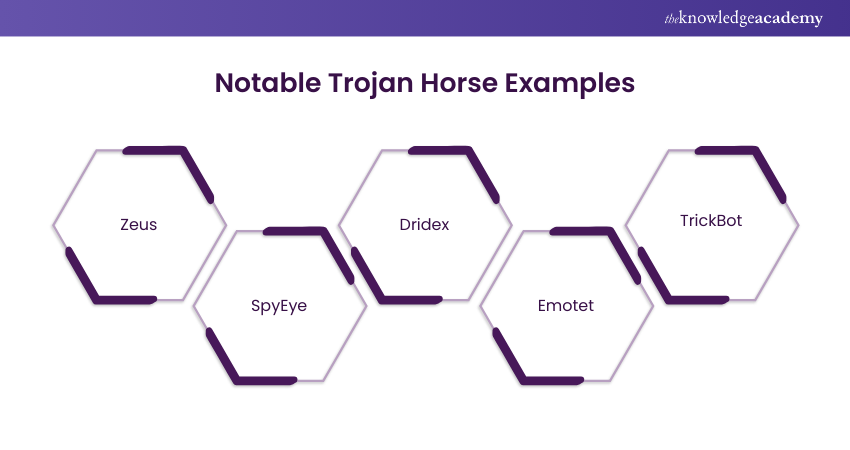
Once successfully installed, these Trojans can execute various malicious activities. These activities may include data theft, the installation of additional malware, or even gaining control over the compromised computer. A few notorious examples of Trojan virus attacks include:
1) Zeus
First identified in 2007, Zeus is a Trojan notorious for its capacity to steal personal and financial information. This includes bank account details and passwords. It has played a role in several high-profile cyberattacks. One such attack is the 2011 Citibank heist, where over $100 million was stolen.
2) SpyEye
This Trojan, similar to Zeus, specialises in the theft of personal and financial data. It gained prominence in 2011 and can bypass certain security measures employed against Zeus. SpyEye contributed to major cyber incidents, including the 2013 theft of over $100 million from Bank of America.
3) Dridex
Targeting banking credentials, Dridex excels in infiltrating financial institutions. It was first identified in 2014 and has been implicated in substantial Cyberattacks.
4) Emotet
Discovered in 2014, Emotet is a Trojan that specialises in the theft of personal and financial data. It also facilitates the installation of additional malware on infected computers. It is particularly adept at spreading through email attachments and phishing attacks. Emotet has been associated with significant incidents, such as the 2019 theft of over $100 million from the city of Baltimore.
5) TrickBot
Emerging in 2016, TrickBot is a Trojan designed for stealing personal and financial data and facilitating the installation of additional malware. It primarily targets financial institutions and has been involved in notable Cyberattacks.
Understand the tactic of unlocking the human firewall through Social Engineering in our comprehensive Social Engineering Training - Sign up now!
How to Prevent Trojan Horse Infections?
To protect your systems from Trojan Malware, it’s essential to use several layers of security. Below are some simple but effective ways to stay safe:
1) Install trusted antivirus software that provides regular real-time protection and updates.
2) Keep your software and operating systems updated so Hackers can’t use known bugs to break in.
3) Avoid downloading suspicious files or clicking unknown links, especially from unfamiliar websites or emails.
4) Teach users to spot phishing emails, as these are a common way Trojans get in.
5) Use strong passwords and turn on Multifactor Authentication (MFA) to prevent Hackers from accessing your accounts.
Unlock the intricate world of Cyber Security with our Ethical Hacking Professional Course and become a guardian of the digital realm today.
How to Remove a Trojan Horse?
Getting rid of a Trojan Horse needs the right tools and steps. Here’s what you should do:
a) Update your antivirus software so it can find and remove the latest threats.
b) Disconnect from the internet to stop the Trojan from stealing more data or spreading.
c) To prevent harmful programs from running, restart your device in Safe Mode. On Windows, press F8 during startup; on macOS, hold Shift while restarting.
d) Delete temporary files, as this can help the scan run faster and may remove parts of the malware. Use Disk Cleanup on Windows or “Empty Trash” on macOS.
How Does Trojan Horses Spread?
Trojan Horses spread in many ways and look like safe, genuine software. They can come through email attachments, fake websites or infected downloads. Hackers use Social Engineering to fool people into clicking or installing the harmful programme without realising it.
Conclusion
Now that you know What is a Trojan Horse, it’s clear that the real threat isn’t brute force; it’s deception. These digital imposters rely on curiosity and trust. Stay sharp, question the unexpected, and let smart security habits be your strongest defence against hidden invaders.
Accelerate your security professional career by attending our Mastering Metasploit Framework Course – Register today!
Frequently Asked Questions
What was the First Trojan Horse Attack?

The first known Trojan Horse attack was the "Animal" program in the early 1970s, created by John Walker. It disguised itself as a game that guessed animals but secretly copied itself onto other systems without the user's knowledge. This marked the beginning of using deception in software to breach security.
How to Check if Trojan is Installed?
To check if a Trojan virus is installed, look for signs like slow computer performance, unexpected pop-ups, or unauthorised changes to settings. Use antivirus or antimalware software to run a full system scan. Reviewing active processes in the Task Manager or Activity Monitor can also help identify suspicious activities.
What are the Other Resources Provided by The Knowledge Academy?
The Knowledge Academy takes global learning to new heights, offering over 3,000 online courses across 490+ locations in 190+ countries. This expansive reach ensures accessibility and convenience for learners worldwide.
Alongside our diverse Online Course Catalogue, encompassing 19 major categories, we go the extra mile by providing a plethora of free educational Online Resources like News updates, Blogs, videos, webinars, and interview questions. Tailoring learning experiences further, professionals can maximise value with customisable Course Bundles of TKA
What is the Knowledge Pass, and how Does it Work?
The Knowledge Academy’s Knowledge Pass, a prepaid voucher, adds another layer of flexibility, allowing course bookings over a 12-month period. Join us on a journey where education knows no bounds.
What are the Related Courses and Blogs Provided by The Knowledge Academy?
The Knowledge Academy offers various Ethical Hacking Training, including the Ethical Hacking Professional and Mastering Metasploit Framework. These courses cater to different skill levels, providing comprehensive insights into Ethical Hacker Roles and Responsibilities.
Our IT Security & Data Protection Blogs cover a range of topics related to Ethical Hacking, offering valuable resources, best practices, and industry insights. Whether you are a beginner or looking to advance your IT Security & Data Protection skills, The Knowledge Academy's diverse courses and informative blogs have got you covered.

John Davies


Cyber Security Governance & Assurance Specialist
John Davies is a cybersecurity expert specialising in governance, risk management, and compliance. With over 15 years in the field, he has led enterprise-wide security programmes across finance, healthcare and public sector organisations. His content provides practical guidance on building secure environments, managing risk and aligning with regulatory frameworks.

Upcoming IT Security & Data Protection Resources Batches & Dates
Date
 Certified Cyber Security Professional (CCS-PRO)
Certified Cyber Security Professional (CCS-PRO)
Fri 17th Apr 2026
Certified Cyber Security Professional (CCS-PRO)
Fri 26th Jun 2026
Certified Cyber Security Professional (CCS-PRO)
Fri 4th Sep 2026
Certified Cyber Security Professional (CCS-PRO)
Fri 23rd Oct 2026

 If you wish to make any changes to your course, please


