


 Top Rated Course

We may not have the course you’re looking for. If you enquire or give us a call on +46 850282424 and speak to our training experts, we may still be able to help with your training requirements.
Top 25 Citrix Interview Questions and Answers for IT Roles
The Knowledge Academy 22 April 2026The key Citrix Interview Questions cover topics like XenApp, XenDesktop, NetScaler, Citrix Cloud, and virtualisation to help you showcase your expertise. Citrix specialises in server, application, and desktop virtualisation, along with networking, Software as a Service (SaaS), and other technologies that support modern digital workplaces.
Home
 Resources
IT Infrastructure & Networking
Top 25 Citrix Interview Questions and Answers for IT Roles
Resources
IT Infrastructure & Networking
Top 25 Citrix Interview Questions and Answers for IT Roles
Resources
IT Infrastructure & Networking
Top 25 Citrix Interview Questions and Answers for IT Roles
Training Outcomes Within Your Budget!
We ensure quality, budget-alignment, and timely delivery by our expert instructors.
Table of Contents
Landing your ideal IT role often comes down to one thing: performing well in the interview. If Citrix is on your focus area, early preparation can give you a strong advantage. Citrix enables secure access to virtual desktops, applications, and data, helping organisations support flexible and modern ways of working. Employers look for candidates who truly understand how Citrix supports these environments.
This blog covers the top 25 Citrix Interview Questions and answers to help you prepare with confidence. It focuses on the practical knowledge needed to keep productivity running smoothly using Citrix. If you are ready to turn challenging questions into clear wins, read on and get interview-ready.
Table of Contents
1) Commonly Asked Citrix Interview Questions and Answers
a) What is Citrix?
b) What services does Citrix offer?
c) What is the Local Host Cache (LHC) in Citrix?
d) What does the Citrix Data Store refer to?
e) What is the role of the Citrix XML Broker?
f) How do you clear the XenServer cache?
g) What are the main components of the Citrix architecture?
h) What is a Citrix ICA file used for?
i) What does the Citrix Web Interface do?
j) What is Citrix Receiver?
2) Conclusion
Commonly Asked Citrix Interview Questions and Answers
Prepare for your next Citrix interview with this curated list of commonly asked Citrix Interview Questions and clear, easy-to-follow answers. These will help you brush up on the key concepts and confidently showcase your technical knowledge. Let's dive in:
What is Citrix?

Citrix is a virtualisation and remote access platform that enables users to access applications, desktops, and data from any device. It is widely used by organisations to deliver secure, centralised IT resources to employees working from different locations.
What services does Citrix offer?
Citrix provides services like:
1) Desktop virtualisation
2) Application virtualisation
3) Remote access
4) Cloud Networking
5) Secure file sharing
6) Load balancing
These services help a wide range of organisations manage apps centrally, improve their performance and boost security.
What is the Local Host Cache (LHC) in Citrix?
Local Host Cache (LHC) helps Citrix continue operations even if the database goes offline. It stores essential configuration data on each Delivery Controller so users can still launch apps and desktops during database outages.
What does the Citrix Data Store refer to?
In modern Citrix environments, the Data Store refers to the Site Database, which is hosted on Microsoft SQL Server. It stores configuration data such as Delivery Controllers, machine catalogs, delivery groups, and policies. This database is essential for managing and operating the Citrix environment.
What is the role of the Citrix XML Broker?
The Citrix XML Broker communicates between StoreFront and the Delivery Controllers. It authenticates users, checks what apps they can access and routes them to the right server whenever they start an application or desktop.
How do you clear the XenServer cache?
“We can clear XenServer cache by shutting down the VM, removing temporary files from /var/xapi/ or /var/cache/, and then restarting toolstack using xe-toolstack-restart. This refreshes stale data and improves performance.”
What are the main components of the Citrix architecture?
The key Citrix components include:
1) Delivery Controller
2) StoreFront
3) Virtual Delivery Agent (VDA)
4) Citrix Receiver/Workspace App
5) NetScaler Gateway
6) License Server
7) SQL Database
8) Hypervisor (like XenServer or VMware)
What is a Citrix ICA file used for?
An Independent Computing Architecture (ICA) file contains connection details for a user’s Citrix session. When you launch a published app or desktop, the file tells your device how to connect to the Citrix server through the ICA protocol. It essentially acts as a shortcut that initiates and configures the user’s remote session.
Lead the future of secure virtualisation. Register for our Citrix Virtual Apps and Desktops 7 Advanced Deployment, Troubleshooting, Security and Administration Training now!
What does the Citrix Web Interface do?
The Web Interface is an older component that provided users with a browser-based portal to access published apps and desktops. It has now been replaced by StoreFront, which is more secure. It acted as the main access point for users before Citrix introduced more advanced delivery methods.
What is the Citrix Receiver?
Citrix Receiver was the client software that users installed to access Citrix apps and desktops. It has now been replaced by Citrix Workspace App with better features and compatibility. It used to enable secure connections across different devices and platforms.
What is the purpose of the Citrix Access Gateway?
Citrix Access Gateway (now NetScaler Gateway) provides secure remote access. It gives users encrypted access to internal apps, desktops and data, even when they log in from outside the organisation. It also supports granular access control, thus ensuring users only reach the resources they’re authorised to use.

Why are Zones used in a Citrix environment?
Zones help distribute Citrix resources across multiple locations. They reduce latency, improve performance at remote sites, and enable Administrators to manage geographically dispersed areas more efficiently.
How does Citrix implement session shadowing?
Shadowing lets administrators view or control a user’s session for troubleshooting. It’s useful when users encounter technical issues and need real-time assistance without being logged out. It greatly reduces support time by allowing admins to diagnose problems directly within the user’s live session.
What is the primary role of Citrix’s Desktop Virtualisation platform?
Its main function is to deliver virtual desktops securely and centrally. It lets users access a consistent desktop experience across different devices while IT controls everything from a central point.
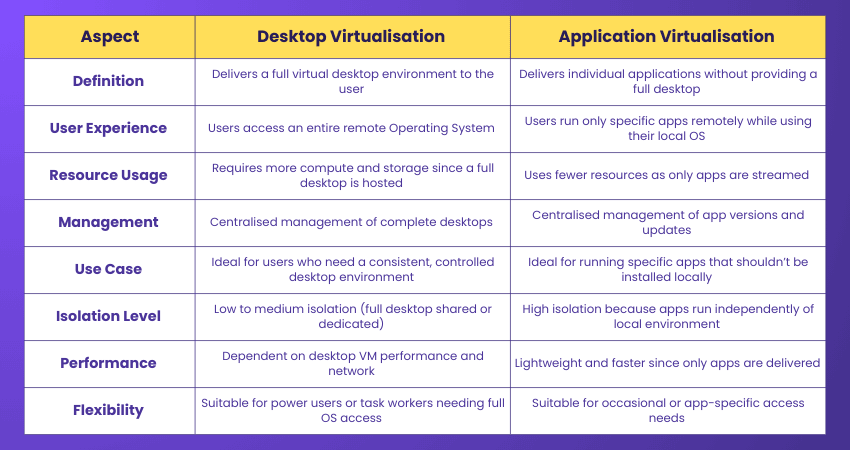
How does desktop virtualisation differ from application virtualisation?
Desktop virtualisation delivers an entire desktop environment, while application virtualisation delivers individual apps. Here are the key differences:
What is Citrix Workspace App?
Citrix Workspace App is the modern client software that users install to access virtual apps, desktops and files across devices. It provides a unified interface and supports improved performance features compared to the older Citrix Receiver. It also integrates with SaaS, Cloud and on-premises resources for a seamless user experience.
Become the traffic controller of the digital world - Sign up for our Citrix NetScaler Install, Configure, and Manage Training now!
Which ports are commonly associated with Citrix services?
Common Citrix ports include:
1) 1494: ICA
2) 2598: Session Reliability
3) 80/443: StoreFront, NetScaler Gateway
4) 1433: SQL Database
5) 27000: License server
6) 7279: Vendor daemon
Which load evaluators are supported in Citrix?
Traditional load evaluators were used in older XenApp versions. In modern Citrix Virtual Apps and Desktops, load management is handled through built-in policies and metrics such as CPU usage, memory usage, session count, and server load. Delivery Controllers use these metrics to balance user sessions efficiently.
What is the maximum refresh interval for the Local Host Cache?
Local Host Cache does not have a fixed maximum refresh interval. It updates frequently to stay in sync with the Site Database, often within a few minutes of any configuration change. This ensures Delivery Controllers can continue operating smoothly, even during temporary database outages.
How can LHC details be viewed in Citrix?
Local Host Cache details can be viewed using Citrix Studio and PowerShell commands on the Delivery Controller. Administrators use these tools to check LHC status, synchronisation health, and database connectivity. Direct inspection of cache database files is not a recommended practice.
What does Virtual Desktop Infrastructure (VDI) mean in FlexCast Technology?
VDI delivers a personalised virtual desktop to each user. With FlexCast, Citrix lets organisations choose the delivery model based on user needs. This includes pooled desktops, dedicated desktops or hosted shared desktops.
Describe Citrix Xen Desktop Solution's HDX Technology
HDX improves the user experience by optimising performance for graphics, audio, video and network conditions. It ensures smooth sessions even on slow or unstable connections. HDX also reduces bandwidth usage, supports advanced multimedia rendering and intelligently adapts to device capabilities.
What is Citrix App Layering?
Citrix App Layering is a technology that separates applications, OS components and user data into independent layers. This makes the management process much easier. It allows IT teams to update apps or operating systems without rebuilding entire images. It also helps reduce storage usage and simplifies the delivery of consistent apps across multiple environments.
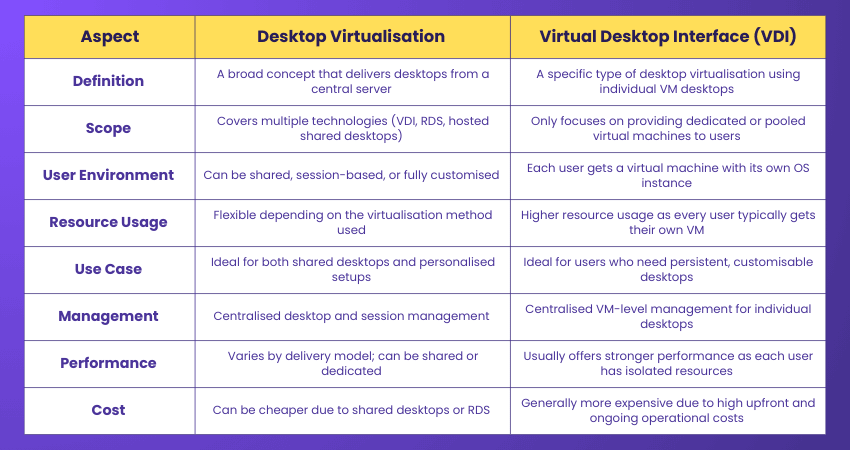
How are desktop virtualisation and virtual desktop interface Different?
Here are the key distinctions between desktop virtualisation and virtual desktop interface:
How do you disable a Citrix Management Console server that is no longer active?
We can deactivate a dormant Citrix Management console server with the following steps:
1) Remove it from the farm
2) Stop related services
3) Cleaning up the server’s entries from the database
4) Update the configuration in Citrix Studio or the Delivery Controller

The Knowledge Academy


Global Training Provider
The Knowledge Academy is a world-leading provider of professional training courses, offering globally recognised qualifications across a wide range of subjects. With expert trainers, up-to-date course material, and flexible learning options, we aim to empower professionals and organisations to achieve their goals through continuous learning.


 If you wish to make any changes to your course, please


