


 Top Rated Course


We may not have the course you’re looking for. If you enquire or give us a call on +0800 780004 and speak to our training experts, we may still be able to help with your training requirements.
Docker Images vs Containers: Key Differences Explained
Lily Turner 17 April 2026A Docker image is a blueprint with instructions for creating containers, while a Docker container is a live, isolated environment where the application runs. Understanding the key distinctions between Docker Image vs Container is essential for anyone envisioning a career in the field of Application Development.

Training Outcomes Within Your Budget!
We ensure quality, budget-alignment, and timely delivery by our expert instructors.
Table of Contents
The simplest way to understand the difference between Docker Image vs Container is to imagine you’re assembling a model spaceship. The blueprint with all the parts and instructions signifies the Docker Image. and the fully built, operational spacecraft is the container. So, essentially, a docker image is the set of instructions needed to create a container, including all dependencies and configurations.
A Container, however, is the running instance of that image, providing a secure, isolated environment for applications. This blog brings you a detailed breakdown of the key differences between Docker Images vs Containers, uncovering how they work together to launch your applications seamlessly across different environments. So, read on!
Table of Contents
1) What is Docker?
2) What is a Docker Image?
3) What is a Docker Container?
4) Difference Between Docker Images and Containers
5) How do Docker Images and Containers Work Together?
6) When to Use Docker Images and Containers?
7) Conclusion
What is Docker?
Docker is a platform that helps Developers build, ship, and run applications using containers. Containers are small, self-contained units that include everything needed to run software, like code, libraries, and system tools. Docker makes it convenient to develop, deploy, and manage apps consistently across different environments, from development to production.
It simplifies app distribution, makes scaling easier, and improves teamwork between Developers and operations teams. For those in tech, learning Docker is essential, as it’s now a key tool in modern Software Development, offering flexibility, scalability, and portability.

What is a Docker Image?
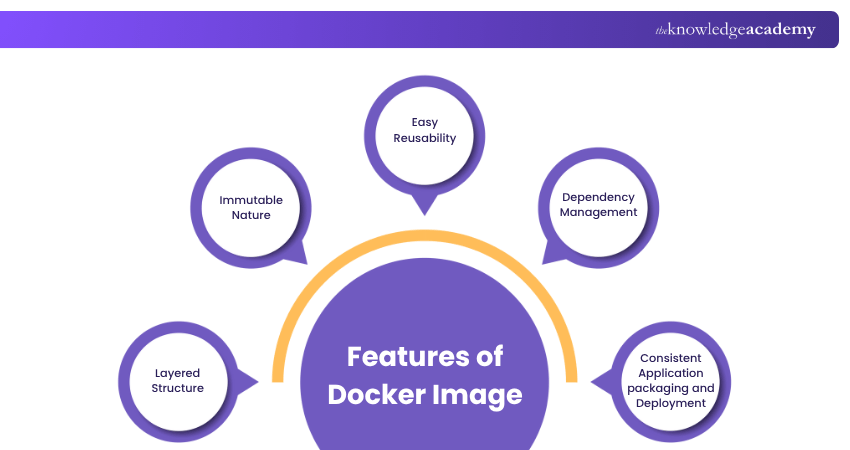
A Docker Image is a fundamental concept in the world of containerisation. It represents a precise snapshot of a specific application or service along with its entire runtime environment. Consider these points:
1) Think of Docker Images as blueprints for creating containers. They allows applications to run consistently across different infrastructures.
2) Docker Images contain the necessary components, like source code, system libraries, dependencies, configurations, and runtime environment.
3) They ensure application consistency across environments, from development to the final production stage.
4) Images are built using instructions specified in a Dockerfile. They outline steps like defining a base image, installing software, and setting configurations.
5) Once created, images can be stored and shared in Docker registries for easy distribution and deployment.
6) Docker Images are essential for packaging applications with dependencies, simplifying deployment, and ensuring software consistency.
7) Mastering Docker Image Commands is crucial for effective container orchestration in modern Software Development.
Build coding confidence and bridge Dev and Ops like a pro! Sign up for our Certified DevOps Professional (CDOP) Training now!
What is a Docker Container?
A Docker Container is a lightweight, standalone and executable package containing everything required to run a piece of software, including the runtime environment, code, system tools, libraries, and settings. Here are some key points to remember:
1) Containers are at the heart of containerisation technology, with Docker being a leading platform.
2) They provide a consistent, isolated runtime environment for applications.
3) Containers are based on Docker Images and serve as blueprints for creating container instances.
4) Running a container means launching an isolated instance of a Docker Image, separate from other containers and the host system.
5) Docker Containers are lightweight and quick, sharing the host OS kernel to start and stop rapidly.
6) Multiple containers can function on the same host without interference, which is ideal for microservices and DevOps.
7) Containers enable consistent and reproducible application packaging, which simplifies the deployment and scaling process.
8) They abstract and encapsulate applications to transform how software is developed, shipped and maintained.
Master docker and build, ship and scale like a pro! Sign up for our comprehensive Docker Training now!
Difference Between Docker Images and Containers
The Docker ecosystem is a framework where both Docker Images and containers work together. Knowing their key difference is crucial for understanding how Docker operates. Although they might seem similar, each has its own role and function in the docker workflow.
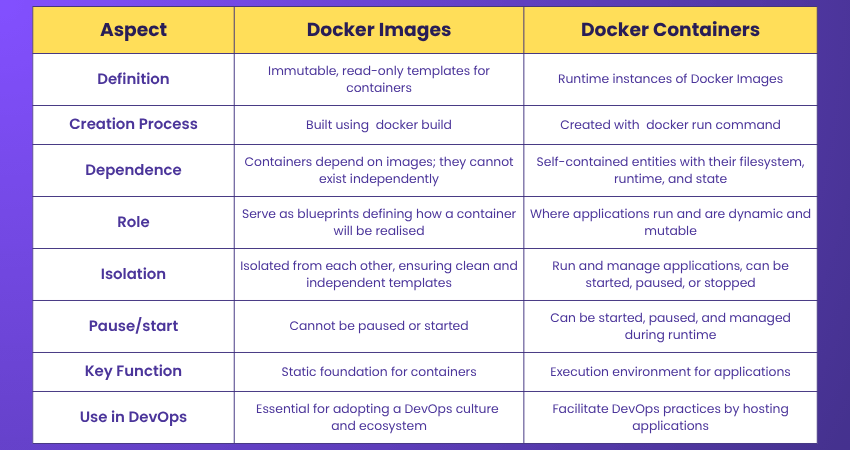
How do Docker Images and Containers Work Together?
Docker images are the blueprints that contain the application's code, dependencies, and configurations, while containers are the runnable instances of those images. An image is like a snapshot, while a container is a running instance created from that snapshot.
When to Use Docker Images and Containers?
Docker images and containers help maintain consistent environments, making deployment easier and isolating applications effectively. They’re great for CI/CD, Cloud-based apps and testing. However, they’re not suitable for apps with heavy GUIs or those needing full VM isolation.
Conclusion
Knowing the difference between Docker Image vs Container helps you use docker better. In this concept, images act as the blueprint, while containers are the running versions of those blueprints. By understanding both, you can easily deploy apps, keep them consistent, and scale them across different setups.
Ready to earn your DevOps badge of honour? Sign up for our DevOps Certification now!
Frequently Asked Questions
What's the Main Difference Between a Docker Image and a Container?

A Docker container is a separate space where an application and all its necessary files and libraries run. On the other hand, a Docker image is a set of instructions for creating that container. So, images build the containers, and containers run the application.
Can Docker Containers Exist Without Images?
No, you need Docker images to create containers because they contain the setup and required components. However, images can exist without a Dockerfile, as you can download them directly from registries like Docker Hub.
What are the Other Resources and Offers Provided by The Knowledge Academy?
The Knowledge Academy takes global learning to new heights, offering over 3,000+ online courses across 490+ locations in 190+ countries. This expansive reach ensures accessibility and convenience for learners worldwide.
Alongside our diverse Online Course Catalogue, encompassing 17 major categories, we go the extra mile by providing a plethora of free educational Online Resources like Blogs, eBooks, Interview Questions and Videos. Tailoring learning experiences further, professionals can unlock greater value through a wide range of special discounts, seasonal deals, and Exclusive Offers.
What is The Knowledge Pass, and How Does it Work?
The Knowledge Academy’s Knowledge Pass, a prepaid voucher, adds another layer of flexibility, allowing course bookings over a 12-month period. Join us on a journey where education knows no bounds.
What are the Related Courses and Blogs Provided by The Knowledge Academy?
The Knowledge Academy offers various DevOps Certification, including the Certified DevOps Professional Course and the DevSecOps Foundation Certification. These courses cater to different skill levels, providing comprehensive insights into DevOps Engineer Job Description.
Our Programming & DevOps Blogs cover a range of topics related to docker images and containers, offering valuable resources, best practices, and industry insights. Whether you are a beginner or looking to advance your DevOps skills, The Knowledge Academy's diverse courses and informative blogs have got you covered.

Lily Turner


Senior AI/ML Engineer and Data Science Author
Lily Turner is a data science professional with over 10 years of experience in artificial intelligence, machine learning, and big data analytics. Her work bridges academic research and industry innovation, with a focus on solving real-world problems using data-driven approaches. Lily’s content empowers aspiring data scientists to build practical, scalable models using the latest tools and techniques.
View Detail

 If you wish to make any changes to your course, please


