


 Top Rated Course

We may not have the course you’re looking for. If you enquire or give us a call on +40 316317743 and speak to our training experts, we may still be able to help with your training requirements.
Computer Telephony Integration: Systems and Benefits
The Knowledge Academy 16 July 2026Computer Telephony Integration connects telephone systems with computers, enabling features like call routing, screen pops, and improved Customer Support. CTI aims to improve call centre efficiency, improve Customer Service by providing agents with relevant information, and streamline communication processes.

Training Outcomes Within Your Budget!
We ensure quality, budget-alignment, and timely delivery by our expert instructors.
Table of Contents
One of the highlights of the digital age is the lightning-fast communication it enables. It's not just an option anymore; it's a ubiquitous component that we can’t live without. But do you know what enables smarter, faster and more personalised customer interactions? It's the power of Computer Telephony Integration (CTI).
From screen pop-ups to automated call routing, CTI has revolutionised how businesses handle communication and turning ordinary calls into data-rich experiences. This blog breaks down everything you need to know about Computer Telephony Integration including its features, benefits and challenges. So read on and explore this world where computers and telephones don’t just coexist; they collaborate!
Table of Contents
1) What is Computer Telephony Integration (CTI)?
2) How Does Computer Telephony Integration Work?
3) Functions of Computer Telephony Integration (CTI)
4) Benefits of Computer Telephony Integration (CTI)
5) How to Implement CTI in Your Business
6) Key Challenges and Considerations
7) How to Choose a Computer Telephony Integration (CTI)?
8) Conclusion
What is Computer Telephony Integration (CTI)?
Computer Telephony Integration (CTI) is a technology that lets computers work with phone systems. It allows users to manage phone calls using a computer, which is especially useful in settings such as call centres and Customer Service teams. With CTI, agents can see caller information on their screen, route calls automatically, log calls, and connect with CRM tools. All of these help them handle calls faster and better.
CTI isn't just for call centres. Businesses use it in many ways to boost communication and efficiency. For example:
1) Sales teams can click to call directly from a CRM, keep track of calls and set reminders for follow-ups.
2) IT teams can manage and monitor phone systems more easily.
As more companies use internet-based calling (VoIP), CTI has adapted to work with Cloud systems, making it easier to scale and use from anywhere.

How Does Computer Telephony Integration Work?
Rather than functioning as a standalone product, CTI is generally integrated within broader platforms, such as call centres or Customer Service software. The CTI process involves several key elements:
1) Connection: CTI links your computer systems with telephone networks through traditional phone lines, a Local Area Network (LAN), or the internet using Voice over Internet Protocol (VoIP).
2) Handling Calls: It enables features such as click-to-dial, on-screen caller information, and intelligent call routing based on criteria like language preferences or customer status.
3) Data Updates: When a call is made or received, CTI automatically retrieves and updates customer information, including order history, previous interactions, and preferences.
4) Smart Features: CTI can record calls, allow managers to listen in live, and provide useful reports, such as call duration or customer wait times. These insights help in optimising Customer Service operations.
5) AI and Automation: CTI systems can automate repetitive tasks such as generating call summaries or transcriptions, saving time and boosting operational efficiency.
Take control of IT support challenges with ease and elevate your skills with our Service Desk Senior Analyst Training - Sign up now!
Functions of Computer Telephony Integration (CTI)
CTI offers a wide range of functionalities that elevate how businesses handle customer interactions. The most exciting functions include the following:
1) Screen Popping
Screen popping is one of the most impactful features of CTI. When an incoming call is detected, the system automatically displays relevant caller information, such as the Automatic Number Identification (ANI) or the dialled number (SDNIS), along with customer data. This might include:
1) Customer’s name
2) Account details
3) Previous interactions
4) Support history
5) Purchase records
Screen popping equips agents with valuable context before they even answer the call, resulting in quicker and more personalised support.
2) Automated Dialling
CTI streamlines the outbound calling process through various automated dialling features. Common methods include:
1) Click-to-call: It allows agents to initiate calls directly from their computer screen by clicking a phone number within a CRM or contact list.
2) Power Dialling: It automatically dials the next number in a queue once an agent becomes available. This eliminates manual dialling delays.
3) Auto-diallers: These systems dial multiple numbers simultaneously and connect answered calls to available agents, optimising efficiency in high-volume call environments like telemarketing or debt collection.
3) Phone Controls
CTI integrates full phone functionality into the agent's desktop, thus enabling them to manage calls without needing a physical handset. Standard controls include the following:
1) Answer and Hang Up: It helps manage call flow directly from the computer interface.
2) Hold and Resume: This places the calls on hold while accessing other information or transferring the caller.
3) Mute, Conference and Transfer: It can easily manage multi-party conversations or escalate calls to supervisors or specialists.

4) Call Routing/Transferring
CTI enables sophisticated call routing mechanisms that help ensure the calls are directed to the most appropriate agent or department. Common routing strategies include:
1) Interactive Voice Response (IVR): This offers callers a menu of options to self-direct their calls using voice or keypad input.
2) Time-based Routing: This routes calls based on the time of day, day of the week or specific scheduling rules.
3) Skills-based Routing: This directs calls to agents with specific expertise or language skills.
4) Queue Prioritisation and Overflow Handling: This ensures high-priority or VIP callers are handled swiftly while managing call queues.
Go from handling tickets to leading teams Our Certified Service Desk Manager (CSDM) Course will help you out - Sign up now!
Benefits of Computer Telephony Integration (CTI)
Computer Telephony Integration offers a wide range of advantages for modern businesses. Let’s explore some of its key benefits in detail:
1) Customer Satisfaction
CTI enhances customer satisfaction by delivering faster and more personalised service. When a customer calls, agents can instantly view their history and details, eliminating the need to repeat information. This leads to quicker resolutions and a smoother, more enjoyable experience for every caller.
2) Agent Efficiency
With CTI, agents can handle calls directly from their computers, saving time and eliminating the need to switch between tools. Features like click-to-call, smart call routing, and instant access to customer data help them work faster, make fewer mistakes, and stay focused.
3) Workforce Motivation
CTI provides agents with the tools and support they need to perform effectively. When tasks become easier and less stressful, overall job satisfaction improves. Additionally, built-in performance tracking and feedback tools enable managers to recognise achievements and keep teams motivated.
4) Seamless Scalability
CTI systems are easy to scale, making them great for growing businesses. Whether you're opening new offices or getting more calls, CTI can grow with you, especially with Cloud-based options that don’t require big changes to your setup.
How to Implement CTI in Your Business
Implementing CTI can boost your business’s communication and efficiency. Here’s a simple step-by-step approach to get started:
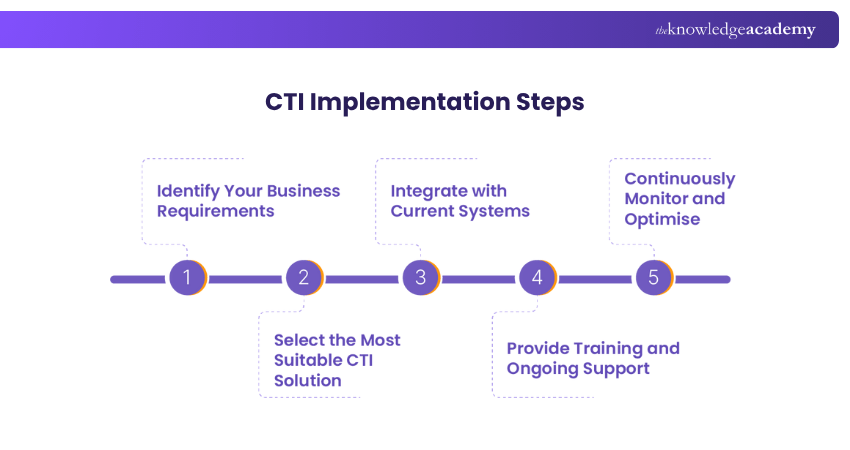
1) Identify Your Business Requirements
Start by assessing what your business truly needs. Consider the number of calls you handle, the size of your team, and what you aim to achieve with CTI. Understanding these factors will help you choose the most suitable solution for your organisation.
2) Select the Most Suitable CTI Solution
Explore different CTI options and compare them based on your goals. Look for features such as smart call routing, customer data integration, and built-in analytics. Ensure the provider offers strong security, reliable performance, and responsive customer support.
3) Integrate with Current Systems
Select a CTI system that integrates seamlessly with your existing tools, such as CRM or helpdesk platforms. A smooth integration boosts efficiency and minimises disruptions. You may need assistance from your IT team or an external specialist to configure it correctly.
4) Provide Training and Ongoing Support
Once your CTI system is in place, train your staff to use it confidently. Good training helps them make the most of the new features. Make sure your provider also offers ongoing support, updates and technical help when needed.
5) Continuously Monitor and Optimise
Keep an eye on how the system is performing. Utilise the analytics and reports to identify trends, monitor customer satisfaction, and assess call efficiency. Regular reviews and updates will help keep the system aligned with your goals and working at its best.
Be the trusted expert for every tech challenge.
Sign up for our Certified Service Desk Support Technician Training and deliver seamless, reliable IT support every time!
Key Challenges and Considerations
While Computer Telephony Integration brings many advantages, there are a few challenges to keep in mind during implementation:
1) Integration Complexity
Connecting CTI with your current systems isn’t always straightforward. It requires a solid understanding of both your existing setup and the CTI tools. Careful planning, testing, and technical support are key to making integration smooth and successful.
2) Ensuring Data Security and Privacy
CTI systems handle sensitive customer information, so strong data protection is essential. You’ll need to put in place strict security protocols and ensure the system complies with relevant privacy laws to avoid risks and protect customer trust.
3) Implementation Costs
Setting up CTI can be expensive at first. Costs may include software licences, hardware upgrades and possibly hiring specialists to manage the setup. Even though the initial investment may be high, the long-term benefits in productivity and service quality can make it worthwhile.
4) Encouraging User Adoption
Getting your team comfortable with a new system can take time. It’s important to provide clear, hands-on training and continued support to help staff adapt. The better they understand the system, the more effectively they’ll use it.
How to Choose a Computer Telephony Integration (CTI)?
Selecting the right CTI provider is crucial to maximising your investment. You need a solution that goes well with your business goals, integrates with existing tools and provides resilient support. Here are the key factors to consider:
1) System Compatibility
1) Make sure your CTI solution integrates seamlessly with existing systems like Customer Relationship Management (CRM), help desk, and communication tools.
2) Poor integration can disrupt workflows and reduce the effectiveness of your CTI investment.
3) Always request live demos to test integration capabilities in real-time.
4) Use demos to identify any compatibility issues before implementing the full solution.
2) Cost Efficiency
1) Don’t focus solely on the initial cost. Instead, factor in setup fees, monthly charges, and costs for premium features or support.
2) Evaluate the total cost in relation to long-term savings like reduced labour and increased efficiency.
3) Consider the benefits of improved customer retention and reduced lost sales.
4) Build an ROI forecast to estimate savings in key areas like agent productivity, customer churn, and sales performance.
3) Support Quality
1) CTI systems can be complex and require dependable technical support.
2) Choose a provider with a reputation for fast, helpful, and knowledgeable customer service.
3) Reliable support ensures minimal disruption to your daily operations.
4) Request client references to validate the provider’s quality of support.
5) Read online reviews to assess real customer experiences with their service.
4) Scalability Planning
1) Choose a CTI solution that can be scaled with the growth of your business.
2) Make sure it supports adding users, expanding locations, and new feature adoption.
3) A flexible platform prevents the need for expensive system overhauls later.
4) Inquire about scalability options, such as Cloud deployment and modular pricing.
5) Planning for growth now helps avoid upgrade challenges in the future.
5) Security Compliance
1) Handling sensitive customer data needs the strongest security measures possible.
2) Pick a CTI provider that complies with regulations like GDPR or HIPAA.
3) Make sure the solution includes Encryption, user access controls and regular security audits.
4) Request details on the provider’s security certifications and compliance standards.
5) Review their data protection policies to ensure your information remains secure.
Conclusion
Computer Telephony Integration is a powerful tech upgrade and a smarter way to connect with customers. By linking phones and computers, CTI streamlines the communication process, boosts efficiency and elevates customer experiences like never before. As businesses grow and expectations rise, CTI offers the edge you need to stay ahead.
Start reshaping strategy and lead IT service excellence like never before. Sign up for our SDI Training now!
Frequently Asked Questions
What is the CTI Lifecycle?

The CTI lifecycle refers to the stages involved in planning, implementing, managing, and optimising CTI systems within a business. It includes the following:
1) Planning & Needs Assessment
2) Solution Selection
3) System Integration & Deployment
4) Training and User Adoption
5) Monitoring & Support
6) Optimisation & Scaling
What are the Sources of CTI Data?
The sources of CTI data come from multiple systems, such as:
1) Telephony systems like Private Branch Exchange (PBX)
2) Customer Relationship Management (CRM) systems
3) Helpdesk or ticketing systems
4) Interactive Voice Response (IVR) systems
5) Workforce Management systems
6) Analytics and reporting tools

The Knowledge Academy


Global Training Provider
The Knowledge Academy is a world-leading provider of professional training courses, offering globally recognised qualifications across a wide range of subjects. With expert trainers, up-to-date course material, and flexible learning options, we aim to empower professionals and organisations to achieve their goals through continuous learning.


 If you wish to make any changes to your course, please


