




 To help and support our clients we are providing a limited number of 250 daily discount codes. Hurry, first come, first served!



Microsoft Project Training FAQs
Microsoft Project is a project management software used to plan, schedule, and track tasks, resources, and timelines. It helps teams manage project progress, control costs, and deliver projects more efficiently.
This Microsoft Project Training is important because it helps delegates plan projects effectively, manage resources, and track progress with confidence. It supports better decision making, improved efficiency, and successful project delivery in real world environments.
Pursuing these courses helps delegates build practical skills, improve professional confidence, and enhance career progression. They also support stronger performance at work by enabling better planning, problem solving, and decision making skills.
There are no formal Prerequisites for attending this Microsoft Project Training Course.
Microsoft Project Training delivers practical, job‑ready skills in a short timeframe. Delegates quickly gain confidence in planning, tracking, and managing projects through hands‑on learning. With guidance from The Knowledge Academy, one of the best training providers, learners become proficient fast.
In this course, delegates will have intensive training with our experienced instructors, a digital delegate pack consisting of important notes related to this course, and a certificate after course completion.
This Microsoft Project Training is a 1-day intensive learning covering the essential skills of Project Management using Microsoft Project.
You will learn how to plan schedules, assign resources, set dependencies, and track progress in Microsoft Project. The course also builds skills in cost control, timelines, reporting, and performance analysis. With The Knowledge Academy as a Global Training Provider, you gain practical, job‑ready project skills.
Microsoft Project Courses cover topics in project planning, scheduling, resource allocation, budgeting, tracking progress, producing reports, and advanced capabilities of Microsoft Project.
Yes, The Knowledge Academy offers support via phone & email for the Microsoft Project courses. Our customer support team is available to assist and promptly resolve any issues delegates may encounter.
At The Knowledge Academy, one of the best training providers, we offer flexible learning options across in Paraguay, including online, in‑person and self‑paced courses, ensuring you can easily access this Microsoft Project Course either nearby or online.
Yes, after completing Microsoft Project Training you will receive a Microsoft Project Certification to validate your achievement and demonstrate your proficiency in the course material.
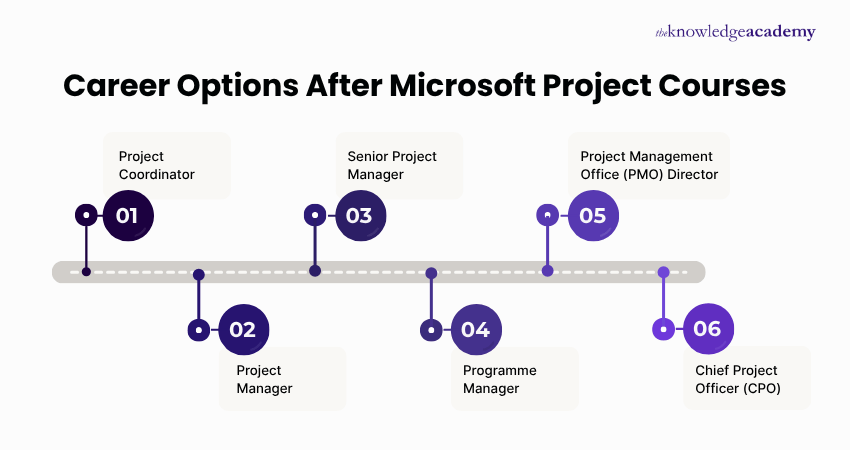
Completing Microsoft Project Training opens roles such as Project Coordinator, Project Planner, and Project Administrator. You can also support Project Managers with scheduling, resource allocation, and progress tracking across industries. With a trusted courses provider like The Knowledge Academy, these skills strengthen your employability.
If you face any issues in accessing the Microsoft Project certification, then you can reach out to our customer support team who will provide you with quick assistance to resolve the issue.
The Knowledge Academy stands out as a prestigious training provider known for its extensive course offerings, expert instructors, adaptable learning formats, and industry recognition. It's a dependable option for those seeking this certification.
Please see our Microsoft Project Training available in Paraguay
The Knowledge Academy is one of the Leading global training provider for Microsoft Project Training.
The training fees for Microsoft Project Training in Paraguay starts from $1295

Why we're the go to training provider for you

Best price in the industry
You won't find better value in the marketplace. If you do find a lower price, we will beat it.

Trusted & Approved
Recognised by leading certification bodies, we deliver training you can trust.

Many delivery methods
Flexible delivery methods are available depending on your learning style.
High quality resources
Resources are included for a comprehensive learning experience.





"Really good course and well organised. Trainer was great with a sense of humour - his experience allowed a free flowing course, structured to help you gain as much information & relevant experience whilst helping prepare you for the exam"
Joshua Davies, Thames Water



Looking for more information on Microsoft Project Training
What is Microsoft Project? Complete Beginner’s Guide Top 27 Microsoft Project Interview QuestionsMicrosoft Project Plan: Features, Pricing, and How to UseTop Microsoft Project Alternatives for Project Management in 2026Microsoft Planner vs Project: Which Tool Should You Use?How to Show Critical Path in Microsoft Project?Convert Microsoft Project to Excel: Step-by-Step GuideWhat is Microsoft Project Viewer: Top MS Project Viewers You Should Know
Top 27 Microsoft Project Interview QuestionsMicrosoft Project Plan: Features, Pricing, and How to UseTop Microsoft Project Alternatives for Project Management in 2026Microsoft Planner vs Project: Which Tool Should You Use?How to Show Critical Path in Microsoft Project?Convert Microsoft Project to Excel: Step-by-Step GuideWhat is Microsoft Project Viewer: Top MS Project Viewers You Should Know 


 If you wish to make any changes to your course, please


