


 Top Rated Course

We may not have the course you’re looking for. If you enquire or give us a call on + 1-866 272 8822 and speak to our training experts, we may still be able to help with your training requirements.
What is Google Cloud Storage? All You Need to Know
Lily Turner 14 July 2026Google Cloud Storage is an online service that lets you store and access files like photos, videos, and documents from anywhere. It keeps your data safe with backups and security features. Businesses and individuals use it to save space, protect important files, and share data easily. With flexible storage options, it’s a reliable way.

Training Outcomes Within Your Budget!
We ensure quality, budget-alignment, and timely delivery by our expert instructors.
Table of Contents

Imagine having all your important files, photos, and videos stored in a secure place where they never get lost; no more worrying about crashed hard drives or misplaced USBs. That’s exactly what Google Cloud Storage (GCS) offers! It’s a powerful, flexible, and reliable way to store and access your data from anywhere in the world. Whether you’re an individual keeping personal memories safe or a business handling a massive dataset, Google has you covered.
With Google Cloud Storage, you get security, scalability, and convenience in one package. Need to share files with a team? Want automatic backups? It’s all possible with just a few clicks. Ready to explore the future of storage? Let’s dive in!
Table of Contents
1) What is Google Cloud Storage?
2) Key Features of Google Cloud Storage
3) Google Cloud Storage Classes
4) What are the Different Google Cloud Storage Options?
5) Cloud Storage Tools
6) Google Cloud Storage Use Cases
7) Google Cloud Pricing Options
8) Does Cloud Storage Work for Personal Photos, Videos, and Files?
9) How Does Cloud Storage Differ from Other Types of Storage?
10) Conclusion
What is Google Cloud Storage?
Google Cloud Storage (GCS) is a scalable and secure object storage service provided by Google. It enables users to store, manage, and retrieve data reliably and efficiently. Data in GCS can be accessed through APIs, web interfaces, or command-line tools, making it versatile for various applications.
GCS supports a wide range of use cases, including backups, media serving, and data analytics. It ensures high durability and availability by replicating data across multiple regions. Users can manage permissions, access control, and security through integrated tools, enhancing data protection.
With flexible storage classes, GCS helps optimise costs based on usage patterns and needs. Overall, GCS offers robust cloud storage solutions suitable for organisations of all sizes.
Key Features of Google Cloud Storage
Google Cloud Storage offers a broad range of features to efficiently and reliably store, share, and manage data:
1) High Capacity and Scalability: It supports storing objects of up to 5 terabytes per object and allows the creation of multiple buckets within a project. The system is designed to scale automatically to handle large volumes of data.
2) Strong Data Consistency: Google Cloud Storage ensures strong read-after-write consistency for uploads and deletes. Once an object is uploaded, you can immediately download, delete, or access its metadata. Any attempt to access a deleted object promptly returns a 404 Not Found status. List operations are eventually consistent from anywhere on the Internet.
3) High Availability and Durability: Objects are not available until they are fully uploaded, ensuring there are no partial uploads. Google Cloud Storage is designed for 99.999999999% (11 9’s) durability and high availability, with automatic redundancy across regions (if configured).
4) Google Developers Console Projects: It's accessible through the Google Developers Console, allowing you to manage project members, billing, authentication, and work with various APIs. You can have multiple projects, each with its Google Cloud Storage instance.
Get started with Google BigQuery and master analytics using the Google BigQuery Training. Sign up now!
5) Bucket Locations: You can specify geographic storage locations for your buckets, choosing between Europe and the US.
6) REST APIs: Google Cloud Storage provides two RESTful programming interfaces (XML and JSON APIs) for creating applications using standard HTTP methods.
7) OAuth 2.0 Authentication: It utilises OAuth 2.0 authentication and authorisation, allowing token-based authentication for applications to act on your behalf.
8) Authenticated Browser Downloads: You can offer browser-based authenticated downloads to individual Google account holders by setting up Google account-based ACLs and sharing a scoped URL for authenticated downloads.
9) Google Account Support for Sharing: Access Control Lists (ACLs) control access to objects and buckets, enabling sharing with the world, Google groups, Google-hosted domains, or specific Google account holders.
Google Cloud Storage Classes
In Google Cloud Storage, classes define the different tiers of data storage, each tailored to varying use cases concerning data access frequency, data retention periods, and budget requirements.
Choosing the right storage class allows you to determine the trade-off between the cost of storing your data and how often you expect to access it. Here's an explanation of each:

1) Standard: The Standard Storage Class in Google Cloud Storage is the default choice and offers the highest level of availability and performance. It's best suited for data that is accessed frequently or requires low-latency access. For instance, a media company could use the Standard Storage Class to store and deliver high-definition video content to their users, ensuring seamless streaming with minimal buffering.
2) Nearline: The Nearline Storage Class is a more economical choice for data that is accessed less frequently, typically less than once a month. While storage costs are lower, access costs are slightly higher compared to the Standard Class. An example might be a company storing monthly financial reports. These reports aren't required on a daily basis but might need to be accessed at the end of each financial quarter.
3) Coldline: The Coldline Storage Class is designed for data that users access even less frequently, typically less than once a quarter. It offers lower storage costs than Standard and Nearline but higher costs to retrieve data. An example use case could be a business storing yearly tax records. Such data doesn't need to be accessed regularly but is important to retain for compliance purposes.
4) Archive: The Archive Storage Class offers the lowest storage costs and is designed for long-term data storage with very infrequent access, typically less than once a year. While retrieval costs are the highest, Google now offers millisecond retrieval in some cases, a major improvement over older archive options. A suitable example is research institutions storing raw research data over several years with minimal need for access.
Interested in GCP? Get started with our Google Cloud Platform Fundamentals Course - Sign up now!
What are the Different Google Cloud Storage Options?
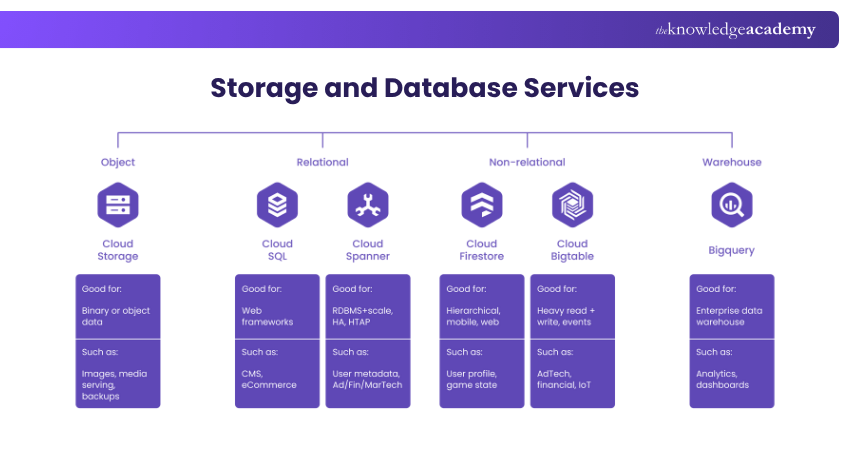
Google Cloud offers a variety of storage solutions tailored to different data types and use cases. Each storage option is crafted with features, scalability, and performance considerations. These include:
Persistent Disk
Persistent Disk is a durable, high-performance block storage service. It provides reliable, low-latency storage, ideal for Virtual Machines (VMs) and container workloads. Key features include automatic replication, snapshots, dynamic resizing, and seamless integration with Compute Engine. Persistent Disk ensures data persistence independently of VMs, making it suitable for databases, file systems, and enterprise-grade persistent storage.
Cloud Filestore
Cloud Filestore offers managed, scalable Network File Storage (NFS) on Google Cloud. It enables easy file sharing across VMs and container-based applications, making it ideal for workloads requiring shared file systems, such as content management and analytics.
Filestore ensures consistent, low-latency performance suitable for enterprise use, supports rapid storage scaling, and integrates seamlessly with Compute and Kubernetes Engine, reducing management complexity.
Develop essential Cloud Architecture skills for Google Cloud Platform by registering in our Architecting Infrastructure With Google Cloud Platform Training today!
Firestore and Bigtable
Firestore is a fully managed NoSQL document database designed for scalability. It offers real-time synchronisation, fast querying, offline access, and automatic scaling, making it ideal for mobile, web, and IoT applications requiring instant, dynamic data updates.
Bigtable is a fully managed NoSQL database optimised for massive analytical workloads. It provides high throughput, low latency, and efficiently handles petabytes of data, making it best suited for analytics, streaming, and applications needing fast data retrieval.
Cloud SQL and Cloud Spanner
Cloud SQL is a managed relational database supporting MySQL, PostgreSQL, and SQL Server. It provides automated backups, scalability, replication, and high availability with minimal management, making it ideal for traditional database applications, websites, and enterprise workloads.
Cloud Spanner is a globally distributed, scalable relational database. It combines relational database structure with global availability and strong transactional consistency, making it suitable for mission-critical, globally distributed applications requiring high performance and reliability.
Cloud Storage Tools
Mostly, there are four crucial tools that help to interact with the Google Cloud Storage Services. Let’s talk about them in the following points:
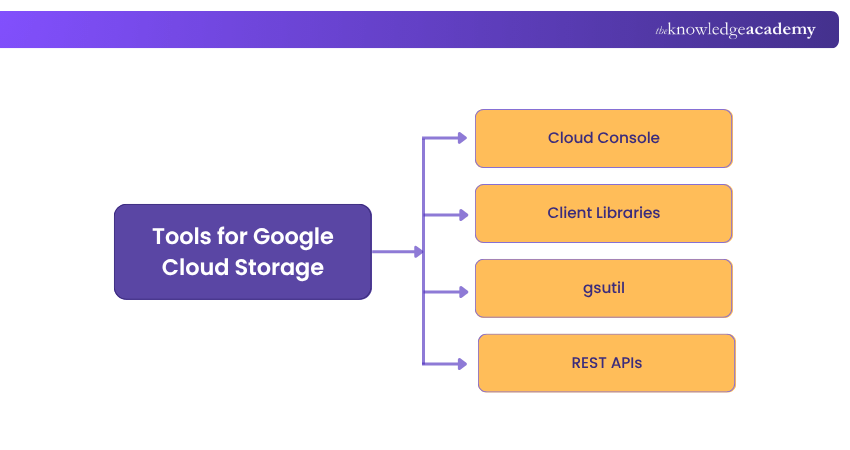
a) Cloud Console: It renders a browser-based web informational interface to handle the records.
b) Client Libraries: The client libraries permit users to effectively manage data with the help of their preferred popular programming languages. Some of those languages include C++, C#, Go, Java, Node.js, PHP, Python and Ruby.
c) gsutil: It is a standard command line tool /terminal that permits users to interact with the contents of the cloud storage in real-time.
d) REST APIs: It runs on top of the JSON or XML API that handles the data.
Google Cloud Storage Use Cases
Here are some primary use cases for Google Cloud Storage:
a) Backups and Archives: Google Cloud Storage offers cost-effective, high-durability storage for data that isn't frequently accessed. This makes it an excellent choice for reducing the expenses associated with backups and archives while maintaining quick access. The stored backup data is versatile and can be utilised for more than just recovery, thanks to low-latency access across all storage classes through a unified API.
b) Integrated Repository for Analytics and Machine Learning: Google Cloud Storage provides high availability and performance within a single region, making it well-suited for computing, analytics, and Machine Learning (ML) workloads within specific geographic areas. Its strong consistency ensures the accuracy and reliability required for analytics tasks.
c) Media Content Storage and Delivery: For low-latency, high-query-per-second content delivery to users dispersed across various geographic regions, Google Cloud Storage's geo-redundant storage with top-notch availability and performance is an optimal choice. This service caters to the availability and throughput demands for streaming audio or video directly to applications or websites.
Unleash the capabilities of cloud computing with our Google Cloud Platform Fundamentals today!
Google Cloud Pricing Options
Like other public Cloud offerings, Google Cloud services follow the pay-as-you-go model. No upfront payments are needed, and users only pay for the Cloud resources they consume. However, specific terms and rates may vary from service to service.
Some services with long-term commitments may offer discounts. For instance, committed use discounts on Compute Engine resources (such as GPUs and instance types) can yield more than 50% discounts. Google Cloud adopters must consult with in-house cloud architects and Google sales staff and utilise Cloud pricing estimation tools like Google Cloud Pricing Calculator to estimate the pricing of prospective Cloud deployments.
Does Cloud Storage Work for Personal Photos, Videos, and Files?
Yes, cloud storage works well for personal photos, videos, and files. It provides secure, scalable, and easily accessible storage from any device. You can back up, organise, and share your personal data without worrying about losing it.
How Does Cloud Storage Differ from Other Types of Storage?
Cloud storage differs from other types of storage by offering remote access via the internet, scalability, and automatic backups. Unlike local storage (like hard drives), cloud storage provides real-time syncing, easier sharing, and doesn't rely on physical devices.
Conclusion
Gain practical expertise with our Networking With Google Cloud Platform Course – Join now!
Frequently Asked Questions
Do You Have to Pay for Google Cloud Storage?

Yes, you do have to pay for Google Cloud Storage, but the cost depends on the type and amount of storage you need. Pricing is based on several factors, including the amount of data stored, the storage class (e.g., Coldline, Archive, Standard, Nearline, etc.), and the location of your data.
Is Google Cloud Safe?
Google Cloud offers excellent hardware-level security to ensure customer data is highly durable/available and safe from physical attacks. The user is ultimately responsible for any data stored in Google Cloud.

Lily Turner


Senior AI/ML Engineer and Data Science Author
Lily Turner is a data science professional with over 10 years of experience in artificial intelligence, machine learning, and big data analytics. Her work bridges academic research and industry innovation, with a focus on solving real-world problems using data-driven approaches. Lily’s content empowers aspiring data scientists to build practical, scalable models using the latest tools and techniques.
View Detail

 If you wish to make any changes to your course, please


