Business Intelligence Reporting

Online Instructor-led (1 days)

Online Self-paced (8 hours)

Microsoft Power BI Course Outline

Module 1: Introduction to Power BI

  • What is Power BI?
  • Power BI Service
  • Power BI Report Server
  • Reports and Dashboards
  • Datasets
  • Row-Level Security
  • Natural Language Queries

Module 2: Data Sources

  • Updating Files in Power BI
  • Power BI Data Model
  • Hierarchies

Module 3: Formatting and Combining Data

  • Formatting Data
  • Combining Data

Module 4: Modelling Data

  • What are the Relationships?
  • What is DAX?
  • Syntax
  • Functions
  • Context
  • Calculated Columns
  • Measures

Module 5: Interactive Data Visualisations

  • Creating Charts
  • Histograms
  • Power BI Admin Portal
  • Report Settings

Show moredown

Who Should Attend this Microsoft Power BI Course?

The Microsoft Power BI Certification is designed to equip delegates with the skills and knowledge needed to effectively use Microsoft Power BI, a powerful business intelligence and data visualisation tool. The Microsoft Power BI Course is especially useful for the following professionals:

  • Business Analysts
  • Data Analysts
  • Data Scientists
  • Managers
  • Information Technology (IT) Professionals
  • Team Leaders
  • Visualisation Specialists

Prerequisites of the Microsoft Power BI Course

There are no formal prerequisites for the Microsoft Power BI Certification Training. However, a basic understanding of Business Analytics and Data Visualisation can be beneficial.

Microsoft Power BI Course Overview

Microsoft Power BI Training explores a powerful reporting tool used to analyse data and present insights visually. Delegates learn how interactive dashboards and reports support clearer data interpretation and performance monitoring.

This training helps delegates transform raw data into meaningful visual insights for informed decision-making. By developing reporting and data visualisation skills, delegates improve accessibility and cross-department analysis.

This 1-Day Microsoft Power BI Course offered by The Knowledge Academy enables delegates to apply Microsoft Power BI techniques confidently. Delegates gain practical insight into publishing reports, integrating organisational data, and sharing dashboards effectively.

Microsoft Power BI Course Objectives

  • To understand Microsoft Power BI fundamentals and reporting features 
  • To extract, analyse, and interpret large data for decisions 
  • To publish reports on the Power BI Report Server 
  • To unify organisational data using Cloud platforms 
  • To build personalised dashboards for ad-hoc analysis 
  • To share data insights with stakeholders efficiently 

Upon completing this Microsoft Power BI Course, delegates master Microsoft Power BI, converting data into actionable insights for informed decision-making and strengthening their capabilities as analysts in a data-driven environment.

Show moredown

What’s Included in this Microsoft Power BI Course?

  • World-class Training Sessions from Experienced Instructors
  • Microsoft Power BI Training Certificate
  • Digital Delegate Pack

Show moredown

Online Instructor-led (1 days)

Online Self-paced (8 hours)

Crystal Reports Training Outline

Module 1: Introduction to SAP Crystal Reports

  • What is SAP Crystal Reports?
  • History and Evolution
  • Benefits of Using SAP Crystal Reports

Module 2: Getting Started with SAP Crystal Reports

  • Understanding the Interface
  • Exploring the Toolbars and Menus
  • Connecting to Databases

Module 3: Creating Basic Reports

  • Setting Up a New Report
  • Adding Fields and Data Sources
  • Formatting and Layout Basics
  • Applying Sorting and Filtering
  • Using Grouping and Summaries

Module 4: Working with Formulas and Parameters

  • Introduction to Formula Fields
  • Commonly Used Functions
  • Creating and Using Parameters
  • Conditional Formatting with Formulas

Module 5: Enhancing Reports with Visuals and Sections

  • Adding Charts and Graphs
  • Using Cross-Tab Reports
  • Implementing Sections
  • Conditional Formatting for Better Readability

Module 6: Exporting and Sharing Reports

  • Exporting to PDF, Excel, Word, and Other Formats
  • Setting Up Print and Page Setup Options
  • Automating Report Distribution
  • Scheduling Reports

Show moredown

Who Should Atend this Crystal Reports Training Course?

The Crystal Reports Training Course is a comprehensive course designed to provide delegates with advanced skills in using Crystal Reports, a powerful business intelligence tool for designing and generating interactive reports from various data sources. This course is useful for the following professionals:

  • Business Analysts
  • Report Designers
  • Data Analysts
  • Information Technology (IT) Professionals
  • Managers
  • Team Leaders
  • Business Intelligence Professionals

Prerequisites of the Crystal Reports Training Course

There are no formal prerequisites for the Crystal Reports Course. However, a basic understanding of business analytics and Crystal Reports could be beneficial.

Crystal Reports Training Course Overview

The Crystal Reports is one of the most effective tools for creating and producing dynamic business intelligence reports. Knowledge of this tool helps professionals in making smarter business choices.

Data analysts, reporters and business intelligence specialists would find it advantageous to master Crystal Reports. It aids in the conversion of raw data to easily comprehensible and visually appealing reports.

This 1-Day Crystal Reports Training covers report design, data visualisation, and advanced features. Delegates gain real-life experience, preparing them to confidently utilise Crystal Reports in their workplace.

Crystal Reports Training Course Objectives

  • To grasp the fundamentals of Crystal Reports
  • To design visually compelling and insightful reports
  • To use advanced features for enhanced reporting
  • To analyse and interpret data effectively
  • To create dynamic and interactive reports
  • To apply Crystal Reports for data-driven decision-making

Upon Crystal Reports Training Course completion, delegates will possess the expertise to utilise Crystal Reports to create impactful reports, interpret data, and facilitate better decision-making within their organisations.

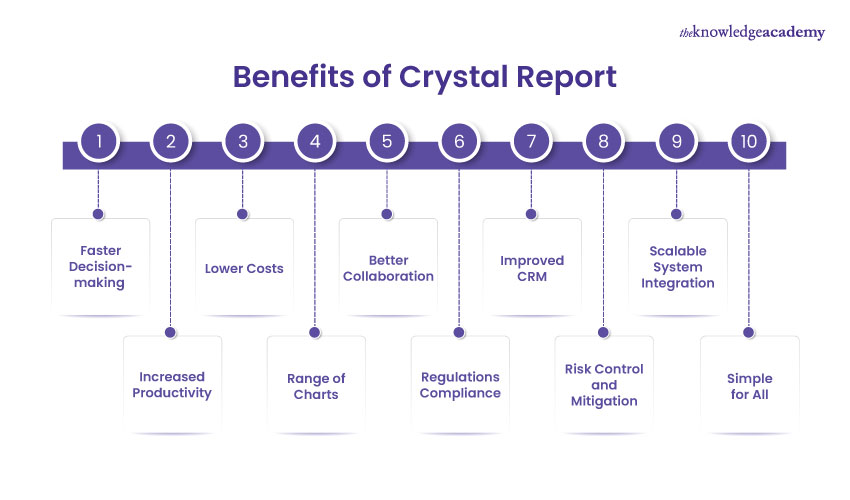
Benefits of Crystal Report

Benefits of Crystal Report

Crystal Reports is a powerful business intelligence tool designed to convert raw data into interactive, insightful reports. Let us break down ten major benefits that make it a valuable asset for data-driven organisations.

  • Faster Decision-Making: Get real-time insights for quicker strategic responses
  • Lower Costs: Reduce overhead by automating data reporting tasks
  • Better Collaboration: Share unified reports across departments for seamless teamwork
  • Improved CRM: Enhance customer relationships with data-backed insights
  • Scalable System Integration: Easily integrate with ERP and other platforms
  • Simple for All: User-friendly interface suitable for technical and non-technical users
  • Increased Productivity: Streamline operations by eliminating manual reporting
  • Range of Charts: Visualise complex data using versatile chart options
  • Regulations Compliance: Ensure data reporting meets industry standards
  • Risk Control and Mitigation: Identify and address issues before they escalate

Show moredown

What’s Included in this Crystal Reports Training Course?

  • World-class Training Sessions from Experienced Instructors
  • Crystal Reports Certificate
  • Digital Delegate Pack

Show moredown

Online Instructor-led (1 days)

Online Self-paced (8 hours)

Cognos BI Reporting Course Outline

Module 1: Cognos BI Reporting Fundamentals

  • Types of Data
  • Data Processing
  • Introduction and Stages of Data Processing
  • Business Intelligence
  • Introduction and Trends in Business Intelligence
  • Business Intelligence Advantages
  • Reporting Fundamentals
  • Report Objects
  • Objects
  • Objects as Containers
  • Locking and Unlocking Objects
  • Hierarchy of Objects

Module 2: Creating a Dashboard or Story

  • General Workflow Steps to Create a View

Module 3: Report Components

  • Toolbox Tab
  • Source Tab
  • Toolbar and Menu
  • On-Demand Toolbar
  • Navigation Menu
  • User Interface

Module 4: Creating Reports

  • Introduction to Active Report
  • Two Types of Objects
  • Active Report Controls
  • Active Report Variables
  • Summary Functions
  • Combined Filters
  • Custom Filters

Module 5: Creating Charts

  • Column Charts
  • Line Charts
  • Scatter Charts
  • Pie Charts
  • Column-Line Charts
  • XML Specification
  • Access Permissions

Show moredown

Who Should Attend this Cognos BI Reporting Training Course?

The Cognos BI Reporting is a comprehensive training course designed to provide delegates with the skills and knowledge needed to effectively use Cognos Business Intelligence (BI) for creating insightful and interactive reports and dashboards. The course is suitable for the following professionals:

  • Business Analysts
  • Report Designers
  • Data Analysts
  • Managers
  • Information Technology Professionals
  • Data Scientists
  • Team Leaders

Prerequisites of the Cognos BI Reporting Training Course

There are no formal prerequisites for the Cognos BI Reporting Course. However, a basic understanding of business analytics and report making can be beneficial.

Cognos BI Reporting Training Course Overview

The Cognos BI Reporting Course introduces delegates to Cognos Business Intelligence, a robust platform designed for reporting, analysis, and data visualisation. Cognos BI is a vital tool for organisations aiming to transform raw data into actionable insights. This course explores the fundamentals of the platform and its relevance in the context of modern business intelligence.

Professionals involved in data analysis, reporting, and decision-making should aim to master Cognos BI. This platform is essential for Business Analysts, Data Scientists, and Professionals seeking to harness the power of data for strategic decision-making. Cognos BI proficiency allows users to create dynamic reports, analyse trends, and gain valuable insights from their data.

This 1-day training provided by The Knowledge Academy delves into Cognos BI Reporting, covering key aspects such as report creation, data visualisation, and interactive dashboards. Delegates engage in hands-on exercises, gaining practical experience leveraging Cognos BI for effective reporting. The training equips delegates with the skills needed to utilise Cognos BI to its full potential.

Course Objectives

  • To understand the fundamentals of Cognos Business Intelligence
  • To create dynamic and visually appealing reports
  • To utilise interactive dashboards for data presentation
  • To analyse and interpret data effectively using Cognos BI
  • To employ advanced features for enhanced reporting
  • To apply Cognos BI for data-driven decision-making

Upon course completion, delegates will possess the skills to navigate and utilise Cognos BI for creating impactful reports, analysing data trends, and contributing to more informed decision-making processes within their organisations.

Show moredown

What’s Included in this Cognos BI Reporting Training Course?

  • World-Class Training Sessions from Experienced Instructors
  • Cognos BI Reporting Certificate
  • Digital Delegate Pack

Show moredown

Online Instructor-led (1 days)

Online Self-paced (8 hours)

Business Objects Reporting​ Course Outline

Module 1: Business Objects Environment

  • Documents
  • Reports and Blocks
  • Classes and Objects
  • Report Formatting
  • Adding New Reports to a Document

Module 2: User Interface

  • Toolbars 
  • Help
  • Status Bar

Module 3: Universe Designer IDT/UDT

  • Introduction
  • CMS
  • Software Admin
  • Security
  • Database Structure
  • Publications

Module 4: Opening and Retrieving Documents

  • Opening, Saving, and Closing Documents
  • Create Element Link

Module 5: Modifying Reports and Analysing Data

  • Creating Sections in Reports
  • Adding Breaks

Module 6: Creating and Editing Queries

  • Understanding Queries
  • Editing Query
  • Rename a Query
  • Add a Query
  • Delete a Query

Show moredown

Who Should Attend this Business Objects Reporting Course?

The Business Objects Reporting Course is ideal for professionals seeking to enhance their skills in data analysis and reporting using the Business Objects platform. This course can benefit a wide range of professionals, including:

  • Business Analysts
  • Data Analysts
  • Financial Analysts
  • Project Managers
  • Reporting Specialists
  • Business Intelligence Professionals
  • Data Scientists

Prerequisites of the Business Objects Reporting Course

There are no formal prerequisites for this Business Objects Reporting Course.

Business Objects Reporting Course Overview

The Business Objects Reporting Course introduces delegates to the critical aspects of using Business Objects for effective reporting within organisational contexts. Business Objects is a powerful business intelligence tool that enables users to extract, analyse, and present data visually. Understanding this tool's capabilities is vital for professionals harnessing data insights and facilitating informed decision-making processes.

Professionals in roles such as Business Analysts, Data Analysts, and decision-makers should aim to master Business Objects Reporting. Creating comprehensive and visually appealing reports is essential for those involved in data-driven decision-making. Business Objects proficiency allows users to transform raw data into meaningful insights, facilitating better understanding and communication of key business metrics.

This 1-day training offered by The Knowledge Academy delves into the functionalities of Business Objects, covering topics such as report creation, data visualisation, and dashboard development. Delegates engage in hands-on exercises, gaining practical experience designing impactful reports and utilising Business Objects to present data effectively within their respective professional domains.

Course Objectives

  • To understand the fundamentals of Business Objects Reporting
  • To create visually appealing and insightful reports
  • To analyse and interpret data using Business Objects
  • To design and develop effective dashboards
  • To enhance skills in data visualisation and presentation
  • To apply Business Objects for informed decision-making

Upon course completion, delegates will acquire the skills to generate impactful reports, derive valuable insights from data, and contribute significantly to data-driven decision-making processes within their organisations.

Show moredown

What’s Included in this Business Objects Reporting Course?

  • World-Class Training Sessions from Experienced Instructors
  • Business Objects Reporting Certificate
  • Digital Delegate Pack

Show moredown

Online Instructor-led (1 days)

Online Self-paced (8 hours)

Business Objects Web Intelligence Reporter Course Outline

The Business Objects Web Intelligence Reporter Course explores the following topics:

Module 1: Web Intelligence Launch Pad

  • Opening Documents in the Reading View
  • Folders and Categories

Module 2: Working in the Java Enabled Design View

  • Documents
  • Reports
  • Blocks (Vertical Tables, Horizontal Tables, Cross Tables, Charts, and Forms)
  • Universe Pane, Classes, and Objects

Module 3: User Interface

  • Toolbars and Menus
  • Data Panel
  • Help

Module 4: Opening and Sharing Documents

  • Opening, Saving, and Closing Documents
  • Retrieving Documents from Inbox and Public Folders
  • Sharing Documents with Others
  • Scheduling Documents to Run and Distribute Automatically

Module 5: Modifying Reports and Analysing Data

  • Editing Blocks to Manipulate Data
  • Adding Blocks to an Existing Report
  • Creating Sections in Reports
  • Adding and Formatting Breaks
  • Adding New Reports to a Document

Module 6: Formatting Documents

  • Borders and Shading
  • Adding Headers and Footers
  • Adding Pictures and Logos
  • Inserting a Page Break
  • Formatting Rules

Module 7: Creating and Editing Queries

  • Understanding Queries
  • Editing Queries
  • Building and Running a New Query

Module 8: Restricting Data with Query Filters

  • Nested Query Filters
  • Query Filters
  • Predefined Query Filters
  • Query Prompts

Module 9: Using Functions

  • Filtering Data
  • Sorting Data
  • Ranking Data
  • Grouping Columns
  • Inserting Simple Calculations

Module 10: Creating Formulas and Variables

  • Adding a Formula to a Block
  • Defining a Formula as a Variable

Show moredown

Who Should Attend this Business Intelligence Training Course?

This Business Intelligence Training Course is suitable for business professionals, analysts, data scientists, and anyone interested in harnessing the power of data for strategic decision-making. This course is especially beneficial for the following professionals:

  • Business Analysts
  • Data Analysts and Data Scientists
  • IT Professionals (Database administrators, developers)
  • Business Managers and Executives
  • Marketing Professionals
  • Finance Professionals
  • Sales Professionals
  • Operations Managers

Prerequisites of the Business Intelligence Training Course

There are no prior requirements for this Business Intelligence Training Course. However, a basic understanding of data concepts and familiarity with tools like Excel can be beneficial.

Business Objects Web Intelligence Reporter Course Overview

The Business Objects Web Intelligence Reporter Course provides a comprehensive introduction to Business Objects Web Intelligence, a powerful reporting tool for efficient data analysis and business reporting. This course explores the relevance of Web Intelligence Reporter in today's dynamic business environment, where insightful reporting is critical for informed decision-making.

Data analysis, Reporting, and Business Intelligence Professionals should aim to master Business Objects Web Intelligence Reporter. The tool is essential for those seeking advanced reporting capabilities, allowing users to create interactive and visually appealing reports. Proficiency in Web Intelligence Reporter is particularly valuable for individuals responsible for translating complex datasets into meaningful insights for strategic decision-makers.

The Knowledge Academy's 1-day training in Business Objects Web Intelligence Reporter equips delegates with the essential skills to harness the tool effectively. Delegates will gain hands-on experience creating dynamic reports, utilising advanced data visualisation features, and extracting valuable insights from their data. Business Intelligence Training Courses ensures that delegates leave with practical knowledge to enhance their reporting and analysis capabilities.

Course Objectives

  • To create interactive and visually compelling reports using Web Intelligence Reporter
  • To utilise advanced data visualisation techniques for impactful reporting
  • To extract actionable insights from complex datasets with Web Intelligence
  • To design comprehensive and dynamic reports tailored to specific business needs
  • To apply best practices for efficient and effective reporting with Web Intelligence

Upon completing the Business Objects Web Intelligence Reporter Course, delegates will possess the skills to generate dynamic and impactful reports, leveraging the tool's advanced features.

Show moredown

What’s Included in this Business Objects Web Intelligence Reporter Course?

  • World-Class Training Sessions from Experienced Instructors
  • Business Objects Web Intelligence Reporter Certificate
  • Digital Delegate Pack

Show moredown

Online Instructor-led (1 days)

Online Self-paced (8 hours)

Business Objects Desktop Intelligence Advanced Reporter Course Outline

Module 1: Introduction to Desktop Intelligence

  • What is Desktop Intelligence?
  • Where does the Data Come From?
  • Presenting and Analysing Data
  • Sharing Information
  • Security
  • Keeping a Document's Data Up-To-Date
  • Demo Materials and Samples
  • Upgrading from Earlier Versions of Desktop Intelligence
  • Repository
  • Folders and Categories

Module 2: Introduction to Accessing Data with Desktop Intelligence

  • What Data Sources are Available?
  • How do you Access Data Sources?
  • Restrictive Connections
  • Workflows for Accessing Data
  • Using the Repository
  • Managing Categories
  • Importing from the Repository
  • Retrieving Different Instances of a Given Document
  • Sending Documents from Desktop Intelligence

Module 3: Combining Data from Different Sources

  • Which Data Providers can you Combine in One Report?
  • Displaying Data from Separate Data Providers
  • Prompts
  • Linking Data Providers
  • What Situations Require to Link Data Providers?
  • Deleting the Link between Data Provider

Module 4: Managing Data Providers

  • Overview
  • Renaming Data Providers
  • Why Rename Data Providers?
  • Getting Statistics on Data Providers
  • Get Statistics on Data Providers
  • Purging and Deleting Data Providers
  • Purge or Delete a Data Provider
  • Using Data Providers Efficiently

Module 5: List of Values and Formulas

  • What is a List of Values?
  • Assign Personal Data from a Text and Excel
  • Displaying the Formula Bar and Editor
  • Transforming a Formula into a Local Variable
  • Inserting Local Variables and Formulas in a Report

Show moredown

Who Should Attend this Business Objects Desktop Intelligence Advanced Reporter Course?

This Business Objects Desktop Intelligence Advanced Reporter Training Course is particularly well-suited for professionals seeking to deepen their expertise in business intelligence and data management. It is highly beneficial for professionals including:

  • Business Intelligence Analysts
  • Data Analysts
  • IT Professionals
  • Report Developers
  • Project Managers
  • Database Administrators
  • Quality Assurance Analysts

Prerequisites of the Business Objects Desktop Intelligence Advanced Reporter Course

There are no formal prerequisites for this Business Objects Desktop Intelligence Advanced Reporter Training Course.

Business Objects Desktop Intelligence Advanced Reporter Course Overview

The Business Objects Desktop Intelligence Advanced Reporter Course delves into the intricacies of Desktop Intelligence, a vital reporting tool in the Business Objects suite. This course explores the relevance of advanced reporting techniques within Desktop Intelligence and its impact on enhancing data analysis capabilities in a business context.

Business Reporting, Data Analysis, and Business Intelligence Professionals should strive to master Business Objects Desktop Intelligence. The tool holds significance for individuals seeking advanced reporting capabilities, enabling them to create sophisticated and detailed reports. Mastery of Desktop Intelligence is valuable for those responsible for delivering comprehensive insights through impactful reports.

The Knowledge Academy's 1-day training in Business Objects Desktop Intelligence Advanced Reporter provides delegates with the expertise to navigate the tool's advanced features effectively. Delegates will gain hands-on experience creating complex reports, utilising advanced functionalities, and extracting meaningful insights from diverse datasets. This training ensures delegates leave with practical knowledge to elevate their reporting and analytical skills.

Course Objectives

  • To master advanced reporting techniques in Business Objects Desktop Intelligence
  • To create complex and detailed reports tailored to specific business requirements
  • To utilise advanced functionalities for enhanced data analysis
  • To extract meaningful insights from diverse and complex datasets
  • To apply best practices for efficient and effective reporting with Desktop Intelligence
  • To improve proficiency in using advanced features to optimise reporting processes

Upon completing this Business Intelligence Course, delegates will possess advanced skills to create detailed and sophisticated reports. This expertise empowers them to contribute significantly to the strategic decision-making processes within their organisations, making them valuable assets in their professional roles.

Show moredown

What’s Included in this Business Objects Desktop Intelligence Advanced Reporter Course?

  • World-Class Training Sessions from Experienced Instructors    
  • Business Objects Desktop Intelligence Advanced Reporter Certificate 
  • Digital Delegate Pack

Show moredown

Online Instructor-led (2 days)

Online Self-paced (16 hours)

MicroStrategy 10 Training Course Outline

Module 1: Introduction to MicroStrategy

  • What is MicroStrategy?
  • MicroStrategy Architecture
    • Storing Information
    • Indexing Data
    • Processing Data
    • Administering MicroStrategy Web and Mobile
  • Desktop
    • Content Panel
    • Dataset Panel
    • Editor Panel
    • Filter Panel
    • Properties Panel
    • Visualisations
  • Installation
    • Steps to Install MicroStrategy Desktop

Module 2: MicroStrategy Objects, Dashboards and Office

  • MicroStrategy Objects

    • Overview
    • Objects Used on Reports
    • Object Groups
  • MicroStrategy Dashboard
    • Overview
    • Steps to Create a Dashboard
    • Steps to Save Dashboard

Module 3: New Features of MicroStrategy 10

  • Features of MicroStrategy 10
  • What Does MicroStrategy Workstation Allow to Administrators and Developers?

Module 4: MicroStrategy Reporting

  • What is MicroStrategy Reporting
  • Components of a Report
  • Report Types
  • Hierarchy Reporting

Module 5: Formatting a Report

  • What is Formatting a Report?
  • Ideas for Formatting
  • Formatting a Combined Grid and Graph Report
  • Formatting a Graph Report
  • Viewing a Graph Report
  • Understanding a Graph Report
  • Formatting Numeric Data in a Report
  • Formatting Groups of Report Rows or Columns
  • Keeping Row and Column Names Visible

Module 6: Analysing Data

  • Introduction to Analysing Data
  • Analysing Data in a Visualisation
  • Steps to Analyse the Data
  • Steps to Export Data
  • Exported Data in the PDF Format
  • Steps to Hide Title Bar

Module 7: Filters, Drilling, and Hierarchies

  • Filters
  • Add a Filter to the Filters Panel
  • Hierarchies
  • Drilling Using Hierarchies

Module 8: Refreshing Data and Answering Report Prompts

  • Refreshing Data
  • Answering Report Prompts

Module 9: Creating a Query for Analysis

  • Business Query
  • Existing Reports
  • Suitable Report Objects
  • How MicroStrategy Project Reflects Data Source?
  • Natural Language Queries

Module 10: Creating Quick Queries and Objects for Designers

  • Report Designer Role
  • Data Source
  • MicroStrategy Project

Show moredown

Who Should Attend this MicroStrategy 10 Training Course?

The MicroStrategy 10 Course is a comprehensive course designed to provide delegates with the skills and knowledge needed to effectively use MicroStrategy 10, a powerful business intelligence and analytics platform. The MicroStrategy 10 Training is particularly well-suited for:

  • Business Analysts
  • Data Analysts
  • Data Scientists
  • Managers
  • Information Technology Professionals
  • Team Leaders
  • Business Intelligence Specialists

Prerequisites of the MicroStrategy 10 Training Course

There are no formal prerequisites for the MicroStrategy 10 Course. However, a basic understanding of business analytics and report making can be beneficial.

MicroStrategy 10 Training Course Overview

The MicroStrategy 10 Course introduces delegates to the MicroStrategy analytics platform, a robust business intelligence tool known for its comprehensive features and powerful data visualisation capabilities. MicroStrategy 10 enables users to analyse and interpret complex datasets, transforming raw information into actionable insights. This course explores the fundamentals of MicroStrategy 10 and its relevance in today's data-driven business landscape.

Business Analysts, Data Scientists, and decision-makers should aim to master MicroStrategy 10. The platform is crucial for those seeking advanced analytics and reporting capabilities, allowing users to make decisions backed by a comprehensive analysis of their data. Proficiency in MicroStrategy 10 is essential for maximising the value of data assets within organisations.

The Knowledge Academy's 1-day training in MicroStrategy 10 equips delegates with essential skills to leverage the platform effectively. Delegates will gain hands-on experience creating interactive dashboards, conducting data analysis, and generating impactful reports. The training covers critical aspects of MicroStrategy 10, ensuring that delegates leave with practical knowledge they can apply in real-world scenarios.

Course Objectives

  • To understand the features and capabilities of MicroStrategy 10
  • To create interactive and visually appealing dashboards
  • To perform advanced data analysis using MicroStrategy 10
  • To utilise MicroStrategy 10 for effective business intelligence
  • To design and implement comprehensive reporting solutions
  • To apply best practices for optimising data visualisation in MicroStrategy 10

Upon course completion, delegates will possess the skills to harness MicroStrategy 10 for sophisticated data analysis, empowering them to derive meaningful insights and drive informed decision-making within their respective professional domains.

Show moredown

What’s Included in this MicroStrategy 10 Training Course?

  • World-class Training Sessions from Experienced Instructors
  • MicroStrategy 10 Training Certificate
  • Digital Delegate Pack

Show moredown

Online Instructor-led (1 days)

Online Self-paced (8 hours)

Minitab Training Outline

Module 1: Introduction to Minitab

  • What is Minitab?
  • Use of Minitab
  • Minitab User Interface
  • Projects and Worksheets
  • Data Types
  • Examine a Worksheets

Module 2: Preparing a Worksheet

  • Open Worksheet, Excel File and Text File
  • Combine the Data into one Worksheet
  • Move and Rename a Column
  • Recode the Data
  • Insert and Name a New Data Column
  • Assign a Formula to a Column 

Module 3: Graphing Data

  • Create, Interpret, and Edit Histograms
  • Create and Interpret Scatterplots with Minitab Assistant
  • Arrange Multiple Graphs on a Single Page
  • Save a Project

Module 4: Analysing Data

  • Display Descriptive Statistics and Interpret the Results
  • Compare Two or More Means
  • Use Minitab’s Project Manager

Module 5: Assessing Quality

  • Introduction to Assessing Quality
  • Create and Interpret Control Charts
  • Add Time/Date Labels to a Control Chart
  • Perform and Interpret a Capability Analysis

Module 6: Designing an Experiment

  • Overview
  • Create a Factorial Design
  • View Design and Enter Data in the Worksheet
  • Analyse a Design and Interpret the Results
  • Use of Stored Model

Module 7: Using Session Commands

  • Enable and Enter Session Commands
  • Copy Session Commands
  • Create and Run an Exec File

Module 8: Generating a Report

  • Introduction
  • Create a New Report
  • Add Rows and Annotations to a Report
  • Rename the Report
  • Send Graphs and Tables to a Report
  • Rearrange the Items in your Report
  • Resize Graphs in the Report

Module 9: Customising Minitab

  • Change Default Options for Graphs
  • Create a Custom Toolbar
  • Add Commands to a Custom Toolbar
  • Assign Shortcut Keys for a Menu Command
  • Restore Minitab's Default Options

Show moredown

Who Should Attend this Minitab Training Course?

The Minitab Course is an all-inclusive course offered to equip the delegates with skills and knowledge required to efficiently use Minitab, which is an effective statistical software that is used to analyse and improve the quality of data. This course is useful for the following professionals:

  • Quality Professionals
  • Data Analysts
  • Data Scientists
  • Researchers
  • Six Sigma Practitioners
  • Academic Researchers
  • Market Analysts

Prerequisites of the Minitab Training Course

There are no formal prerequisites for the Minitab Course. However, a basic understanding of data analytics and statistical analysis can be beneficial.

Minitab Training Course Overview

A Minitab Course provides learners with the knowledge to use Minitab statistical software for data analysis, quality control, and process improvement across various industries.

The Minitab Training covers essential skills such as importing and managing data, creating and interpreting graphs, performing statistical analyses including hypothesis testing and regression, and applying tools for quality improvement like SPC and DOE.

This Minitab Training equips professionals to apply data-driven decision-making, identify patterns, and solve practical business challenges in sectors including healthcare, manufacturing, and service industries.

Minitab Training Course Objectives

  • To understand the features and functions of Minitab software
  • To apply statistical tools for data analysis and interpretation
  • To create charts, graphs, and reports for process improvement projects
  • To use hypothesis testing, regression, and control charts effectively
  • To support Six Sigma and Lean projects with data-driven decisions

This course 1 day combines expert-led teaching with interactive labs. By the end, learners will confidently use Minitab for quality improvement, business optimisation, and evidence-based decision-making.

Increase your analytical skills by taking the Minitab Training Course at The Knowledge Academy and realise the full potential of data in making organisations successful.

Show moredown

What’s Included in this Minitab Training Course?

  • World-class Training Sessions from Experienced Instructors
  • Minitab Certificate
  • Digital Delegate Pack

Show moredown

Online Instructor-led (1 days)

Online Self-paced (8 hours)

QlikView Training Course Outline

Module 1: Introduction to QlikView

  • What is BI?
    • Why is BI Important?
  • Introduction to Data Visualisation
  • Types and Tools of BI
  • What is QlikView?
  • QlikView Architecture
  • QlikView Installation
  • Starting QlikView
  • Opening and Saving a Document
  • Closing a Document

Module 2: Scripting

  • Opening Script Editor
    • Edit Script Icon
    • Using Keyboard Shortcut
  • Features of QlikView Script Editor

Module 3: Making Queries in QlikView

  • LOAD Statement

Module 4: Sheets

  • Sheet Properties
  • Creating Sheet Objects

Module 5: Boxes

  • List Box
    • Creating List Box
  • Multi Box
    • Association between Sheet Objects
  • Statistics Box
  • Table Box
  • Input Box

Module 6: Charts

  • Bar and Pie Charts
  • More Chart Types

Module 7: Pivot and Straight Tables

  • Pivot Tables
  • Straight Tables

Module 8: Objects

  • Button, Text, and Line/Arrow Objects
  • Slider, Current Selection, and Bookmark Objects

Module 9: Document, User Preferences and Reload

  • Document
  • User Preferences
  • Reload

Module 10: Creating a Document

  • Loading Data into QlikView
  • Associate Data from Many Tables
  • Concatenate Tables
  • Link External Information to a Document

Module 11: Advance Features

  • Data Association
  • Load Inline
  • Field Groups
  • Handling Cross-tables
  • And-Mode in a List Box
  • Semantic Links
  • Number Formats
  • Access Restriction

Show moredown

Who Should Attend this QlikView Training Course?

The QlikView Course is a comprehensive course designed to provide delegates with the skills and knowledge needed to effectively use QlikView, a powerful data visualisation and business intelligence platform. This course is useful for the following professionals:

  • Business Analysts
  • Data Analysts
  • Data Scientists
  • Researchers
  • Information Technology Professionals
  • Managers
  • Business Intelligence Specialists

Prerequisites of the QlikView Training Course

There are no formal prerequisites for the QlikView Course. However, a basic understanding of business analytics and data science can be beneficial.

QlikView Training Course Overview

The QlikView Course introduces you to QlikView's powerful business intelligence capabilities, enabling you to convert raw data into interactive dashboards for faster decision-making in data-driven environments.

Proficiency in this QlikView is essential for professionals seeking to unlock the potential of their data. This training empowers delegates to build dynamic visualisations, extract meaningful insights, and improve data interpretation skills for smarter business outcomes.

This 1-Day QlikView Training by The Knowledge Academy covers data modelling, dashboard creation, and interactive reporting through hands-on practice to help you apply QlikView confidently in real-world scenarios.

QlikView Training Course Objectives

  • To understand the fundamentals of QlikView
  • To create interactive and visually appealing dashboards
  • To perform effective data modelling in QlikView
  • To utilise QlikView for data analysis and reporting
  • To design and implement interactive visualisations
  • To apply advanced features for enhanced data exploration

After completing this QlikView Training, delegates will have the expertise to leverage QlikView to create dynamic dashboards, analyse data trends, and present actionable insights. This QlikView Certification Course empowers them to make data-driven decisions, enhancing their overall effectiveness in data analysis and reporting roles.

Show moredown

What's Included in this QlikView Training Course?

  • World-Class Training Sessions from Experienced Instructors
  • QlikView Training Certificate
  • Digital Delegate Pack

Show moredown

Online Instructor-led (1 days)

Online Self-paced (8 hours)

Tableau Desktop Training Course Outline

Module 1: Introduction to Tableau

  • What is Tableau?
  • Environmental Setup
  • Get Started with Tableau
  • Tableau File and Data Types
  • Data Visualisation

Module 2: Tableau Architecture

  • Architecture

Module 3: Tableau Data Sources

  • Custom Data View
  • Extracting Data
  • Fields Operations
  • Editing Metadata
  • Data Joining and Blending

Module 4: Tableau Worksheets

  • Adding Worksheet
  • Save and Delete Worksheet
  • Paged Workbook

Module 5: Tableau Calculations

  • Operators
  • Functions
  • Date Calculations
  • Table Calculations
  • LOD Calculations

Module 6: Tableau Sort and Filters

  • Basic Sorting
  • Basic Filters
  • Top Filters

Module 7: Tableau Charts

  • Pie Chart

Module 8: Advanced Features of Tableau

  • Dashboard
  • Trend Lines

Show moredown

Who Should Attend this Tableau Desktop Training Course?

The Tableau Desktop Course provides learners with the skills to effectively use Tableau Desktop, a powerful data visualisation and business intelligence tool for interactive reporting and analysis. This course can be beneficial for a wide range of professionals, including:

  • Business Analysts
  • Data Analysts
  • Data Scientists
  • Information Technology Professionals
  • Managers
  • Team Leaders
  • Business Intelligence Specialists

Prerequisites of the Tableau Desktop Training Course

There are no formal prerequisites for the Tableau Desktop Course. However, a basic understanding of business analytics and data science can be beneficial.

Tableau Desktop Training Course Overview

The Tableau Desktop Course introduces delegates to Tableau Desktop, a powerful data visualisation and business intelligence tool. This course provides a solid foundation in creating interactive dashboards, visual reports, and data-driven insights using Tableau’s intuitive interface.

This course is designed for individuals passionate about data and business intelligence, as well as organisational leaders and decision-makers. It focuses on transforming raw data into clear, visual insights to support strategic and data-driven decision-making. 

The Knowledge Academy's 1-day Tableau Desktop Training equips learners with the skills that will enable them to navigate and create interactive dashboards to support the growth of the company.

Tableau Desktop Training Course Objectives

  • To understand the fundamentals of Tableau Desktop
  • To create interactive and visually appealing dashboards
  • To connect Tableau Desktop with diverse data sources
  • To explore and analyse data sets effectively
  • To design compelling visualisations for data-driven storytelling
  • To share and collaborate on Tableau dashboards

Upon completing the Tableau Desktop Training Course, delegates will possess the skills to transform raw data into actionable insights through engaging visualisations. BI Reporting Courses empowers them to contribute to informed decision-making within their organisations.

Show moredown

What’s Included in this Tableau Desktop Training Course?

  • World-Class Training Sessions from Experienced Instructors
  • Tableau Desktop Training Certificate
  • Digital Delegate Pack

Show moredown

Online Instructor-led (1 days)

Online Self-paced (8 hours)

Pig and Hive Training for Extracting Business Data Course Outline

Module 1: Introduction to Hadoop and Pig

  • Hadoop
  • Hadoop Distributed File System
  • System Architecture
  • Apache Pig Architecture
  • Components of Pig
  • Pig Execution Modes
  • Working of Pig

Module 2: Hive

  • Overview
  • Hive Architecture
  • Components of Hive
  • Working of Hive
  • Experimentation with Hive

Module 3: Exploring HDFS and MapReduce

  • What is HDFS (Hadoop Distributed File System)?
  • Objectives of HDFS
  • Exporting Data from HDFS to Local Machine
  • Setting the HDFS Block Size for a Specific File in a Cluster
  • Importing Data from Another Hadoop Cluster
  • Saving Compressed Data on HDFS
  • What is MapReduce?
  • Components of MapReduce
  • Advantages of MapReduce

Module 4: Executing Data Flows with Pig

  • What is Apache Pig?
  • Why do We Need Apache Pig?
  • Connecting to the Pig Console and Pig Execution Options
  • Using Pig to Interactively Filter the Dataset
  • Grouping, Subsetting, and Aggregating Data Using Pig

Module 5: Manipulating Data with Hive

  • How Hive Organise the Data?
  • How Does Apache Hive Software Work?
  • What are the Different Data Types Used by Apache Hive?

Module 6: Extract Business Value with HiveQL

  • What is Business Value?
  • What is HiveQL?
  • HiveQL Built-in Operators

Module 7: Real-Time Access to Hadoop Based Data Lake

  • Introduction to Hadoop-Based Data Lake
  • Proposed High-Level Approach
  • Hadoop-Based Data Processing
  • Business Scenario

Show moredown

Who Should Attend this Pig and Hive Training for Extracting Business Data Course?

The Pig and Hive Training for Extracting Business Data Training Course is a comprehensive course designed to equip delegates with the skills and knowledge needed to effectively use Pig and Hive, two powerful tools in the Hadoop ecosystem, for extracting, transforming, and analysing business data. This Business Intelligence Course is useful for the following professionals:

  • Business Analysts
  • Data Analysts
  • Data Engineers
  • Information Technology Professionals
  • Managers
  • Database Administrators
  • Business Intelligence Professionals

Prerequisites of the Pig and Hive Training for Extracting Business Data Course

There are no formal prerequisites for the Pig and Hive Training for Extracting Business Data Training Course. However, a basic understanding of data extraction and Hadoop can be beneficial.

Pig and Hive Training for Extracting Business Data Course Overview

This Pig and Hive Training for Extracting Business Data introduces delegates to Pig and Hive, two essential components of the Apache Hadoop ecosystem designed for large-scale data processing. This training is crucial for individuals looking to harness the power of these tools in extracting, transforming, and loading (ETL) data efficiently. Understanding Pig and Hive is highly relevant in today's data-driven business environment.

Professionals such as Data Engineers, Analysts, and Developers should aim to master Pig and Hive. These tools are essential for handling big data, as they provide a streamlined approach to processing and querying large datasets. Mastery of Pig and Hive empowers professionals to enhance their data processing capabilities, enabling them to extract valuable insights and support informed decision-making.

The Knowledge Academy's 1-day training in Pig and Hive equips delegates with practical skills to navigate and utilise these tools effectively. Delegates will learn to write Pig Latin scripts for data processing and use Hive for querying structured data. The training covers critical aspects of Pig and Hive, ensuring that delegates leave with hands-on experience to apply to real-world business scenarios.

Course Objectives

  • To understand the fundamentals of Pig and Hive in the Hadoop ecosystem
  • To write Pig Latin scripts for data extraction and transformation
  • To use Hive for querying and analysing structured data
  • To perform efficient ETL processes on large-scale datasets
  • To optimise data processing workflows using Pig and Hive
  • To apply best practices in leveraging Pig and Hive for business data extraction

Upon completing the Pig and Hive Training, delegates will possess the skills to leverage Pig and Hive for extracting and processing business data effectively. Business Intelligence Courses empowers them to contribute to streamlined data workflows, facilitating improved decision-making and data-driven insights within their professional roles.

Show moredown

What’s Included in this Pig and Hive Training for Extracting Business Data Course?

  • World-Class Training Sessions from Experienced Instructors
  • Pig and Hive Training for Extracting Business Data Certificate
  • Digital Delegate Pack

Show moredown

Online Instructor-led (1 days)

Online Self-paced (8 hours)

Balanced Business Scorecard Training Course Outline

Module 1: Why Use a Balanced Scorecard?

  • What is Balanced Scorecard?
  • Why Use a Balanced Scorecard?
  • Overview of Four Perspectives:
    • Financial Perspective
    • Customer Perspective
    • Internal Process Perspective
    • Learning and Growth Perspective

Module 2: Strategy Mapping and Operational Objectives

  • What is a Strategy Map?
  • How Does Strategy Mapping Help an Organisation?
  • Translating Strategy into Operational Objectives
  • Alignment of Strategy Maps with Balanced Business Scorecard

Module 3: Strategic Themes and Measurement

  • Strategic Themes Overview
  • Measurement Techniques
  • Target Setting

Module 4: Aligning the Organisation and Cascading Scorecards

  • Aligning the Organisation to the Strategy
  • Five Fundamental Steps
  • Cascading a Balanced Scorecard
  • Business Unit, Functional, Support, and Personal Scorecards

Module 5: Implementing and Managing for Results

  • Balanced Scorecard Development Process:
    • Build Purpose Statement
    • Design Change Agenda
    • Make a Map
    • Create Great Measures
    • Launch Some Initiatives
  • Balanced Scorecard Implementation Challenges
  • Managing for Results with a Balanced Scorecard
  • Results-Based Management (RBM) and Common Elements

Module 6: Advanced Integration and Managing Change

  • Aligning Incentive Schemes
  • Aligning Budget/Resource Planning
  • Continuous Learning Process
  • Change Management and its Goals
  • Case Study

Show moredown

Who Should Attend this Balanced Business Scorecard Training Course?

The Balanced Business Scorecard Course is a comprehensive course designed to provide delegates with the skills and knowledge needed to effectively create, implement, and manage a Balanced Scorecard, a strategic performance management framework that aligns business goals and measures performance across various dimensions. This course is useful for the following professionals:

  • Business Managers
  • Business Consultants
  • Strategic Planners
  • Executives
  • Managers
  • Performance Analysts
  • Business Intelligence Professionals

Prerequisites of the Balanced Business Scorecard Training Course

There are no formal prerequisites for the Balanced Business Scorecard Course. However, a basic understanding of strategic planning and performance assessment can be beneficial.

Balanced Business Scorecard Training Course Overview

Balanced Business Scorecard Course introduces delegates to the Balanced Scorecard, a strategic management framework that aligns business activities with organisational goals and objectives. This training explores the relevance of the Balanced Scorecard in providing a holistic and balanced view of an organisation's performance, encompassing financial and non-financial metrics.

Professionals involved in Strategic Planning, Performance Management, and Organisational Development should aim to master the Balanced Scorecard. Understanding this subject is crucial for individuals seeking to enhance their ability to create and implement effective strategic plans, measure performance, and drive overall business success. Mastery of the Balanced Scorecard is essential for decision-makers and executives responsible for shaping organisational strategies.

The Knowledge Academy's 1-day training in the Balanced Scorecard equips delegates with essential skills to effectively design, implement, and manage a Balanced Scorecard system. Delegates will gain insights into developing key performance indicators (KPIs), aligning strategies with objectives, and measuring organisational performance comprehensively. The training ensures that delegates leave with practical knowledge to apply Balanced Scorecard principles in their organisational context.

Course Objectives

  • To understand the fundamentals of the Balanced Scorecard framework
  • To design and implement effective strategic plans using the Balanced Scorecard
  • To develop and align key performance indicators with organisational objectives
  • To measure and evaluate executive performance comprehensively
  • To enhance decision-making by utilising insights derived from the Balanced Scorecard
  • To apply best practices for successful Balanced Scorecard implementation

Upon completing the Balanced Business Scorecard Training, delegates will be able to manage a Balanced Scorecard system within their organisations. This BI Reporting Course empowers them to contribute significantly to strategic planning, performance management, and overall business success.

Show moredown

What’s Included in this Balanced Business Scorecard Training Course?

  • World-Class Training Sessions from Experienced Instructors
  • Balanced Business Scorecard Training Certificate
  • Digital Delegate Pack

Show moredown

Online Instructor-led (1 days)

Online Self-paced (8 hours)

Microsoft BI Training​ Course Outline

Module 1: Introduction to Power BI

  • What is Power BI?
  • Power BI Service
  • Power BI Report Server
  • Power BI Desktop
  • Reports and Dashboards
  • Datasets
  • Row-Level Security
  • Content Packs
  • Natural Language Queries

Module 2: ​​Data Sources

  • Publishing to Power BI from Excel
  • Updating Files in Power BI
  • Data Refresh
  • Power BI Data Model
  • Managing Data Relationships
  • Optimising the Model for Reporting
  • Hierarchies
  • SQL Servers
  • Other Data Sources
  • R Script Data Connector
  • Creating a Group

Module 3: Shaping and Combining Data

  • Query Editor
  • Applied Steps
  • Advanced Editor
  • Shaping Data
  • Formatting Data
  • Combining Data

Module 4: Modelling Data

  • What are the Relationships?
  • Creating and Viewing Relationships
  • Cardinality
  • Cross Filter Direction
  • What is DAX?
  • Syntax
  • Functions
  • Context
  • Calculated Columns
  • Calculated Tables
  • Measures

Module 5: Interactive Data Visualisations

  • Power BI Reports: Page Layout and Formatting
  • Multiple Visualisations
  • Creating Charts
  • Using Geographic Data
  • Histograms
  • Power BI Admin Portal
  • Report Settings
  • Desktop Settings

Show moredown

Who should attend this Microsoft BI Training Course?

The Microsoft BI Course is a comprehensive course designed to provide delegates with the skills and knowledge needed to effectively use Microsoft Business Intelligence (BI) tools for data analysis, reporting, and visualisation. This Business Intelligence Course is useful for the following professionals:

  • Business Managers
  • Business Analysts
  • Data Analysts
  • Data Scientists
  • Managers
  • Information Technology Professionals
  • Business Intelligence Professionals

Prerequisites of the Microsoft BI Training Course

There are no formal prerequisites for the Microsoft BI Course. However, a basic understanding of business intelligence and report making can be beneficial.

Microsoft BI Training Course Overview

Microsoft BI Course provides delegates with a comprehensive understanding of Microsoft's Business Intelligence suite, a robust data analysis, visualisation, and reporting tool. Effective BI solutions are integral to deriving actionable insights from vast datasets, making Business Intelligence Training Courses highly relevant for professionals seeking to enhance their analytical capabilities.

Professionals in roles such as Data Analysts, Business Intelligence Developers, and IT Professionals should aim to master Microsoft BI by taking up Microsoft Bi Training. The suite, including Power BI and SQL Server Reporting Services, is crucial for individuals and organisations looking to harness the full potential of their data.

The Knowledge Academy's 1-day Microsoft BI Training equips delegates with hands-on experience using Power BI for data visualisation and SQL Server Reporting Services to create comprehensive reports. Delegates will learn to connect to diverse data sources, create interactive dashboards, and generate actionable insights. 

Course Objectives

  • To understand the fundamentals of Microsoft Business Intelligence
  • To use Power BI for interactive data visualisation
  • To create comprehensive reports with SQL Server Reporting Services
  • To perform advanced data analysis using Microsoft BI tools
  • To streamline reporting processes for more efficient decision-making

Upon completing this Microsoft BI Training, delegates can confidently navigate and utilise Microsoft's BI suite. BI Reporting Courses empower them to contribute significantly to data-driven decision-making within their organisations, enhancing their proficiency in leveraging BI tools for strategic insights.

Show moredown

What’s included in this Microsoft BI Training Course?

  • World-Class Training Sessions from Experienced Instructors
  • Microsoft BI Training Certificate
  • Digital Delegate Pack

Show moredown

Online Instructor-led (1 days)

Online Self-paced (8 hours)

Pentaho BI Training Course Outline

Module 1: Pentaho Data Integration

  • Pentaho Data Integration and Pentaho BI Suite
  • Using PDI in Real-World Scenarios
  • Loading Data Warehouses or Data Marts
  • Data Cleansing
  • Migrating Information

Module 2: Introducing Transformations

  • Basics About Transformations
  • Designing a Transformation
  • Understanding PDI Data and Metadata
  • Handling Errors

Module 3: Creating Basic Task Flows

  • Introducing Jobs
  • Designing and Running Jobs
  • Enriching your Work by Sending an Email
  • Understanding and Changing the Flow of Execution
  • Managing Files

Module 4: Reading and Writing Files

  • Learning to Read all Kind of File
  • Describing the Incoming Field
  • Reading the Most Common Kinds of Sources
  • Describing the Content of the Output File

Module 5: Manipulating PDI Data and Metadata

  • Working with Strings
  • Operating with Dates
  • Working with Complex Structures

Module 6: Loading Data Marts with PDI

  • Introducing Dimensional Modelling
  • Loading Fact Tables
  • Translating the Business Keys into Surrogate Key

Show moredown

Who should attend this Pentaho BI Training Course?

The Pentaho BI Course is a comprehensive course designed to provide delegates with the skills and knowledge needed to effectively use Pentaho Business Intelligence (BI) tools for data integration, analytics, and reporting. This course is useful for the following professionals:

  • Business Managers
  • Business Analysts
  • Data Analysts
  • Data Scientists
  • Data Engineers
  • Information technology Professionals
  • Business Intelligence Professionals

Prerequisites of the Pentaho BI Training Course

There are no formal prerequisites for the Pentaho BI Course. However, a basic understanding of Business Intelligence and data analysis will be beneficial.

Pentaho BI Training Course Overview

The Pentaho BI Course provides valuable insights into Pentaho Business Intelligence, a comprehensive data integration and analytics suite. Delegates will explore the relevance of Pentaho BI in modern business environments, understanding its role in streamlining data processes and generating actionable insights.

Professionals involved in data integration, business analytics, and decision-making should aim to master Pentaho BI. The platform is crucial for individuals seeking to enhance data-driven decision-making capabilities, enabling them to gather, analyse, and visualise data efficiently. Pentaho BI proficiency is particularly valuable for optimising data processes within their organisations.

The Knowledge Academy's 1-day Pentaho BI Course by The Knowledge Academy equips delegates with essential skills to leverage the platform effectively. Delegates will gain hands-on experience in data integration, analytics, and reporting, covering critical aspects of Pentaho BI. The training ensures that delegates leave with practical knowledge to apply Pentaho BI solutions in real-world scenarios.

Course Objectives

  • To understand the fundamentals of Pentaho Business Intelligence
  • To master data integration processes using Pentaho BI tools
  • To gain proficiency in analytics and reporting within the Pentaho environment
  • To optimise data-driven decision-making through Pentaho BI
  • To develop skills in visualising and interpreting data using Pentaho tools
  • To apply best practices for efficient utilisation of Pentaho BI solutions

Upon completing this course, delegates will possess the expertise to effectively integrate, analyse, and visualise data using Pentaho BI tools. This BI Reporting Course empowers them to contribute significantly to data-driven decision-making processes within their organisations, enhancing their value as professionals in the field.

Show moredown

What’s included in this Pentaho BI Training Course?

  • World-Class Training Sessions from Experienced Instructors
  • Pentaho BI Training Certificate
  • Digital Delegate Pack

Show moredown

Online Instructor-led (1 days)

Online Self-paced (8 hours)

DAX Training​ Course Outline

Module 1: Introduction to DAX

  • What is DAX?
  • Syntax
  • Data Types and Operators
  • Evaluation Contexts
  • Functions

Module 2: DAX Variables and Formatting

  • DAX Variables
  • Debugging Errors in DAX Code

Module 3: Building Data Models

  • Introduction to Data Modelling
  • Data Modelling Concepts in DAX
  • Getting Data into Data Model

Module 4: Power BI Desktop and SSAS

  • Power BI Desktop
  • SSAS Tabular

Module 5: Progressive DAX Syntax and Functions

  • Breaking Down DAX Syntax
  • Dealing with Relationships
  • Introduction to Aggregation Functions
  • Functions for Parent-Child Hierarchies

Module 6: Table Functions

  • Introduction to Table Functions
  • Looking at Table Manipulation Functions

Module 7: Date, Time, and Time Intelligence Functions

  • Introduction to Date and Time Functions
  • Looking at Time Intelligence Functions

Module 8: Optimising Data Model

  • Introducing the VertiPaq Engine
  • Simplifying Data Model

Module 9: Optimising DAX Queries

  • Introduction to the DAX Calculation Engines
  • Capturing Power BI Queries Using DAX Studio
  • Power BI Performance Analyser

Show moredown

Who Should Attend this DAX Training Course? 

The DAX Course equips learners with essential skills to use Data Analysis Expressions (DAX), the powerful formula language used across Microsoft BI tools such as Power BI, Excel, and SQL Server Analysis Services.

  • Excel Power Users
  • Business Intelligence Developers
  • Data Analysts
  • Data Scientists
  • Financial Analysts
  • Information Technology Professionals
  • Business Intelligence Professionals

Prerequisites of the DAX Training Course

There are no formal prerequisites for the DAX Course. However, a basic understanding of data analysis and formula languages can be beneficial.

DAX Training Course Overview

DAX Training teaches professionals how to perform advanced data analysis using Microsoft tools. It is essential for creating custom calculations and building powerful data models.

Delegates gain practical skills in syntax, functions, and debugging. These help improve reporting accuracy, streamline data workflows, and support better business decisions.

This 1-day course from The Knowledge Academy covers operators, formatting, and time functions. It offers hands-on learning to strengthen data modelling and analytical performance.

DAX Training Course Objectives

  • To comprehend the essentials of Data Analysis Expressions (DAX) and its applications
  • To acquire proficiency in creating and optimising DAX formulas for data analysis
  • To develop effective debugging techniques for identifying and resolving DAX code errors
  • To explore the practical applications of DAX functions in data manipulation
  • To enhance skills in managing data relationships and optimising data models with DAX
  • To build date tables and strengthen data analysis capabilities effectively

Upon completing this DAX Training, delegates gain strong data modelling and analysis skills, improving their professional capability and career prospects in data-driven industries through advanced BI reporting expertise. 

Show moredown

What’s Included in this DAX Training Course?

  • World-class Training Sessions from Experienced Instructors
  • DAX Certificate
  • Digital Delegate Pack

Show moredown

Online Instructor-led (1 days)

Online Self-paced (8 hours)

Grafana Training Course Outline

Module 1: Introduction to Grafana

  • What is Grafana?
  • Features of Grafana
    • Dashboard Templating
    • Provisioning
    • Annotations
    • Monitoring
    • Custom Plugins
    • Alerting and Alert Hooks
    • Permission and Teams
    • SQL Data Sources
  • Install Grafana OSS

Module 2: Grafana with InfluxDB and Prometheus

  • Grafana with InfluxDB
  • Grafana and Prometheus

Module 3: Best Practices

  • Common Observability Strategies
  • Dashboard Management Maturity Level
  • Exemplars
  • Intro to Time Series
  • Build a Grafana Query
  • Build a Prometheus Query in Grafana
  • How to Connect Grafana with MySQL?

Module 4: Organisation and Dashboard Management

  • Create an Organisation

  • Manage Organisations
    • Delete an Organisation
    • Edit an Organisation
  • Creating Dashboard
  • User Management
    • View User Details
    • User Information
    • Permissions
    • Organisations
    • Sessions

Module 5: Template and Variables

  • Templates and Variables
  • Variable Syntax
  • Add a Query Variable

Show moredown

Who Should Attend this Grafana Training Course?

The Grafana Training is a comprehensive course designed to provide delegates with the skills and knowledge needed to effectively use Grafana, a powerful open-source platform for data visualisation, monitoring, and analytics. This course is useful for the following professionals:

  • Business Managers
  • Business Analysts
  • DevOps Engineers
  • Data Scientists
  • System Administrators
  • Information Technology Professionals
  • Business Intelligence Professionals

Prerequisites of the Grafana Training Course

There are no formal prerequisites for the Grafana Training. However, a basic understanding of business intelligence and report making can be beneficial. 

Grafana Training Course Overview

Grafana is a powerful open-source analytics and visualisation tool used to monitor, analyse, and display real-time data from multiple sources. It enables users to create interactive dashboards that provide valuable insights into system performance and operations.

Learning Grafana helps professionals enhance their data monitoring and reporting capabilities, enabling better decision-making and improved system reliability. It is especially beneficial for IT professionals, data analysts, and DevOps engineers managing complex infrastructures.

This 1-Day training by The Knowledge Academy is designed to equip delegates with hands-on experience in creating dashboards, setting alerts, and integrating Grafana with various data sources to streamline monitoring and analysis across multiple environments.

Course Objectives

  • To understand the fundamentals of Grafana for time-series data visualisation
  • To create visually appealing dashboards using Grafana
  • To connect Grafana to various data sources for comprehensive monitoring
  • To implement advanced analytics and alerting in Grafana
  • To optimise dashboards for efficient data analysis
  • To apply best practices in leveraging Grafana for effective data visualisation

Upon completing the Grafana Training, delegates will possess the skills to leverage Grafana effectively for visualising and monitoring time-series data. This Business Intelligence Course empowers them to enhance their organisation's data-driven decision-making processes, ensuring a proactive approach to system monitoring and performance optimisation.

Show moredown

What’s Included in this Grafana Training Course?

  • World-Class Training Sessions from Experienced Instructors
  • Grafana Certificate
  • Digital Delegate Pack

Show moredown

Online Instructor-led (1 days)

Online Self-paced (8 hours)

Qlik Sense Training Course Outline

Module 1: Introduction to Qlik Sense

  • What is Qlik Sense?
  • What can You Do in Qlik Sense?
  • How does Qlik Sense Work?
  • How can You Deploy Qlik Sense?
  • How to Manage and Monitor Qlik Sense Sites?
  • Extend Qlik Sense and Adapt it for Your Own Purposes

Module 2: Introducing Qlik Sense Installation Guide

  • System Requirements for Qlik Sense
  • Supported Browsers in Qlik Sense
  • Related Documentation
  • Support Services

Module 3: Planning the Qlik Sense Deployment

  • Architecture
  • Deployment
  • Setup Workflow

Module 4: Working with Charts

  • Types of Charts
  • Creating Bar Chart
  • Creating Box Plot Chart

Module 5: Dashboard Creation and Visualisation

  • Dashboard Design Principles
  • Building Basic Visualisations
  • Dashboard Reporting
  • Storytelling with Data 

Show moredown

Who Should Attend this Qlik Sense Training Course?

The Qlik Sense Course introduces professionals to the world of data visualisation, analytics, and Business Intelligence (BI) using the Qlik Sense platform. This Qlik Sense Training Course can help a lot of professionals and some of them include:

Data Analysts

  • Data Scientists
  • Data Visualisation Designers
  • Data Engineers
  • IT Managers
  • Business Analysts
  • Solution Architects
  • Database Administrators

Prerequisites of the Qlik Sense Training Course

There are no formal prerequisites for attending the Qlik Sense Course.

Qlik Sense Training Course Overview 

Qlik Sense is a leading cloud analytics platform offering advanced visualisation, dashboard creation, natural language analytics, reporting, and alerting, with greater flexibility and richer graphics than QlikView. 

It integrates large datasets, supports interactive dashboards, and works across desktops, tablets, and mobiles. Qlik Sense Training helps professionals enhance analytics capability and access advanced career opportunities. 

The Knowledge Academy’s 1-Day Qlik Sense Training teaches architecture, deployment fundamentals, key functions, and how Qlik Sense works with other apps, guided by highly skilled instructors. 

Qlik Sense Course Objectives 

  • To attain in-depth knowledge about Qlik Sense
  • To gain an understanding of the basics of deployment
  • To learn about various functions of Qlik Sense
  • To become familiar with Qlik Sense software and its working
  • To come in touch with the difference between Qlik Sense and Qlik View

After completing this Qlik Sense Training Course, delegates will be able to create applications and various dashboard sheets. They will also be able to use Qlik Sense software smoothly for various purposes.

Show moredown

What’s Included in this Qlik Sense Training Course?

  • World-Class Training Sessions from Experienced Instructors
  • Qlik Sense Certificate
  • Digital Delegate Pack

Show moredown

Online Instructor-led (1 days)

Online Self-paced (8 hours)

JasperReports Training Course Outline

Module 1: Introduction to Jasper Reports

  • Overview
  • Report Template
  • Troubles in Report Development

Module 2: Getting Started

  • Creating Your First Report

Module 3: Basic Notions of JasperReports

  • Report Life Cycle
  • Data Sources and Print Formats
  • Expressions

Module 4: Report Structure

  • Bands

Module 5: Reports Elements

  • Working with  
    • Images
    • Text
  • Other Elements

Module 6: Fields, Parameters, and Variables

  • Scope and Lifecycle of Report Variables
  • Best Practices in Variable Definition and Use

Module 7: Bands and Groups

  • Types of Groups in JasperReports
  • Techniques for Band Customisation
  • Strategies for Effective Group Management
  • Advanced Grouping Strategies

Show moredown

Who Should Attend this JasperReports Training Course?

The JasperReports Course is designed for individuals who want to learn how to create, customise, and manage reports using the JasperReports library, a popular open-source reporting tool. A variety of professionals can benefit from this course, such as:

  • Business Analysts
  • Data Analysts
  • Technical Consultants
  • Software Architects
  • Java Programmers
  • System Administrators
  • Aspiring Developers

Prerequisites of the JasperReports Training Course

There are no formal prerequisites for this JasperReports Course.

JasperReports Training Course Overview

JasperReports Training introduces delegates to the principles of designing, generating, and managing dynamic reports using JasperReports. It covers core concepts such as report templates, data sources, layouts, parameters, and visual elements.

This training strengthens analytical and reporting capabilities by enabling delegates to build accurate, interactive reports that support informed decision-making. Delegates develop confidence in handling diverse data sources and improve data presentation skills.

This 1-Day course offered by The Knowledge Academy helps delegates apply JasperReports principles confidently in real-world scenarios. Delegates gain practical experience to design, deploy, and optimise reports that communicate business data effectively.

JasperReports Training Course Objectives

  • To understand the fundamental concepts of JasperReports for report creation
  • To design dynamic and visually appealing reports using JasperReports
  • To integrate JasperReports with diverse data sources for comprehensive reporting
  • To implement parameterisation for creating customisable reports
  • To explore advanced features of JasperReports for enhanced reporting capabilities
  • To gain expertise in designing and deploying reports using JasperReports

Upon completing the JasperReports Training, delegates will possess the skills to leverage JasperReports to create powerful and interactive reports. Business Intelligence Certification Courses empowers them to contribute significantly to their organisation's reporting needs, ensuring effective communication of data-driven insights to support strategic decision-making processes.

Show moredown

What’s Included in this JasperReports Training Course?

  • World-Class Training Sessions from Experienced Instructors
  • JasperReports Training Certificate
  • Digital Delegate Pack

Show moredown

Online Instructor-led (1 days)

Online Self-paced (8 hours)

Business Intelligence Analyst Course Overview

Module 1: Introduction to Business Intelligence

  • Overview of Business Intelligence (BI)
  • Role of Data in Business Decision-Making
  • Introduction to BI Tools and Technologies
  • Understanding Data Sources: Structured Vs Unstructured Data

Module 2: Data Warehousing and ETL Processes

  • Introduction to Data Warehousing
  • ETL Fundamentals
  • Data Warehouse Design and Dimensional Modelling
  • Data Mart Vs Data Warehouse

Module 3: Data Analytics and Visualisation

  • Fundamentals of Data Analysis and Statistical Techniques
  • Introduction to Data Visualisation Tools
  • Crafting Effective Visualisations
  • Interactive Dashboards and Data Storytelling

Module 4: SQL for Business Intelligence

  • Basics of SQL
  • SQL Techniques for Data Analysis
  • SQL Functions and Stored Procedures for BI Tasks
  • Optimising SQL Queries for Performance
  • Data Manipulation and Analysis Using SQL

Module 5: Introduction to Business Analytics with Python

  • Python Basics for Data Analysis
  • Data Manipulation with Pandas
  • Introduction to Predictive Analytics with Python

Module 6: BI Tools and Technologies

  • Overview of Popular BI and Analytics Tools
  • Data Connection, Visualisation, and Dashboard Creation
  • Exploring Power BI: Data Modelling, Reporting, and Publishing
  • Introduction to Qlik Sense
  • Comparative Analysis of BI Tool

Module 7: Project Management and Collaboration in BI

  • Fundamentals of Project Management for BI Projects
  • Collaboration Techniques and Tools for BI Teams
  • Stakeholder Management and Communication Strategies
  • BI Project Lifecycle

Show moredown

Who Should Attend this Business Intelligence Analyst Course?

The Business Intelligence Analyst Training Course is designed to equip professionals from various industries with the necessary skills to excel in leveraging data for strategic decision-making. This course is especially beneficial for the following professionals:

  • Business Analysts
  • Data Analysts
  • Data Scientists
  • IT Professionals
  • Management Consultants
  • Finance Professionals
  • Marketing Analysts
  • Product Managers

Prerequisites of the Business Intelligence Analyst Course

There are no formal prerequisites for this Business Intelligence Analyst Training Course.

Business Intelligence Analyst Course Overview

The Business Intelligence Analyst Training Online is designed to equip delegates with the essential skills required for any analyst role. Therefore, one will master data visualisation, statistical analysis, predictive modelling, and data interpretation along with leading BI tools such as Power BI, Tableau, and SQL.

Delegates acquire a deep understanding of their analytical capabilities. This provides them with clarity in their decision-making. Therefore, enhance a company's functional efficiency, delivering useful understandings for other opportunities that support the company's growth.

This 1-day course offered by The Knowledge Academy covers all the essential topics required to become skilled in business intelligence. Delegates will learn practical skills enabling them to apply their knowledge immediately in their roles.

Course Objectives

  • To understand the fundamentals of Business Intelligence
  • To learn data analysis techniques for extracting actionable insights
  • To develop skills in data visualisation and interpretation
  • To gain proficiency in using BI tools for reporting and analytics
  • To understand the role of Business Intelligence In driving organisational success
  • To apply Business Intelligence concepts to real-world scenarios

Upon completion, delegates will learn how to leverage data effectively and can identify trends, make strategic decisions, and optimise business performance.

Show moredown

What’s included in this Business Intelligence Analyst Course?

  • World-Class Training Sessions from Experienced Instructors
  • Business Intelligence Analyst Certificate
  • Digital Delegate Pack

Show moredown

Online Instructor-led (1 days)

Online Self-paced (8 hours)

Flowchart and Process Mapping Training Course Outline

Module 1: Basics of Process Map

  • Introduction
  • What is a Process Map?
  • Benefits of using Process Maps
  • Business Process Modelling Tools
  • Cross-Functional and Deployed Diagrams
  • Detailed Flowchart
  • Process Analysis
  • Analysing Process Maps

Module 2: Introduction to Business Process Mapping

  • What is Business Process Mapping?
  • What are the Tasks in the Process?
  • What is the Difference Between Mapping and Modelling?
  • Needs of Business Process Mapping
  • Benefits of Business Process Mapping
  • How to Create a Process Map?
  • Best Practices for Business Process Mapping
  • Types Business Process Mapping
  • How Can I Start Using Business Process Mapping?

Module 3: Business Process Mapping Techniques and Tools

  • SIPOC Diagrams
  • BPMN Process Maps
  • UML Diagrams
  • VSM (Value Stream Mapping)
  • IPO (Input-Process-Output) Model
  • GUT Priority Matrix

Module 4: Steps to Create a Business Process Map

  • Identify the Problem
  • Brainstorm Activities Involved
  • Figure Out Boundaries
  • Determine and Sequence the Steps
  • Draw Basic Flowchart Symbols
  • Finalise the Process Flowchart

Module 5: Process Mapping Symbols and Notation

  • Process and Operation Symbols
  • Branching and Control of Flow Symbols
  • Input and Output Symbols
  • File and Information Storage Symbols
  • Data Processing Symbols
  • Process Mapping Symbols Tip

Show moredown

Who Should Attend the FlowChart and Process Mapping Training Course?

The FlowChart and Process Mapping Course is designed for professionals seeking to enhance their skills in creating and analysing Flowcharts to improve processes and communication within their organisations. This course will benefit the following professionals:

  • Process Improvement Managers
  • Business Analysts
  • Project Managers
  • Operations Managers
  • Quality Assurance Professionals
  • Supply Chain Managers
  • Lean Six Sigma Practitioners

Prerequisites of the FlowChart and Process Mapping Training Course

There are no formal prerequisites to attend the FlowChart and Process Mapping Training Course. However, a basic knowledge of business process management would be beneficial.

FlowChart and Process Mapping Training Course Overview

The FlowChart and Process Mapping Course gives delegates an in-depth understanding of flowcharting, a visual representation technique used to illustrate processes, workflows, and decision-making steps. Flowcharts are crucial in various industries by simplifying complex systems, aiding process optimisation, and enhancing overall efficiency. This course introduces the fundamentals of flowchart mapping and its relevance as a universal tool for process analysis.

Professionals across diverse sectors, including Project Managers, Business Analysts, and Operations Specialists, should aim to master flowchart mapping. It is essential for those involved in process improvement, project planning, and quality management. Flowchart mapping provides a standardised approach to represent procedures visually, making identifying bottlenecks easier, facilitating effective workflows, and enhancing communication among team members and stakeholders.

The Knowledge Academy's 1-day FlowChart and Process Mapping Course equips delegates with practical skills to create, interpret, and optimise flowcharts. Delegates will delve into the intricacies of flowchart symbols, conventions, and techniques for mapping various types of processes. The training ensures that delegates gain hands-on experience, enabling them to apply flowchart mapping effectively in their professional environments.

Course Objectives

  • To comprehend the fundamentals of flowchart mapping as a visualisation tool
  • To master the use of flowchart symbols and conventions
  • To create detailed and accurate flowcharts for different processes
  • To analyse existing processes and identify areas of improvement using flowcharts
  • To streamline workflows and enhance communication through effective flowchart mapping
  • To apply flowchart mapping techniques to optimise business processes

Upon completing the FlowChart and Process Mapping Training Course, delegates will possess the skills to create clear and insightful flowcharts, empowering them to analyse, optimise, and communicate processes effectively. Business Intelligence Courses contribute to improved decision-making, streamlined workflows, and enhanced efficiency in their professional roles.

Show moredown

What’s Included in this FlowChart and Process Mapping Course?

  • World-Class Training Sessions from Experienced Instructors
  • Flowchart Mapping Certificate
  • Digital Delegate Pack

Show moredown

Not sure which course to choose?

Speak to a training expert for advice if you are unsure of what course is right for you. Give us a call on +44 1344 203 999 or Enquire.

Introduction to Business Intelligence Reporting Courses

Business Intelligence (BI) Reporting Courses by The Knowledge Academy develop professionals' expertise to analyse, visualise, and interpret data for strategic decision-making. The focus lies on transforming raw information into actionable insights using advanced tools.

Knowledge in automated reporting, interactive dashboard creation, and performance trend analysis enables learners to enhance efficiency and support data-driven growth. These capabilities empower organisations to improve decision-making, boost productivity, and achieve measurable results.
 

Core Concepts in Business Intelligence Reporting Courses

Core Concepts in Business Intelligence Reporting Courses

Our Business Intelligence Reporting Courses cover essential methods, tools, and frameworks for gathering, processing, and presenting business data. Below are the core concepts covered in our courses:

  • Data Visualisation and Dashboard Design: Learners get knowledge on presenting dynamic dashboards and charts using applications like Power BI and Tableau.
  • Data Modelling and Analysis: Using DAX, Cognos BI, and MicroStrategy, professionals learn how to organise and analyse big datasets.
  • Reporting and Automation: To improve accuracy and efficiency, get proficient in developing automated reports using Business Objects and Crystal Reports.
  • Data Integration and Management: Learn how to link various data sources and ensure smooth data transfer between BI platforms.
  • Predictive and Statistical Analysis: Use advanced methods with programs like Minitab to assess performance outcomes and predict trends.
  • Performance Monitoring: Learners gain the skill to convert data into useful company insights that aid in constant development and strategic planning.
Show more blue-arrow

Package deals for Business Intelligence Reporting

Our training experts have compiled a range of course packages on a variety of categories in Business Intelligence Reporting, to boost your career. The packages consist of the best possible qualifications with Business Intelligence Reporting, and allows you to purchase multiple courses at a discounted rate.

Swipe for more. Don’t miss out!

Business Intelligence Reporting FAQs

Business Intelligence (BI) refers to the activity of gathering, processing and transforming data into usable information. The Knowledge Academy’s Business Intelligence Certification educates about the ways in which BI assists companies to make wise decisions, and enhance efficiency.

BI Reporting displays the information through dashboards, charts and reports. The Knowledge Academy’s Business Intelligence Certification learners acquire the method of transforming raw data into strategic information. To learn how to succeed in reporting, you also can have a Business Intelligence Certificate online to make it flexible and effective.

The Knowledge Academy's training encompasses the 5 BI stages like data collection, data storage, data analysis, data visualisation, and decision-making, so that the learners can master the entire BI lifecycle to have a significant impact on the business.

Absolutely! AI and big data are accelerating the growth of BI. After training from The Knowledge Academy, the future will be one in which BI will make smarter decisions and enhance the performance of businesses.

Business strategy is projected by Business Analysts, and BI deals with data analysis tools and systems. The Knowledge Academy provides the best of both worlds and allows learners to be strong in either or both capacities.

With The Knowledge Academy's Business Intelligence Certification, you will have practical training in tools like Power BI, Tableau, and Qlik, which will improve your skills to make a wise interactive report. Business intelligence reporting involves the use of such tools that make data presentation clear and effective.

KPIs are indicators used in measuring business success. With The Knowledge Academy you will learn to define, monitor and visualise KPIs to make reporting consistent with strategic directions. A Business Intelligence Reporting includes KPIs that assist in monitoring performance and objectives.

BI Reporting is useful in healthcare, finance, retail industry and manufacturing, among others. The Knowledge Academy demonstrates how BI is adjusted to any industry to enhance decision-making and efficiency. A Business Intelligence Reporting assists in making the insights applicable to the needs of all the sectors.

This Business Intelligence Certification from The Knowledge Academy validates your ability to analyse data, build reports, and support business decisions. This will boost your credibility and career prospects. You’ll also learn business intelligence reporting to communicate effectively.

You’ll gain in-demand skills, improve data literacy, and increase your earning potential by up to 30%. With this Business Intelligence Certification, The Knowledge Academy ensures you're job-ready with practical, real-world BI expertise.

These Business Intelligence Courses are ideal for analysts, managers, IT professionals, and beginners. The Knowledge Academy welcomes anyone eager to enhance their data skills and drive business success.

Holding this Business Intelligence Certification from The Knowledge Academy proves your BI expertise, enhances your resume, and can lead to promotions or hikes of up to 25%.

The course includes BI concepts, tools like Power BI, real-world projects, and expert-led sessions. The Knowledge Academy ensures a comprehensive, hands-on learning experience.

Yes! The Knowledge Academy offers tailored corporate training to upskill teams, improve data-driven culture, and enhance organisational performance.

This training boosts your career, enhances decision-making skills, and increases your earning potential. The Knowledge Academy ensures expert guidance and support to make this happen.

Yes, The Knowledge Academy provides 24/7 support for this BI Reporting Training to ensure learners get help anytime, making your learning journey smooth and uninterrupted.

You’ll learn data analysis, dashboard creation, KPI tracking, and BI tools with BI Reporting Training. The Knowledge Academy equips you with practical skills to turn data into business value. This involves learning business intelligence and reporting strategies which become sources of strategic decisions.

You will study the analysis of data, the creation of dashboards, and KPI monitoring, and BI tools. The Knowledge Academy’s Business Intelligence Course provides you with the practical skills on how to transform data into business value.

You can use your BI Reporting training in actual projects after training, advance your BI career, or consider certifications. Career guidance and next steps are also provided at the Knowledge Academy.

Yes, The Knowledge Academy has a self-paced option for BI Reporting Training to give you a chance to learn wherever you are, anytime and at your own pace; ideal to busy professionals.

The Knowledge Academy stands out as a prestigious training provider known for its extensive course offerings, expert instructors, adaptable learning formats, and industry recognition. It's a dependable option for those seeking this certification.

The Knowledge Academy is one of the Leading global training provider for Business Intelligence Reporting.

The training fees for Business Intelligence Reporting in Portugal starts from €1195

Show more down

Why we're the go to training provider for you

icon

Best price in the industry

You won't find better value in the marketplace. If you do find a lower price, we will beat it.

icon

Trusted & Approved

Recognised by leading certification bodies, we deliver training you can trust.

icon

Many delivery methods

Flexible delivery methods are available depending on your learning style.

icon

High quality resources

Resources are included for a comprehensive learning experience.

barclays Logo
deloitte Logo
Thames Water Logo

"Really good course and well organised. Trainer was great with a sense of humour - his experience allowed a free flowing course, structured to help you gain as much information & relevant experience whilst helping prepare you for the exam"

Joshua Davies, Thames Water

santander logo
bmw Logo
Google Logo
cross

Exclusive Deals Big Savings This March!

Grab up to 40% OFF and level up your skills this spring! march-madness

WHO WILL BE FUNDING THE COURSE?

close

close

Thank you for your enquiry!

One of our training experts will be in touch shortly to go over your training requirements.

close

close

Press esc to close

close close

Back to course information

Thank you for your enquiry!

One of our training experts will be in touch shortly to go overy your training requirements.

close close

Thank you for your enquiry!

One of our training experts will be in touch shortly to go over your training requirements.