


 Top Rated Course

We may not have the course you’re looking for. If you enquire or give us a call on +33 805638382 and speak to our training experts, we may still be able to help with your training requirements.
Azure Security Tools: Secure Your Workloads and Data
The Knowledge Academy 29 August 2026The best Azure Security Tools have features such as network security, Identity and Access Management (IAM), Security Analytics, and Incident response and forensics.

Training Outcomes Within Your Budget!
We ensure quality, budget-alignment, and timely delivery by our expert instructors.
Table of Contents
Key Takeaways
1) Azure Security Tools help protect identities, networks, workloads, applications and data across Cloud environments.2) Different tools address different security requirements, so organisations may need several complementary services.3) Microsoft Defender for Cloud and Microsoft Sentinel support different areas of Cloud security, monitoring and threat detection.4) Choosing appropriate tools should begin with security risks, architecture and operational requirements.5) Effective Cloud security also depends on correct configuration, continuous monitoring and regular improvement.
Imagine your organisation runs several critical workloads in Azure. One morning, an unusual sign-in is detected. At the same time, suspicious network traffic appears and a security team discovers that one application is using sensitive credentials.
Which security tool should handle each problem?
The answer is unlikely to be just one.
Cloud environments have multiple security layers, from identities and networks to workloads, data and threat detection. This is why Microsoft Azure provides security services designed to address different risks and work together as part of a broader security architecture.
What is Microsoft Azure?
Microsoft Azure is a widely-used Cloud Computing platform that provides services for areas such as computing, storage, networking, databases, analytics, Artificial Intelligence (AI) and application development.
Organisations can use Azure to build, deploy and manage applications and infrastructure across Cloud and hybrid environments. Because these environments can contain sensitive data, applications and identities, security needs to be considered across multiple layers.

Top 7 Azure Security Tools and Functions
Besides helping companies accomplish their business objectives, Azure is well known for its security services. With strong uptime, they can safely rely on the services of this cloud-native platform. Here are the top Seven Azure Security Tools that you need to know about in today's Cloud Computing world:
1) Microsoft Defender for Cloud
Microsoft Defender for Cloud is a cloud-native application protection platform that helps organisations improve security posture and protect workloads. It can provide security recommendations, assess configurations and help identify risks across cloud resources. Defender for cloud also provides workload protection capabilities for supported resources and environments.
Best for: Cloud security posture management and workload protection.
2) Microsoft Sentinel
Microsoft Sentinel is Microsoft's cloud-native Security Information and Event Management (SIEM) platform. It also provides security orchestration, automation and response capabilities. It can collect and analyse security data from different sources to help security teams detect, investigate and respond to threats. Analytics rules, threat intelligence and automation can support security operations across connected environments.
Best for: Centralised security analytics, threat detection, investigation and response.
3) Azure Firewall
Azure Firewall is a managed cloud-based network security service that helps control network traffic. Organisations can configure network and application rules to manage permitted traffic. Logging and integration with other Azure monitoring and security capabilities can also support visibility and investigation.
Best for: Controlling and filtering network traffic.
4) Microsoft Entra ID
Microsoft Entra ID, formerly known as Azure Active Directory, is Microsoft's cloud-based identity and access management service. It helps organisations manage users, applications and access to resources. Capabilities such as Conditional Access and Multi-factor Authentication (MFA) can help strengthen access controls and reduce risks associated with compromised credentials.
Best for: Identity and access management.
5) Microsoft Entra ID Protection
Microsoft Entra ID Protection helps organisations detect, investigate and respond to identity-related risks. It can identify signals associated with risky users and sign-ins. Organisations can use these signals with identity controls and risk-based policies to help manage access.
Best for: Identifying and responding to identity risks.
6. Azure Key Vault
Azure Key Vault helps organisations securely store and control access to secrets, cryptographic keys and certificates. Applications and services can retrieve required secrets without embedding sensitive credentials directly in application code. Access controls, monitoring and key-management capabilities can further support protection.
Best for: Managing secrets, keys and certificates.
Gain expertise in developing, testing, and maintaining Azure solutions in our Developing Solutions for Microsoft Azure AZ-204 Certification Training - Sign up now!
7) Azure DDoS Protection
Azure DDoS Protection helps protect Azure resources against Distributed Denial-of-Service (DDoS) attacks. It provides additional DDoS mitigation capabilities for protected resources and can help organisations improve the resilience of Internet-facing workloads against large-scale network attacks.
Best for: Protecting eligible Azure resources against network-layer DDoS attacks.
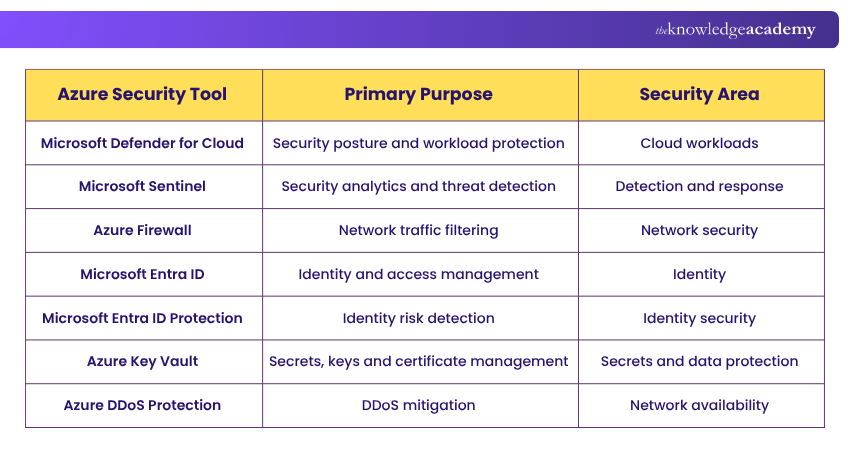
Here's a concise Azure Security Tools comparison:
How to Choose the Best Azure Security Tools?
Selecting the right Azure Security Tools is crucial for protecting your cloud environment. Here are five simple tips to help you make the best choice for your organisation.
1) Assess Your Needs: Identify the specific security requirements of your organisation. Consider factors like data protection, network security, and User Access Management. Choosing tools that address these needs ensures comprehensive security coverage.
2) Evaluate Compatibility: Ensure the security tools you choose are compatible with your existing Azure infrastructure. Tools that seamlessly integrate with your current setup will be easier to implement and manage. Compatibility minimises disruption and maximises efficiency.
3) Check for Scalability: Choose security tools that can grow with your organisation. As your business expands, your security needs will also increase. Scalable tools can handle increased data, users, and traffic without compromising performance.
4) Consider User-friendliness: Opt for security tools that are easy to use and understand. User-friendly tools simplify training and reduce the likelihood of errors. This ensures that your team can utilise and manage the tools.
5) Look for Support and Updates: Select tools from vendors that offer strong customer support and regular updates. Continuous support and updates are essential for addressing new security threats and maintaining tool effectiveness. Reliable vendor support ensures your security tools remain up-to-date and functional.
Here's a quick checklist to make the right choice:
Before choosing a tool, ask:
□ What resources need protection?□ Which threats are most relevant?□ What controls are already in place?□ Does the tool integrate with the existing architecture?□ Who will monitor and respond to alerts?□ What skills are required to operate it?□ What are the cost and scalability considerations?□ Are there specific compliance or governance requirements?
Learn core Azure services with our Microsoft Azure Fundamentals AZ-900 Certification Training -Join today!
Why Azure Security Tools Matter?
Azure Security Tools are essential for maintaining a secure and compliant cloud environment. Here are five reasons why these tools are crucial for your organisation:
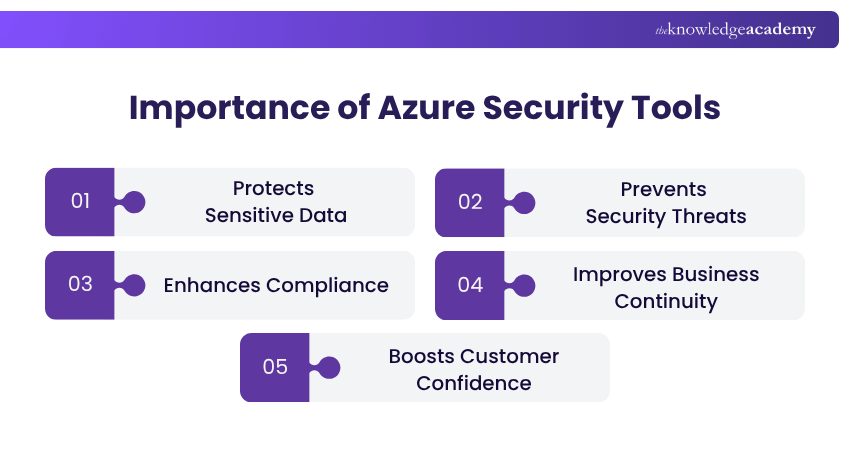
1) Protects Sensitive Data: Azure Security Tools help safeguard your data from unauthorised access. Protecting data is crucial for maintaining privacy and compliance with regulations. Effective data protection builds trust with customers and stakeholders.
2) Prevents Security Threats: These tools identify and mitigate security threats, such as malware and phishing. Proactively addressing threats minimises the risk of security incidents. Preventing threats ensures the integrity and availability of your systems.
3) Enhances Compliance: Using this tool helps you comply with industry standards and legal requirements. Compliance ensures your organisation meets necessary security and privacy regulations. Adhering to regulations avoids legal penalties and enhances your reputation.
4) Improves Business Continuity: It protects your systems from disruptions caused by cyber-attacks and other threats. Maintaining business continuity ensures your operations run smoothly without interruptions. Consistent operations support business growth and customer satisfaction.
5) Boosts Customer Confidence: Implementing robust security measures increases customer trust in your organisation. Customers feel safer knowing their data is protected by effective security tools. High customer confidence can lead to increased loyalty and business success.
Pro Tip
Review alerts, permissions, policies and configurations regularly rather than assuming that enabling a service automatically secures the environment.
Acquire expertise in Azure security with our Microsoft Azure Security Technologies AZ500 Training – Join today!
Best Practices for Using Azure Security Tools
Implementing security services is only the beginning. Their effectiveness also depends on how they are configured, monitored and maintained.
1) Apply Least-privilege Access: Grant users, applications and services only the permissions they require. Review access periodically and remove unnecessary privileges.
2) Use Strong Authentication: Apply appropriate authentication controls, including MFA, particularly for privileged or sensitive access.
3) Enable Appropriate Logging and Monitoring: Collect security-relevant logs and ensure that important events can be reviewed and investigated.
4) Review Security Configurations: Cloud environments change frequently. Regularly review firewall rules, permissions, security policies and workload configurations to identify outdated or unnecessary settings.
5) Protect Secrets and Credentials: Avoid storing passwords, keys or other sensitive credentials directly in application code. Use appropriate secrets-management capabilities and follow suitable rotation practices.
6) Prioritise Security Alerts: Not every alert carries the same level of risk. Establish processes for triaging alerts based on context, severity, and potential impact.
7) Use Automation Appropriately: Automation can support repeatable security operations and response processes. Design and test automated actions carefully to avoid unintended consequences.
8) Review Security Posture Regularly: New workloads, users, applications and threats can change an organisation's risk profile. Review security posture as the environment evolves and address significant findings.
Pro Tip
Centralise the relevant security signals, wherever appropriate. Connecting logs and alerts can help security teams investigate related activity across networks rather than reviewing every source in isolation.
Conclusion
Azure is a dynamic cloud platform that can help your company in various ways with consistent quality and efficiency. Remember, securing your Cloud environment is not optional in today's digital landscape. With the Azure Security Tools highlighted in this blog, you can protect your data, detect threats, and control your digital assets.
Gain skills in managing cloud services with our Microsoft Azure Administrator AZ104 Course – Join now!
Frequently Asked Questions
What is the Difference Between Microsoft Sentinel and Defender for Cloud?

Microsoft Sentinel primarily supports security analytics, detection, investigation and response as a SIEM platform. Microsoft Defender for Cloud focuses on Cloud security posture management and workload protection. Organisations may use both as complementary capabilities.
Which Azure Security Tool Should I Use First?
There is no universal starting tool. Begin by identifying your most significant security risks, architecture and existing controls. Identity, network, workload and monitoring requirements can then guide tool selection.
Is Microsoft Entra ID the Same as Azure Active Directory?
Microsoft Entra ID is the current name for the service previously called Azure Active Directory. Organisations may still encounter the older Azure AD terminology in existing documentation or configurations.
Is Zero Trust an Azure Security Tool?
No. Zero Trust is a security approach rather than an individual Azure tool. Azure and Microsoft security capabilities can help organisations implement controls aligned with Zero Trust principles.
Can One Azure Security Tool Protect an Entire Cloud Environment?
Generally, no single tool addresses every security requirement. Cloud environments typically require multiple complementary controls covering areas such as identity, networking, workloads, secrets, monitoring and threat response.

The Knowledge Academy


Global Training Provider
The Knowledge Academy is a world-leading provider of professional training courses, offering globally recognised qualifications across a wide range of subjects. With expert trainers, up-to-date course material, and flexible learning options, we aim to empower professionals and organisations to achieve their goals through continuous learning.


 If you wish to make any changes to your course, please


