


 Top Rated Course

We may not have the course you’re looking for. If you enquire or give us a call on +64 98874342 and speak to our training experts, we may still be able to help with your training requirements.
.NET Framework: The Backbone of Modern Windows Applications
Richard Harris 27 March 2026The .NET Framework is a Microsoft platform with a class library and runtime for building and running applications in a controlled environment. It simplifies development by managing memory, errors, and security. Developers can create desktop, web, and service-based applications with consistent and reliable performance.

Training Outcomes Within Your Budget!
We ensure quality, budget-alignment, and timely delivery by our expert instructors.
Table of Contents

Think about the apps you rely on every single day. The ones that open quickly, never freeze, and just work. Ever wondered what gives them that smooth and dependable feel? In many cases, the answer is the .NET Framework. For more than twenty years, this Microsoft technology has powered everything from workplace tools to popular websites, quietly making your digital life easier without you even noticing.
In this blog, you will learn what the .NET Framework is, how it evolved, and the architecture behind it. You will also explore its key components, benefits, and limitations, helping you understand why it remains a trusted base for modern applications.
Table of Contents
1) What is .NET Framework?
2) The Evolution of .NET Technology
3) .NET Framework Architecture
4) Core Components of the .NET Framework
5) .NET Version Compatibility Table
6) Why Businesses Choose the .NET Framework?
7) How to Develop Applications with the .NET Framework?
8) Key Benefits of the .NET Framework
9) Common Limitations of the .NET Framework
10) Conclusion
What is .NET Framework?
The .NET Framework is a Software Development platform created by Microsoft. It provides a controlled environment for building and running applications. These applications can be Windows desktop programs, websites, web services or enterprise solutions.
The framework includes a large library of prebuilt functions and a runtime environment that manages code execution. Developers can write programs in many languages such as C #, Visual Basic or F #. These languages work together smoothly because of the shared runtime system.

The Evolution of .NET Technology
.NET has evolved greatly, growing from a Windows-only framework into a powerful open-source, cross-platform platform used worldwide. Its development can be understood in three main stages.
1) The .NET Framework Era (Early 2000s to around 2016)
In the beginning, .NET was designed mainly for Windows computers. It helped developers build applications more easily by managing memory, improving security, and reducing errors.
What it was used for:
a) Windows desktop apps
b) Web apps using older tools like ASP.NET Web Forms
c) Rich desktop apps using WinForms and WPF
Main Idea:
Make Windows Development easier, safer, and more organised.
2) The .NET Core Revolution (2016 to 2020)
This was a major turning point. Microsoft rebuilt .NET to make it work on Windows, Linux, and macOS. It was also made open source, which allowed millions of developers to contribute and improve it.
What changed:
a) Worked across multiple operating systems
b) Became lighter, faster, and modular
c) Removed older technologies such as Web Forms
d) Focused on modern web tools like ASP.NET MVC and Web API
Main Idea:
Make .NET flexible, faster, and suitable for modern apps.
3) The Unified .NET (2020 to Today: .NET 5, 6, 7, 8, 9, 10)
Microsoft then combined .NET Framework and .NET Core into one clean and modern platform simply called .NET. This unified platform supports almost every type of development today.
Modern Features Include:
a) Better speed and performance improvements every year
b) Blazor for building web apps with C # instead of JavaScript
c) Minimal APIs for simpler and faster web services
d) MAUI for creating apps that run on Windows, Android, iOS, and macOS
Main Idea:
Create a single .NET platform that supports web apps, cloud apps, mobile apps, artificial intelligence, IoT, and more.
Learn from experienced instructors via flexible learning methods with our Visual Basic Course – Join now!
.NET Framework Architecture
The .NET Framework architecture is designed to make development simple, secure, and consistent. It has two main building blocks:
1) The Framework Class Library
2) The Common Language Runtime
These layers work together to help developers write, test, deploy, and run applications with ease.
Here is how the Architecture Works:
a) At the top, developers write code in languages such as C #.
b) This code is converted into a special format called Intermediate Language.
c) The Common Language Runtime executes this code safely.
d) The Framework Class Library provides ready-to-use functions, saving time and reducing errors.
e) Application models such as Windows Forms, ASP.NET or WPF offer templates and structures to build different types of apps.
Core Components of the .NET Framework
These are the core components of the .NET Framework:

1) Framework Class Library (FCL)
The Framework Class Library is a collection of reusable code components. It contains classes for handling files, connecting to databases, drawing graphics, processing text, managing networking tasks, and more. Developers use the FCL to avoid writing common functions manually. This reduces effort and keeps applications consistent and efficient.
2) Common Language Runtime (CLR)
The Common Language Runtime is the core of the .NET Framework and manages how applications run. It handles memory, garbage collection, error management, threading, and security. It also lets different programming languages work together because all .NET code is compiled into Intermediate Language before execution.
3) Application Models
The .NET Framework supports several application models, each designed for different development needs. These models include:
a) Windows Forms for desktop applications
b) ASP.NET for web applications
c) Windows Presentation Foundation (WPF) for rich user interfaces
d) Windows Communication Foundation (WCF) for service-based communication
e) Windows Workflow Foundation (WF) for automated workflows
Gain practical experience with Django's powerful features and functionalities with our Python Django Training – Join now!
.NET Version Compatibility Table
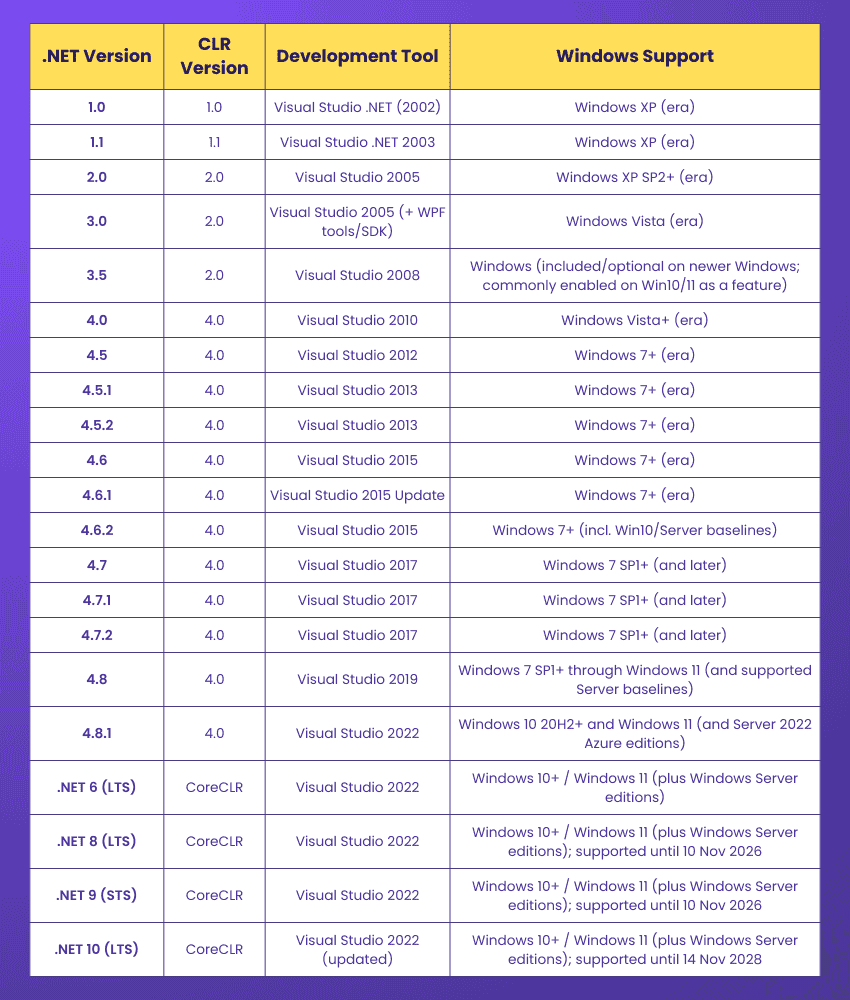
Visual Studio needs the .NET Framework installed to build .NET applications. Older Windows versions included .NET by default, while newer ones require manual installation of .NET 3.5 or later. Now, let’s look at how each .NET version aligns with its CLR, Visual Studio support, and Windows compatibility.
Why Businesses Choose the .NET Framework?
The .NET Framework has been a preferred choice for organisations for many reasons. Below are the most valued benefits.
1) High Reliability
Applications built with the .NET Framework are highly stable and offer consistent performance. Businesses trust it for mission-critical systems. Its reliability makes it a safe choice for long-term projects.
2) Platform Portability
Although the classic .NET Framework mainly supports Windows, it allows different application types to run across multiple Windows devices, including desktops and servers. This ensures organisations can deploy solutions across their entire Windows ecosystem efficiently.
3) Extensive Class Library
The Framework Class Library saves development time by providing ready-made code blocks for common tasks. This helps developers focus more on core business logic rather than repetitive coding.
4) Support for Side-by-side Execution
Different versions of the .NET Framework can run on the same machine. This helps organisations support multiple applications without version conflicts. It also makes upgrades smoother by avoiding application disruptions.
5) Integration with Legacy Systems
Large organisations often rely on older systems. .NET connects easily with COM components, databases, and enterprise tools. This reduces the need for expensive migrations. This level of compatibility helps businesses modernise at their own pace.
6) Efficient Memory Management
The CLR handles memory automatically. This reduces memory leaks and improves application performance. Developers spend less time fixing memory issues and more time building new features.
7) Open-source Availability
Some components of .NET are open source. This increases transparency, flexibility, and community support for developers. It also encourages innovation through shared tools and community contributions.
8) Cross-language and Platform Interoperability
Applications built in C# can work with components created in Visual Basic or other .NET languages. This improves teamwork and integration across development teams. Teams can choose the language that best fits their skills and project needs.
9) Strong Security Features
The .NET Framework offers built-in security features such as code verification, role-based security, and encryption support. These features help protect sensitive applications. This makes it a reliable option for industries handling confidential data.
10) Increased Developer Productivity
Tools like Visual Studio, IntelliSense, and debugging helpers make development faster and easier. These features reduce development time and help teams deliver high-quality applications sooner.
11) Backward Version Compatibility
Older applications continue to run on newer versions of the framework. This protects earlier investments and reduces rework. Businesses can upgrade systems without starting from scratch.
Learn OOP basics like encapsulation, abstraction, and modular design with our Object Oriented Programming (OOPs) Course – Register today!
How to Develop Applications with the .NET Framework?
Developing applications using the .NET Framework is simple and structured. Here is a basic key points to note:
1) Install Visual Studio:
This is the most powerful development environment for .NET. It includes tools for editing code, building interfaces, debugging, and deployment.
2) Choose a Programming Language:
You can select from C #, Visual Basic or F #. C # is the most widely used.
3) Select an Application Model:
Decide whether you want to build a desktop application, a web app, a service or a workflow-based system.
4) Design the User Interface:
Use tools like Windows Forms Designer or XAML editor for WPF.
5) Write the Business Logic:
Add your code using the Framework Class Library and CLR support.
6) Test the Application:
Visual Studio provides unit testing and debugging tools to ensure quality.
7) Build and Deploy:
Once the application is ready, publish it using Visual Studio. The framework takes care of versioning and configuration.
Key Benefits of the .NET Framework
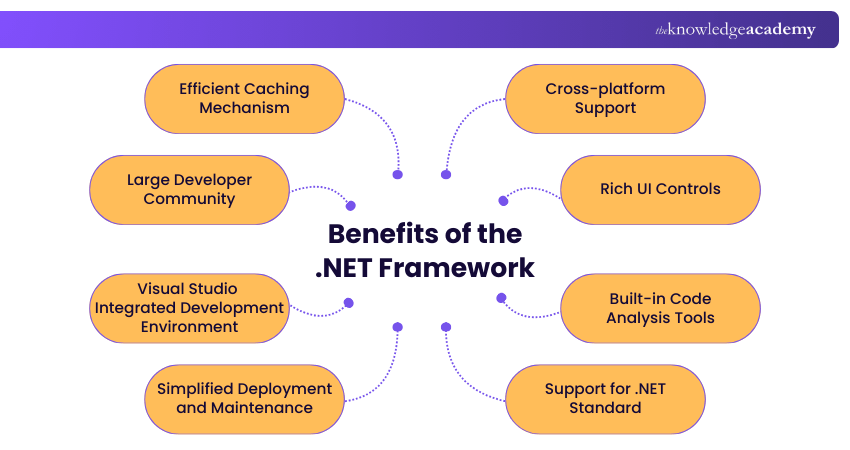
These are the benefits of the .NET Framework:
1) Cross-platform Support
While the classic .NET Framework was originally Windows-only, modern .NET now runs on Windows, Linux, and macOS, allowing developers to build applications across platforms. Its open-source nature also lets developers customise and improve it as needed.
2) Rich UI Controls
The .NET Framework includes powerful tools such as Windows Forms and WPF that provide ready-made buttons, grids, menus, charts, and many more controls. These controls help developers design clean, interactive, and user-friendly interfaces without needing to code everything manually.
3) Built-in Code Analysis Tools
.NET works closely with Visual Studio, which provides built-in tools to check code quality. These tools catch common mistakes, suggest improvements, and flag performance issues early. This helps developers write cleaner, more reliable code with less debugging.
4) Support for .NET Standard
The .NET Framework supports .NET Standard, a shared set of libraries that work across different versions of .NET. This means developers can write code once and reuse it across multiple .NET platforms. It simplifies development and reduces duplicate work.
5) Simplified Deployment and Maintenance
Deploying .NET applications is simple because the framework manages versioning, security updates, and configuration. Developers can update specific parts without touching the whole system, making maintenance quicker and smoother.
6) Visual Studio Integrated Development Environment
Visual Studio is a powerful and user-friendly IDE with drag-and-drop tools, smart code suggestions, built-in debugging, and one-click publishing. These features speed up development and help developers create high-quality applications faster.
7) Large Developer Community
Millions of developers use .NET worldwide. This means there is always help available through forums, online groups, tutorials, open-source projects, and shared tools. The strong community support makes problem-solving easier and learning faster.
8) Efficient Caching Mechanism
The .NET Framework includes a reliable caching system that stores frequently used data in memory, helping apps load faster and perform better. Developers can also customise caching to suit their needs.
Acquire knowledge of how to configure security and code access security with our C# And .NET Training – Join now!
Common Limitations of the .NET Framework
These are the limitations of the .NET Framework:
1) Vendor Lock-in
The .NET Framework is controlled by Microsoft, so developers rely on its updates and policies. Any changes Microsoft introduces can affect existing projects, reducing flexibility and limiting long-term control for organisations and developers.
2) Licensing Costs
Although parts of .NET are open-source, using tools like Visual Studio at a professional level can be expensive. As projects grow, organisations may need paid editions or advanced services, which can increase overall development costs.
3) Instability in New Releases
Sometimes, new updates or patches may not work smoothly with older applications. Large or complex projects can face performance issues or compatibility problems when migrating shifting to a new version. This can affect stability during major upgrades.
4) High RAM Usage
Applications built on the .NET Framework often require more memory compared to lightweight frameworks. As projects grow and more libraries are added, RAM usage increases. This may impact performance on devices with limited resources.
5) Limited Object-relational Mapping Support
While .NET offers tools for database connections, its built-in Object-relational Mapping (ORM) support is less flexible than some alternatives. Even small database changes can cause compatibility issues, making updates harder to manage.
Conclusion
The .NET Framework remains a dependable foundation for building secure and high-performing applications. With its rich tools, strong reliability, and long-term support, it continues to serve both developers and businesses well. Understanding its evolution, components, benefits, and limitations helps you make better choices when creating modern, scalable software solutions.
Gain hands-on experience working with real-world projects and technologies. Join our Programming Training now!
Frequently Asked Questions
Is .NET Backend or Frontend?

.NET is mainly used for Backend Development, where it powers servers, APIs, databases, and business logic. However, it can also be used for frontend tasks through technologies like ASP.NET Web Forms, Blazor, WPF, and Windows Forms, depending on the type of application being built.
Is .NET a Programming Language?
No, .NET is not a programming language. It is a development framework that provides tools, libraries, and a runtime environment for building applications. Developers write .NET applications using languages like C#, F# or Visual Basic.
What are the Other Resources and Offers Provided by The Knowledge Academy?
The Knowledge Academy takes global learning to new heights, offering over 3,000+ online courses across 490+ locations in 190+ countries. This expansive reach ensures accessibility and convenience for learners worldwide.
Alongside our diverse Online Course Catalogue, encompassing 19 major categories, we go the extra mile by providing a plethora of free educational Online Resources like Blogs, eBooks, Interview Questions and Videos. Tailoring learning experiences further, professionals can unlock greater value through a wide range of special discounts, seasonal deals, and Exclusive Offers.
What is The Knowledge Pass, and How Does it Work?
The Knowledge Academy’s Knowledge Pass, a prepaid voucher, adds another layer of flexibility, allowing course bookings over a 12-month period. Join us on a journey where education knows no bounds.
What are the Related Courses and Blogs Provided by The Knowledge Academy?
The Knowledge Academy offers various Programming Training, including the .NET Programming Training, C# and .NET Training, and the Blazor WebAssembly Course. These courses cater to different skill levels, providing comprehensive insights into Open Source Software.
Our Programming & DevOps Blogs cover a range of topics related to .NET Framework, offering valuable resources, best practices, and industry insights. Whether you are a beginner or looking to advance your Programming & DevOps skills, The Knowledge Academy's diverse courses and informative blogs have got you covered.

Richard Harris


Senior Full Stack Developer and Technology Educator
Richard Harris is a highly experienced full-stack developer with deep expertise in both frontend and backend technologies. Over his 12-year career, he has built scalable web applications for startups, enterprises and government organisations. Richard’s writing combines technical depth with clear explanations, ideal for developers looking to grow in modern frameworks and tools.

Upcoming Programming & DevOps Resources Batches & Dates
Date
 .NET Programming Training
.NET Programming Training
Thu 17th Sep 2026
.NET Programming Training
Thu 17th Dec 2026

 If you wish to make any changes to your course, please


