


 Top Rated Course


We may not have the course you’re looking for. If you enquire or give us a call on +47 80010068 and speak to our training experts, we may still be able to help with your training requirements.
Xcode vs Swift: Which one is Right for you?
Richard Harris 25 February 2026Navigate the differences between Xcode and Swift in this insightful comparison. Understand Xcode as an integrated development environment and Swift as a programming language, their unique features, and use cases. This blog helps developers and aspiring coders decide which tool aligns best with their project requirements and skill levels, offering a clear path for those entering iOS and macOS development.

Training Outcomes Within Your Budget!
We ensure quality, budget-alignment, and timely delivery by our expert instructors.
Table of Contents
The choice between Xcode vs Swift is a fundamental decision that every developer must consider. Xcode, Apple's integrated development environment or IDE, and Swift, its modern and versatile programming language, are the cornerstones of software creation within the Apple ecosystem.
Moreover, this juxtaposition represents the classic dilemma faced by developers, as Xcode provides the essential platform for crafting applications, while Swift serves as the language in which those applications are coded. Xcode is a development environment used by developers to write, test & manage code, while Swift is the programming language used to create iOS & macOS applications. Understand how to choose between Xcode vs Swift.
Table of Contents
1) A brief overview of Xcode
2) A brief overview of Swift
3) A detailed comparison between Xcode vs Swift
4) Synergies between Xcode and Swift
5) How do you choose between Xcode and Shift?
6) Conclusion
A brief overview of Xcode
Xcode is a versatile and powerful Integrated Development Environment (IDE) designed for macOS and iOS application development. Developed by Apple, it serves as the primary software platform for building software that runs on Apple's ecosystem, including apps for iPhone, iPad, Mac, Apple Watch, and Apple TV.
Additionally, Xcode offers a comprehensive suite of tools to streamline the development process. It includes a code editor, debugger, Interface Builder for creating user interfaces, and an extensive set of libraries and frameworks that simplify the development of applications.
Moreover, one of its standout features is the visual interface builder, which allows developers to design user interfaces with a user-friendly drag-and-drop interface. The IDE also offers robust debugging and testing capabilities, making it easier to identify and rectify issues within the code.
Furthermore, Xcode's seamless integration with Swift, Apple's programming language, ensures a consistent and efficient development experience, allowing developers to create high-quality applications that leverage the full potential of the Apple ecosystem. With its constant updates and improvements, Xcode remains an essential tool for developers in the Apple ecosystem.
A brief overview of Swift
Swift is a high-performance and modern programming language developed by Apple for building applications across their ecosystem, including iOS, macOS, watchOS, and tvOS. It was introduced in 2014 as a replacement for Objective-C, and it has since gained widespread adoption among developers.
Additionally, one of Swift's primary advantages is its clean and concise syntax, making it approachable for newcomers to programming while also offering a powerful toolset for experienced developers. Swift's real-time feedback and error-catching features during coding expedite the development process and minimise bugs.
Furthermore, performance is another standout feature. Swift is a compiled language, which means it's highly efficient, resulting in faster and more responsive applications. It also introduces safety features like optionals and error handling to enhance the stability of apps, reducing the risk of runtime crashes.
Moreover, Swift's open-source nature has fostered a vibrant community, leading to the creation of a wide range of libraries and frameworks, making it a versatile choice for developers. Whether you're a beginner or an experienced coder, Swift offers an ideal environment for creating high-quality software within the Apple ecosystem.

A detailed comparison between Xcode vs Swift
Here are the various parameters giving a detailed comparison between Xcode vs Swift:
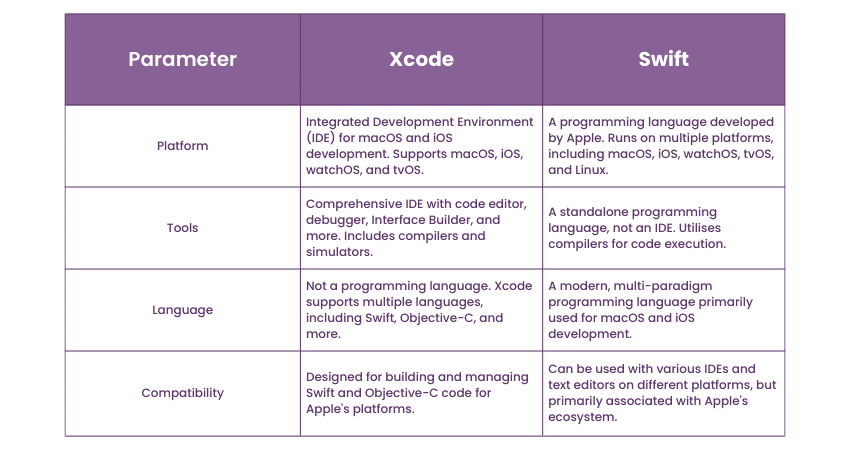
Platform
Xcode is Apple's premier integrated development environment (IDE) designed for macOS and iOS application development. This comprehensive platform offers a code editor, visual interface builder, and robust debugging tools. Its seamless integration with Swift and constant updates make it a pivotal choice for creating high-quality apps in the Apple ecosystem.
In contrast, Swift, Apple's modern programming language, offers an interactive coding environment with real-time feedback. Its code editor supports syntax highlighting and autocompletion for efficient coding. Swift's built-in debugging tools help identify and rectify issues, while the open-source community ensures a rich ecosystem of libraries and frameworks for developers to utilise.
Tools
Xcode, Apple's integrated development environment, provides essential tools for app development, including a code editor with autocompletion, a visual interface builder for UI design, and advanced debugging tools. It supports version control and simplifies testing and deployment processes, ensuring a comprehensive and efficient development experience.
In comparison, Swift offers a suite of developer-friendly tools, including a code editor with syntax highlighting and real-time feedback, facilitating efficient coding. Robust debugging and profiling tools enhance error identification and optimisation. Swift's package manager simplifies dependency management, and its open-source community ensures a rich ecosystem of libraries and frameworks.
Language
Xcode primarily supports two programming languages, namely Swift and Objective-C. Swift, Apple's modern language, offers a more approachable and efficient coding experience. Objective-C, an older language, is still used in legacy projects. Xcode seamlessly integrates both, allowing developers to choose the language that best suits their needs.
On the other hand, Swift is a programming language developed by Apple specifically for macOS, iOS, watchOS, and tvOS development. While it's primarily used for Swift development, it's also interoperable with Objective-C, allowing developers to leverage existing Objective-C code and libraries within their Swift projects, ensuring a smooth transition for iOS and macOS app development.
Compatibility
Xcode primarily targets the Apple ecosystem, which is compatible with macOS and iOS. It supports the creation of binary files for these platforms, allowing developers to build apps for Mac and iOS devices. Xcode's architecture, while designed for macOS, also facilitates cross-platform development for Apple's other operating systems, including watchOS and tvOS.
In comparison, Swift is compatible with macOS, iOS, watchOS, and tvOS. It enables the creation of binary files for these platforms, making it versatile for Apple ecosystem development. Its architecture supports the compilation of code for various Apple devices, providing a unified language and toolset for cross-platform development across Apple's operating systems.
Synergies between Xcode and Swift
Xcode and Swift, the integrated development environment (IDE) and programming language developed by Apple, are inherently intertwined, forming a powerful duo that enhances the iOS and macOS app development process.
Moreover, their synergies contribute to efficient, high-quality app creation and are fundamental to the Apple ecosystem. Let's explore how Xcode and Swift work seamlessly together:
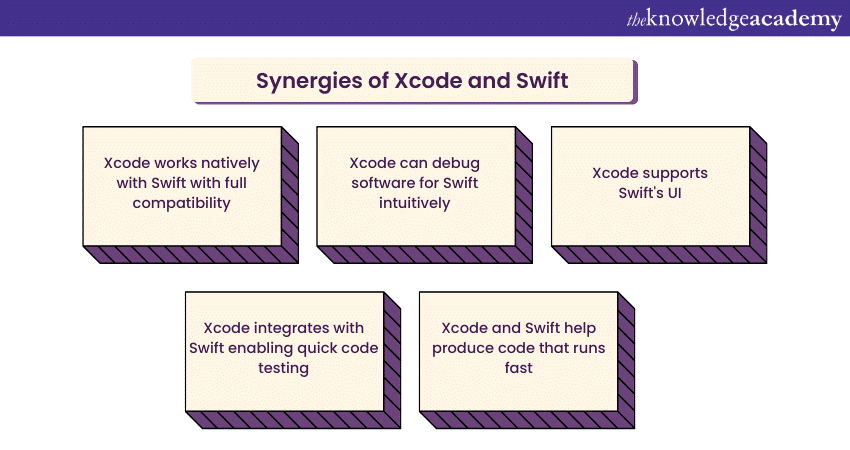
a) Native integration: Xcode is the primary environment for developing software on Apple's platforms. It's designed to work natively with Swift, making it the default and recommended language for iOS and macOS development. This native integration ensures that developers can leverage Swift's capabilities to their fullest extent without compatibility issues.
b) Real-time debugging: Xcode's robust debugging tools are tailored for Swift. Developers can set breakpoints, inspect variables, and analyse the call stack within their Swift code, facilitating efficient troubleshooting and error resolution. Swift's clear and concise syntax makes debugging in Xcode more intuitive and less error-prone.
c) Interface builder: Xcode's Interface Builder seamlessly supports Swift's UI components. Developers can visually design user interfaces, creating a tight connection between the visual aspects of an app and the underlying Swift code. This visual approach accelerates the design and development process, reducing potential discrepancies between design and functionality.
d) Swift playgrounds: Xcode integrates with Swift Playgrounds, providing an interactive environment for experimenting with Swift code snippets and ideas. This synergy enables developers to prototype and test Swift code quickly within a controlled environment, which can then be seamlessly incorporated into full-fledged Xcode projects.
e) Enhanced performance: Swift's optimised and compiled nature aligns well with Xcode's emphasis on performance. Apps built with Swift in Xcode tend to run faster and consume fewer system resources, resulting in a smoother user experience.
Create stunning and responsible applications by signing up for our SwiftUI Training now!
How do you choose between Xcode and Shift?
Choosing between Xcode and Swift is a critical decision for iOS and macOS app development. Your choice depends on several factors, including your experience, project requirements, and personal preferences. Here are the various aspects that can help you make an informed decision:
Consider your skill level
a) Xcode: If you're a beginner or new to iOS development, Xcode might be your best starting point. Its visual interface builder and integrated development environment simplify the process, and you can gradually transition into Swift as you become more comfortable.
b) Swift: If you already have programming experience and are familiar with Swift, using it directly can be efficient. Swift's modern syntax and strong type system make it accessible to developers from various backgrounds.
Project complexity
a) Xcode: For relatively straightforward apps or prototypes, Xcode provides a user-friendly environment to design and build quickly. Its visual tools can expedite development, especially for apps with simpler UI requirements.
b) Swift: For more complex or performance-critical projects, Swift's compiled nature and advanced features may be a better fit. Swift excels in large-scale applications and those demanding high performance.
Performance requirements
a) Xcode: While Xcode is the IDE, Swift is the language that directly influences app performance. For apps where performance is not a primary concern, Xcode's simplicity is sufficient.
b) Swift: If you need your app to be highly performant, especially for gaming or applications that require real-time processing, Swift's compiled nature and low-level control over system resources make it a better choice.
Cross-platform considerations
a) Xcode: If you plan to build applications across multiple Apple platforms (iOS, macOS, watchOS, and tvOS), Xcode's seamless integration with Swift, as well as its support for Objective-C, is advantageous.
b) Swift: If you are solely targeting iOS and macOS and want a language that is more focused and efficient for these platforms, Swift is a natural choice.
Community and ecosystem
a) Xcode: Xcode offers a wealth of resources and community support for all aspects of iOS development, not just Swift programming. This can be advantageous if you're seeking comprehensive guidance.
b) Swift: Swift has a growing open-source community with a rich ecosystem of libraries and frameworks. It's a fantastic choice if you value innovation and plan to contribute to or leverage open-source Swift projects.
Learn to apply Swift programming knowledge on an IOS application by signing up for our Swift Programming Language course now!
Conclusion
The decision between Xcode vs Swift holds significant importance in the domain of app development. Xcode delivers a comprehensive development environment, while Swift provides a powerful programming language. The interplay of these tools, along with Perl Interview Questions, accommodates diverse developer requirements, guaranteeing the creation of top-notch, effective applications within the Apple ecosystem.
Attain the knowledge to develop iOS applications by signing up for our IOS App Development Training now!
Frequently Asked Questions

Richard Harris


Senior Full Stack Developer and Technology Educator
Richard Harris is a highly experienced full-stack developer with deep expertise in both frontend and backend technologies. Over his 12-year career, he has built scalable web applications for startups, enterprises and government organisations. Richard’s writing combines technical depth with clear explanations, ideal for developers looking to grow in modern frameworks and tools.


 If you wish to make any changes to your course, please


