


 Top Rated Course

We may not have the course you’re looking for. If you enquire or give us a call on +47 80010068 and speak to our training experts, we may still be able to help with your training requirements.
What is Web Scraping and How It Extracts Online Data
Lily Turner 17 April 2026Web Scraping is a technique through which you can automatically collect data from a website - such as product details, emails, headlines, or price info. You can then store this data in Excel, CSV, or a database and analyse it. It is a shortcut to manual copy-paste, which is used for fast and accurate data collection.

Training Outcomes Within Your Budget!
We ensure quality, budget-alignment, and timely delivery by our expert instructors.
Table of Contents
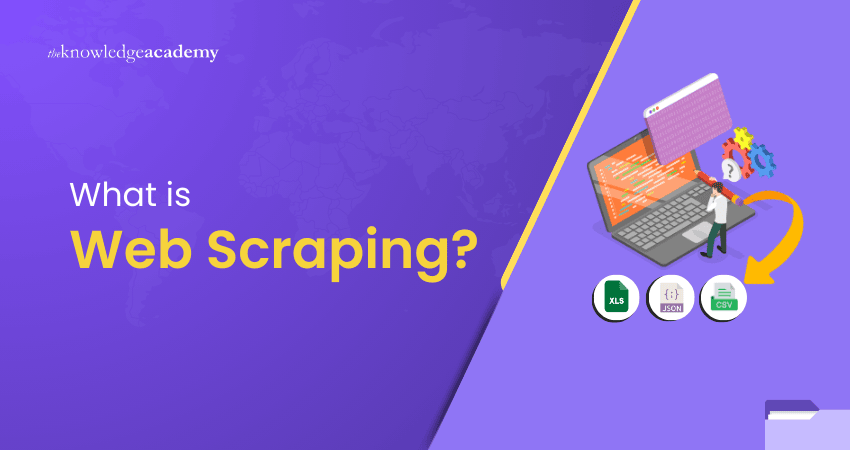
Data is the biggest power in today's time. Every business, researcher, or developer makes decisions by using data. But when data is in scattered form on a website, manually copying it is time-consuming and boring. This is where Web Scraping comes into play. It is a smart technique by which we can automatically extract data from a website using scripts or tools.
Whether you want to find out product prices, track news headlines, or need content for research, this technique is useful in everything. In this blog, we will explain in detail: What is Web Scraping, how does it work, how to use it, and what are the legal limitations?
Table of Contents
1) What is Web Scraping?
2) Types of Web Scrapers
3) How to Scrape the Web?
4) How Web Scrapers Work?
5) Common Applications of Web Scraping
6) Tools for Web Scraping
7) Conclusion
What is Web Scraping?
Web Scraping is a technique through which you can automatically extract data from a website. It is a digital shortcut to manual copy-paste, but it is much faster and more accurate. In this, content is extracted using scripts or tools, such as text, prices, images, reviews, etc.
For example, imagine that you need the name, price and rating of 100 products from Amazon. Through Web Scraping, you can get this data in an Excel or CSV file in seconds. It is super helpful for researchers, marketers and coders.
The scraper understands the HTML structure of the page and picks the part it needs. Then, that data is saved in a file or database. With this, you can easily do the work of analysis, automation and reporting.
Types of Web Scrapers
Not every web scraper works the same way. Web Scraping tools are designed differently based on their use case, user needs, and technical setup. Let us understand four common categories in which you find web scrapers.
Self-built or Pre-built
You can build a web scraper yourself or use a pre-built (ready-made) tool. Self-built scrapers are used when you need a completely custom solution. To build them, programming knowledge is required like Python, HTML, CSS, XPath, etc. These are flexible but can be time-consuming.
Pre-built scrapers, on the other hand, are ready to go. All you have to do is install them and start scraping data. They have many extra features like:
1) Schedule scraping
2) Export output to Excel, JSON or Google Sheets
3) Get notifications when scraping is complete.
If you are a beginner, pre-built tools are best.
Browser Extension vs Software
Web scrapers come in two forms: browser extensions and standalone software.
Browser extensions are simple and easy to use. You can install them directly in browsers like Chrome and Firefox. They are lightweight and can easily perform basic scraping tasks. However, browser extensions have some limitations. Like:
1) Limited access to advanced features
2) IP rotation is not possible.
3) Difficulty handling heavy scraping
Software-based scrapers, on the other hand, are more powerful. You have to install a program on the system. These tools can handle complex scraping workflows, such as login-based scraping, captcha bypass, and heavy data extraction.
They are a little technical but are more useful in the long term.
User Interface
The user interface makes a lot of difference.
Some scrapers are command-line based, and the code has to be written in the Matlab terminal. This is great for developers, but beginners may get confused. Some scrapers come with a proper visual interface where you can easily select data by clicking. This drag-and-drop UI is beginner-friendly. Some tools also provide helpful tips so you understand which feature does what.
Cloud vs Local
Another major difference is the location of the scraper, cloud-based or local-based. Local scrapers run on your computer. This means:
1) CPU and RAM are used by your system
2) If there is heavy scraping, the system can slow down
3) Internet usage can also be high
Cloud scrapers run on an external server. You just have to assign the task, and the server scrapes the data for you. You can do other work while the scraping is complete. Cloud tools can easily handle IP rotation and heavy workloads. These are ideal for large-scale or regular scraping needs.
Learn how to turn raw text into valuable data – start your Advanced Data Science Certification journey now!
How to Scrape the Web?
If you are thinking that Web Scraping is just a matter of running a code, then wait a bit! There are some important steps in this process which you should follow, whether you are a beginner or have some experience. Below, we have explained six simple steps which form the base of every scraping journey.

Step 1: Gather the URLs to Scrape
First of all, you have to decide from which website you want data. If you want customer reviews for books, then you will collect the URLs of sites like Goodreads, Amazon, or LibraryThing. These links are the first step of your scraping process. The more URLs you have, the more data you can extract.
Step 2: Inspect the Web Page Elements
Now, you have to see what and where that data is on that website. Right-click on the browser and choose “Inspect” or “View Page Source” option. From here, you will see the backend HTML code of that page, which contains the information you want to scrape.
Step 3: Select the Specific Data to Extract
When you inspect, the corresponding HTML tag of the front-end element is highlighted. For example, if you want the title, author, and rating of a book on Amazon, you will have to look for tags like
, , or
in which this data is stored. These tags help in telling the scraper what to extract.
Step 4: Develop the Scraping Script
Now, it is time for some coding. You can write a scraping script in a language like Python using libraries like BeautifulSoup or Scrapy. This code tells the scraper what data to extract from which HTML tag. If you are a beginner, you can also use pre-built templates.
Step 5: Run Your Scraping Code
After the script is ready, run it. In this step, the scraper sends a request to the website, extracts the data, and processes it. If everything goes right, your desired data will be ready for analysis. If the site is slow or the request is blocked, it is important to be patient.
Step 6: Store the Extracted Data
After getting the data, saving it is equally important. You can save the scraped data in Excel, CSV or database format. Some people also use the Regex module to get clean output. After saving, you can analyse that data, create charts, or make business decisions.
How Web Scrapers Work?
Web Scraping sounds simple, but it is actually a technical process that involves three steps. No matter which tool you use, every scraper works around these steps.
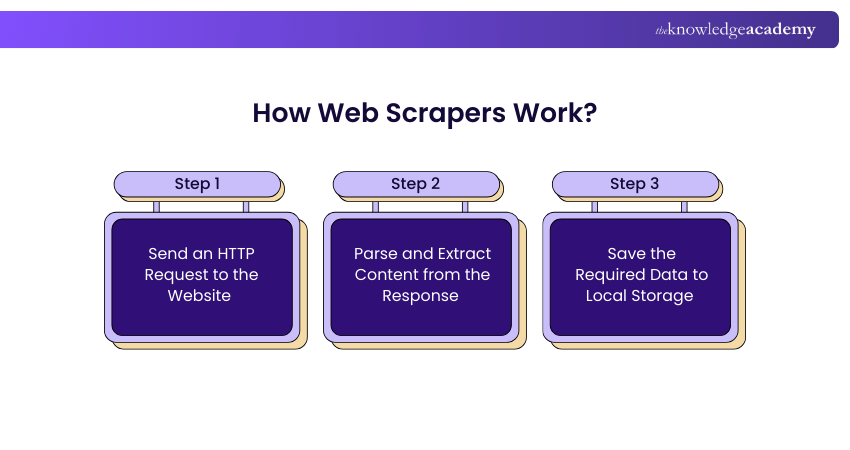
Step 1: Send an HTTP Request to the Website
When we open a website in the browser, we send an HTTP request, meaning we digitally “knock” it. A web scraper does the same thing. It sends an HTTP request to the target website so that it can access the page’s data. If the website allows, the scraper moves forward.
Step 2: Parse and Extract Content from the Response
After the HTTP request is accepted, the website sends its data, usually in HTML or XML format. The scraper reads this code and "parses" it, that is, breaks it and understands where which data is stored. This step is important because it helps the scraper decide which content to extract from it, such as product name, price, ratings, or reviews.
Step 3: Save the Required Data to Local Storage
When the required data is found, the scraper saves that data, usually in Excel, CSV or JSON format. In this step, the data is converted into a structured format so that it can be used later for analysis, reporting or automation.
This process seems easy, but it is repeated several times, not just once. Every website has its own rules, and sometimes, sending too many requests can block the website. Hence, it is very important to use the scraping script in the right way.
Unlock insights from unstructured text with expert-led Predictive Analytics Course – join today!
Common Applications of Web Scraping
Nowadays, Web Scraping is being used not only by tech companies but in every industry. From small businesses to large corporations, everyone is collecting data and making smart decisions. Let's see some common uses:
1) Tracking Prices
Companies use Web Scraping to track product prices of their own and competitors'. As soon as the price of a product changes, the scraper catches that change. This helps companies set their pricing strategy so that they can make a profit and stay in the competition.
2) Conducting Market Analysis
Large-scale data is needed to understand market trends and customer behaviour. Web Scraping helps companies collect real-time data such as customer reviews, trending products, or buying patterns. This data becomes a gold mine for future planning and business growth.
3) Monitoring News Updates
News monitoring is very important for some businesses, especially those companies that depend heavily on media coverage. Web Scraping allows them to track every new article, blog, or mention. This makes it easier to manage reputation.
4) Performing Sentiment Analysis
What are people thinking about your product? Web Scraping lets you get real-time feedback from platforms like Facebook and Twitter. Whether it is positive or negative – sentiment analysis tells us how the audience is viewing your brand.
5) Building Email Marketing Lists
Another common use of Web Scraping is to create email lists. Companies scrape and collect publicly available emails through which they send marketing campaigns or newsletters. But keep in mind – it is very important to keep legal policies in mind while doing this.
Master data extraction and analysis techniques with hands-on Text Mining Training – join now!
Tools for Web Scraping
You don't necessarily need to be a coding expert for Web Scraping. Python is a language with many tools and libraries that make this process very simple. Below are some popular tools that can be used by anyone from beginners to experts:
BeautifulSoup
BeautifulSoup is a Python library that helps you understand the structure of XML and HTML pages by reading them. You can easily extract data from any webpage, such as headlines, prices, reviews, etc. It is very friendly for beginners and makes things like searching and filtering easy.
Scrapy
Scrapy is a slightly advanced framework in Python, which is specially made for Web Scraping. It not only extracts data but also does automatic crawling. Once you define the rules, it automatically roams around the site and collects the data, just like a spider!
Pandas
Pandas are mainly used for data analysis, but if you use them with BeautifulSoup, Web Scraping is also possible. Its biggest advantage is that you can do the entire scraping and analysis in a single language (Python). It is also easy to get the output in CSV or Excel format.
Parsehub
Parsehub is for those people who are not comfortable with coding. This is a no-code tool where you can point-and-click to scrape data from a website. Just provide the URL, click on the data, and the scraper will do the job for you. The free version is available, but some features are available in the paid version.
Conclusion
Web Scraping is a powerful technique that helps you easily extract publicly available data on the internet. Whether you want to compare prices, do market research, or build an email list, this technique is useful everywhere. With the right tools and the right steps, this process becomes beginner-friendly. Just keep in mind the legality and website policies.
Master the art of data extraction and boost your analytics skills – join our Data Mining Training now!
Frequently Asked Questions
How effective is Web Scraping?

Web Scraping is an effective way to collect large amounts of data without having to manually look at and copy it. With the right tools, it is quite accurate and fast for analysis and automation.
What is the main objective of Web Scraping?
The main goal of Web Scraping is to collect useful data from websites, such as product prices, reviews, or news, so that you can do business analysis, marketing, or research work smartly.
What are the Other Resources and Offers Provided by The Knowledge Academy?
The Knowledge Academy takes global learning to new heights, offering over 3,000 online courses across 490+ locations in 190+ countries. This expansive reach ensures accessibility and convenience for learners worldwide.
Alongside our diverse online course catalogue, encompassing 19 major categories, we go the extra mile by providing a plethora of free educational Online Resources like News updates, Blogs, videos, webinars, and interview questions. Tailoring learning experiences further, professionals can maximise value with our customisable Course Bundles.
What is The Knowledge Pass, and How Does it Work?
The Knowledge Academy’s Knowledge Pass, a prepaid voucher, adds another layer of flexibility, allowing course bookings over a 12-month period. Join us on a journey where education knows no bounds.
What are the Related Courses and Blogs Provided by The Knowledge Academy?
The Knowledge Academy offers various Data Science Courses, including the Text Mining Training and Advanced Text Analytics Course. These courses cater to different skill levels, providing comprehensive insights into Text Mining Tools and Software.
Our Data Analytics Blogs cover a range of topics related to Web Scraping, offering valuable resources, best practices, and industry insights. Whether you are a beginner or looking to advance your Data Mining skills, The Knowledge Academy's diverse courses and informative blogs have got you covered.

Lily Turner


Senior AI/ML Engineer and Data Science Author
Lily Turner is a data science professional with over 10 years of experience in artificial intelligence, machine learning, and big data analytics. Her work bridges academic research and industry innovation, with a focus on solving real-world problems using data-driven approaches. Lily’s content empowers aspiring data scientists to build practical, scalable models using the latest tools and techniques.
View Detail
Upcoming Data, Analytics & AI Resources Batches & Dates
Date
 Data Mining Training
Data Mining Training
Thu 23rd Jul 2026
Data Mining Training
Thu 12th Nov 2026

 If you wish to make any changes to your course, please


