


 Top Rated Course

We may not have the course you’re looking for. If you enquire or give us a call on +91-181-5047001 and speak to our training experts, we may still be able to help with your training requirements.
Chef vs Puppet vs Ansible: A Comprehensive Comparison
Lily Turner 24 February 2026Discover the key differences between Chef vs Puppet vs Ansible, their features, benefits, and which automation tool best suits your needs. This comparison covers usability, configuration styles, scalability, and cost to help you choose the automation tool that fits your needs. Make smarter automation decisions with clarity.

Training Outcomes Within Your Budget!
We ensure quality, budget-alignment, and timely delivery by our expert instructors.
Table of Contents
Imagine your IT infrastructure as a high-pressure kitchen during dinner rush. Orders are flying in, timing is everything, and consistency matters. Now picture three master chefs each with their own tools, techniques, and tempo stepping up to take charge. That’s what it feels like when you're deciding between Chef vs Puppet vs Ansible.
Each tool brings its own flavour to automation: Chef offers flexibility, Puppet ensures precision, and Ansible delivers speed with simplicity. To run a smooth kitchen or a scalable infrastructure you need the right chef in charge. In this blog, we’ll explore the key differences in Chef vs Puppet vs Ansible to help you find your ideal automation match.
Table of Contents
1) What is a Chef?
2) Characteristics of a Chef
3) What is Puppet?
4) What is Ansible?
5) Difference Between Chef vs Puppet vs Ansible
6) Which is Better: Chef vs Puppet vs Ansible?
7) Which Automation Tool is Easiest to Learn: Chef, Puppet, or Ansible?
8) Conclusion
What is a Chef?
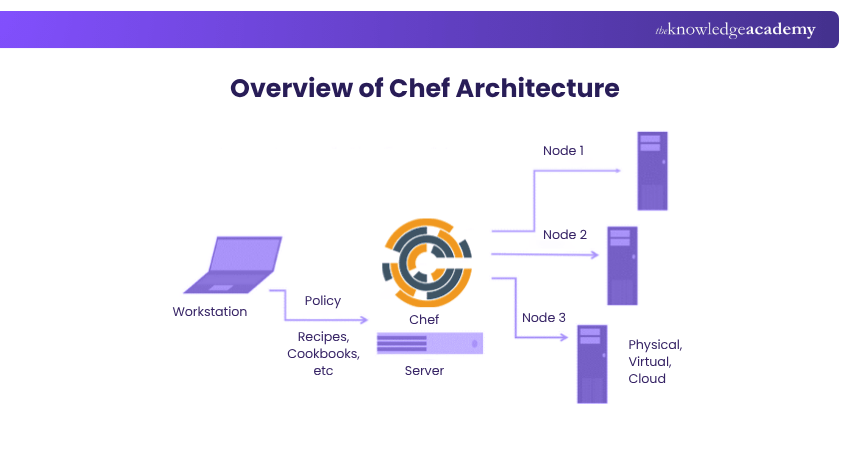
Chef is a Configuration Management tool that permits you to define and manage the state of your infrastructure using code. Chef uses Ruby as its Domain-specific Language (DSL) for writing system configurations called recipes. Consider the following points:
1) Recipes are grouped into cookbooks, collections of related recipes that can be applied to one or more nodes (servers or virtual machines) in your infrastructure.
2) Chef follows a master-agent architecture, where a central server (the Chef server) stores and distributes cookbooks to the nodes. Meanwhile, each node runs a client (the Chef client) that executes the recipes and reports back to the server.
3) Ansible also provides a Command-line Interface (the Ansible CLI) that allows you to interact with the nodes and a web-based dashboard (the Ansible Tower) that provides visibility and analytics into your infrastructure.
Characteristics of a Chef
Here are some key characteristics of Chef:
a) Ruby-based Configuration: Chef uses Ruby as its domain-specific language (DSL), offering great flexibility and control. However, it requires programming knowledge and familiarity with Ruby syntax and conventions.
b) Master-agent Architecture: Chef follows a master-agent model, requiring a central server and a client on each node. This setup ensures control but adds complexity and requires secure communication between components.
c) Pull-based System: Nodes in Chef periodically pull updates from the server, keeping them in sync with the desired state. While reliable, this can introduce slight delays and inconsistencies across nodes.
d) Robust Features and Integrations: Chef supports a wide range of features and integrates seamlessly with cloud platforms and DevOps tools, making it suitable for complex, multi-platform environments.
a) Data bags
b) Data roles
c) Data environments
d) Data attributes
e) Data search
f) Data notifications
g) Data reporting
h) Data testing
i) Data auditing
It also integrates with various Cloud providers, such as AWS, Azure, Google Cloud, and VMware, as well as other DevOps tools, such as Jenkins, Docker, and Git.

What is Puppet?
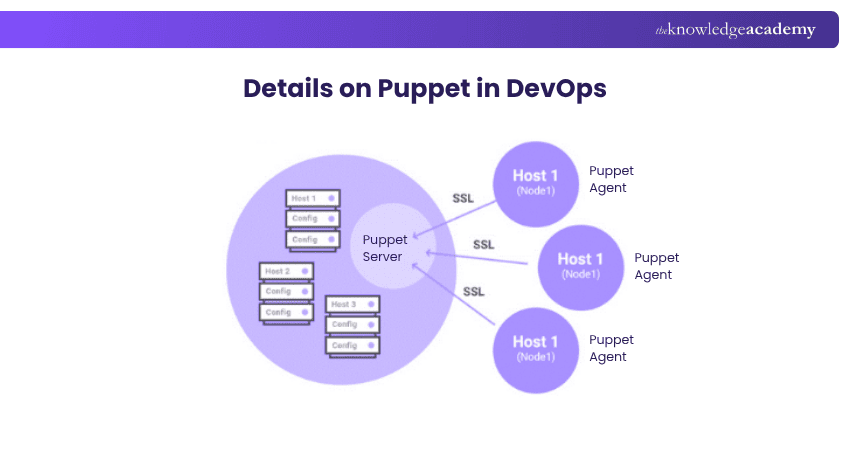
Puppet is another Configuration Management tool that allowing you to define and manage the state of your infrastructure using code. Puppet uses its declarative language for writing system configurations called manifests. Manifests are grouped into modules, collections of related manifests that can be applied to one or more nodes in your infrastructure.
Consider these points:
1) Puppet also follows a master-agent architecture, where a central server (the Puppet master) stores and distributes the modules to the nodes.
2) Each node runs a client (the Puppet agent) that executes the manifests and reports to the server.
3) Puppet provides a Command-line Interface (the Puppet CLI) that allows you to interact with the server and the nodes and a web-based dashboard (the Puppet Enterprise Console).
Characteristics of Puppet
Here are some of the main characteristics of Puppet:
a) Declarative Language: Puppet uses its own declarative language to define system configurations. It’s designed to be easy to read and write but offers limited control over the execution flow. Users must learn Puppet’s syntax, semantics, and best practices for effective usage.
b) Master-agent Architecture: Like Chef, Puppet follows a master-agent model, requiring the installation of a server and a client on each node. While this ensures centralised control, it also adds complexity and requires secure communication between components.
c) Supports Pull and Push Models: Puppet offers both pull-based and push-based configuration management:
a) In pull mode, nodes regularly check the server for updates and apply them.
b) In push mode, the server initiates and sends updates to the nodes.
c) This dual model offers flexibility but demands more coordination between nodes and the server.
d) Advanced Features and Integrations: Puppet includes robust features such as facts, variables, resources, classes, templates, Hiera, and custom functions. It integrates seamlessly with cloud platforms like AWS, Azure, Google Cloud, and VMware, and with DevOps tools such as Jenkins, Docker, and Git.
Level up your IT Automation prowess with Ansible Essentials Training – harness the power of simplicity and scalability for seamless orchestration and Configuration Management.
What is Ansible?
Ansible is a widely used Configuration Management and orchestration tool that allows you to define and manage the state of your infrastructure using code. Here are some important points associated with Ansible:
1) It uses YAML as its data serialisation language for writing system configurations called playbooks which are tasks and actions that can be executed on one or more nodes in your infrastructure.
2) Ansible follows an agentless architecture, where a central machine (the Ansible controller) connects to the nodes via SSH or WinRM and executes the tasks on them.
3) Ansible doesn't need installation or maintenance on the nodes, which simplifies the deployment process.
4) Ansible provides a Command-line Interface (the Ansible CLI) to interact with the nodes and a web-based dashboard (the Ansible Tower).

Characteristics of Ansible
Here are some of the key characteristics of Ansible:
a) Uses YAML for Configuration: Ansible uses YAML to define system configurations, known as playbooks. YAML is simple and easy to read, but it can be sensitive to formatting and indentation errors. Learning YAML’s syntax and best practices is important for writing error-free automation scripts.
b) Agentless Architecture: Ansible is agentless, meaning there’s no need to install software on the target machines. This makes setup faster and simpler. However, you do need to make sure the nodes have the necessary permissions and tools (like Python) for tasks to run smoothly.
c) Push-based Model: Ansible uses a push-based approach, where a central controller sends updates directly to the nodes. This keeps systems aligned with the desired state in real time but may carry some risk if updates fail or produce unexpected results.
d) Powerful Features and Integrations: Ansible includes a wide range of tools such as modules, roles, variables, inventory, handlers, templates, and plugins. It works well with cloud platforms like AWS, Azure, Google Cloud, and VMware, and integrates with DevOps tools like Jenkins, Docker, and Git.
Become familiar with the workings of configuration integration and Jenkins. Join our Jenkins Training for Continuous Integration now!
Difference Between Chef vs Puppet vs Ansible
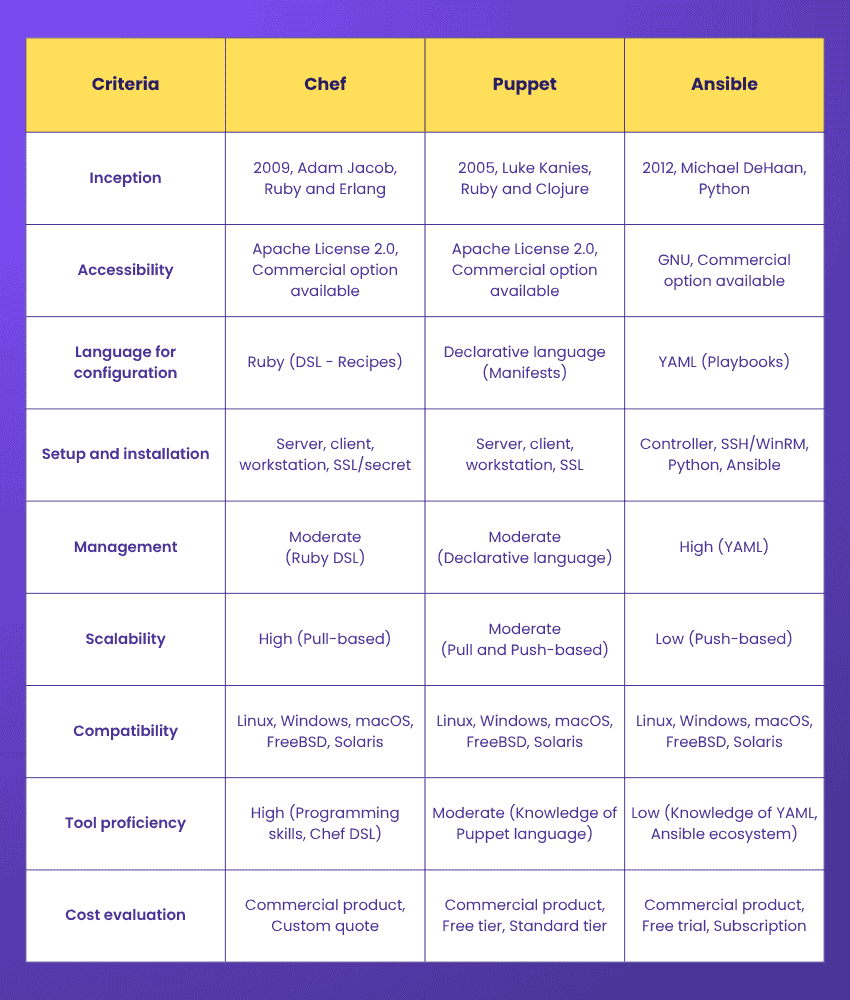
Here’s a detailed comparison of Chef vs Puppet vs Ansible across key areas such as accessibility, setup, configuration language, scalability, and cost. Understanding these differences will help you choose the right tool based on your team’s skills, infrastructure needs, and long-term automation goals.
Inception
The table below highlights the inception timeline of Chef, Puppet, and Ansible and how they gained popularity over time.

Accessibility
Chef, Puppet, and Ansible are open-source tools that also offer commercial versions tailored for enterprise use.
1) Chef is available under the Apache License 2.0. Its enterprise offering, Chef Enterprise Automation Stack, includes advanced features and dedicated support. Pricing is customised based on the number of nodes and support requirements.
2) Puppet, also licensed under Apache 2.0, provides Puppet Enterprise. It includes a free tier for up to 10 nodes and a standard pricing model of approximately £95.16 per node per year.
3) Ansible is distributed under the GNU General Public License. Its commercial version, Ansible Automation Platform, offers a 60-day free trial and subscription-based pricing, which varies depending on the number of nodes and the level of support selected.
Language for Configuration
In the Puppet vs Ansible vs Chef comparison, these tools use different languages to define and manage system configurations, each offering varying levels of complexity, control, and usability.
1) Chef: It uses Ruby as its domain-specific language for creating configuration scripts known as recipes. Ruby provides significant flexibility and control, making Chef highly customisable. However, it requires a solid understanding of programming concepts, and its support for imperative and procedural code can lead to inconsistencies in larger setups.
2) Puppet: It uses a declarative language to write configurations called manifests. It is designed for clarity and simplicity, enabling users to define the desired state of systems without needing to specify how to reach that state. While easier to read and manage, it restricts users from using common programming constructs such as loops, conditionals, and variables.
3) Ansible: It relies on YAML for writing playbooks, a format known for its readability and straightforward structure. It is ideal for users with limited programming experience. However, YAML’s strict formatting especially indentation can easily introduce errors if not carefully managed. Success with Ansible depends on following clear syntax rules and best practices.
Learn to use Puppet to ensure faster software releases with our Puppet Training – Register now!
Setup and Installation Process
Chef, Puppet, and Ansible differ significantly in their setup and installation processes, affecting ease of deployment and scalability.
1) Chef: It requires the installation and configuration of a server, a client on each node, and a workstation to manage interactions. It also relies on a secure communication channel between the server and nodes, typically established using SSL certificates or a shared secret. Due to its architecture and requirements, Chef’s setup can be complex and time-consuming, particularly in large or dynamic environments.
2) Puppet: It follows a similar model, requiring both a server and client on each node, along with a workstation for management. Like Chef, it uses SSL certificates to secure communication. However, Puppet offers built-in tools and automation scripts that streamline the setup process, making it generally faster and slightly more user-friendly than Chef’s.
3) Ansible: It stands out for its simplicity. It does not require any agents or additional software on the target nodes. Instead, it connects via SSH or WinRM and runs tasks remotely. Only a controller machine with Python and Ansible installed is needed. This agentless architecture makes Ansible the quickest and easiest to set up among the three tools.
Management Simplicity
In the Ansible vs Chef vs Puppet discussion, these tools offer varying levels of management simplicity, largely influenced by the languages they use and the complexity of their configurations.
1) Chef: It uses Ruby as its domain-specific language (DSL), offering high flexibility and control when defining system configurations. However, this flexibility comes with the need for programming expertise and familiarity with Ruby syntax. Chef supports imperative and procedural styles, which, while powerful, can introduce inconsistency and make configurations harder to maintain.
2) Puppet: It employs a declarative language that allows users to describe the desired state of a system in a clear and readable manner. Its simplicity improves usability, especially for basic setups. However, it limits expressiveness by not supporting standard programming constructs like variables, loops, or conditionals. This makes complex configurations harder to implement. Puppet’s management simplicity is moderate, striking a balance between usability and capability.
3) Ansible: It relies on YAML for writing playbooks, known for its readability and minimal syntax. This simplicity enables faster adoption and reduces the need for extensive coding. While YAML’s sensitivity to indentation can lead to formatting errors, Ansible generally requires less logic and code to manage infrastructure.
Scalability
In the Ansible vs Chef vs Puppet comparison, these tools use different methods to apply updates, which affects how well they scale in large or complex systems.
1) Chef: It uses a pull-based model. This means each node regularly checks with the server for updates and applies them when needed. This helps keep everything up to date but can sometimes cause delays or small mismatches between nodes. Chef works well in large and fast-changing environments, making it highly scalable.
2) Puppet: It supports both pull and push models. Nodes can either check for updates like in Chef or receive updates directly from the server. This gives you more control over when updates happen, but it also needs more setup and coordination. Puppet is moderately scalable and handles large, mixed environments with different systems and platforms.
3) Ansible: It uses a push-based model. The controller machine sends updates directly to the nodes using SSH or WinRM. This allows quick updates but can be risky if something goes wrong during the process. Ansible is great for smaller setups that need fast and simple updates, but it may not scale as well in very large or complex systems.
Compatibility
Chef, Puppet, and Ansible are all widely compatible with different systems, cloud platforms, and DevOps tools.
1) Chef: It supports major operating systems like Linux, Windows, macOS, FreeBSD, and Solaris. It works well with popular cloud providers such as AWS, Azure, Google Cloud, and VMware, and integrates easily with tools like Jenkins, Docker, and Git.
2) Puppet: It offers similar compatibility. It runs on the same range of operating systems and supports leading cloud platforms. It also works smoothly with commonly used DevOps tools like Jenkins, Docker, and Git.
3) Ansible: It is equally versatile. It supports all major operating systems, including Linux, Windows, macOS, FreeBSD, and Solaris. It works with cloud providers such as AWS, Azure, Google Cloud, and VMware (including ESX and ESXi), and connects well with DevOps tools like Jenkins, Docker, and Git.
Tool Proficiency
Chef, Puppet, and Ansible each require a different level of skill to use effectively.
1) Chef: It needs a high level of knowledge. You should be comfortable with programming, especially in Ruby, and understand how Chef works its language, structure, and workflow. You’ll also need to follow best practices to write and manage code properly.
2) Puppet: It requires a moderate level of skill. You don’t need to be a programmer, but you should know how Puppet’s language and system work. Understanding its structure and using good coding habits will help you manage configurations smoothly.
3) Ansible: It is the easiest to learn and use. It uses YAML, a simple and readable format, so you don’t need strong technical skills to get started. With some basic knowledge, you can quickly begin using Ansible to manage your systems and automate tasks.
Become familiarised with Chef and its development environment. Join our Chef Fundamentals Training now!
Cost Evaluation
Chef, Puppet, and Ansible all offer free open-source versions and paid options for businesses, but their costs can be quite different.
1) Chef: It has a free version, and a paid product called Chef Enterprise Automation Stack. The cost depends on how many nodes you have and the level of support you need. Chef can be expensive, as you must pay for server and client licences, plus support and maintenance fees.
2) Puppet: It also offers a free version, and a paid product called Puppet Enterprise. It includes a free plan for up to 10 nodes, and a standard plan that costs around £95.16 per node each year. Puppet’s pricing is more affordable than Chef’s, but you still need to pay for licences and support.
3) Ansible: It has a free version, and a paid product called Ansible Automation Platform, which includes a 60-day free trial. Its pricing is based on a subscription, depending on the number of nodes and the support you choose. Ansible is usually the most cost-friendly option because there are no licence fees only support and maintenance costs if needed.
Which is Better: Chef vs Puppet vs Ansible?
When comparing Chef vs Puppet vs Ansible, Ansible stands out for its ease of use with simple YAML playbooks and agentless architecture, making it great for fast automation. Chef relies on Ruby and a pull-based approach suited for complex setups, while Puppet combines a declarative language with flexible push and pull models for managing large environments efficiently.
Which Automation Tool is Easiest to Learn: Chef, Puppet, or Ansible?
Among Chef vs Puppet vs Ansible, Ansible is the easiest automation tool to learn. It uses simple YAML syntax and works without agents, making it quick to set up and ideal for beginners. In contrast, Chef requires Ruby programming skills, and Puppet uses its own declarative language both involve a steeper learning curve and more complex agent-based setups.
Conclusion
In the comparison of Chef vs Puppet vs Ansible, each tool offers unique strengths depending on your needs. However, Ansible stands out for its simplicity, ease of use, and agentless setup, making it ideal for beginners. Chef and Puppet offer more control and scalability but come with steeper learning curves and more complex configurations. Choose based on your team’s skills and infrastructure size.
Learn to streamline development and deployment processes for faster releases with our Kubernetes Training – Join today!
Frequently Asked Questions
What is an Advantage of Using Ansible for Automation as Compared to Puppet and Chef?

One significant advantage of using Ansible for automation compared to Puppet and Chef is its simplicity and ease of use. Additionally, its agentless architecture, ease of configuration, quick setup and excellent orchestration capabilities make it a popular choice for teams looking for a user-friendly and efficient automation tool.
Which is Better, Chef or Puppet or Ansible?
You can choose Ansible for its simplicity, Puppet for its control, and Chef for its flexibility. It's important to understand the strengths and limitations of each tool, as that's the key to leveraging their capabilities to the fullest.
What are the Other Resources and Offers Provided by The Knowledge Academy?
The Knowledge Academy takes global learning to new heights, offering over 3,000 online courses across 490+ locations in 190+ countries. This expansive reach ensures accessibility and convenience for learners worldwide.
Alongside our diverse Online Course Catalogue, encompassing 17 major categories, we go the extra mile by providing a plethora of free educational Online Resources like Blogs, eBooks, Interview Questions and Videos. Tailoring learning experiences further, professionals can unlock greater value through a wide range of special discounts, seasonal deals, and Exclusive Offers.
What is The Knowledge Pass, and How Does it Work?
The Knowledge Academy’s Knowledge Pass, a prepaid voucher, adds another layer of flexibility, allowing course bookings over a 12-month period. Join us on a journey where education knows no bounds.
What are the Related Courses and Blogs Provided by The Knowledge Academy?
The Knowledge Academy offers various DevOps Certification, including the Chef Fundamentals Training, Puppet Training, and the Ansible Essentials Training. These courses cater to different skill levels, providing comprehensive insights into Ansible Interview Questions.
Our Programming & DevOps Blogs cover a range of topics related to DevOps, offering valuable resources, best practices, and industry insights. Whether you are a beginner or looking to advance your Programming & DevOps skills, The Knowledge Academy's diverse courses and informative blogs have got you covered.

Lily Turner


Senior AI/ML Engineer and Data Science Author
Lily Turner is a data science professional with over 10 years of experience in artificial intelligence, machine learning, and big data analytics. Her work bridges academic research and industry innovation, with a focus on solving real-world problems using data-driven approaches. Lily’s content empowers aspiring data scientists to build practical, scalable models using the latest tools and techniques.
View Detail
Upcoming Programming & DevOps Resources Batches & Dates
Date
 Certified DevOps Professional (CDOP)
Certified DevOps Professional (CDOP)
Thu 1st Oct 2026
Certified DevOps Professional (CDOP)
Thu 17th Dec 2026

 If you wish to make any changes to your course, please


