


 Top Rated Course

We may not have the course you’re looking for. If you enquire or give us a call on +44 1344 203 999 and speak to our training experts, we may still be able to help with your training requirements.
Transport layer Security (TLS): Definition, Importance and Benefits
The Knowledge Academy 27 March 2026Transport Layer Security (TLS) is a cryptographic protocol that secures data transmission over networks by ensuring privacy, authentication, and data integrity. It encrypts communication, verifies identities, and prevents data tampering. It also helps keep websites, emails, APIs, and online services secure and trustworthy.
Home
 Resources
IT Infrastructure & Networking
Transport layer Security (TLS): Definition, Importance and Benefits
Resources
IT Infrastructure & Networking
Transport layer Security (TLS): Definition, Importance and Benefits
Resources
IT Infrastructure & Networking
Transport layer Security (TLS): Definition, Importance and Benefits

Training Outcomes Within Your Budget!
We ensure quality, budget-alignment, and timely delivery by our expert instructors.
Table of Contents
From sending emails to making online payments, we trust the internet with vast amounts of personal and business data every day. Much of this information travels silently across networks, where it could be exposed if not properly protected. That’s where Transport Layer Security (TLS) steps in as a powerful safeguard. It works quietly in the background to keep your digital interactions secure.
TLS encrypts data during transmission and verifies identities before communication begins. This prevents unauthorised access, data tampering, and impersonation attacks. For organisations, it builds customer trust and supports modern security standards. In this blog, you’ll explore what TLS is, how it works, and why it plays such a critical role in today’s connected world.
Table of Contents
1) What is Transport Layer Security?
2) How Does Transport Layer Security Work?
3) Importance of Using TLS
4) How to Protect Email With TLS?
5) Benefits of Transport Layer Security
6) Challenges of Transport Layer Security
7) Conclusion
What is Transport Layer Security?
Transport Layer Security is a security system that operates above the Transport Layer of the Open Systems Interconnection (OSI) model. It protects data when it travels over a network such as the internet. It encrypts data while it is being transmitted between two systems, such as between a web browser and a web server or an email client and an email server. It is the successor to the Secure Sockets Layer (SSL).
TLS ensures that information sent over the internet remains private and tamper-free. Its three main goals are confidentiality, data integrity, and proper authentication. When TLS is in use, even if someone manages to intercept the data, they cannot read or modify it without the proper encryption keys.

How Does Transport Layer Security Work?
Transport Layer Security works through a process known as the TLS handshake. This happens behind the scenes every time a secure connection is established. Let's check the process involved:
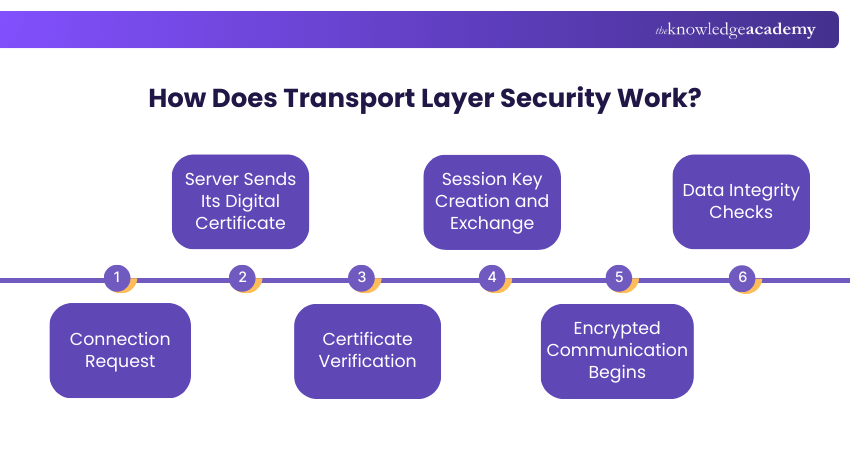
Step 1: Connection Request
TLS starts when a client, such as a web browser or email application, contacts a server and asks to create a secure connection. This request signals that the client wants to communicate using encryption.
Step 2: Server Sends Its Digital Certificate
In response, the server sends a digital certificate to the client. This certificate contains the server’s public key and identity details, helping prove that the server is genuine.
Step 3: Certificate Verification
The client checks the server’s certificate using trusted certificate authorities. This step ensures that the certificate is valid, trusted, and has not expired or been altered.
Step 4: Session Key Creation and Exchange
Once the certificate is verified, the client creates a unique session key. This key is encrypted using the server’s public key and sent to the server. Only the server can decrypt it using its private key.
Step 5: Encrypted Communication Begins
After both sides share the same session key, secure communication starts. All data exchanged during the session is encrypted, keeping it safe from interception.
Step 6: Data Integrity Checks
TLS continuously checks the data being sent to ensure it has not been changed during transmission. If tampering is detected, the secure connection can be ended immediately.
Importance of Using TLS
Transport Layer Security plays a vital role in protecting data that is constantly moving across the internet. Without TLS, information like passwords, personal details, and messages can be easily seen or stolen by attackers. TLS encrypts this data, which means it turns the information into a secure form that cannot be read by anyone who intercepts it.
This level of protection is essential in today’s digital environment, where cyber threats and data breaches are increasingly common. For organisations, TLS reduces security risks and helps meet basic safety standards. Overall, it plays a major role in keeping online communication safe and reliable.
Strengthen your network defence skills with our Cisco IOS Network Security Training – Register today!
How to Protect Email With TLS?
Email is one of the most common ways to share information, yet it is often overlooked when it comes to security. Without proper protection, it can have security issues. Let's check how you can protect your email with TLS:
1) Choose a Secure Email Provider
Choosing a secure email provider is the first step in protecting your emails with TLS. A reliable provider automatically supports modern TLS versions and ensures that emails are encrypted while being sent and received.
a) Supports TLS by default for incoming and outgoing emails
b) Uses modern and secure TLS versions
c) Offers security controls for administrators
d) Follows recognised email security standards
2) Configure Your Email Client
Even if your email provider supports TLS, your email client must be set up correctly. Proper configuration ensures that emails are always sent and received using encrypted connections, reducing the chances of data exposure.
a) Enable TLS for incoming mail servers
b) Enable TLS for outgoing mail servers
c) Disable outdated or insecure protocols
d) Use recommended encryption settings
3) Send Emails Securely
Once TLS is enabled, emails are protected automatically during transit. Users do not need to take extra steps, as encryption happens in the background. For highly sensitive data, TLS can be combined with additional security measures such as message encryption, digital signatures, or secure file-sharing platforms.
a) Emails are encrypted during transmission
b) Protects email content from interception
c) Works seamlessly with most email systems
d) Can be combined with extra security tools if needed
4) Check for TLS in Action
TLS only works when both the sending and receiving email servers support it. It is important to confirm that TLS is actually being used. This can be done by checking email headers or security indicators provided by the email service. You can find that with details indicating either TLS or encryption.
a) Review email headers for TLS details
b) Look for security indicators in email clients
c) Confirm encrypted delivery status
d) Identify insecure email routes
5) Regularly Update Your Systems
TLS security improves over time, and older versions can become unsafe. Regular updates ensure your systems use the latest encryption methods and remain protected against new threats.
a) Fixes known security vulnerabilities
b) Improves compatibility with other servers
c) Prevents configuration issues
d) Maintains long-term email security
Learn to design, implement, and manage secure enterprise networks through CCNP Security Training – Sign up soon!
Benefits of Transport Layer Security
TLS offers a wide range of benefits for individuals, businesses, and digital platforms. The following are some of the major benefits of it:
1) Enhanced Security
a) Encrypts data while it travels across the internet
b) Protects information from hackers and eavesdroppers
c) Secures passwords, personal data, and payment details
d) Prevents unauthorised access to sensitive information
e) Reduces the risk of data leaks and breaches
f) Makes intercepted data unreadable to attackers
2) Stronger Authentication
a) Verifies the identity of servers using digital certificates
b) Helps users connect to the correct and trusted website
c) Prevents fake or impersonated websites
d) Reduces the risk of phishing attacks
e) Protects against man-in-the-middle attacks
f) Improves trust between users and systems
3) Customer Trust
a) Shows visible security signs like HTTPS and padlocks
b) Reassures users that their data is protected
c) Encourages users to share information safely
d) Increases customer loyalty and repeat visits
e) Improves brand credibility and reputation
f) Supports safer User Experiences (UX)
4) SEO Boost
a) Helps websites rank higher in search results
b) Meets Search Engine Optimisation (SEO) security requirements
c) Improves website credibility for search engines
d) Reduces security warnings in browsers
e) Supports long-term online visibility
f) Contributes to overall digital growth
5) Secure Email Communication
a) Encrypts emails while they are being sent
b) Prevents unauthorised access to email content
c) Protects sensitive business and personal data
d) Improves privacy in email communication
e) Supports compliance with data protection rules
f) Strengthens overall email security
6) Reliable Data Transmission
a) Ensures data reaches the receiver without changes
b) Detects tampering during data transmission
c) Prevents corrupted or altered messages
d) Maintains accurate and consistent communication
e) Reduces errors in data exchange
f) Supports stable and secure connections
Challenges of Transport Layer Security
While Transport Layer Security offers strong protection, it also comes with certain challenges that everyone needs to understand. Here are those challenges:
1) Application-level Operation: TLS works at the application level, so each application and connection must create its own secure session. This can make implementation more complex.
2) Application Compatibility: TLS can only protect communication if the application supports it. Older or legacy applications may not work with modern TLS versions.
3) Management Overhead: TLS requires regular configuration, certificate management, and renewals. This adds extra administrative effort, especially in large environments.
4) Security Exploitation Risks: Because TLS is widely used, attackers often target weak configurations or outdated versions. Regular updates and proper setup are essential.
Conclusion
Transport Layer Security has become a significant part of secure digital communication. From securing websites and APIs to protecting emails and cloud services, TLS plays a vital role in modern cyber security. In an era where data and cyber threats are increasingly common, implementing TLS is not just good practice. It is essential for protecting users, businesses, and digital ecosystems.
Gain hands-on experience in core networking technologies with our Cisco Training – Start now!
Frequently Asked Questions
What Provides Security at the Transport Layer?

Security at the transport layer is ensured by protocols such as TLS. TLS encrypts data, ensures integrity, and authenticates communication endpoints, protecting information as it travels across networks.
What are the Two Best Practices Used to Secure APIs?
Two best practices for securing APIs are using OAuth 2.0 for strong authentication and HTTPS/TLS for encrypted communication. Together, these measures protect data confidentiality and prevent unauthorised access to API endpoints.
What are the Other Resources and Offers Provided by The Knowledge Academy?
The Knowledge Academy takes global learning to new heights, offering over 3,000+ online courses across 490+ locations in 190+ countries. This expansive reach ensures accessibility and convenience for learners worldwide.
Alongside our diverse Online Course Catalogue, encompassing 17 major categories, we go the extra mile by providing a plethora of free educational Online Resources like Blogs, eBooks, Interview Questions and Videos. Tailoring learning experiences further, professionals can unlock greater value through a wide range of special discounts, seasonal deals, and Exclusive Offers.
What is The Knowledge Pass, and How Does it Work?
The Knowledge Academy’s Knowledge Pass, a prepaid voucher, adds another layer of flexibility, allowing course bookings over a 12-month period. Join us on a journey where education knows no bounds.
What are the Related Courses and Blogs Provided by The Knowledge Academy?
The Knowledge Academy offers various Cisco Training, including CCNA Cybersecurity Operation Training, CCNP Security Training and Cisco Quality of Service Training. These courses cater to different skill levels, providing comprehensive insights into the Data Link Layer.
Our IT Infrastructure & Networking Blogs cover a range of topics related to Transport Layer Security, offering valuable resources, best practices, and industry insights. Whether you are a beginner or looking to advance your IT Infrastructure & Networking skills, The Knowledge Academy's diverse courses and informative blogs have got you covered.

The Knowledge Academy


Global Training Provider
The Knowledge Academy is a world-leading provider of professional training courses, offering globally recognised qualifications across a wide range of subjects. With expert trainers, up-to-date course material, and flexible learning options, we aim to empower professionals and organisations to achieve their goals through continuous learning.

Upcoming IT Infrastructure & Networking Resources Batches & Dates
Date
 Cisco CyberOps Associate Training
Cisco CyberOps Associate Training
Mon 20th Jul 2026
Cisco CyberOps Associate Training
Mon 2nd Nov 2026

 If you wish to make any changes to your course, please


