


 Top Rated Course

We may not have the course you’re looking for. If you enquire or give us a call on +800 312616 and speak to our training experts, we may still be able to help with your training requirements.
What is Selenium: A Complete Guide for Test Automation
Scarlett Adams 06 May 2026Selenium is an open-source automation tool used for testing web applications across browsers. It simulates user actions for quality assurance. Primarily used for functional and regression testing, Selenium supports multiple Programming Languages including Java, Python and JavaScript, which makes it highly flexible.

Training Outcomes Within Your Budget!
We ensure quality, budget-alignment, and timely delivery by our expert instructors.
Table of Contents

Selenium is one of the powerhouses behind flawless web experiences. It's an automation fuel that tests every click, scroll and interaction before users ever see them. It's like having a tireless digital assistant that checks your website across browsers, platforms, and environments with machine‑like precision. Essentially, from automating repetitive test cases to validating complex web interactions, it simplifies the testing process while improving speed and accuracy.
In this blog, we’ll uncover What is Selenium in detail. We'll explore how this open‑source marvel became the backbone of modern test automation as it empowers Testers to work smarter deliver faster and build more reliable applications. So read on!
Table of Contents
1) What is Selenium?
2) Who Uses Selenium?
3) Importance of Testing in Selenium
4) Key Features of Selenium
5) Core Components of the Selenium
6) Types of Testing Automated with Selenium
7) Key Benefits of Using Selenium
8) Limitations of Selenium Automation
9) Best Practices for Using Selenium
10) Conclusion
What is Selenium?
Selenium is a widely used open-source framework designed to automate web applications for testing. It allows Testers and Developers to interact with web browsers in a platform-independent manner and supports multiple Programming Languages such as Java, Python, and C#, making automated testing flexible and efficient.
Selenium was first created by Jason Huggins in 2004 as an internal tool at ThoughtWorks. In 2008, it was released as an open-source project, which later led to the development of Selenium WebDriver, significantly advancing web automation testing capabilities.

Who Uses Selenium?
Now that we’ve outlined What is Selenium, let’s explore the key professionals who commonly use the Selenium framework:
1) Developers: Developers use Selenium to test and verify web application features during development. By automating the browser interactions, they can quickly detect and resolve issues, thus helping ensure smoother development and faster, more reliable software delivery.
2) Testers: Testers utilise Selenium to automate browser-based testing and validate web application functionality across different browsers and platforms. It enables them to run repetitive test cases, conduct regression testing and maintain the overall stability and performance of applications.
3) DevOps Engineers: DevOps professionals integrate Selenium into CI/CD pipelines to automate testing during the deployment process. This helps ensure that new updates or code changes do not disrupt existing features or introduce new defects.
4) Automation Engineers: Automation engineers use Selenium to build scalable and maintainable test automation frameworks. They design automated testing solutions that handle complex test scenarios and improve overall testing efficiency.
Importance of Testing in Selenium
Manual testing can be slow and susceptible to human error. Selenium also allows Developers and Testers to automate the testing of web applications across multiple platforms and browsers. These are benefits of Selenium Testing:
1) Language Support: Selenium supports various Programming Languages, including Ruby, Java, PHP, Perl, Python, JavaScript, and C#.
2) Browser Compatibility: Selenium enables testing across multiple browsers such as Google Chrome, Mozilla Firefox, Microsoft Edge, Safari, and Internet Explorer, helping ensure consistent application behaviour.
3) Scalability: Selenium automation can scale to accommodate numerous test cases, scenarios, and user interactions. This capability allows organisations to achieve broader test coverage.
4) Reusable Test Scripts: Testers can create reusable scripts that can be applied across diverse test cases and projects. This saves time and reduces the effort required for script maintenance.
5) Parallel Testing: Selenium supports parallel execution, allowing multiple tests to run simultaneously. This significantly reduces testing time and improves development efficiency.
6) Documentation and Reporting: Selenium provides detailed logs and reports of test executions, making it easier to monitor outcomes and identify areas that require improvement.
7) User Experience Testing: Selenium can simulate real user interactions, helping Testers evaluate usability and ensure that applications deliver a smooth and intuitive user experience.
8) CI/CD Integration: Selenium integrates seamlessly with CI/CD pipelines, enabling automated testing for every code update.
Key Features of Selenium
Here are the key features that’ll help you understand What is Selenium further:
1) Multi-browser Support: Selenium allows testing across multiple web browsers such as Chrome, Firefox, Edge, and Safari.
2) Multi-language Compatibility: It supports several Programming Languages, including Java, Python, C#, JavaScript, and Ruby.
3) Easy Web Element Identification: Selenium provides simple methods to locate and interact with web elements during testing.
4) High Performance and Speed: Compared to many other automation tools, Selenium offers faster execution and efficient performance.
5) Support for Dynamic Web Elements: It can handle dynamic elements in modern web applications, making automated testing more flexible.
6) Open-source Platform: Selenium is freely available and supported by a large Developer community.
7) Portability: It can run across multiple operating systems such as Windows, macOS, and Linux.
8) Code Reusability: Test scripts and elements can be reused across different test cases and projects, improving efficiency.
Build reliable test automation skills with the power of Selenium. Sign up for our comprehensive range of Selenium Courses today!
Core Components of the Selenium
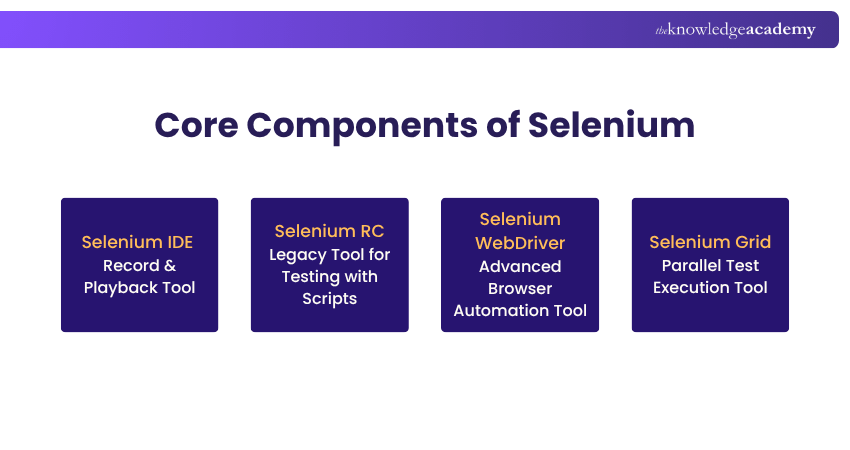
One of the biggest steps in learning What is Selenium is knowing its core components. Selenium Suite has four components namely Selenium IDE, Selenium RC, Selenium WebDriver and Selenium Grid. Let's explore them in detail:
1) Selenium IDE
This is a browser extension available for browsers like Chrome and Firefox. It helps users record and replay browser interactions. It captures actions such as clicks, form submissions and selections, and converts them into automated test scripts.
These scripts can be generated in programming languages like Java, C#, Python, Ruby or Selenium’s scripting language called Selenese. Selenium IDE helps quickly create and validate automated test scripts, detect and highlight errors during test playback, and perform cross-browser testing.
2) Selenium RC
Selenium RC, which stands for Remote Control, was developed to automate web application testing. It simulates user interactions across different browsers and platforms. It enables remote browser automation and allows test scripts to be written in numerous programming languages. However, Selenium RC had significant limitations.
Firstly, it relied on a JavaScript-based proxy to communicate with browsers, which created instability and compatibility issues with modern web applications. Also, separate drivers were required for different browsers, making maintenance more difficult as browsers evolved. Furthermore, test scripts often had to wait for browser responses before moving to the next step.
3) Selenium WebDriver
This is an advanced version of Selenium RC developed to overcome its limitations. It interacts directly with browsers using native browser methods, eliminating the need for the JavaScript proxy used in Selenium RC. WebDriver integrates well with Selenium IDE and Selenium Grid, enabling faster, more reliable, and scalable automated test execution.
4) Selenium Grid
This is a tool that allows testers to run automated tests simultaneously on multiple machines and browsers. It works through a hub-and-node architecture, where the central hub distributes test commands (usually in JSON format) to different connected nodes. This enables parallel test execution and reduces overall testing time.
Level Up Your Automation Game with the blend of Selenium and C#. Register for our Selenium Immersion with C# Training today!
Types of Testing Automated with Selenium
Selenium is widely used for browser automation and supports multiple types of web application testing. Here are some of the key testing types that can be automated using Selenium:

1) Functional Testing
Selenium helps verify whether a website or application meets specified requirements. It automates user actions, such as clicking, typing, and navigating pages, to validate various functionalities.
2) Regression Testing
Selenium can run regression tests to make sure that newly introduced changes do not negatively impact existing features. This is especially important in environments where applications are frequently updated.
3) Visual Testing
Selenium can assist in validating the visual appearance of a website or application. It compares the current version with a baseline version to detect any unintended visual or functional changes.
4) Smoke Testing
Selenium can run regression tests to make sure that newly introduced changes do not negatively impact existing features. This is especially important in environments where applications are frequently updated.
5) Cross-Browser Testing
Selenium supports smoke testing to quickly verify that the primary features of an application or website function correctly after a new build or update is released.
6) Data-driven Testing
In data-driven testing, Selenium works with external data sources to test applications using multiple input datasets. This helps validate how the application behaves under different data conditions.
7) User Interface (UI) Testing
Selenium automates testing of user interface components such as buttons, forms, menus and text fields. This ensures they are visible, responsive and function properly.
Limitations of Selenium Automation
Despite its many advantages, Selenium also has certain limitations that users should consider:
1) Cross-browser Compatibility Challenges: Although Selenium supports multiple browsers, differences in how these browsers interpret HTML and CSS can sometimes lead to inconsistent test results.
2) Slower Test Execution: Since Selenium relies on browser drivers to interact with web browsers, test execution can occasionally be slower, particularly when running tests on large or complex web applications.
3) Difficulty Handling Dynamic Web Elements: Selenium may struggle with dynamic elements whose attributes (such as IDs) change frequently on web pages. This can cause automated test scripts to fail if the element identifiers are not handled carefully.
4) Limited Support for Mobile Application Testing: Selenium is mainly designed for web application testing and does not directly support native mobile application automation. Developers often rely on other tools or frameworks for mobile testing.
5) Limited Support for Desktop Applications: Selenium does not natively support testing of Windows-based desktop applications. In such cases, Testers typically use third-party tools or libraries to automate desktop application testing.
From efficient setup to scalable automation, take your Selenium journey to new heights. Sign up for our Selenium Testing Framework Training now!
Best Practices for Using Selenium
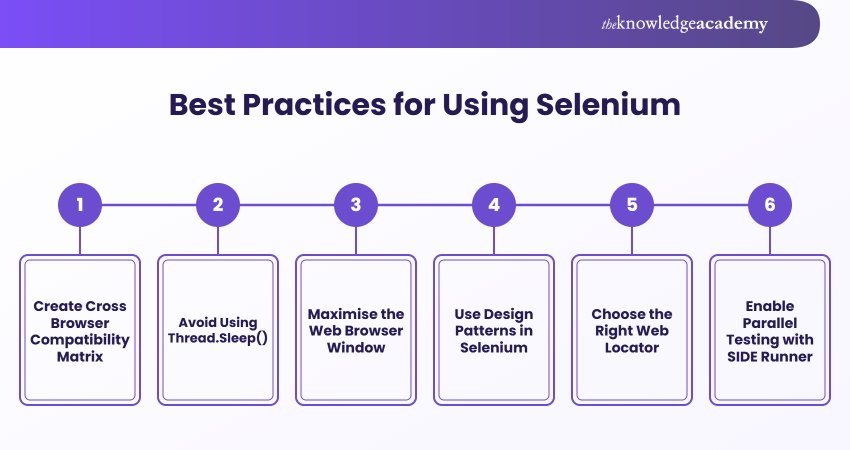
Although there are no strict rules for creating scalable automation tests, following certain principles can significantly improve the effectiveness of Selenium tests. Consider these practices:
1) Create Cross Browser Compatibility Matrix
A cross-browser compatibility matrix helps Testers identify which browsers, versions, and operating systems should be prioritised during testing. This ensures that the web application performs consistently across different environments and provides a uniform user experience for all users. Using such a matrix also helps teams plan test coverage effectively and detect browser-specific issues early.
2) Avoid Using Thread.Sleep()
Using fixed delays such as Thread.sleep() is not recommended in Selenium automation because it pauses the entire test thread and slows down execution. Instead, Testers should use implicit or explicit waits, which allow the script to wait dynamically until a specific element or condition is met, making the tests more reliable and efficient.
3) Maximise the Web Browser Window
Maximising the browser window during test execution ensures that all page elements are visible and accessible. This also helps capture accurate screenshots for debugging and reporting, especially when tests are run across multiple browsers and screen resolutions.
4) Use Design Patterns in Selenium
Implementing design patterns such as the Page Object Model (POM) improves the structure and maintainability of Selenium test scripts. In this approach, every web page is represented as a class that contains its elements and related actions. This separation of test logic from page elements reduces code duplication and simplifies script maintenance when the UI changes.
5) Choose the Right Web Locator
Selecting stable and reliable web locators is crucial for building effective Selenium tests. Locators such as ID, Name, XPath, and CSS selectors allow scripts to interact with elements on the web page. Choosing unique and stable locators reduces test failures and improves the overall reliability of the automation framework.
6) Enable Parallel Testing with SIDE Runner
Selenium SIDE Runner is a popular command-line tool that executes Selenium IDE test cases outside the browser environment. It supports parallel test execution, thus allowing multiple tests to run simultaneously across different browsers or configurations. This significantly reduces test execution time and enables easier integration with CI/CD pipelines for automated workflows.
Conclusion
Understanding What is Selenium is important because it continues to redefine how teams approach web testing by making automation faster and smarter. From simplifying repetitive testing tasks to ensuring consistent performance across browsers, it empowers Developers and Testers to build high-quality web applications with confidence. Mastering it is about delivering seamless digital experiences in the web ecosystem.
Master Selenium WebDriver from scratch and automate with the power of Python. Sign up for our Selenium WebDriver with Python Training now!
Frequently Asked Questions
Is Selenium difficult to learn?

Selenium is generally considered easy to learn for beginners, especially for those with basic programming knowledge. Understanding concepts such as web elements, locators, and browser drivers can help learners quickly start creating automation scripts. With practice, users can gradually move on to more advanced frameworks and testing techniques.
Is C++ supported by Selenium?
Selenium does not officially provide native support for C++. The most commonly supported Programming Languages include Java, Python, C#, JavaScript, and Ruby. Developers who want to use Selenium typically choose one of these languages for writing automation scripts.
What are the Other Resources and Offers Provided by The Knowledge Academy?
The Knowledge Academy takes global learning to new heights, offering over 3,000+ online courses across 490+ locations in 190+ countries. This expansive reach ensures accessibility and convenience for learners worldwide.
Alongside our diverse Online Course Catalogue, encompassing 17 major categories, we go the extra mile by providing a plethora of free educational Online Resources like Blogs, eBooks, Interview Questions and Videos. Tailoring learning experiences further, professionals can unlock greater value through a wide range of special discounts, seasonal deals, and Exclusive Offers.
What is The Knowledge Pass, and How Does it Work?
The Knowledge Academy’s Knowledge Pass, a prepaid voucher, adds another layer of flexibility, allowing course bookings over a 12-month period. Join us on a journey where education knows no bounds.
What are the Related Courses and Blogs Provided by The Knowledge Academy?
The Knowledge Academy offers various Selenium Courses, including the Selenium Immersion with C# Course, Selenium WebDriver with Python Training and the Introduction to Test Automation with Selenium Web Driver Course. These courses cater to different skill levels, providing comprehensive insights into Selenium Tester Roles and Responsibilities.
Our Programming & DevOps Blogs cover a range of topics related to Selenium, offering valuable resources, best practices, and industry insights. Whether you are a beginner or looking to advance your Programming and DevOps skills, The Knowledge Academy's diverse courses and informative blogs have got you covered.
Upcoming Programming & DevOps Resources Batches & Dates
Date
 Introduction to Test Automation with Selenium Web Driver
Introduction to Test Automation with Selenium Web Driver
Fri 26th Jun 2026
Introduction to Test Automation with Selenium Web Driver
Fri 25th Sep 2026
Introduction to Test Automation with Selenium Web Driver
Fri 4th Dec 2026

 If you wish to make any changes to your course, please


