


 Top Rated Course


We may not have the course you’re looking for. If you enquire or give us a call on +44 1344 203 999 and speak to our training experts, we may still be able to help with your training requirements.
What is a Session ID? Everything You Need to Know
Richard Harris 27 March 2026A Session ID is a unique set of characters used to recognise and track a user’s session on a website or app, transmitted via cookies, URL, or hidden form field. It helps track activities like logging in, adding items to a cart, or navigating between pages. It ensures smooth navigation, maintains login status, and secure interactions.

Training Outcomes Within Your Budget!
We ensure quality, budget-alignment, and timely delivery by our expert instructors.
Table of Contents
You close your browser, come back, and the website still remembers you. Ever wondered how that happens? That smooth experience isn’t some magic. The mastermind behind this functionality is the Session ID, a tiny but powerful code that helps websites recognise you.
From keeping you logged in to saving your preferences or progress, Session IDs make online journeys simple, seamless, and secure. In this blog, you can discover what a Session ID is, how it works, where it is used, and much more, all in very simple words. Continue reading!
What is a Session ID?
A session ID, also known as a session token or session identifier, is a unique string of characters assigned by a web server when a user visits a website. This identifier allows the server to recognise and remember the user throughout their visit, which is referred to as a session.
A session is a limited period of interaction between your browser (the client) and the website’s server. During this time, the Session ID helps the server keep track of your actions, like staying logged in, filling out a multi-page form, or watching a video from where you left off.
How Do Session ID Work?
Session ID works by helping a website recognise and remember users during their visit. Since websites use HTTP or HTTPS, which are stateless and don’t remember previous actions, Session IDs link all of a user’s actions during a session. Here's how exactly it works:

1) User Connects to the Website: When a user visits a website, the server will create a session. This happens immediately or after the user logs in.
2) Session ID is Created: The web server generates a unique Session ID for the user. Instead of using simple numbers, it is created with complex IDs with mixed letters, numbers, and symbols.
3) Session ID is Sent to the Browser: The server sends the Session ID to the user’s browser. It will be stored as a cookie. This ID identifies the user throughout the session.
4) Session ID is Sent Back with Every Request: For every new page or action, the browser sends the Session ID to the server. This allows the server to match the request with the correct session data, like login info, progress, or cart items.
5) Server Confirms and Responds: The server checks the Session ID to make sure it is valid. If it is, it completes the requested action, such as loading a page or processing a form.
6) Session Ends: The session ends when the user logs out, closes the browser, or is inactive for a while. At this point, the Session ID is invalidated, and the user must start a new session to continue.
This process ensures a secure and smooth experience across multiple pages, without re-entering your information on every request.
Where and Why are Session IDs Used?
Session IDs are widely used across many websites and apps, including:
1) E-commerce Sites: To keep track of shopping cart items or recently viewed products.
2) Banking and Finance Websites: To maintain secure access during transactions.
3) Online Learning Platforms: To track lesson progress and user login.
4) Social Media Platforms: To keep users logged in.
5) Membership Sites or Forums: To keep users signed in and manage their sessions.
Session IDs are used for various purposes. Below are important scenarios of its usage:
1) Smooth User Experience: Session IDs help users log in and track their activities across pages.
2) Enhanced Security: They ensure only the correct user can access their data. This helps to keep sessions private and protected.
3) Better Website Usability: They allow things like shopping carts and preferences to work without interruptions.
4) Anonymous Tracking: Session IDs do not store personal data but help connect actions from the same user.
Discover HTML syntax, tags, and semantic markup to create web pages with our HTML and CSS Course – Register today!
Methods of Transmitting Session ID
There are three primary methods used to transmit session IDs between a browser and a server. Let’s explore each of them below:
1) Cookies
Cookies are small files stored in your browser. When you visit a website, the server generates a session cookie containing your session ID. This cookie is automatically sent back to the server with every request you make, such as navigating to another page or adding an item to your shopping cart.
2) URL Parameter
If cookies are disabled in your browser, the Session ID can be added directly to the URL as a parameter. This method attaches the Session ID to the web address, like this:
https://www.example.com/page?sessionid=123abc
This lets the server recognise your session and link it to the page activity even without cookies.
3) Hidden form Field
Another way to transmit a session ID is through a hidden form field. This is a piece of information embedded within a form that users do not see. When the form is submitted (for example, by clicking “Submit” or “Next”), the hidden field sends the session ID back to the server along with the rest of the form data.
Explore the coding basics for responsive web layouts with our Website Design Course – Join soon!
What are Alternative Types to Session ID?
While Session IDs are common, other methods are also used for managing sessions, especially in more advanced applications. Here are some of the alternatives to Session IDs:
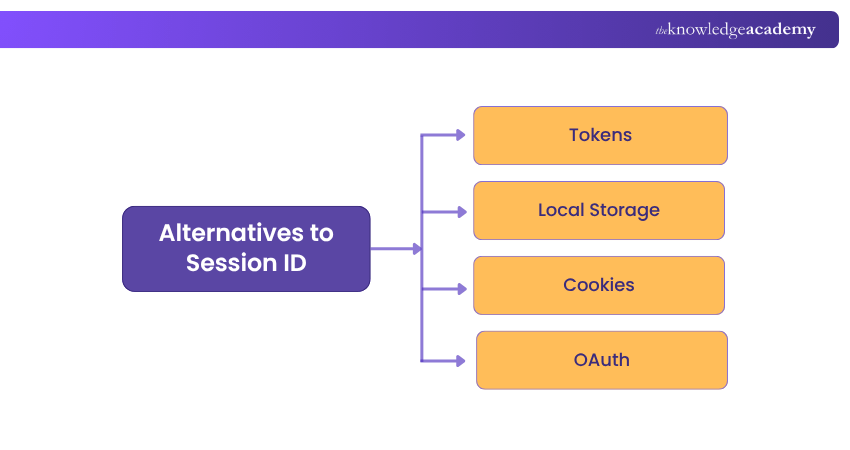
1) Tokens (Such as JWT - JSON Web Tokens)
Tokens are small pieces of data stored in the user’s browser. Unlike Session IDs, which store user data on the server, tokens carry user data inside them.
Benefits:
1) Works well without server storage
2) Easily scalable
3) Can include user roles and permissions
2) Local Storage
Modern web browsers allow storing data in local storage. This can hold session details locally without sending them on every request.
Benefits:
1) Large storage capacity
2) Simple to use for non-sensitive information
3) Good for offline web apps
3) Cookies
Apart from Session ID cookies, persistent cookies are also used for "Remember Me" features or long-term preferences.
Benefits:
1) Easy to implement and manage
2) Can be used for personalisation
3) Reduces need for repeat logins
4) OAuth
OAuth is a secure method that allows users to log into websites using third-party accounts like Google, Facebook, or Apple.
Benefits:
1) Very secure, no need to type passwords into every website
2) Ideal for connecting with third-party services
3) Reduces password-related risks
Acquire the necessary skills for Web Development, including HTML, CSS, and JavaScript with our Web Development Training – Sign up anytime!
How Secure are Session ID?
Session IDs are powerful, but they must be managed carefully. If they’re not handled carefully, they can be stolen or misused, putting users at risk. There are a few ways attackers might steal Session IDs:
1) Through public Wi-Fi without encryption
2) Using malicious scripts (like cross-site scripting or XSS)
3) By capturing Session IDs from URLs if they’re not hidden or encrypted
Here are the best practices for a secure Session ID:
1) Use long, random, unguessable Session IDs
2) Use HTTPS to encrypt data during transmission
3) Set cookies as HttpOnly and Secure
4) Implement session timeout (e.g., 15 minutes of inactivity)
5) Invalidate the Session ID on logout
6) Use IP/user-agent checks to detect stolen sessions
Conclusion
Session IDs may seem small, but they play a big role in how websites work behind the scenes. From keeping you logged in to remembering your progress or activity, they help create smooth, personalised, and secure online experiences. Knowing this simple mechanism can help you browse more safely and confidently in your everyday website usage.
Learn the technologies for versatile web solutions with App & Web Development Training – Start building your website effectively!
Frequently Asked Questions
How Do I Find My Current Session ID?

You can find your Session ID by:
1) Opening browser developer tools
2) Going to the "Application" or "Storage" section
3) Look under Cookies or Session Storage
There, you can look for a key like session_id or similar. This ID is assigned by the server to track your session during interactions.
How to Get Session ID from Task Manager?
You cannot directly get a web Session ID from Task Manager. However, in a Windows Terminal Server environment, you can view Session IDs like this:
1) Open Task Manager
2) Go to the Users tab
3) See the Session ID column for each user
What are the Other Resources and Offers Provided by The Knowledge Academy?
The Knowledge Academy takes global learning to new heights, offering over 3,000 online courses across 490+ locations in 190+ countries. This expansive reach ensures accessibility and convenience for learners worldwide.
Alongside our diverse Online Course Catalogue, encompassing 19 major categories, we go the extra mile by providing a plethora of free educational Online Resources like Blogs, eBooks, Interview Questions and Videos. Tailoring learning experiences further, professionals can unlock greater value through a wide range of special discounts, seasonal deals, and Exclusive Offers.
What is The Knowledge Pass, and How Does it Work?
The Knowledge Academy’s Knowledge Pass, a prepaid voucher, adds another layer of flexibility, allowing course bookings over a 12-month period. Join us on a journey where education knows no bounds.
What are the Related Courses and Blogs Provided by The Knowledge Academy?
The Knowledge Academy offers various App & Web Development Training, including Node.JS Course, UX Design Course and Web Development Training. These courses cater to different skill levels, providing comprehensive insights into Proximity Sensors.
Our Programming & DevOps Blogs cover a range of topics related to Session ID, offering valuable resources, best practices, and industry insights. Whether you are a beginner or looking to advance your Programming skills, The Knowledge Academy's diverse courses and informative blogs have got you covered.

Richard Harris


Senior Full Stack Developer and Technology Educator
Richard Harris is a highly experienced full-stack developer with deep expertise in both frontend and backend technologies. Over his 12-year career, he has built scalable web applications for startups, enterprises and government organisations. Richard’s writing combines technical depth with clear explanations, ideal for developers looking to grow in modern frameworks and tools.


 If you wish to make any changes to your course, please


