


 Top Rated Course

We may not have the course you’re looking for. If you enquire or give us a call on + 1-866 272 8822 and speak to our training experts, we may still be able to help with your training requirements.
What Is Read Only Memory (ROM)?
Richard Harris 15 July 2026ROM is non-volatile memory that stores essential startup instructions like firmware and BIOS, retaining data even when power is off, unlike volatile RAM. It is typically programmed during manufacturing. Modern variants, such as EEPROM and flash memory, allow limited updates while maintaining read-only protection for core operations.

Training Outcomes Within Your Budget!
We ensure quality, budget-alignment, and timely delivery by our expert instructors.
Table of Contents
Before you even open an app or click a key, there’s one tiny chip that kicks everything into motion: ROM. Short for Read Only Memory, it’s your device’s core memory that stores the "how-to" of turning on, starting up, and running smoothly. It doesn’t get wiped, doesn’t crash, and never forgets. Let's learn What is ROM, the digital DNA, your device needs to function.
Whether you're using a laptop, smartphone, or tablet, learning What is ROM is the essential starting point of every device. It holds critical firmware, never erases, and operates in the background. Think of it as your device’s backstage crew, silent, steady, and essential. Get ready to unlock the memory that never sleeps.
Table of Contents
1) Understanding What is ROM
2) The Role of ROM in Computers
3) How Does ROM Work?
4) Types of ROM
5) Example Applications of ROM
6) Advantages and Disadvantages of Different Types of ROM
7) Difference Between RAM and ROM
8) ROM vs Hard Drive
9) What Does 128GB ROM Mean?
10) Where is ROM Located in Computer?
11) Conclusion
Understanding What is ROM
ROM is an acronym for Read Only Memory. It is a type of permanent or non-volatile memory that stores instructions and data permanently. Non-volatile means that the Data does not disappear when the power is turned off. Read Only Memory is mainly used to store the bootstrap process that helps to start the system.
The Bootstrap process is a set of instructions that tells the processor how to load the operating system and other essential programs. ROM is also used to store firmware, which is software that controls the basic functions of hardware devices, such as keyboards, mouse, printers, etc.

1) Block Diagram of ROM
It consists of n input lines and m output lines. The m input lines are used in this circuit diagram to receive the input address for the ROM. The input address in this diagram is determined by where you want to access the content of the ROM.
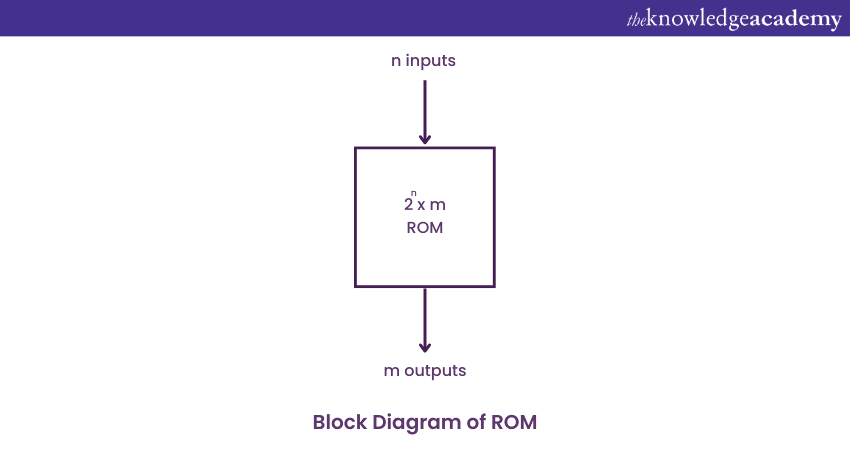
Since each of the m input lines is binary in nature, they can either hold the value 0 or 1. There are a total of 2^n addresses that are referred to by the input lines, and each of these addresses contains m bit information. This information is presented as the output of the ROM. Such a ROM is specified by 2^n x m ROM notation.
2) Internal structure of ROM
The internal structure of Read-Only Memory consists of two basic components: a decoder and OR gates. A decoder is a circuit combination that converts a coded form (such as binary) to a normal form (such as decimal). The input is binary, and the output is decimal. The OR gates in the Read-Only Memory take the outputs of the decoder as their inputs. This ROM can store 64 words, each with 4 bits.
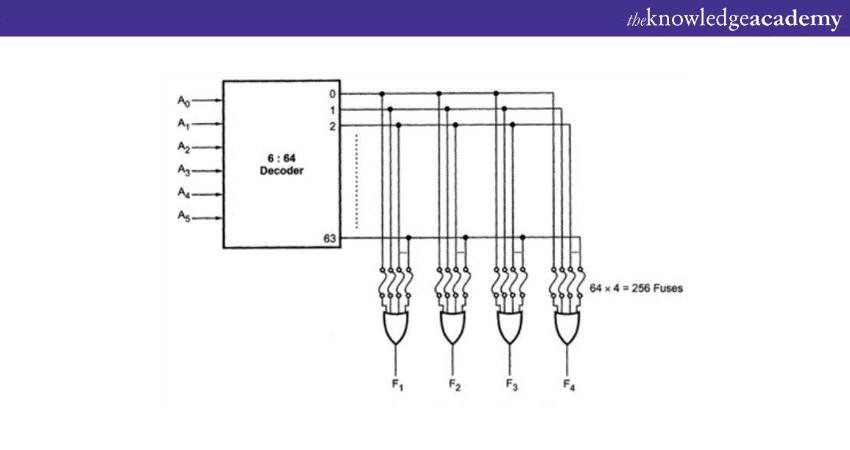
There are four output lines, and one of the 64 words is selected by the six input lines. The input lines specify the address of the word in binary. For example, if the input is 000000, the output is word number 0. If the input is 111111, the output is word number 63.
The Role of ROM in Computers
In a computer system, ROM typically contains firmware and basic start-up programs such as the BIOS or bootloader, which initialise hardware, perform system checks, and load the operating system at power-on.
Since its contents are stable and persistent, ROM ensures a computer always has access to the low-level instructions it needs to begin functioning. So, they act as a foundational memory component that keeps the system reliable and ready to start.
a) Stores Boot Instructions: Contains firmware required to initialise hardware during startup
b) Non-Volatile Memory: Retains data even when the computer is switched off
c) Supports Hardware Communication: Helps the operating system interact with system components
d) Ensures System Stability: Provides consistent instructions necessary for basic operations
How Does ROM Work?
ROM is powered by a small, long-life battery within the computer. It consists of two basic components: a decoder and OR logic gates. The decoder receives binary input and converts it to its decimal equivalent. The OR gates use the decoder's decimal output as their input.
ROM functions like a disk array and contains a grid of rows and columns to manage system operations. Each element in the grid corresponds to a specific memory element on the ROM chip, connected by diodes. When a request is made, the address input locates the specific memory location. The value read from the ROM chip corresponds to the contents of the selected array element.
Empower your career with skills that keep the world connected. Sign up for our IT Training now!
Types of ROM
There are different types of Read Only Memory, depending on how they are programmed and modified. Some of the common types are:
1) MROM (Masked ROM)
This type of ROM has the data hard-wired into it during the manufacturing process. It is inexpensive and fast, but it cannot be changed or updated by the user. For example, an MROM chip may store the Basic Input/Output System (BIOS) of a computer, which contains the instructions for booting and initialising the hardware components.
2) EPROM (Erasable Programmable ROM)
This type of ROM can be erased and reprogrammed by exposing it to ultraviolet light for a certain period of time. The ultraviolet light removes the charge that stores the data in the ROM chip. After erasing, the user can programme new data using a PROM Programmer.
For example, an EPROM chip may store the Software of a video game console, which can be updated by replacing the old chip with a new one.
3) Mask ROM
This is a type of ROM that is customised for a specific application or device during the manufacturing process. The data stored in mask ROM cannot be changed or erased by any means.
Mask ROM is also known as custom ROM or application-specific ROM. Mask ROM is fast and reliable, but it lacks flexibility and adaptability. Mask ROM is used for storing programs that are unique to a particular device or system, such as video game cartridges and embedded systems.
4) Programmable Read Only Memory (PROM)
PROM, or Programmable Read Only Memory, starts as an empty ROM. The process begins with the creation of a blank memory, followed by Programming. An electronic device called a PROM Programmer or PROM burner writes data onto the PROM chip.
Once programmed, the PROM cannot be altered, which is why it is known as a one-time programmable device. During Programming, current flows through all possible paths in the chip. The Programmer uses high voltage to burn out unwanted fuses, selecting a specific path for the current. This allows users to add data and instructions according to their needs.
5) Erasable Programmable Read Only Memory (EPROM)
This is a type of ROM that can be programmed and erased by the user multiple times using ultraviolet light. The data stored in EPROM can be read by the computer but not modified by the user. EPROM is also known as UV erasable ROM or UV ROM.
EPROM offers more flexibility and reusability than PROM, but it requires a special device called an EPROM eraser, and it takes a long time to erase the data. EPROM is used to store programs that need to be updated occasionally, such as software updates and patches.
6) Electrically Erasable Programmable Read Only Memory (EEPROM)
EEPROM, or Electrically Erasable Programmable Read Only Memory, was designed to address the limitations of EPROM. Unlike EPROM, EEPROM allows for multiple erases and reprograms without the need for specialised tools or ultraviolet light.
Its main advantage is the ability to update specific data without having to erase the entire chip first. This means you won't lose important information when updating your EEPROM chip.
Take your first step into the digital world with finesse. Register for our IT Fundamentals Training now!
Example Applications of ROM
ROM is used in various hardware components, including computer systems, game consoles, and embedded devices. Here are some common applications:
a) Operating Systems: ROM stores essential components of the Operating System (OS), ensuring they remain intact even when the power is turned off and back on.
b) Firmware: Devices like BIOS use ROM to store Firmware, which initialises hardware components during the boot process.
c) System Settings: Critical system settings and configurations are often stored in ROM.
d) Game Consoles: Game cartridges use ROM chips to store game data permanently.
Break down problems and build up your skills. Master troubleshooting with our Computer Hardware Troubleshooting Course - Sign up now!
Advantages and Disadvantages of ROM
Here are the key advantages of ROM:
a) Non-volatile: ROM retains its data even when the power is switched off. This makes it the ideal storage choice essential system instructions that must always be available, such as firmware and boot programs.
b) High Security: Because ROM contents cannot be easily altered, it provides strong protection against unauthorised changes. This reduces the risk of malware or accidental modification affecting critical system operations.
c) High Reliability: Data stored in ROM remains stable over long periods. Since it is not regularly written to, the risk of data corruption is minimal, ensuring consistent system behaviour over time.
d) Cost-effective for Mass Production: ROM is inexpensive when produced in large quantities. This makes it suitable for consumer electronics and embedded systems where the same instructions are used across many devices.
e) Fast Data Access: ROM allows quick retrieval of stored instructions. This enables faster system start-up and efficient execution of low-level operations during the boot process.
However, ROM is not without its drawbacks. Here are some big ones:
a) Limited Modifiability: ROM data cannot be easily updated or changed. Any modification often requires specialised hardware or replacing the memory chip entirely.
b) Low Storage Capacity: Compared to other memory types, ROM offers limited storage space. It is not designed to hold large volumes of data or frequently changing information.
c) Slow Write Speeds: For ROM types that allow rewriting, such as EEPROM or EPROM, the writing process is slow and inefficient compared to modern storage technologies.
d) Physical Wear: Rewritable ROM types have a limited number of write cycles. Repeated updates can gradually wear out the memory cells, reducing their lifespan.
e) High Initial Manufacturing Cost: Some ROM types, such as Mask ROM, are expensive to produce in small quantities. The high setup cost makes them impractical for low-volume or customised applications.
Difference Between RAM and ROM
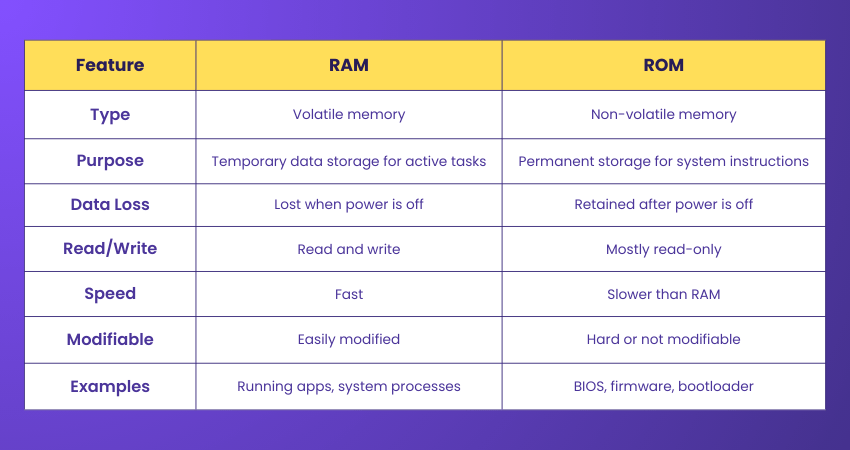
This table highlights the differences and roles of ROM and RAM in a computer system. Understanding these distinctions is important for optimising performance and ensuring efficient operation.
ROM vs Hard Drive
Before diving into the differences, it’s important to understand that ROM (Read-Only Memory) and a Hard Drive (HDD/SSD) serve distinct but essential roles in a computer system. Let's see the differences:

What Does 128GB ROM Mean?
When a device is said to have 128GB ROM, it refers to 128 gigabytes of internal storage, often in smartphones and tablets. While technically ROM means “Read-Only Memory,” in modern devices, it usually refers to flash storage, which can be both read and written.
This 128GB is used to store the operating system, apps, photos, videos, and other data. So, in common usage, 128GB ROM = 128GB internal storage, not traditional read-only memory.
Where is ROM Located in Computer?
In a computer, ROM is typically located on the motherboard, embedded as a chip near the CPU. It stores essential firmware like the Basic Input/Output System (BIOS) or Unified Extensible Firmware Interface (UEFI), which runs first when the computer is powered on. BIOS is a key part of this startup process.
Some ROM may also be found in embedded devices like graphics cards or other hardware components that need built-in startup instructions. It is not user-accessible or modifiable in regular use.
Conclusion
Read Only Memory may be small and silent, but it’s the steady heartbeat of every digital device. By storing essential instructions that never fade, ROM ensures technology wakes up ready for action each time. Understanding What is ROM and its timeless role will help you appreciate the hidden architecture that keeps our modern world running.
Master the tools that power modern work with our End User Training - Sign up now!
Frequently Asked Questions
How Long can Data be Retained in ROM?

Data in ROM can be retained indefinitely, as it is non-volatile memory. It does not require power to maintain its contents, allowing data to persist for the life of the device. ROM is used to store permanent data, such as firmware, that does not need frequent updates or changes.
What are the Four Levels of Computer Memory?
The four levels of computer memory are registers, cache, main memory (RAM), and secondary storage (e.g., hard drives, SSDs). Registers are the fastest and smallest, followed by cache memory. RAM offers more space but is volatile, while secondary storage provides large, non-volatile storage for long-term data retention.

Richard Harris


Senior Full Stack Developer and Technology Educator
Richard Harris is a highly experienced full-stack developer with deep expertise in both frontend and backend technologies. Over his 12-year career, he has built scalable web applications for startups, enterprises and government organisations. Richard’s writing combines technical depth with clear explanations, ideal for developers looking to grow in modern frameworks and tools.


 If you wish to make any changes to your course, please


