


 Top Rated Course

We may not have the course you’re looking for. If you enquire or give us a call on +39 800580270 and speak to our training experts, we may still be able to help with your training requirements.
What is Bandwidth: A Complete Guide for Beginners
John Davies 21 April 2026Bandwidth is the maximum data transfer rate of a network, measured in bps, affecting download speed, streaming quality, and performance for multiple users. Higher Bandwidth allows more data to flow at once, reducing buffering and delays. Limited Bandwidth can cause slow loads, poor video quality, and dropped connections.

Training Outcomes Within Your Budget!
We ensure quality, budget-alignment, and timely delivery by our expert instructors.
Table of Contents

Have you ever tried streaming a movie while someone else was on a video call, and suddenly everything starts buffering? Slow Internet at the worst time is frustrating, and it often comes down to one thing: Bandwidth. With global Internet capacity now exceeding 7,000 terabits per second and online activity growing rapidly, understanding Bandwidth is key to enjoying a smoother and more reliable online experience.
In this blog, you will learn What is Bandwidth, how it differs from internet speed, and simple ways to measure and improve it. You will also discover how much Bandwidth you need and whether more Bandwidth truly means a faster, smoother connection.
Table of Contents
1) What is Bandwidth?
2) Bandwidth vs Internet Speed: What's the Difference?
3) Best Practices for Measuring Bandwidth
4) How to Boost Your Bandwidth?
5) Importance of Bandwidth
6) Examples of Bandwidth Control Tools
7) How Much Bandwidth Should You Have?
8) Does More Bandwidth Mean Faster Internet?
9) Conclusion
What is Bandwidth?
Bandwidth is the maximum amount of data that can be transferred over a network in a given time. It is measured in bits per second, such as Mbps or Gbps, and shows how much data an internet connection can handle at once. Higher Bandwidth supports smoother streaming, faster downloads, and better overall performance.
Bandwidth is often confused with internet speed, but it refers to capacity rather than speed. Understanding What is Bandwidth is especially important when multiple devices share a connection. Enough Bandwidth keeps video calls and online work running smoothly, while low Bandwidth can cause buffering and slow performance.

Bandwidth vs Internet Speed: What's the Difference?
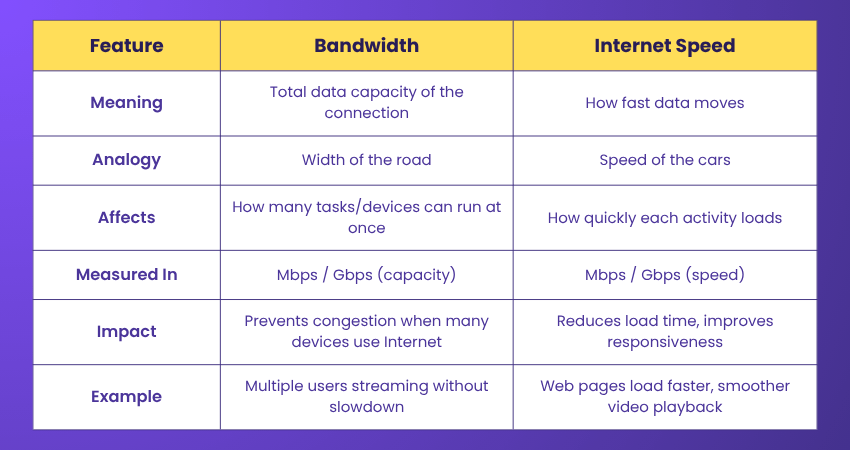
Bandwidth is the amount of data your network can handle at once, while Internet speed is how fast that data travels. Bandwidth affects how many online tasks can run smoothly together, whereas speed affects how quickly each task loads. Both work together to deliver a smooth online experience.
Best Practices for Measuring Bandwidth
Bandwidth isn’t about only testing your Internet speed, but it requires more thought and strategy. This is because accurate measurement ensures you're getting the Internet speed you're paying for. It identifies the potential barriers that help to enhance network performance. To master its measurement, here are several best practices that you can follow accordingly:
Use Reliable Tools
Choosing reliable Bandwidth testing tools is essential for accurate results. Trusted tools provide consistent readings and help you understand your actual network capacity instead of showing inflated or misleading speeds from unreliable or overloaded testing platforms.
Well-known tools such as Speedtest.net and Fast.com are widely used because they test against stable servers. These tools help identify real bandwidth performance and make it easier to compare results over time or across different networks.
Test in Real-world Conditions
Bandwidth should be tested under conditions that match everyday internet use. Activities like video calls, streaming, gaming, or downloading files place different demands on the network and reveal how Bandwidth performs during normal usage.
Testing only when the network is idle may not show real limitations. Simulating daily tasks helps identify performance drops and ensures your Bandwidth can support routine online activities without lag, buffering, or connection instability.
Measure Both Upstream and Downstream Bandwidth
Bandwidth includes both download and upload capacity, yet many users focus only on download speeds. Upload bandwidth is equally important for tasks such as video conferencing, cloud backups, file sharing, and remote collaboration.
Measuring both directions provides a complete view of network performance. Balanced upload and download bandwidth ensures smoother communication, faster data transfers, and better reliability when multiple users or devices share the same connection.
Eliminate Interference
Interference can significantly affect Bandwidth test results. Background downloads, automatic updates, and cloud syncing consume Bandwidth silently and distort measurements, making the connection appear slower than it actually is during testing.
For better accuracy, pause all background activity and use a wired Ethernet connection. Wi-Fi signals are affected by distance, walls, electronic devices, and neighbouring networks, which can cause unstable and inconsistent results.
Test with Various File Sizes
Testing Bandwidth with only small files can give misleading results, as short transfers often complete quickly. Larger files reveal how the network handles sustained data flow over longer periods of usage.
By testing both small and large file transfers, you gain deeper insight into network behaviour. This approach highlights potential bottlenecks and helps determine whether Bandwidth remains stable during heavy or prolonged data usage.
Repeat Tests for Accuracy
Bandwidth performance changes throughout the day due to network congestion, ISP traffic, and local demand. Running a single test may not reflect true capacity or average performance across different usage periods.
Repeating tests at different times helps identify patterns, such as peak and off-peak performance. Averaging multiple results provides a realistic benchmark and supports better troubleshooting when discussing issues with your Internet Service Provider (ISP).
Build practical expertise to design, manage, and secure enterprise network systems. with our Interconnecting Cisco Networking Devices Part 1 Training- Join now!
How to Boost Your Bandwidth?
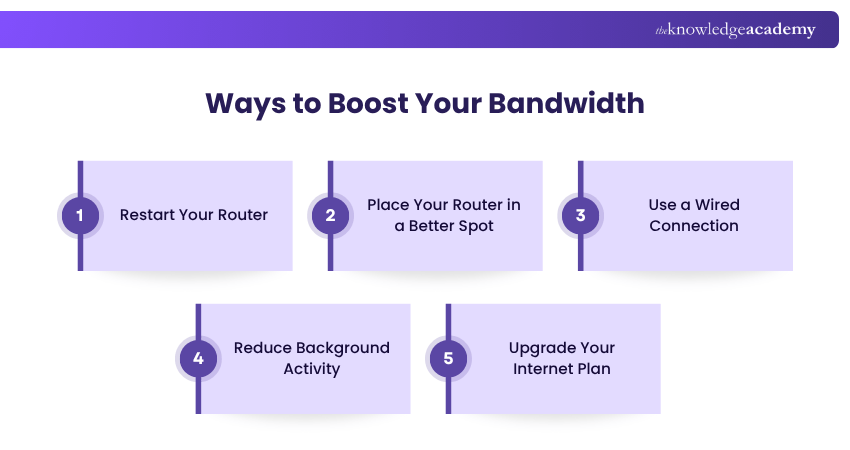
If several devices in your home are using the Internet at the same time, it can reduce your connection quality. Here are some simple steps to help improve your Bandwidth and get a smoother online experience:
1) Restart Your Router
Switch your router off for about 20–30 seconds and turn it back on. This refreshes the connection and can fix temporary issues, helping your Internet perform better. This simple reset often boosts performance by removing small network glitches.
2) Place Your Router in a Better Spot
Keep your router in an open, central place in your home. Avoid putting it behind walls or near devices such as microwaves and wireless phones, as they can weaken the signal. Positioning it higher, like on a shelf, can also help the signal spread more evenly.
3) Use a Wired Connection
Connect your device directly to the router using an Ethernet cable to enjoy a faster and more stable connection. Wired Internet is ideal for activities such as online gaming, streaming or video calls where consistency matters.
4) Reduce Background Activity
Stop unused downloads, apps, or streaming on other devices to free up Bandwidth for your current task. Closing background apps ensures your primary device gets the strongest connection.
5) Upgrade Your Internet Plan
If your connection is still slow, consider switching to a higher-speed package that supports more devices. A better plan offers more Bandwidth, helping you avoid slowdowns during busy usage times.
Importance of Bandwidth
Bandwidth is essential for smooth and reliable network performance. Proper management ensures critical applications get enough capacity while reducing congestion and service issues. Below are the key reasons why Bandwidth matters:
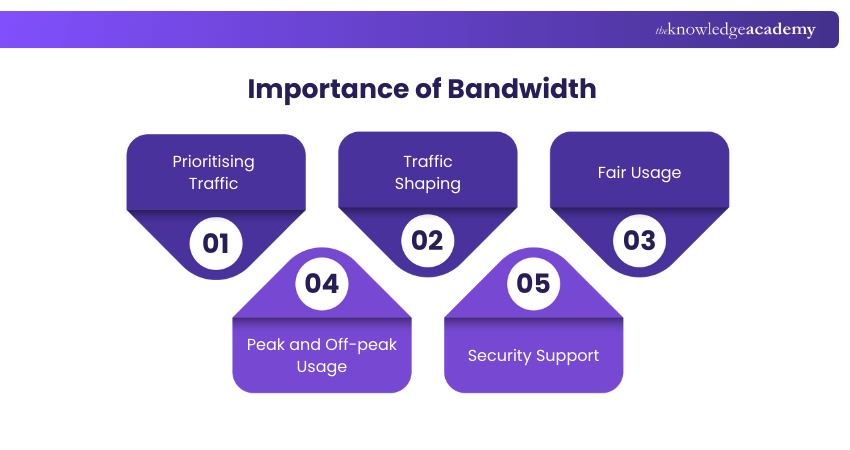
1) Prioritising Traffic: Bandwidth helps prioritise important activities like video calls and cloud applications over less urgent tasks, ensuring consistent performance for time-sensitive work.
2) Traffic Shaping:Traffic shaping controls how Bandwidth is shared across users and applications. Methods like rate limiting and quality of service help prevent sudden usage spikes.
3) Fair Usage: Bandwidth Management ensures no single user or application consumes excessive resources, reducing congestion and maintaining balanced performance for everyone.
4) Peak and Off-peak Usage: Bandwidth can be adjusted during busy and quiet periods to maintain stability and make efficient use of network resources.
5) Security Support: Controlled Bandwidth allocation helps limit suspicious traffic and reduce the impact of attacks such as Distributed Denial of Service.
Acquire the skills to design, configure, and troubleshoot network topologies with our Cisco Packet Tracer Course – Register today!
Examples of Bandwidth Control Tools
Bandwidth control tools monitor and prioritise network traffic to keep networks stable and efficient. Commonly used in businesses, they prevent congestion, ensure fair usage, and protect critical applications. Below are some common examples:
1) Traffic Shaping Software
Traffic shaping tools regulate how much Bandwidth different applications or users can consume. Popular examples include NetLimiter and SolarWinds, which help prioritise services like video conferencing over less critical activities.
2) Quality of Service (QoS) Tools
QoS tools allow administrators to assign priority levels to different types of traffic. These features are commonly built into networking solutions from Cisco, Juniper Networks, and Ubiquiti.
3) Network Monitoring Tools
Network monitoring tools track Bandwidth usage in real time to identify heavy users and bottlenecks. Widely used tools include PRTG Network Monitor, Nagios, and Zabbix for performance analysis.
4) Firewall-Based Bandwidth Control
Many modern firewalls include built-in Bandwidth Management features. Solutions from Fortinet, Palo Alto Networks, and Sophos can limit traffic by application, user or device while improving network security.
5) Router and Switch Management Tools
Enterprise routers and switches often include native Bandwidth controls. Hardware from Cisco, TP-Link, and MikroTik allows administrators to set limits, monitor usage, and optimise performance directly through the hardware.
How Much Bandwidth Should You Have?
The Bandwidth you need depends on your household usage and the number of devices. For simple tasks like browsing and email, 10–25 Mbps is usually enough. If you stream HD or 4K videos, play online games, or work remotely, aim for 50–100 Mbps to keep your connection smooth.
Homes with many devices and heavier usage, such as multiple people streaming or downloading large files, should consider 150 to 200 Mbps or more. Choosing a plan that matches your device count and Internet habits ensures faster and more reliable performance.
Does More Bandwidth Mean Faster Internet?
More Bandwidth does not always mean faster Internet, but it helps your connection run smoothly when many devices are in use. It lets more data travel at once, which reduces slowdowns during activities like streaming, gaming or video calls. Your Internet speed also depends on your provider, router, and Wi-Fi signal, so Bandwidth mainly helps support multiple tasks at the same time.
Conclusion
Understanding What is Bandwidth helps you choose the right Internet plan and enjoy smooth browsing, streaming, and online work. With the right Bandwidth, your home can support multiple devices without lag or buffering. Remember to check your usage, number of devices, and online habits to find the best fit. The right Bandwidth turns frustratingly slow connections into a fast and stress-free online experience.
Gain practical experience with Cisco tools used in real-world IT environments. Join our CCNA Training now!
Frequently Asked Questions
What is Bandwidth in Terms of Communication?

In communication, Bandwidth refers to the maximum capacity of a channel to transfer data within a specific timeframe, measured in Bits Per Second (BPS). Higher Bandwidth enables faster data transmission and better communication performance.
What are the Three Types of Bandwidths?
The three main types of Bandwidths are:
a) Analogue Bandwidth: Frequency range measured in hertz
b) Digital Bandwidth: Data transfer rate measured in bits per second
c) Network Bandwidth: Capacity of network connections for data transmission
What are the Other Resources and Offers Provided by The Knowledge Academy?
The Knowledge Academy takes global learning to new heights, offering over 3,000+ online courses across 490+ locations in 190+ countries. This expansive reach ensures accessibility and convenience for learners worldwide.
Alongside our diverse Online Course Catalogue, encompassing 17 major categories, we go the extra mile by providing a plethora of free educational Online Resources like Blogs, eBooks, Interview Questions and Videos. Tailoring learning experiences further, professionals can unlock greater value through a wide range of special discounts, seasonal deals, and Exclusive Offers.
What is The Knowledge Pass, and How Does it Work?
The Knowledge Academy’s Knowledge Pass, a prepaid voucher, adds another layer of flexibility, allowing course bookings over a 12-month period. Join us on a journey where education knows no bounds.
What are the Related Courses and Blogs Provided by The Knowledge Academy?
The Knowledge Academy offers various CCNA Training, including the CCNP Collaboration Training, CCNA Certification, and the Cisco Packet Tracer Course. These courses cater to different skill levels, providing comprehensive insights into Network Layer.
Our IT Infrastructure & Networking Blogs cover a range of topics related to Bandwidth, offering valuable resources, best practices, and industry insights. Whether you are a beginner or looking to advance your IT Networking skills, The Knowledge Academy's diverse courses and informative blogs have got you covered.

John Davies


Cyber Security Governance & Assurance Specialist
John Davies is a cybersecurity expert specialising in governance, risk management, and compliance. With over 15 years in the field, he has led enterprise-wide security programmes across finance, healthcare and public sector organisations. His content provides practical guidance on building secure environments, managing risk and aligning with regulatory frameworks.

Upcoming IT Infrastructure & Networking Resources Batches & Dates
Date
 CCNA Certification
CCNA Certification
Mon 22nd Jun 2026
CCNA Certification
Mon 10th Aug 2026
CCNA Certification
Mon 21st Sep 2026
CCNA Certification
Mon 26th Oct 2026
CCNA Certification
Mon 21st Dec 2026

 If you wish to make any changes to your course, please


