


 Top Rated Course

We may not have the course you’re looking for. If you enquire or give us a call on +39 800580270 and speak to our training experts, we may still be able to help with your training requirements.
C++ Arrays: Setup and Examples
Richard Harris 21 April 2026C++ Arrays store multiple values of the same data type in a single, fixed-size structure for efficient data handling and processing. They provide quick access to elements using index positions. Arrays are commonly used when working with structured data that requires fast retrieval and predictable memory usage.

Training Outcomes Within Your Budget!
We ensure quality, budget-alignment, and timely delivery by our expert instructors.
Table of Contents

Organising a vast number of values doesn't have to be a daunting task, thanks to C++ Arrays. This is the ultimate toolbox for storing multiple values under one neat name, thus making data handling faster and more efficient. From simple applications to complex systems, arrays help you structure data in a reliable and predictable way.
This blog explores C++ Arrays, highlighting their types, advantages and drawbacks in detail. To make your learning even smoother, you'll learn how to set up arrays, initialise them correctly and work through practical examples that bring the concept to life. So read on and code on!
Table of Contents
1) What are C++ Arrays?
2) C++ Array Types
3) Initialisation of Array in C++
4) Access Elements in C++ Array
5) Example 1: Displaying Array Elements
6) Example 2: Take Inputs from User and Store Them in an Array
7) Advantages of C++ Arrays
8) Disadvantages of C++ Arrays
9) Conclusion
What are C++ Arrays?
An array in C++ is a data structure that lets you store multiple elements of the same data type in a single variable. In simple terms, it is a collection of similar data items grouped together. Arrays can hold values of basic types like int and char, as well as derived types such as pointers and structures.
All elements in an array are stored in consecutive memory locations and accessed using their index number, starting from 0. This structure makes arrays efficient for organising and retrieving data. Arrays are especially useful when handling large sets of information where fast, direct access is required.

C++ Array Types
C++ Array types include single-dimensional and multidimensional arrays. These structures help organise data efficiently based on the complexity of the information being stored. Let's explore them in detail:
1) Single Dimensional Array
A single-dimensional array stores a sequence of elements of the same data type within a continuous block of memory. Each value is placed next to the other, and you can access any element using a single index. This type of array is ideal for storing simple lists such as marks, prices or names.
2) Multidimensional Array
A multidimensional array is one that contains one or more arrays as its elements. It uses multiple indices to access values and is often visualised in rows and columns. This type is useful for representing complex data structures such as matrices, tables, grids or game boards.
Take your Game Development mastery to the next level with our C++ Programming for Unreal Game Development Training – Sign up now!
Initialisation of Array in C++
`Initialising an Array in C++ is essential for storing and managing multiple values. Different initialisation methods let you control how data is assigned, organised and accessed within the array.
1) Initialise Array with Values in C++
You can develop an array and assign values to it at the same time. For example:

Here, the array numbers have five elements, each initialised with a specific value.
Output:
{10, 20, 30, 40, 50}
2) Initialise Array with Values and Without Size in C++
If you ignore the size, C++ automatically sets the array size depending on the number of elements provided. For example:

The compiler automatically creates an array of size 4.
Output:
{85, 90, 78, 92}
3) Initialise Array After Declaration (Using Loops)
You can declare an array first and then assign values using a loop. For example:
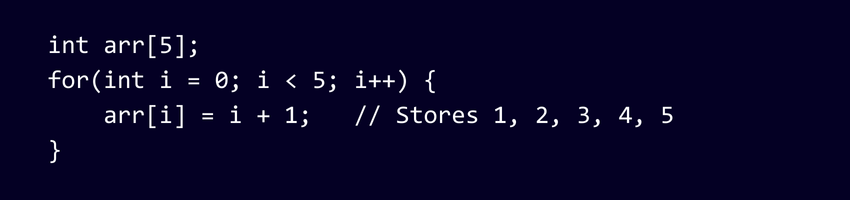
This method is commonly used when values depend on calculations or incremental logic.
Output:
{1, 2, 3, 4, 5}
4) Initialise an Array Partially in C++
You can initialise only some elements. Remaining elements automatically become 0. For example:

Here, only two elements are given values; the rest default to zero.
Output:
{10, 20, 0, 0, 0}
5) Initialise the Array With Zero in C++
If you want all elements to be zero, you can use a simple syntax. For example:

All five elements automatically become zero because C++ fills the remaining values with 0.
Output:
{0, 0, 0, 0, 0}
Access Elements in C++ Array
In C++, every element in an array is associated with a number. This number is known as an array index. You can access an array's elements by using those indices.
Key Array Pointers
1) Array indexing begins at 0, which means x[0] refers to the first element.
2) If an array has size m, the last element is located at index m-1.
3) In this case, x[7] would be the final element.
4) All array elements occupy consecutive memory locations.
5) For example, if the starting address of x[0] is 3000, then x[1] will be stored at 3004, x[2] at 3008, and so on.
6) The address increases by 4 bytes each time because an int typically occupies 4 bytes in memory.
Turn your coding ideas into an interactive reality with our C# Programming (C Sharp) Course - Sign up now!
Example 1: Displaying Array Elements
Here’s an example of displaying a C++ Array element:

Here’s the expected output:

This shows how to declare, initialise and print all the elements of a fixed-size array.
Example 2: Take Inputs from User and Store Them in an Array
Here’s an example that illustrates how to take inputs and store them in an Array:
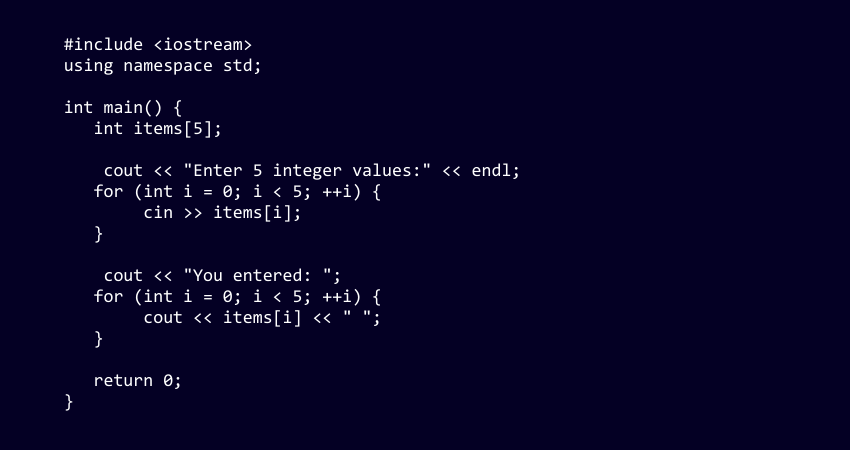
Here’s the expected output:

Advantages of C++ Arrays
The key advantages of C++ Arrays are:
1) Efficient Memory Use: Arrays store elements in continuous memory locations, which improves allocation efficiency and speeds up data access.
2) Quick Access to Elements: Each item can be retrieved directly using its index. This allows for fast and simple data access.
3) High Performance: Index-based access is faster compared to structures like linked lists or trees because it gives direct access to the element’s memory location.
4) Supports Multiple Data Types: Arrays can hold integers, characters, strings and other supported data types.
5) Easy to Use in Algorithms: Many standard algorithms rely on arrays, making them simple to implement in C++.
6) Works Well With Other Structures: Arrays can be combined with stacks, queues and other data structures to build more complex systems.
7) Simple Function Handling: Arrays can be passed to functions easily. This helps with the efficient handling of large datasets.
Disadvantages of C++ Arrays
Here are the main drawbacks of C++ Arrays you need to consider:
1) Fixed Size: An array’s size is set during declaration and cannot grow dynamically.
2) Contiguous Memory Requirement: Large arrays may fail to allocate if there isn’t enough continuous memory space available.
3) No Automatic Bounds Checking: C++ allows accessing array elements outside their bounds, which may cause crashes or memory errors.
4) Limited Flexibility: Arrays cannot resize or change dimensions. This makes them less suitable for algorithms requiring dynamic data handling.
5) Costly Insertion and Deletion: Adding or removing elements requires shifting other values. This becomes slow and inefficient for large arrays.
Conclusion
C++ Arrays offer a simple yet powerful way to organise data, making them an essential tool for beginners and experienced programmers alike. With clear setup methods and practical examples as outlined in this blog, arrays help turn scattered values into structured collections. Mastering them is the key to tackling more advanced data structures and writing reliable code.
Master C Programming and build the backbone of modern software - Sign up for our C Programming Course now!
Frequently Asked Questions
What's the Coolest Thing About Arrays?

The coolest thing about C++ Arrays is how fast they are. Because elements are stored in consecutive memory locations, you can access any value instantly using its index; no searching required.
Can I Change the Size of an Array Later?
No, the size of a regular C++ Array cannot be changed once it’s declared. If you need a resizable structure, you can use alternatives like std::vector from the C++ Standard Library.
What are the Other Resources and Offers Provided by The Knowledge Academy?
The Knowledge Academy takes global learning to new heights, offering over 3,000+ online courses across 490+ locations in 190+ countries. This expansive reach ensures accessibility and convenience for learners worldwide.
Alongside our diverse Online Course Catalogue, encompassing 17 major categories, we go the extra mile by providing a plethora of free educational Online Resources like Blogs, eBooks, Interview Questions and Videos. Tailoring learning experiences further, professionals can unlock greater value through a wide range of special discounts, seasonal deals, and Exclusive Offers.
What is The Knowledge Pass, and How Does it Work?
The Knowledge Academy’s Knowledge Pass, a prepaid voucher, adds another layer of flexibility, allowing course bookings over a 12-month period. Join us on a journey where education knows no bounds.
What are the Related Courses and Blogs Provided by The Knowledge Academy?
The Knowledge Academy offers various C Programming Courses, including the C++ Programming (C Plus Plus) Course, C# Programming (C Sharp) Training and the C Programming Course. These courses cater to different skill levels, providing comprehensive insights into C++ Programming.
Our Programming & DevOps Blogs cover a range of topics related to C++, offering valuable resources, best practices, and industry insights. Whether you are a beginner or looking to advance your C++ Programming skills, The Knowledge Academy's diverse courses and informative blogs have got you covered.

Richard Harris


Senior Full Stack Developer and Technology Educator
Richard Harris is a highly experienced full-stack developer with deep expertise in both frontend and backend technologies. Over his 12-year career, he has built scalable web applications for startups, enterprises and government organisations. Richard’s writing combines technical depth with clear explanations, ideal for developers looking to grow in modern frameworks and tools.

Upcoming Programming & DevOps Resources Batches & Dates
Date
 C++ Programming (C Plus Plus)
C++ Programming (C Plus Plus)
Thu 3rd Sep 2026
C++ Programming (C Plus Plus)
Thu 3rd Dec 2026

 If you wish to make any changes to your course, please


