


 Top Rated Course

We may not have the course you’re looking for. If you enquire or give us a call on +44 1344 203999 and speak to our training experts, we may still be able to help with your training requirements.
What is Multi-Factor Authentication (MFA)? Prevent Identity Theft
John Davies 17 April 2026Multi-Factor Authentication (MFA) enhances security by requiring multiple verification methods, reducing unauthorised access to systems and data. It adds extra protection beyond passwords, making stolen credentials far less useful to attackers. This layered approach helps safeguard sensitive information across accounts and applications.
Home
 Resources
IT Security & Data Protection
What is Multi-Factor Authentication (MFA)? Prevent Identity Theft
Resources
IT Security & Data Protection
What is Multi-Factor Authentication (MFA)? Prevent Identity Theft
Resources
IT Security & Data Protection
What is Multi-Factor Authentication (MFA)? Prevent Identity Theft

Training Outcomes Within Your Budget!
We ensure quality, budget-alignment, and timely delivery by our expert instructors.
Table of Contents
Ever had that uneasy feeling after reusing the same password across multiple accounts? You are not alone. With cyber threats growing smarter every day, a single password is no longer enough to protect what matters most. Multi-Factor Authentication adds extra layers of security, making it far harder for attackers to break in, even if they get hold of your password.
This blog explains how Multi-Factor Authentication works, its key methods, benefits, and real-world use cases. Discover how this powerful approach ensures only trusted users gain access. Let us explore further.
Table of Contents
1) What is Multi-Factor Authentication (MFA)?
2) Why is MFA Important?
3) How Does Multi-Factor Authentication Work?
4) Types of Multi-Factor Authentication Methods
5) Other Types of Multi-Factor Authentication Methods
6) What are Examples of Multi-Factor Authentication?
7) MFA vs Two-Factor Authentication (2FA): Key Differences
8) Conclusion
What is Multi-Factor Authentication (MFA)?
Multi-Factor Authentication (MFA) is a security method that requires users to verify their identity using two or more different authentication factors before accessing an account, application, or system. Instead of relying only on a password, MFA adds extra layers of protection, making unauthorised access much harder.
MFA combines something you know, something you have, and something you are, such as passwords, one-time codes or biometrics. Using multiple checks together helps protect sensitive data and blocks access even if one factor is compromised.

Why is MFA Important?
Multi Factor Authentication (MFA) is important because it adds an extra layer of security beyond passwords, reducing the risk of unauthorised access. Even if login credentials are compromised, MFA helps protect accounts and sensitive data.
1) Stronger Account Protection: Prevents attackers from accessing accounts using stolen passwords.
2) Reduced Risk of Cyber Attacks: Limits the impact of phishing and credential theft.
3) Improved Compliance: Helps organisations meet security and regulatory requirements.
4) Enhanced User Trust: Builds confidence by safeguarding personal and business information.
How Does Multi-Factor Authentication Work?
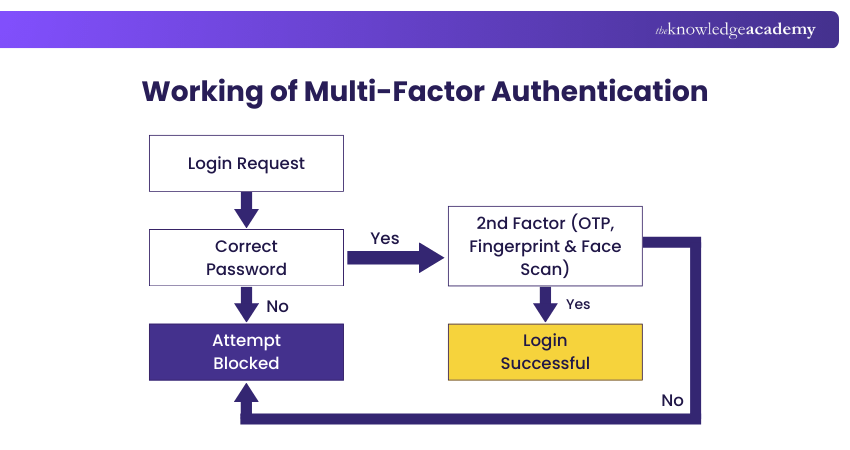
When a login request is made, MFA follows a step-by-step verification process to confirm the user’s identity:
1) Password Check: The system first verifies the password and blocks access immediately if it is incorrect.
2) Second-Factor Verification: If the password is valid, a second authentication factor such as an OTP, fingerprint, or face scan is required.
3) Access Decision: Access is granted only when both factors are verified; if the second factor fails, the login is denied.
Types of Multi-Factor Authentication Methods
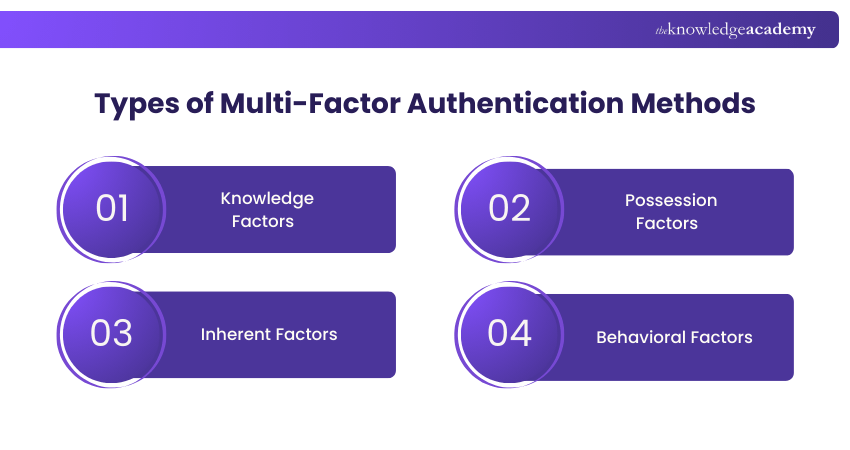
Multi-Factor Authentication methods are grouped by how a user’s identity is verified. By combining different checks, each authentication factor adds a distinct layer of security. Together, these approaches form the core MFA categories, which are explained in detail in the sections below:
1) Knowledge Factors
Knowledge factors rely on something the user knows. These include passwords, PINs, and security questions. They are easy to use but vulnerable on their own, which is why they are commonly paired with other MFA methods.
2) Possession Factors
Possession factors are based on something the user possesses, such as a mobile phone, an authenticator app or a hardware token. Examples include SMS or email OTPs, push notifications, smart cards, and USB security keys that confirm user ownership.
3) Inherent Factors
Inherent factors depend on something the user is, also known as biometrics. This includes fingerprint scans, facial recognition, voice authentication, and iris or retina scans. These traits are unique to each individual and provide strong, hard-to-replicate security.
4) Behavioral Factors
Behavioral factors analyse how and from where a user accesses a system. This includes checking recognised locations or IP addresses and monitoring typing or interaction patterns. Any unusual behaviour can trigger additional verification to strengthen security.
Build awareness, reduce risks, and defend your workplace – Sign up for Cyber Security Awareness Training and create a resilient workforce.
Other Types of Multi-Factor Authentication Methods
Beyond the standard methods, MFA can also include advanced approaches such as location-based checks and adaptive or risk-based authentication to enhance security and user experience. Here are the other types of MFA:
Location-based
Location-based authentication verifies user identity by analysing the geographic origin of the login attempt. If the request comes from an unexpected or suspicious location, the system requires additional verification steps to ensure access is legitimate and secure.
Adaptive Authentication or Risk-based Authentication
Adaptive or risk-based authentication evaluates contextual factors such as device, network, behaviour, and time of access. Based on the assessed risk, it dynamically adjusts security requirements, adding stronger verification when unusual patterns are detected while allowing seamless access in low-risk situations.
What are Examples of Multi-Factor Authentication?
MFA is a commonly applied practice in many industries that keeps delicate systems and data safe. The two cases of real-world use of MFA by businesses to achieve a balance between security and user-friendliness are given below.
Remote Access to Employees
The companies allow remote access by mandating both the login credentials, hardware token, and biometric authentication. Access levels also depend on where the networks are located to enhance security beyond confidence in locales.
System Access to On-site Employees Only
Hospitals provide proximity badges whose credentials are attached to employees. Employees log on as they come into work, so that during the workday they can safely and conveniently use systems and will be automatically locked out after they leave.
Learn to identify and mitigate digital threats while understanding compliance and security protocols in our Cyber Security Risk Management Course - Register now!MFA vs Single Sign-on
Multi-Factor Authentication and Single Sign-On (SSO) serve different purposes. SSO enables access to multiple applications using a single login, reducing password fatigue and fitting neatly into a broader MFA strategy.
MFA strengthens security by adding extra verification steps during login. While it does not focus on convenience, it protects accounts from unauthorised access. Today, MFA and SSO are often combined to balance ease of use with strong security.
MFA vs Two-Factor Authentication (2FA): Key Differences
MFA and Two-Factor Authentication (2FA) are related but different. 2FA, also known as Two-Step Verification, uses exactly two factors, while MFA can involve two or more depending on security needs.
Many systems rely on Two-Step Verification for everyday access, as two factors are often sufficient. However, for sensitive data such as financial or personal information, organisations may add extra authentication layers to strengthen security.
Conclusion
As cyber threats grow more advanced, Multi-Factor Authentication plays a vital role in keeping digital spaces secure. By adding intelligent layers beyond passwords, it strengthens Cyber Security, protects sensitive data, and limits unauthorised access. Adopting this approach helps individuals and organisations build trust, stay resilient, and confidently navigate today’s digital-first world.
Strengthen your protection against Cyber threats through our comprehensive Cyber Security Courses- Sign up now!
Frequently Asked Questions
How do I Set up Multi-Factor Authentication?

To set up Multi-Factor Authentication, open your account’s security settings and choose an extra verification method, such as an authenticator app, text message or call. Follow the steps to link your device by scanning a QR code or entering a code, adding stronger protection beyond a password.
Why is Two-Factor Authentication no Longer Safe?
Two-factor authentication is not broken, but SMS-based 2FA is increasingly vulnerable to SIM swapping, phishing, malware, and push-fatigue attacks. While better than passwords alone, relying only on SMS codes can create a false sense of security, making stronger methods like authenticator apps or hardware keys essential.
What are the Other Resources and Offers Provided by The Knowledge Academy?
The Knowledge Academy takes global learning to new heights, offering over 3,000+ online courses across 490+ locations in 190+ countries. This expansive reach ensures accessibility and convenience for learners worldwide.
Alongside our diverse Online Course Catalogue, encompassing 19 major categories, we go the extra mile by providing a plethora of free educational Online Resources like Blogs, eBooks, Interview Questions and Videos. Tailoring learning experiences further, professionals can unlock greater value through a wide range of special discounts, seasonal deals, and Exclusive Offers.
What is The Knowledge Pass, and How Does it Work?
The Knowledge Academy’s Knowledge Pass, a prepaid voucher, adds another layer of flexibility, allowing course bookings over a 12-month period. Join us on a journey where education knows no bounds.
What are the Related Courses and Blogs Provided by The Knowledge Academy?
The Knowledge Academy offers various Cyber Security Training, including the Introduction to System and Network Security Training, Cyber Security Awareness Training, and the Cyber Security Risk Management Training. These courses cater to different skill levels, providing comprehensive insights into Incident Response.
Our IT Security & Data Protection Blogs cover a range of topics related to MFA, offering valuable resources, best practices, and industry insights. Whether you are a beginner or looking to advance your IT Security & Data Protection, The Knowledge Academy's diverse courses and informative blogs have got you covered.

John Davies


Cyber Security Governance & Assurance Specialist
John Davies is a cybersecurity expert specialising in governance, risk management, and compliance. With over 15 years in the field, he has led enterprise-wide security programmes across finance, healthcare and public sector organisations. His content provides practical guidance on building secure environments, managing risk and aligning with regulatory frameworks.

Upcoming IT Security & Data Protection Resources Batches & Dates
Date
 Certified Cyber Security Professional (CCS-PRO)
Certified Cyber Security Professional (CCS-PRO)
Fri 24th Jul 2026
Certified Cyber Security Professional (CCS-PRO)
Fri 9th Oct 2026

 If you wish to make any changes to your course, please


