


 Top Rated Course

We may not have the course you’re looking for. If you enquire or give us a call on +36 18508731 and speak to our training experts, we may still be able to help with your training requirements.
What is a Data Source, and How Does it Work?
Lily Turner 21 April 2026A Data Source is any system, location, or repository from which data originates and is accessed for analysis, reporting, or processing. It can be a Database, spreadsheet, API and cloud service. It provides the information needed to make informed decisions, supports applications and enables organisations to collect valuable information.

Training Outcomes Within Your Budget!
We ensure quality, budget-alignment, and timely delivery by our expert instructors.
Table of Contents
You can’t make smart decisions without solid data, and you can’t get data without a reliable source. But What is a Data Source? It is the starting point of every digital insight, feeding tools like Excel, Power BI, and CRMs. But how do they work? Where does the data live, and how does it get from there to here? To know more and gather insights, read on!
If you're using data, it's time you met its source. We rely on these from business reports to mobile apps. In this blog, you can pull back the curtain and reveal where your data comes from, how it moves, and why getting it right is the first step to smarter decisions. Ready to trace your insights back to the source? Let’s dive in and explore!
Table of Contents
1) What is a Data Source?
2) Data Source Types
3) How Data Source Works?
4) Data Source Functions
5) Best Practices for Managing Data Sources
6) Data Source Purpose
7) Data Source Examples
8) Conclusion
What is a Data Source?
A Data Source is the place where data is gathered from. It can be a file, a Database, a website, a cloud service, or even a sensor. Data Sources provide the raw information that apps, reports, or tools use to generate results or make decisions. This concept serves as the starting point for any data utilisation.

Key Takeaways:
1) Used in reports, dashboards, and applications
2) Essential for making informed, Data-driven decisions
3) It can be local or cloud-based
4) Supports automation and real-time data use
Data Source Types
All the Data Sources cannot be equal. They vary based on where they come from, how they're accessed, and what they’re used for. Let's discuss the various types:
1) Machine Data Sources
Machine Data Sources are connected directly to a system or machine. They often require specific drivers to access the data. These are usually stored in system registries and are not portable. Ideal for internal tools and desktop applications, they're fast and efficient but limited in mobility.
Example: A Data Source set up on your desktop that connects directly to SQL Server
2) File Data Sources
File Data Sources are saved as files (often with a .dsn extension) and contain the connection information needed to access a Database. These can be shared between users and systems, making them more flexible and portable.
Example: A file on a shared drive that lets multiple users connect to the same Access Database
How Data Source Works?
Data Sources are active parts of your Data ecosystem. Here’s how they operate behind the scenes:
1) Data Model
Before you can use Data effectively, it needs to be organised. That’s where a Data model comes in. A Data model defines how the Data is structured, related, and stored. It helps ensure consistency and clarity when querying or analysing the Data.
Unearth secrets in Data! Start your mining mission with our Data Science with R Training now!
2) Copy and Share Data Sources
In collaborative environments, copying or sharing a Data Source streamlines teamwork. Teams can connect to the same datasets without needing to recreate connections. File Data Sources are particularly useful in such cases, as they are portable and user-friendly.
3) Data Source and Connectors
To link a Data Source to your application, you’ll often use data connectors. These connectors act as bridges, enabling tools like Power BI, Tableau, or Python scripts to communicate with databases, APIs, cloud storage, and more.
Data Source Functions
Data Sources are more than just storage; they actively power the entire data workflow. From collecting raw information to transforming it into valuable insights, they play an important role in the data process. Here's what they do:

1) Data Extraction
Data Extraction is the first step of pulling data from the source. It could be from a database, a spreadsheet, a website, or a cloud platform. Extraction can be done in real-time, like live user Data, or in batches, like weekly sales reports.
1) Pulls raw data from the source system
2) It can be automated or manual
3) Supports structured and unstructured Data
4) Often, the first step in the ETL process
2) Data Transformation
Once Data is extracted, it’s rarely ready to use. Transformation involves cleaning, organising, and reshaping the data to make it meaningful. This process may include removing duplicates, converting formats, or merging fields.
1) Cleans and structures raw data
2) Ensures consistency like date formats, units
3) Applies business logic like categorising orders by region
4) Prepares data for reporting or loading
3) Data Loading
After transformation, the data must be loaded into a target system. This could be a data warehouse, analytics dashboard, or cloud storage. The loading process is when the processed data becomes accessible to end-users or applications for analysis and reporting.
1) Moves data into a usable platform
2) Supports batch or real-time updates
3) Can overwrite or append existing data
4) Enables dashboards and reports to refresh
4) Data Pipelines & Automation
Data pipelines are automated workflows that transfer data from source to destination. This process typically involves Extraction, Transformation, and Loading (ETL). Automation ensures data flows consistently without manual intervention, enabling businesses to make accurate decisions.
1) Connects all stages of the Data process
2) Reduces manual tasks and delays
3) Supports real-time analytics and alerts
4) Scales easily with growing Data needs
Turn Data dust into diamonds. Explore Data Science and Blockchain Training today!
Best Practices for Managing Data Sources
Managing Data Sources well is the key to keeping your Data reliable, secure, and easy to work with. Let's discuss the best practices for managing Data Sources:
1) Maintain Data Catalogue
A Data catalogue functions like a library index for your Data Sources. It keeps track of what data you have, where it's stored, who owns it, and how it should be used. This reduces duplication, minimises confusion, and helps teams easily locate and utilise the correct data.
a) List all active Data Sources with descriptions
b) Include data owners, formats, and refresh frequency
c) Improve data discoverability across teams
d) Helps maintain transparency and data governance
2) Use Descriptive Schemas
Naming matters. Using clear and descriptive names for tables, columns, and fields makes your data easier to understand, especially for new users or teams working across departments.
a) Avoid vague labels like “TBL1” or “DATA_OLD”
b) Use meaningful names like “Customer Orders” or “Invoice Date”
c) Enhances collaboration and reduces errors
d) Makes integration with tools and queries simpler
3) Sanitise Data Storage
Over time, unused or outdated Data Sources can accumulate, slowing down systems and complicating management. Regularly reviewing and cleaning up these sources helps maintain a well-organised and efficient data environment.
a) Remove redundant, outdated, or duplicate Data Sources
b) Archive unused data for future reference
c) Free up storage space and reduce clutter
d) Prevents users from relying on incorrect or obsolete data
4) Ensure Data Security
Data Sources often contain sensitive or confidential information. Protecting this data is critical, not just to avoid breaches. It is important to stay compliant with Data privacy laws like the General Data Protection Regulation (GDPR) or the Health Insurance Portability and Accountability Act (HIPAA).

a) Use strong access controls and user permissions
b) Encrypt Data in storage and during transfers
c) Monitor access logs and detect unusual activity
d) Regularly audit Data Sources for security gaps
Be the Sherlock Holmes of Data; Start your Python Data Science Course here!
Data Source Purpose
The purpose of a Data Source is simple yet impactful: to provide the raw information necessary for analysis, decision-making, automation, and reporting. In any Data-driven environment, from small business spreadsheets to enterprise-level data warehouses, Data Sources serve as the foundational element upon which all other processes are built.
Here’s a Deeper Look at Why Data Sources Matter:
1) Fuel for Decision-making
Data Sources deliver the facts and figures that help businesses make informed choices. From sales trends to customer behaviour, having accurate data at your fingertips helps you avoid guesswork and act confidently.
2) Powering Reports and Dashboards
Visual tools like dashboards rely on Data Sources to populate graphs, KPIs, and charts. Without a live or updated Data Source, reports become outdated and unreliable.
3) Supporting Business Intelligence (BI)
Data Sources feed into BI tools like Power BI, Tableau, and Looker, helping teams uncover patterns, forecast trends, and gain valuable insights from massive Datasets.
4) Driving Automation and Smart Systems
In modern applications, Data Sources help automate processes like sending alerts, updating records, or triggering workflows. For example, a CRM can pull data from a customer Database to personalise email campaigns.
5) Maintaining Operational Efficiency
Whether it's tracking inventory, managing payroll, or analysing website performance, Data Sources ensure that every system runs with up-to-date and reliable information.
6) Ensuring Compliance and Traceability
Data Sources are also used to track and document activity for regulatory and auditing purposes. Having well-managed Data Sources ensures transparency and accountability in your operations.
7) Enabling Real-time Monitoring
With the rise of real-time analytics, Data Sources allow organisations to track events as they happen. Whether it's monitoring equipment performance or following user activity on a website.
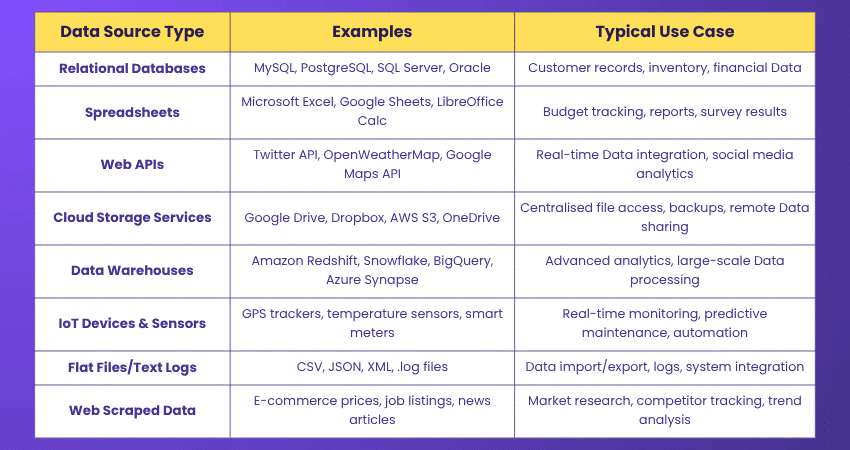
Data Source Examples
Let’s look at some of the most common and useful examples of Data Sources:
Conclusion
Data Sources are the backbone of data-driven insights, turning scattered information into cohesive narratives. They bridge the gap between raw data and meaningful analysis, enabling businesses to uncover patterns, trends, and valuable insights. Whether it’s a basic spreadsheet or a complex database, understanding Data Sources enhances Data Management and strengthens decision-making, ensuring that every piece of information is effectively utilised for impactful outcomes.
Transform boring numbers into bold insights; Master Keras Training for Data Scientists now!
Frequently Asked Questions
What is the Main Source of Data?

The main source of data depends on the context but commonly includes internal systems like Databases, spreadsheets, and applications and external Sources such as APIs, cloud platforms, and sensors. Together, these Sources provide raw data used for analysis, reporting, automation, and informed decision-making.
What is Required for Data Source?
A Data Source requires stored data, a defined structure (schema), a connection method (like a driver or API), and proper access permissions. It also needs integration support with tools or systems. It ensures the Data is accurate, secure, and ready for extraction, transformation, and analysis within various applications or platforms.
What are the Other Resources and Offers Provided by The Knowledge Academy?
The Knowledge Academy takes global learning to new heights, offering over 3,000+ online courses across 490+ locations in 190+ countries. This expansive reach ensures accessibility and convenience for learners worldwide.
Alongside our diverse Online Course Catalogue, encompassing 17 major categories, we go the extra mile by providing a plethora of free educational Online Resources like Blogs, eBooks, Interview Questions and Videos. Tailoring learning experiences further, professionals can unlock greater value through a wide range of special discounts, seasonal deals, and Exclusive Offers.
What is The Knowledge Pass, and How Does it Work?
The Knowledge Academy’s Knowledge Pass, a prepaid voucher, adds another layer of flexibility, allowing course bookings over a 12-month period. Join us on a journey where education knows no bounds.
What are the Related Courses and Blogs Provided by The Knowledge Academy?
The Knowledge Academy offers various Data Science Courses, including the Data Science with R Training, PySpark Training and Text Mining Training. These courses cater to different skill levels, providing comprehensive insights into Data Accuracy.
Our Data, Analytics & AI Blogs cover a range of topics related to Data Science, offering valuable resources, best practices, and industry insights. Whether you are a beginner or looking to advance your Data Analytics skills, The Knowledge Academy's diverse courses and informative blogs have got you covered.

Lily Turner


Senior AI/ML Engineer and Data Science Author
Lily Turner is a data science professional with over 10 years of experience in artificial intelligence, machine learning, and big data analytics. Her work bridges academic research and industry innovation, with a focus on solving real-world problems using data-driven approaches. Lily’s content empowers aspiring data scientists to build practical, scalable models using the latest tools and techniques.
View Detail
Upcoming Data, Analytics & AI Resources Batches & Dates
Date
 Data Mining Training
Data Mining Training
Thu 23rd Jul 2026
Data Mining Training
Thu 12th Nov 2026

 If you wish to make any changes to your course, please


