


 Top Rated Course


We may not have the course you’re looking for. If you enquire or give us a call on +36 18508731 and speak to our training experts, we may still be able to help with your training requirements.
16 Best 2D Animation Software for Beginners and Professionals
Richard Harris 24 February 2026Create stunning animations with 2D Animation Software tools, including Adobe Animate, Toon Boom Harmony, Moho, TVPaint, and Krita. Explore user-friendly and professional options to design dynamic, creative, and high-quality animations for films, games, marketing, and digital storytelling projects.

Training Outcomes Within Your Budget!
We ensure quality, budget-alignment, and timely delivery by our expert instructors.
Table of Contents
2D Animation brings characters, backgrounds, and stories to life in a flat space using specialised software. These tools let you create, edit, and animate 2D graphics for films, games, marketing, or education helps in making ideas move and storytelling come alive.
Choosing the right software depends on your project’s complexity, artistic style, budget, and skill level. To simplify your search, this blog explores the 16 Best 2D Animation Software for beginners and professionals, highlighting their top features, pros, cons, and pricing to help you find your ideal tool.
Table of Contents
1) What is 2D Animation Software?
2) Top 16 2D Animation Software
a) Adobe Animate
b) Toon Boom Harmony
c) Synfig
d) Moho Pro
e) OpenToonz
f) Krita
g) Blender
h) Animaker
i) TupiTube
j) Tvpaint
3) Future Trends of 2D Animation
4) Conclusion
What is 2D Animation Software?
2D Animation Software is a tool that helps people create animations in two dimensions, which means they look flat like a drawing on paper. This software allows you to design characters, backgrounds, and other elements that move on the screen. You can create smooth motion by arranging drawings in a sequence, like flipping through a picture book. It is commonly used for making cartoons, explainer videos, and advertisements.
These tools are great for beginners and professionals alike, offering features like drawing, colouring, and adding sound effects. Some software even lets you create Animations quickly by using pre-made templates. Many 2D Animation tools are user-friendly and don’t require advanced technical skills to start. With practice, you can make creative projects that tell stories or entertain people.

Top 16 2D Animation Software
In this section, we will explore Top 16 2D Animation Software along with its pros and cons. This will make it easy for you to choose the right tool for you. Let's explore them below:
Adobe Animate
Adobe Animate is a 2D Animation Software that also belongs to the Adobe Creative Cloud suite. It allows you to create interactive animations for web, games, and apps using HTML5, JavaScript, and WebGL. You can also create frame-by-frame animations, motion graphics, and character animations using vector and bitmap graphics. Let's explore the pros and cons of this tool:
Pros:
1) Part of Adobe Creative Cloud
2) Supports interactive animations
3) Supports vector and bitmap graphics
4) Integrates with other Adobe software
Cons:
1) Expensive and subscription-based
2) Requires internet connection and Adobe account
3) Not very user-friendly or intuitive
4) No free trial or demo
Price: $20.99 per month
Toon Boom Harmony
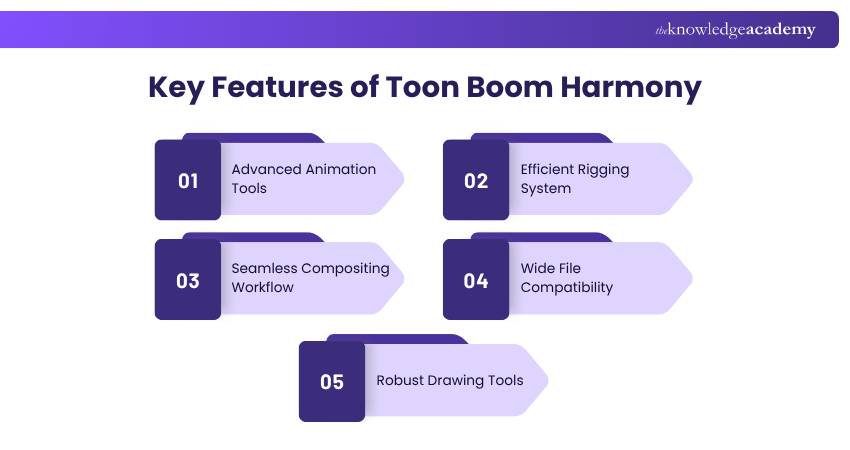
Toon Boom Harmony is a professional 2D Animation Software that is used by many studios and animators around the world. It offers a complete set of tools and features for creating stunning 2D Animations, from drawing and painting to rigging and compositing. You can also integrate it with other software, such as Photoshop, Illustrator, and After Effects. Let's explore the pros and cons of Toon Boom Harmony:
Pros:
1) Professional and industry-standard
2) Powerful and versatile
3) Rich in features and tools
4) Supports raster and vector graphics
5) Supports 2D and 3D integration
Cons:
1) Expensive and subscription-based
2) The complex and steep learning curve
3) Requires high system requirements
4) No free trial or demo
Price: Starting from £19 per month
Synfig
Synfig is another free and open-source 2D Animation Software that lets you create vector-based animations. It has a unique feature called “bones”, which allows you to create cut-out animations and manipulate characters easily. You can also use layers, filters, gradients, and transformations to enhance your animations. Here are the pros and cons of Synfig:
Pros:
1) Free and open-source
2) Supports vector graphics
3) Has a bone system for cut-out animation
4) Has layers, filters, gradients, and transformations
Cons:
1) Outdated and buggy
2) Difficult to use and understand
3) Lacks some basic tools and features
4) No support or documentation
Price: Free
Moho Pro
Moho Pro is a 2D Animation Software that is used to create professional and realistic animations. It has a lot of features and tools for creating vector-based animations, such as drawing, painting, rigging, morphing, and physics. You can also use its Smart Bones, Smart Warp, and Smart Mesh features to create smooth and natural movements. Let's explore the pros and cons of Moho Pro:
Pros:
1) Used for creating professional and realistic animations
2) Supports vector-based animations
3) Has a lot of features and tools
4) Supports Smart Bones, Smart Warp, and Smart Mesh
Cons:
1) Expensive and subscription-based
2) Difficult to use and master
3) Requires high system requirements
4) No free trial or demo
Price: Approximately £320 for a perpetual license
OpenToonz
OpenToonz is also a free and open-source 2D Animation Software. It is based on the software used by Studio Ghibli, the famous Japanese animation studio. It has a lot of features and tools for creating traditional and digital 2D Animations, such as scanning, drawing, colouring, inking, and rendering. You can also use plugins and scripts to extend its functionality. Let's explore the pros and cons of OpenToonz:
Pros:
1) Free and open-source
2) Based on professional software
3) Has a lot of features and tools
4) Supports plugins and scripts
Cons:
1) Complicated and confusing
2) Unstable and buggy
3) Lacks support and documentation
4) No free trial or demo
Price: Free
Krita
Krita is a free and open-source 2D Animation Software that is mainly used for digital painting and illustration. It has a lot of brushes, textures, patterns, and effects for creating realistic and artistic paintings. You can also use its animation mode, called Animation Workspace, to create frame-by-frame animations with onion skinning and audio features. Let's explore the pros and cons of Krita:
Pros:
1) Free and open-source
2) Mainly used for digital painting and illustration
3) Has a lot of brushes, textures, patterns, and effects
4) Supports frame-by-frame animation
Cons:
1) Not very focused on animation
2) Lacks some animation features and tools
3) Slow and laggy
4) No support or documentation
Price: Free
Blender
Blender is yet another free-to-use and open-source software that is primarily used for 3D Animation. However, it can also be used for 2D Animation. It has a powerful and comprehensive set of tools and features for creating 3D models, scenes, and animations, especially when compared between Blender and Maya. You can also use its 2D and 3D Animation mode, called Grease Pencil, to create 2D Animations with a 3D feel. Here are the pros and cons of Blender:
Pros:
1) Free and open-source
2) Powerful and comprehensive
3) Supports 3D and 2D Animation
4) Supports Grease Pencil mode
Cons:
1) The complex and steep learning curve
2) Requires high system requirements
3) Lacks support and documentation
4) No free trial or demo
Price: Free
Master the art of 3D modelling for Unity with our Blender 3D Modeling for Unity Course – Sign up today!
Animaker
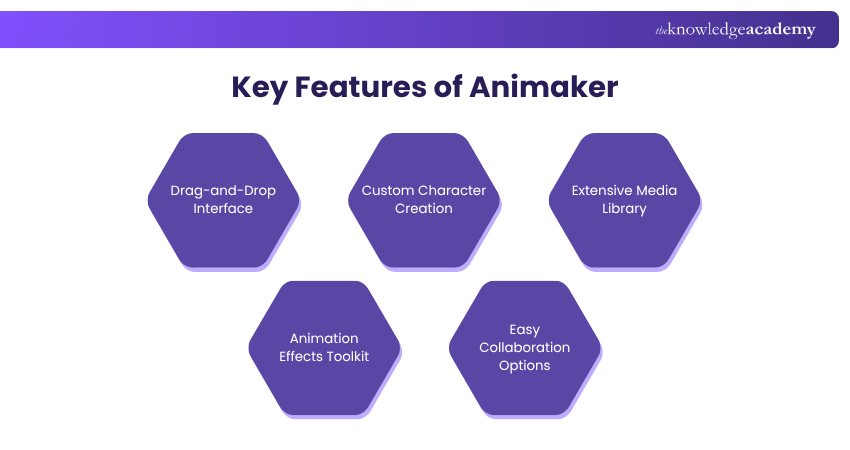
Animaker is a 2D Animation Software that is cloud-based and online. It lets you create animated videos, presentations and infographics using pre-made templates, characters, backgrounds, and icons. You can also add voice-overs, music, sound effects, and transitions to your videos. You can also use it to export and share your videos online. Let's explore the pros and cons of Animaker:
Pros:
1) Cloud-based and online
2) Easy to use and learn
3) Has pre-made templates and assets
4) Supports voice-overs, music, and sound effects
Cons:
1) Limited and generic style
2) Not very flexible or original
3) Requires internet connection and account
4) Has watermark and video length restrictions
Price: Free plan available; paid plans start from approximately £10 per month
TupiTube
TupiTube is also an open-source 2D Animation Software that is designed for children and beginners and is free. It allows you to create basic and fun animations using drawing, colouring, and painting tools. You can also use frames, layers, onion skinning, and lip-sync features to animate your drawings. Here are the pros and cons of TupiTube:
Pros:
1) Free and open-source
2) Designed for children and beginners
3) Supports drawing, colouring, and painting
4) Supports frames, layers, onion skinning, and lip-sync
Cons:
1) Limited and childish style
2) Lacks some advanced features and tools
3) Not very stable or reliable
4) No support or documentation
Price: Free
Tvpaint
Tvpaint is a 2D Animation Software that is used to create traditional and hand-drawn animations. It has a lot of features and tools for creating frame-by-frame animations, such as drawing, colouring, inking, and shading. You can also use layers, masks, filters, and effects to enhance your animations. Here are the pros and cons of Tvpaint:
Pros:
1) Used for creating traditional and hand-drawn animations
2) Supports frame-by-frame animations
3) Has a lot of features and tools
4) Supports layers, masks, filters, and effects
Cons:
1) Expensive and license-based
2) Not very compatible or integrable
3) Not very user-friendly or intuitive
4) No free trial or demo
Price: £19.97 per month
Adobe Animate
Adobe Animate is a professional animation software used for creating 2D Animations and interactive content. It offers tools for designing characters, backgrounds, and effects, along with options for adding sound and interactivity. It’s widely used in industries like advertising, gaming, and web design. The software is part of Adobe Creative Cloud, making it easy to integrate with other Adobe tools.
Pros:
1) Powerful tools for creating animations and interactive designs
2) Integrates with other Adobe Creative Cloud apps like Photoshop
3) Supports various export formats, including HTML5 and video
4) Suitable for both beginners and professionals
Cons:
1) Requires a subscription, which can be expensive
2) Steeper learning curve for beginners
3) Demands a powerful computer for smooth performance
4) Can feel overwhelming due to the many features
Price: Free
Animation Paper
It is a simple and user-friendly software designed for traditional hand-drawn animations. It allows animators to sketch, plan, and test their ideas quickly. The software is lightweight and focuses on drawing and frame-by-frame animation. It’s great for beginners as well as experienced animators looking for a basic tool.
Pros:
1) Easy to use with a clean interface
2) Lightweight software that runs smoothly on most computers
3) Perfect for traditional, frame-by-frame animation
4) Offers basic tools to focus on sketching and animating
Cons:
1) Limited advanced features for professional use
2) No built-in colour or shading options
3) Not suitable for complex or large-scale projects
4) Requires exporting to another software for additional editing
Price: Free public alpha version available; full version pricing to be announced
Clip Studio Paint
Clip Studio Paint is a popular software for both drawing and 2D Animation. It provides a range of brushes, tools, and effects for detailed artwork. The animation feature is ideal for short clips, offering frame-by-frame tools and onion-skinning. It’s widely used by illustrators and animators who enjoy creating high-quality digital art and animations. When comparing Adobe Express vs Illustrator, the latter stands out for its advanced tools for detailed and scalable artwork, while Adobe Express is better suited for simpler design projects and quick animations.
Pros:
1) Combines powerful drawing tools with animation features
2) Affordable compared to other professional software
3) Great for detailed and artistic animations
4) Supports both raster and vector graphics
Cons:
1) Limited for creating long or complex animations
2) Can be overwhelming for beginners due to many features
3) Requires a one-time purchase or subscription for updates
4) Animation timeline can feel restrictive for advanced projects
Price: £19.97 per month
Master the art of storytelling with our Video Editing Course, Sign-up Now!
Linearity Move
Linearity Move (formerly known as Vectornator) is a modern animation tool focusing on vector-based 2D Animation. It offers precise control for designing smooth animations, especially for logos, icons, and illustrations. The software is great for creating sleek, professional designs and is often used by graphic designers. It’s also optimised for iPads, making it portable and easy to use.
Pros:
1) Free to use and accessible on multiple devices
2) Excellent for vector-based animations and graphic design
3) User-friendly interface with modern tools
4) Works seamlessly on iPads with touch controls
Cons:
1) Limited features for traditional frame-by-frame animation
2) Not suitable for detailed character animations
3) Advanced users may find it lacking in professional tools
4) Requires a good understanding of vector design
Price: One-time purchase starting at £42 for the Pro version; the EX-version is priced higher
Pencil2D
Pencil2D is a free-to-use, open-source 2D Animation Software. It allows you to create simple hand-drawn animations. It is easy to use, lightweight, and cross-platform. You can draw, sketch, and animate with a pencil, pen, brush, or eraser tool. You can also import and export images, sounds, and videos. Let's explore the pros and cons of this tool:
Pros:
1) Free and open-source
2) Easy to use and learn
3) Lightweight and fast
4) Cross-platform and portable
5) Supports raster and vector graphics
Cons:
1) Limited features and tools
2) No advanced animation options
3) There is no timeline or onion-skinning
4) No support or documentation
Price: Free
Cartoon Animator 5
Cartoon Animator 5 is a professional 2D Animation Software designed for creators who want to bring characters to life with ease. It offers intuitive motion capture, facial animation, and lip-syncing tools. You can animate characters from images, apply 3D motions to 2D models, and use pre-built templates for faster production. Ideal for beginners and professionals alike, it simplifies complex animation workflows.
Pros:
1) User-friendly interface with drag-and-drop functionality
2) Real-time motion capture and facial animation
3) Supports PSD, AI, and vector-based assets
4) Extensive library of motions and templates
Cons:
1) Higher cost compared to many basic 2D tools
2) Steeper learning curve for total beginners
3) Fewer free assets in trial version
Price: One-time licence starts at approx €149 for the base version.
Future Trends of 2D Animation
The world of 2D Animation is rapidly evolving, blending traditional artistry with advanced digital technologies. Artificial intelligence and machine learning are automating tasks such as frame interpolation and lip-syncing, allowing animators to focus more on creativity and storytelling.
Hybrid techniques that combine 2D visuals with 3D depth, augmented reality (AR), and virtual reality (VR) are becoming increasingly popular, delivering immersive and visually rich experiences. 2D animation is also expanding its reach across modern platforms like short-form videos, mobile apps, and streaming services.
Its versatility, cost-effectiveness, and unique aesthetic appeal continue to make it a favourite among creators. The growing demand for handcrafted and expressive visuals highlights a renewed appreciation for the timeless charm of traditional 2D art.
Conclusion
We hope you read and understand the 10+ 2D Animation Software. These tools are great for creating animated graphics, videos, and stories. However, choosing the best one for your project can be challenging. By considering factors such as the level of complexity and the budget, you can find the best one for your needs. One exciting development in the industry is the use of AI Animation Generators, which help artists streamline their workflow and create stunning visuals with minimal effort.
Unlock your creative potential with our Animation and Design Training – Sign up now!
Frequently Asked Questions
Can 2D Animation Be Self-taught?

Yes, 2D Animation can be self-taught with online tutorials, practice, and dedication. Many free resources and beginner-friendly software make it easy to learn at your own pace.
Are there AI-assisted features in modern 2D Animation Software?
Yes, many modern 2D Animation Software tools now include AI-assisted features such as automatic in-between frame generation, smart character rigging, and real-time lip-syncing from audio, making animation faster, smoother, and more efficient.
What are the Other Resources and Offers Provided by The Knowledge Academy?
The Knowledge Academy takes global learning to new heights, offering over 3,000+ online courses across 490+ locations in 190+ countries. This expansive reach ensures accessibility and convenience for learners worldwide.
Alongside our diverse Online Course Catalogue, encompassing 17 major categories, we go the extra mile by providing a plethora of free educational Online Resources like Blogs, eBooks, Interview Questions and Videos. Tailoring learning experiences further, professionals can unlock greater value through a wide range of special discounts, seasonal deals, and Exclusive Offers.
What is The Knowledge Pass, and How Does it Work?
The Knowledge Academy’s Knowledge Pass, a prepaid voucher, adds another layer of flexibility, allowing course bookings over a 12-month period. Join us on a journey where education knows no bounds.
What are Related Courses and Blogs Provided by The Knowledge Academy?
The Knowledge Academy offers various Animation and Design Training, including 2D Animation Course, Video Editing Course, and Animation Course. These courses cater to different skill levels, providing comprehensive insights into Animator Job Description.
Our Office Applications Blogs cover a range of topics related to Animation, offering valuable resources, best practices, and industry insights. Whether you are a beginner or looking to advance your Animation skills, The Knowledge Academy's diverse courses and informative blogs have got you covered.

Richard Harris


Senior Full Stack Developer and Technology Educator
Richard Harris is a highly experienced full-stack developer with deep expertise in both frontend and backend technologies. Over his 12-year career, he has built scalable web applications for startups, enterprises and government organisations. Richard’s writing combines technical depth with clear explanations, ideal for developers looking to grow in modern frameworks and tools.


 If you wish to make any changes to your course, please


