


 Top Rated Course

We may not have the course you’re looking for. If you enquire or give us a call on +852 2592 5349 and speak to our training experts, we may still be able to help with your training requirements.
Web Application Testing: The Ultimate Guide to Quality
Richard Harris 18 April 2026Web Application Testing assesses web-based applications to ensure they work correctly, perform well, remain secure, and deliver a good user experience. It focuses on identifying bugs, performance issues, security risks, and usability problems. Testing both functionality and user experience helps teams to deliver reliable web applications.

Training Outcomes Within Your Budget!
We ensure quality, budget-alignment, and timely delivery by our expert instructors.
Table of Contents

Think about the last time a website loaded slowly or crashed midway on your device. Even small issues can frustrate users and push them away for good. That is why Web Application Testing is important. It helps to ensure web applications are fast, secure, and easy to use across different browsers, devices, and real-world conditions.
Whether you are new to performing tests or looking to improve user experiences, this blog will help you out. In this blog, you will learn about what Web Application Testing is, its importance, types, and more. So, keep reading ahead to learn more!
Table of Contents
1) What is Web Application Testing?
2) Why is Web Application Testing Important?
3) Types of Web Application Testing
4) How to Test a Web Application or Website?
5) Core Testing Approaches for Web Applications
6) Best Practices for Web Application Testing
7) Why is an End-to-end Web Application Testing a Priority?
8) Conclusion
What is Web Application Testing?
Web Application Testing is the process of evaluating a Web Application in a systematic way to ensure it is secure against threats and working as expected. It focuses on validating every feature and workflow function to help applications perform reliably.
Also, Web Application Testing involves testing performance, compatibility, and security to enable a smooth user experience. Identifying errors proactively helps to prevent failures that can affect user trust and business results.

Why is Web Application Testing Important?
Web Application Testing is very important because it helps make sure a website works in the right way. It finds problems early so that the users will not face any issues. Let’s check them in detail:
1) Maintaining High Quality Standard
In general, even small mistakes can cause big problems for your website. Things like broken buttons, forms that don’t work, or slow pages can upset users and make them leave. Testing helps find and fix these issues early so that everything will work well. It maintains your website to stay high-quality.
2) Improving the User Experience
If users find a site confusing or slow, they may never come back. To avoid such situations, Website Application Testing helps improve your website design, layout, and flow. It also checks how users interact with the app and can fix anything that could make their experience worse beforehand.
3) Ensuring Security and Data Protection
Web Applications tend to collect personal details like names, emails, and passwords. If the app is not secure, it allows hackers to steal this information. Security testing helps find and fix these risks to keep user data safe. In the same way, data protection ensures that users’ data stays protected and the business follows privacy rules.
Types of Web Application Testing
There are different ways to test a web application. Each one looks at a different part of the website. Here are the most common types:
1) Functionality Testing
It ensures every feature of a Web Application is working as intended. It checks elements, such as links, buttons, and forms, to confirm they respond correctly across devices and browsers.
2) Security Testing
This type of testing checks for security issues like weak passwords, data leaks, or the ways that hackers might hack into the system. It helps keep user and company information safe.
3) System Testing
The system testing type checks the entire website to see if everything works well as a whole. The focus areas are login pages, menus, and payment features.
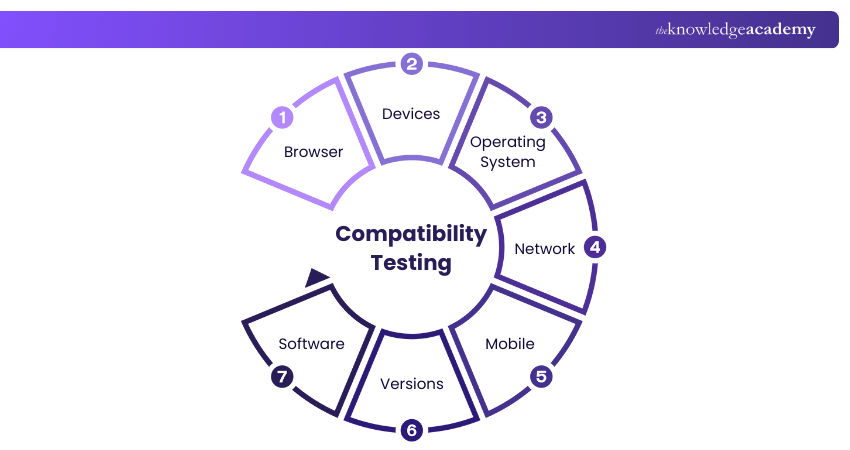
4) Compatibility Testing
Compatibility testing determines and helps the website look and work properly on all browsers, devices (phones, tablets, desktops), and operating systems.
5) Integration Testing
This tests how different parts of the website talk to each other. It finds issues that can happen when these parts work together, even if each part works well on its own.
Acquire insights into improving testing practices and methodologies by registering our ISTQB Software Testing Foundation Course today!
6) Performance Testing
Performance testing helps to check how quickly a website loads and how well it works when many people are using it at the same time.
7) Stress Testing
Stress testing in Website Application Testing performs the role of pushing the website to its limits to see what happens when traffic increases or the server is under pressure.
8) Accessibility Testing
This ensures the website works for everyone, including people with disabilities. They tend to use screen readers or only a keyboard to browse.
9) Regression Testing
Whenever an app is updated, something that worked before might have an issue now. Regression testing makes sure that old features still work after the new updates.
10) Database Testing
Database testing looks at the back-end to make sure data is saved, shown, and updated correctly. It also helps find missing or incorrect information.
11) Usability Testing
This type of testing is about how easy and pleasant your website is while using it. It finds confusing layouts, unclear labels, or anything else that might annoy users.
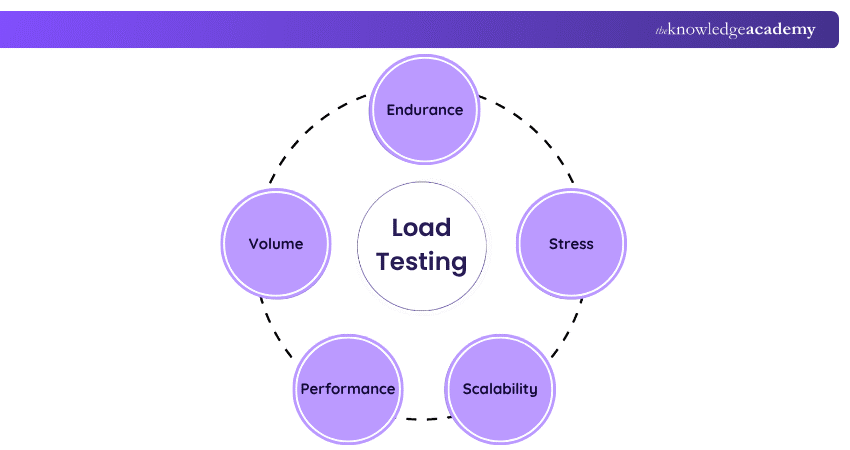
12) Load Testing
Load testing checks how the website performs when many people are using it at once. It shows if your website stays fast or becomes slow when many people use it at the same time.
13) Crowd Testing
Crowd testing uses people from various places using the app on different devices for testing. It gives feedback based on real-life use, which you might not get from laboratory testing.
Learn testing skills, boost your career, and stand out in the technical industry with our Certified Software Testing Professional (CSTP) Course – Join now!
How to Test a Web Application or Website?
Web Application Testing, or website testing, is usually done step-by-step to make sure nothing is missing. Let’s check the steps involved in its process:
Step 1: Conduct Functionality Testing
Start by testing if the main functions work. You can check if the buttons are clicked, if users are able to fill out forms, if the links are working, and so on. It confirms that everything on the page is doing what it is actually designed for and is supposed to do.
Step 2: Perform Usability Testing
This step looks at how people use the application. It focuses on whether users are able to understand the app easily and if it is simple to find information. This testing helps remove anything that might confuse users.
Step 3: Run Interface Testing
Interface testing is carried out to check how well your application connects to other systems, like databases or Application Programming Interface (APIs). For example, if you change your password, it will check if it is updated everywhere properly.
Step 4: Execute Compatibility Testing
Your website should work well on all devices, like mobiles, tablets, desktops, and different browsers. Compatibility testing helps spot display errors or features that don’t work properly across devices.
Step 5: Assess Performance Through Testing
Performance testing checks if your website is fast enough. If it takes too long to load, users may leave. It also checks how the site behaves when a lot of people visit at once. It is always better to check the performance before launching and facing any issues.
Step 6: Carry Out Security Testing
The last and final step is to check for weak spots in the system. It includes instances like Can someone guess your password, Is user data safe, and a lot more security details. You need to fix all security risks before making your website live.
Enhance software testing and sharpen your bug-hunting skills by signing up for our Manual Testing Training immediately!
Core Testing Approaches for Web Applications
There are different ways to test a web application. Choosing the right mix of approaches gives better results. Here are some of the core testing approaches:
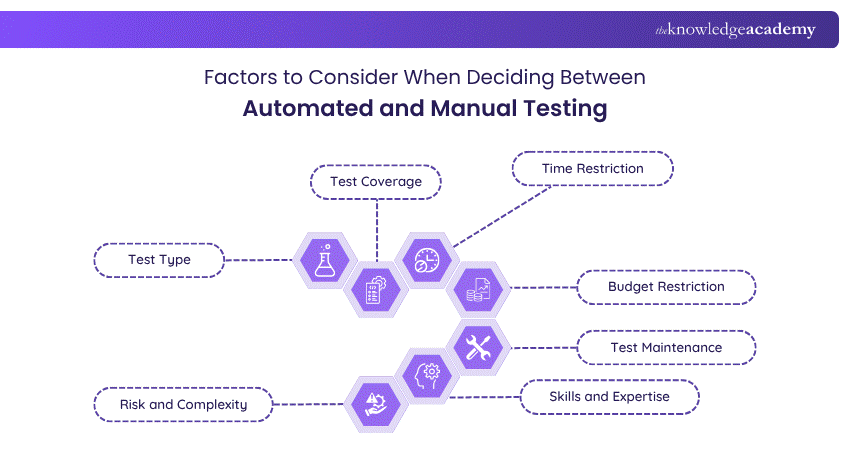
1) Manual Testing vs Automated Testing
1) Manual Testing: It is done by humans. It is specifically good for spotting design problems or testing new features.
2) Automated Testing: It uses software tools to run tests quickly and repeatedly. It is great for checking the same things over and over, like login or payment processes.
2) Black Box Testing vs White Box Testing
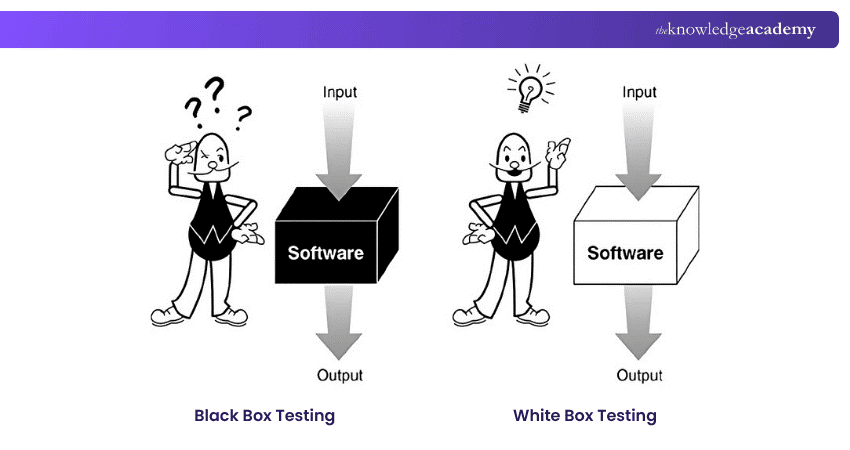
1) Black Box Testing: It tests the app by using it like a regular user, without looking at the code inside. It is to find user-facing problems without knowing how the app is built.
2) White Box Testing: It means looking inside the code and checking how each part works. Developers usually do this to check logic or paths in the code.
3) The Testing Pyramid Explained
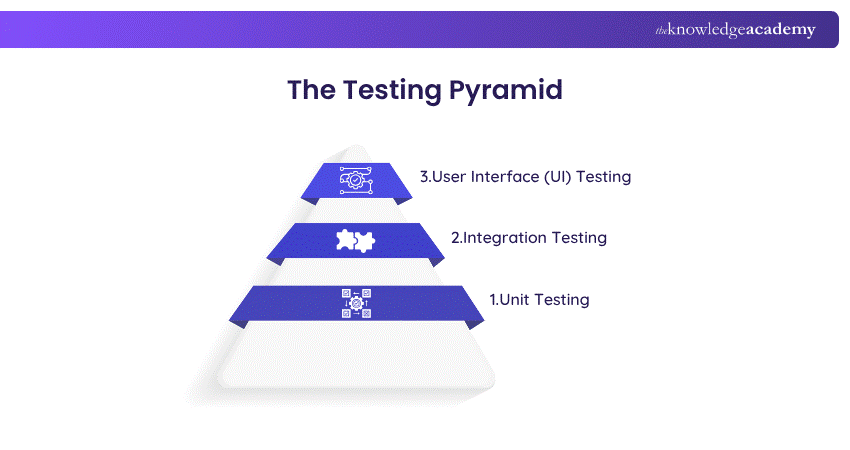
The Testing Pyramid is a way to plan testing efficiently. It does a lot of small tests for individual functions (unit tests), fewer tests that check how parts work together (integration tests), and even fewer tests that check the full system through the User Interface (UI tests).
This method saves time, reduces errors early, and makes testing more efficient and reliable. It helps you test the right things at the right time, so that you can find problems early without slowing down the work.
Upgrade your practical skills in automated testing with our Unit Testing Course – Register today!
Best Practices for Web Application Testing
So far, you have an idea of what Web Application Testing is and its various types and approaches. Now, it is time for you to know the best practices for it. Here are a few best practices:
1) Prioritise Cross-browser Compatibility Testing
1) Test your website on all browsers, like Chrome, Firefox, and Edge
2) Check how it looks on both desktop and mobiles
3) Ensure buttons, images, and layouts appear the same everywhere
4) Fix issues that only happen on specific browsers or screen sizes
2) Pay Close Attention to Usability Testing Criteria
1) Maintain a simple and easy website design to understand
2) Clearly label the menus, buttons, and links
3) Use readable fonts and colours that are easy on the eyes
4) Help users find what they need without confusion
3) Measure and Analyse Web Application Performance
1) Use tools to test your website’s loading speed
2) Check how long it takes for pages to show content
3) Find out what slows down the site, like large images or scripts
4) Optimise code and images to improve speed
4) Monitor Real-time Traffic for Better Insights
1) Keep an eye on how users move through your site in real-time
2) Spot pages where users drop off or spend too much time
3) Identify where your website is slow or causing errors
4) Use this data to fix problems and improve user experience continuously
Why is an End-to-end Web Application Testing a Priority?
End-to-end Web Application Testing is a priority since it helps businesses rapidly scale digital solutions and adapt to constant technological change. To ensure every feature works seamlessly, organisations need strong testing strategies and resources with solid automation testing expertise.
As cloud computing, business analytics, and Agile development are rising, testing is embedded across the software development lifecycle. This helps teams to release high-quality software faster, minimise risk, and meet changing user demands.
Conclusion
Web Application Testing is essential in a world where users expect fast, secure, and flawless digital experiences. Applying the right testing concepts, choosing the appropriate testing types, and following proven practices can help deliver reliable applications. This not only improves quality and performance but also protects user trust, supports business growth, and ensures Web Applications are ready to use.
Build real-world testing skills and advance your software testing skills with Software Testing Courses – Join today!
Frequently Asked Questions
What are the Challenges Faced in Web Application Testing?

Some common challenges are testing the website on different devices and browsers, keeping up with quick changes during development, making sure the site stays safe from threats, and updating automated tests as the app changes over time.
What is the Difference Between Web Testing and Application Testing?
Web testing is only for apps that run in a browser, like websites. Application testing includes all types of apps, such as mobile apps and desktop applications, even if they don’t use a browser.
What are the Other Resources and Offers Provided by The Knowledge Academy?
The Knowledge Academy takes global learning to new heights, offering over 3,000+ online courses across 490+ locations in 190+ countries. This expansive reach ensures accessibility and convenience for learners worldwide.
Alongside our diverse Online Course Catalogue, encompassing 19 major categories, we go the extra mile by providing a plethora of free educational Online Resources like Blogs, eBooks, Interview Questions and Videos. Tailoring learning experiences further, professionals can unlock greater value through a wide range of special discounts, seasonal deals, and Exclusive Offers.
What is The Knowledge Pass, and How Does it Work?
The Knowledge Academy’s Knowledge Pass, a prepaid voucher, adds another layer of flexibility, allowing course bookings over a 12-month period. Join us on a journey where education knows no bounds.
What are the Related Courses and Blogs Provided by The Knowledge Academy?
The Knowledge Academy offers various Software Testing Courses, including OWASP Certification, Manual Testing Training, and Unit Testing Course. These courses cater to different skill levels, providing comprehensive insights into Test Scenario vs Test Case.
Our Business Analysis Blogs cover a range of topics related to Web Application Testing, offering valuable resources, best practices, and industry insights. Whether you are a beginner or looking to advance your Web Application knowledge, The Knowledge Academy's diverse courses and informative blogs have got you covered.

Richard Harris


Senior Full Stack Developer and Technology Educator
Richard Harris is a highly experienced full-stack developer with deep expertise in both frontend and backend technologies. Over his 12-year career, he has built scalable web applications for startups, enterprises and government organisations. Richard’s writing combines technical depth with clear explanations, ideal for developers looking to grow in modern frameworks and tools.

Upcoming Business Analysis Resources Batches & Dates
Date
 OWASP Certification
OWASP Certification
Thu 9th Jul 2026
OWASP Certification
Thu 17th Sep 2026
OWASP Certification
Thu 26th Nov 2026

 If you wish to make any changes to your course, please


