


 Top Rated Course

We may not have the course you’re looking for. If you enquire or give us a call on +44 1344 203 999 and speak to our training experts, we may still be able to help with your training requirements.
How To Switch Back to a Personal Account on Instagram: Explained
James Smith 22 April 2026Switching back to a personal account on Instagram is easy and takes just a few steps. Ideal for users who prefer privacy, a simpler interface, and no need for ads or analytics. Go to your profile, tap the menu “Settings and Privacy,” then choose “Switch to Personal Account.” This reverts your account to a standard personal profile.

Training Outcomes Within Your Budget!
We ensure quality, budget-alignment, and timely delivery by our expert instructors.
Table of Contents
Does your Instagram feel more business than personal lately? Are you missing the days when it was just about sharing moments? You're not alone. Many users switch to business or creator accounts for some features. However, lately, they will miss the ease of their personal profile.
If you want more privacy and fewer distractions, switching back to a personal account might be the fresh start you need. In this blog, you can explore How to Switch Back to Personal Account on Instagram, what changes to expect, and why a personal account might be the right choice for you. Let’s get started!
Table of Contents
1) Types of Instagram Accounts
2) How to Switch to a Personal Account on Instagram?
3) How to Check Account Type on Instagram?
4) How Switching Affects Your Profile and Content?
5) Why You Might Want to Switch Back to a Personal Account?
6) Conclusion
Types of Instagram Accounts
Instagram gives you two types of accounts for its users. They are personal and professional Instagram accounts. Each one tends to work differently. Let's check what those account types are:
Personal Instagram Account
A personal account is the default option when you first sign up on Instagram. It is designed for everyday users who want to share moments with friends and family. It doesn’t include analytics or promotional tools but offers the simplest and most private experience.
What It Includes:
1) Access to all core Instagram features
2) You can make it private
3) You can post pictures, stories, and reels
4) No analytics or promotions
5) No business contact or category labels
Professional Instagram Account
A professional account is public by default, allowing anyone to view your posts, reels, and videos. It’s designed for users who want to grow their presence or promote a brand. There are two types of professional accounts: business accounts and creator accounts.
Business Account
Perfect for businesses, brands, shops, and service providers, this account type includes:
1) Access to Instagram insights and analytics
2) Contact buttons like "Call" or "Email"
3) Shopping tools and ad promotions
4) Business category labels
Creator Account
This account is best suited for content creators, influencers, artists, bloggers, or public figures. It includes:
1) Insights to track followers
2) Category options like artist, blogger, coach, etc.
3) Inbox organisation of primary and general tabs
4) Tools to schedule posts and content
How to Switch to a Personal Account on Instagram?
The process of changing to a personal account on Instagram is easy and only takes a few steps. You can change from a professional account to a personal account and vice versa.
If you’re worried about any content alterations during this process, do not worry. This can be done without any changes to your existing content and followers.
Switch to Personal Account on Instagram App (Android & iPhone)
The above-discussed are the general steps for switching your account to a personal one. Now, let’s check How to Switch Back to Personal Account on Instagram app using Android and IOS devices.
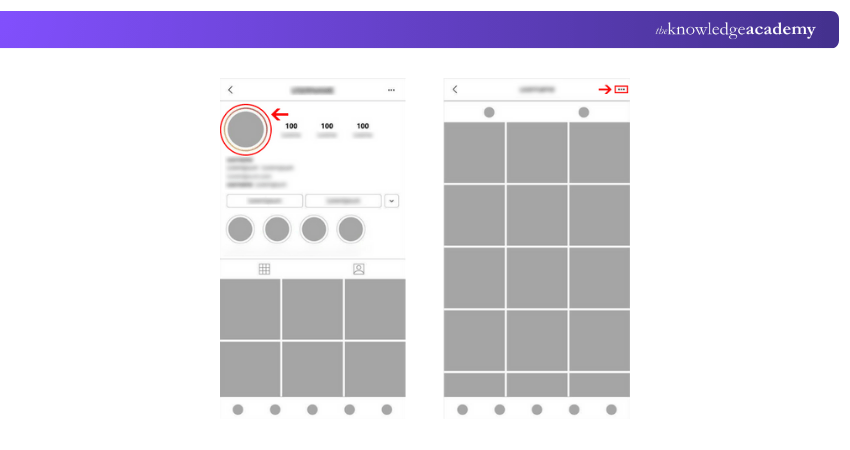
Step 1: Go to your Instagram app and navigate to your profile page.
Step 2: Tap the three-line icon, which will be on the top right corner of the profile page. Click those lines.
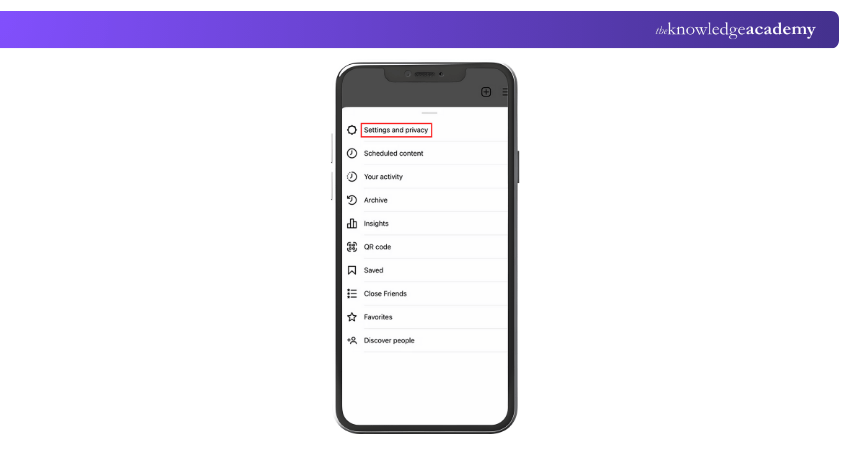
Step 3: Select “Settings and Privacy” from the viewing page.
Step 4: There, if you scroll down, you can see either of the options of “Business Tools and Controls” or “Creator Tools and Controls.” If it is not visible there, you can also check with the “Account” or “Preferences” section.
Step 5: Scroll down and you will be able to see the “Switch Account Type” option. You need to click that.
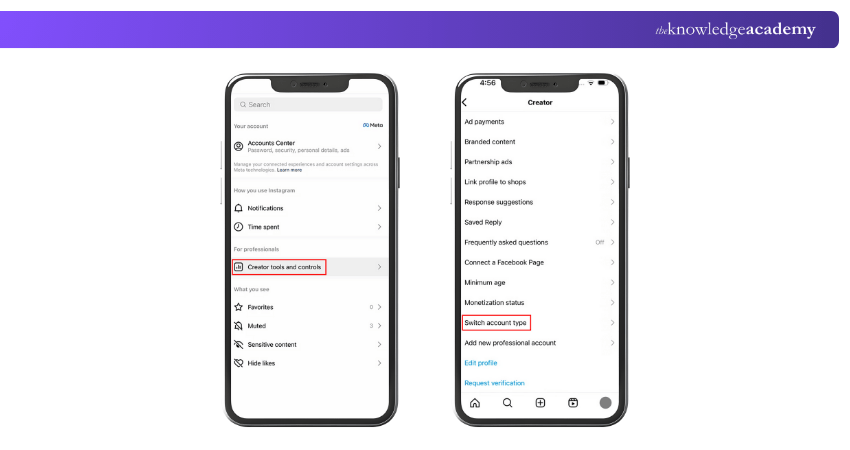
Step 6: If you click that option, you will be provided the option of “Switch to Personal Account” from the pop-up window.
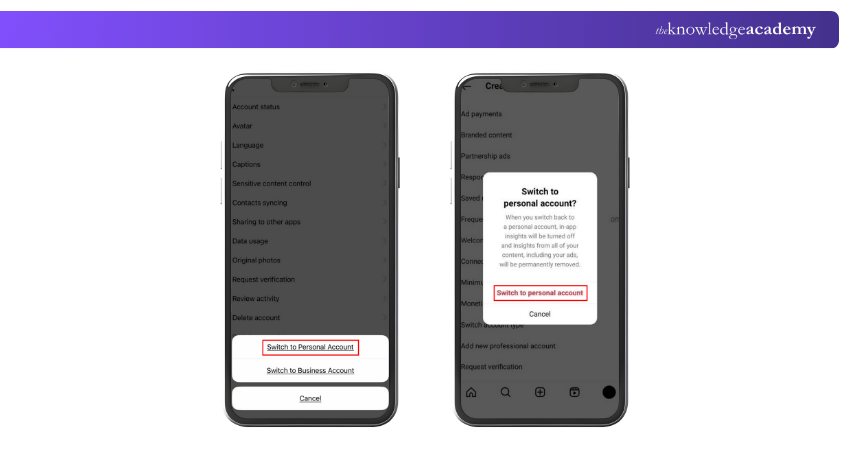
Step 7: Select that option and once again choose “Switch to Personal Account” to confirm submission.
Now, your Instagram account will be changed from a professional, public account to a private, personal account.
Discover strategies to enhance your online presence effectively with our Social Media Marketing Course – Register today!
How to Check Account Type on Instagram?
You can check your Instagram account type in two easy ways:
Check Through Privacy Settings
1) Open Instagram on your phone and go to your profile page
2) Tap the menu icon in the top-right corner
3) Select “Settings and Privacy” from the menu
4) Tap on “Account Privacy”
5) Check for the “Private Account” toggle
a) If you see the toggle, your account is personal
b) If there’s no toggle, you are using a professional account (business or creator)
Check Through Account Type and Tools
For this method also, you need to again go to your profile, tap the menu, and choose “Settings and Privacy.” Scroll down and choose “Account Type and Tools.”
1) If you see “Switch to Personal Account”, it means you're using a professional account
2) If you see “Switch to Professional Account”, then you're already on a personal account
How Switching Affects Your Profile and Content?
When you switch from a business or creator account back to a personal one, your content stays the same. Nothing will be deleted or changed. This includes:
1) Your followers
2) All your posts, videos, stories, highlights
3) Your username and bio
4) Your saved posts
However, some features and business tools will be removed or hidden, such as:
1) The contact button for call or email
2) The business category tag below your name, like Blogger or Restaurant
3) Access to insights and post analytics
4) Any promoted content history
5) Your visibility in Instagram’s business discovery areas
Also, your Instagram bio may look shorter because the contact info and category label will no longer appear.
Learn effective Social Media platform utilisation with our Influencer Marketing Course – Join soon!
Why You Might Want to Switch Back to a Personal Account?
There are some reasons that are general for users to switch back to a personal account. Here are some of those reasons:
1) Privacy Control: Personal accounts can be made private; professional accounts are public.
2) No Need for Tools: Insights, ads, and contact buttons may no longer be useful.
3) Simpler Profile: To remove business tags and extra features which are not required.
4) Better Reach: Some users report higher engagement on personal accounts.
5) Stopped Selling or Promoting: Business tools aren’t needed anymore.
6) Less Clutter: For an easy-to-use option without pro features.
Conclusion
Switching back to a personal account on Instagram is easy, quick, and sometimes it is just what you need. Whether you're stepping away from business, want more privacy, or simply need a cleaner profile, a personal account gives you more control and less distraction. By knowing How to Switch Back to Personal Account on Instagram, switching back is just a few taps away.
Get into the trends of the rapidly evolving digital landscape with our Digital Marketing Courses – Explore immediately!
Frequently Asked Questions
How Do I Remove the Professional Dashboard on Instagram?

To remove the professional dashboard on your Instagram account, you must switch to a personal account. Here are the steps for that:
1) Go to your profile
2) Tap the menu
3) Go to “Settings and Privacy”
4) Tap “Account Type and Tools”
5) Select “Switch to Personal Account”
Once done, the professional dashboard will disappear from your profile.
Is it Better to Have a Personal or Business Instagram?
The answer to that totally depends on your goals. A personal account is best for privacy and casual use. A business account suits those promoting products or needing insights. A creator account is ideal for influencers or brands wanting scheduling tools and performance data. You can choose what fits you best.
What are the Other Resources and Offers Provided by The Knowledge Academy?
The Knowledge Academy takes global learning to new heights, offering over 3,000 online courses across 490+ locations in 190+ countries. This expansive reach ensures accessibility and convenience for learners worldwide.
Alongside our diverse Online Course Catalogue, encompassing 17 major categories, we go the extra mile by providing a plethora of free educational Online Resources like Blogs, eBooks, Interview Questions and Videos. Tailoring learning experiences further, professionals can unlock greater value through a wide range of special discounts, seasonal deals, and Exclusive Offers.
What is The Knowledge Pass, and How Does it Work?
The Knowledge Academy’s Knowledge Pass, a prepaid voucher, adds another layer of flexibility, allowing course bookings over a 12-month period. Join us on a journey where education knows no bounds.
What are the Related Courses and Blogs Provided by The Knowledge Academy?
The Knowledge Academy offers various Digital Marketing Courses, including the Instagram Marketing Course, the Influencer Marketing Course and the Social Media Marketing Course. These courses cater to different skill levels, providing comprehensive insights into How to Change Instagram Username.
Our Digital Marketing Blogs cover a range of topics related to Social Media, offering valuable resources, best practices, and industry insights. Whether you are a beginner or looking to advance your Digital Marketing skills, The Knowledge Academy's diverse courses and informative blogs have got you covered.

James Smith


Digital Marketing Manager and Trainer
James Smith is a digital marketing professional with over a decade of experience in SEO, content strategy, paid media and analytics. He has supported both SMEs and global brands in transforming their digital presence. James’s writing and training are rooted in results-driven tactics and the latest marketing trends.
View Detail
Upcoming Digital Marketing Resources Batches & Dates
Date
 Instagram Marketing Course
Instagram Marketing Course
Fri 10th Jul 2026
Instagram Marketing Course
Fri 6th Nov 2026

 If you wish to make any changes to your course, please


