


 Top Rated Course

We may not have the course you’re looking for. If you enquire or give us a call on +33 805638382 and speak to our training experts, we may still be able to help with your training requirements.
12 Best Kanban Software That You Should Know
The Knowledge Academy 15 July 2026Kanban Software helps teams visualise tasks, manage workflows, and improve efficiency using digital boards, cards, and columns effectively. It offers clear real-time visibility into work progress and potential bottlenecks. This improves collaboration, prioritisation, and continuous improvement across modern agile teams.

Training Outcomes Within Your Budget!
We ensure quality, budget-alignment, and timely delivery by our expert instructors.
Table of Contents

Managing work effectively requires clear visibility, shared understanding, and smooth collaboration. Kanban Software offers a simple, visual way to track tasks, manage priorities, and improve workflow efficiency across teams.
By making work visible and progress easy to follow, Kanban helps teams stay organised, reduce delays, and deliver better results. Let’s explore how this approach supports more efficient and collaborative ways of working.
Table of Contents
1)12 Best Kanban Tools in 2026
2) Understanding Kanban Software
3) How to Choose a Kanban Software?
4) Benefits of Kanban Software
5) Future Scope of Kanban Software
6) What is Kanban Board Software?
7) Which Kanban Software Works Best for Enterprise-level Teams?
8) Conclusion
12 Best Kanban Tools in 2026
When opting for Kanban Software, you must look for many features. The best ones offer greater flexibility, metrics and analysis, collaboration tools, pull system and many more. The following 12 Kanban Software fulfil these criteria quite well. So, explore these tools in detail and decide based on your project needs.
1) Teamhood
Teamhood is a potent Kanban board tool that can help optimise processes, regardless of industry or company size.
a) The tool is designed with the Kanban board concept in mind but does not require users to use the framework.
b) Features include task prioritisation, metrics viewing, and report generation, enhancing team efficiency with a customisable task board.
c) The board's design anticipates complexity, displaying more actionable information on one screen than other tools.
d) Unlike Monday, Asana, or Microsoft Project, Teamhood uniquely shows interconnected project elements on a single screen for easier management.
e) Users can design Kanban boards with custom columns, column groups, rows, and workflows, tracking subtasks effectively.
f) Secondary workflows can be added to progress columns, giving complete control over the board’s appearance.

Master the core concepts with the best Kanban Interview Questions and Answers for your interview prep.
2) Asana
Asana is a visual Task Management tool that helps you collaborate on projects.
a) Asana provides a basic Kanban board for viewing project tasks and tracking task movements.
b) Team members can create task boards with columns, but advanced features are absent.
c) Asana does not support WIP limits or tracking lead and cycle times.
d) It is suitable for adding a simple Kanban board to Task Management efforts.
e) Asana is not a comprehensive Kanban solution and struggles with complex projects and multi-team management.
f) Ideal for simple visualisation needs, but what you see is what you get.
Become an efficient Scrum Master, Product Owner, or Developer by signing up for our comprehensive Scrum Certification - Sign up now!
3) Trello
Trello is a widely-used Task Management tool that employs a basic task board to see work items.
a) Teams can manage simple processes and visualise tasks by phase using Trello.
b) A Trello board features one item-wide column where tasks are listed vertically.
c) Each task can include details like descriptions, due dates, and checklists.
d) Trello lacks advanced Kanban features such as lead time or velocity tracking.
e) Best suited for simple, visual Task Management or personal task tracking.
f) Designed for straightforward processes with small teams; not ideal for medium or large businesses.
g) Project Management features are limited, and plugins may be needed to replace missing functionality.
h) While not optimal for organisational use, Trello is excellent for personal task tracking.
4) Monday
Monday is a table-based work automation and management tool.
a) Monday displays work items in a list format with the ability to add rows for priority, status, and other details.
b) It offers a simple Kanban task board for visualising tasks, customisable with columns grouped by status, priority, or assignment.
c) For a true Kanban experience, tasks are best visualised by status.
d) Monday is primarily a work automation tool with Kanban as an additional feature, offering limited functionality.
e) It lacks key Kanban features such as WIP limits, reports, and swimlanes.
f) It integrates with various tools like HubSpot for Project Management, customer service, and email tasks.
g) The free plan supports only two users, pushing users towards upgrading to paid plans.
5) Businessmap
Businessmap is a great option if you're looking for a Kanban tool to serve enterprise needs.
a) Businessmap’s split boards allow viewing multiple levels of information simultaneously, from enterprise-level data to team tasks.
b) Work items can be linked between boards, business rules can be created, and WIP limits set to streamline processes for large enterprises.
c) Visualising everything in one place eliminates the need to relay information to management, saving time on meetings.
d) Ideal for visualising company-wide processes and creating a comprehensive project overview.
e) Not convenient for daily use, as seeing the entire project may make it harder to identify and prioritise critical tasks.
f) Best suited for creating a company plan overview rather than as a day-to-day team tool.
6) Microsoft Project
Microsoft Project is among the longest-standing project management tools available.
a) Microsoft Project was originally designed for traditional Project Management and Gantt charts.
b) It now includes a basic Kanban view, allowing teams to experiment with the framework or visualise tasks on a board.
c) Integrates well with Microsoft tools like Teams, SharePoint, and Planner, making it useful for organisations using these platforms.
d) Collaboration features are limited, which might hinder real-time teamwork.
e) Integration with non-Microsoft tools may not be as seamless.
f) Offers no advanced Kanban features, with task boards limited to basic customisation, such as adding extra columns.
g) Not suitable as a dedicated Kanban tool due to its minimal Kanban capabilities.
Acquire skills to implement Kanban with our Kanban Foundation Course – Join now!
7) Wrike
Wrike is an enterprise-oriented tool that includes Kanban support, making it a suitable option for organisations seeking a Project Management solution with lean features.
a) Wrike offers features to support various departments, from HR to Web Design.
b) Includes a simple Kanban board for task visualisation, allowing customisable columns and WIP limits to manage work in progress.
c) Compared to Jira, Wrike is more flexible and adaptable to different Project Management and Kanban methods, whereas Jira leans heavily on Agile/Scrum.
d) Wrike and Monday.com both include boards in their Project Management tools, but Wrike focuses more on Kanban and collaboration.
e) Asana’s intuitive interface appeals to non-technical teams, but Wrike’s features are better suited for large organisations and complex projects.
f) While Wrike is ideal for enterprise-level Project Management with Kanban visualisation, other tools may be more comprehensive for certain needs.
Master the art of effective Project Management in our Certified Professional in Agile Project Management (CPAPM) Course - Sign up now!
8) Jira
Jira, a product of Atlassian, is ideal for IT organisations as a Task Management system as it offers features that help dev teams manage work.
a) Jira's features primarily cater to the IT process, allowing users to plan, execute, release code, and manage issue tracking.
b) Kanban boards in Jira are used to track ongoing work and are configured with columns and WIP limits to provide workflow control and quick overviews.
c) Teams can measure velocity using cycle time and leverage Project Management features like reporting and collaboration.
d) While Jira is robust for IT, its complexity can make it challenging for users in non-IT fields.
e) Jira leans heavily towards Scrum, making it less adaptable compared to tools like Teamhood, which supports both Scrum and Kanban.
f) Jira’s boards are well-regarded for managing the entire Software Development Life Cycle, from planning to bug tracking.
9) KanbanTool
This is a basic Task Management tool that allows you to view your team’s workflow on an online board.
a) KanbanTool is a free, straightforward tool from the older generation of Kanban Software.
b) It is useful for building task boards with columns, column groups, and rows.
c) Teams can utilise features like Burndown charts and other reports to manage tasks effectively.
d) Offers fundamental task management capabilities, including task assignment and the addition of extra details.
e) A drawback is the difficulty in tracking changes without logging in.
f) Target columns by due dates and a calendar feature opening in a separate window would improve usability.
g) Best suited for smaller projects; lacks the scalability of tools like Wrike and Jira for managing larger, complex projects.
11) Smartsheet
Smartsheet is a digital solution designed for enterprise customers, enabling users to visualise tasks on a straightforward Kanban board organised into columns.
a) Smartsheet is ideal for analysing and reviewing large amounts of data within a solution.
b) Includes features for project planning and execution, making it versatile for various tasks.
c) Offers powerful features like reporting and automation, suitable for complex and heavy projects.
d) Simpler projects or those focusing on visuals might benefit more from traditional tools.
e) Automation and collaboration features are excellent, with the Forms tool being particularly useful.

11) Kanboard
This is a fundamental, open-source Kanban-based task management application that assists groups in seeing their work processes by means of uncomplicated, adaptable boards.
a) Kanboard is a free open-source tool that manages projects and tasks using the Kanban technique.
b) The application provides a visual overview of the workflow stages by means of boards with columns.
c) The workflow is managed by dragging and dropping the cards within the limits of work in progress.
d) The main functions include user allocation, setting deadlines, adding notes, and managing files.
e) The interface is rather simple when compared with today's popular Kanban tools.
f) By default, there are reporting and integration options without the use of plugins.
g) It is more appropriate for personal use or small team projects rather than large and complicated ones.
12) ProofHub
This is a comprehensive project and task management tool that includes Kanban boards for visual workflow management.
a) ProofHub is a project and collaborator-based management system with a Kanban feature.
b) It enables groups to form graphic boards and shift work through different workflow stages.
c) Todos have the support of due dates, responsible persons, comments, and document attachments.
d) Moreover, there are calendars, reports, discussions, and time tracking features.
e) Some of the advanced functionalities are provided only in the paid plan.
f) Automation and integrations are highly restricted compared to mainstream tools.
g) Ideal for the teams that are mindful of the single platform for Kanban, collaboration, and project tracking.
Implement Kanban boards to track and manage work with Kanban Practitioner Training – Join now!
Understanding Kanban Software
Kanban Software is a digital tool that helps teams implement the Kanban methodology, a work management approach based on visualisation, limitation, and continuous improvement. By using Kanban Estimation, teams can better assess workload and optimise task completion.
Kanban Software enables teams to create and manage Kanban Boards, visually tracking work items as they progress through various stages. Additionally, Kanban Software supports teams with the following:
a) Tracking and updating their work progress in real-time
b) Communicate and collaborate effectively
c) Automate repetitive tasks
d) Analyse and report their performance data
Moreover, Kanban Software aims to streamline workflows and enhance productivity within organisations.
How to Choose a Kanban Software
Selecting the right Kanban Software begins with understanding how your team works. Before making a decision, reflect on these key considerations:
a) Do you require multiple boards linked across different teams?
b) Will your team follow strict work in progress limits or need more flexibility?
c) Are advanced analytics important for tracking performance and forecasting outcomes?
Steps to Implement Kanban Software
Implementation should always start small.
a) Test with a single team to fine tune the workflow before expanding it across the organisation.
b) Customise gradually by adding swimlanes, automations, or CRM integrations once the tool proves useful in daily operations.
c) Refine continuously by treating Kanban boards as adaptable systems and updating columns, rules, and policies based on ongoing feedback
Benefits of Kanban Software
Implementing Kanban Software offers numerous benefits that can significantly enhance workflow efficiency and productivity within an organisation. Let’s explore some key Benefits of Kanban Software:
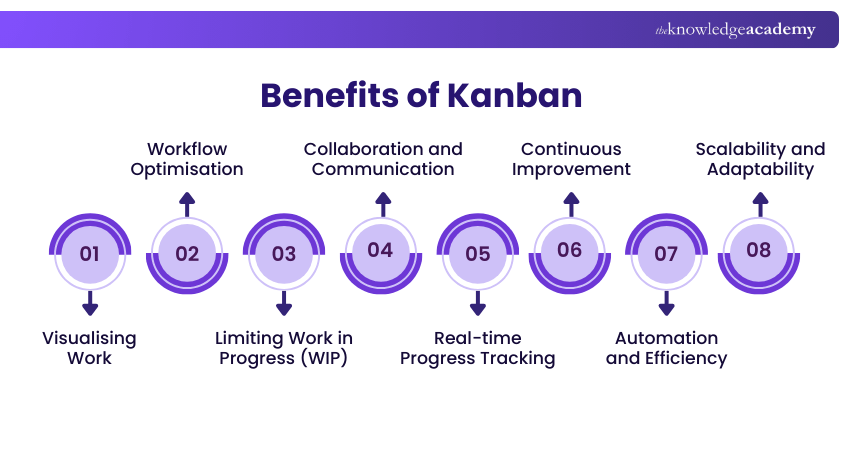
1) Visualising Work: Kanban Software provides a visual representation of work, typically in the form of Kanban boards. This visual clarity allows teams to easily understand the status of tasks, their priorities, and dependencies.
2) Workflow Optimisation: Kanban Software enables teams to optimise their workflows by identifying and eliminating inefficiencies. By visualising the flow of work and tracking task progress, teams can pinpoint areas where work tends to accumulate or where delays occur.
3) Limiting Work in Progress (WIP): One of most fundamental Principles of Kanban is to limit the amount of work in progress. Kanban Software helps teams enforce this principle by setting WIP limits for each column or stage of the workflow.
4) Collaboration and Communication: Kanban Software fosters collaboration and communication among team members. Features such as comments, attachments, and @mentions facilitate real-time communication and contextual discussions directly within the software.
5) Real-time Progress Tracking: Kanban Software allows teams to track the progress of tasks in real time. Team members can update their work status, providing visibility into which tasks are in progress, completed, or blocked.
6) Continuous Improvement: Kanban Software supports the principle of continuous improvement by providing data and metrics for analysis. Through features like cycle time, lead time, and cumulative flow diagrams, teams can measure their performance, pinpoint improvement areas, and implement changes accordingly.
7) Automation and Efficiency: Kanban Metrics play a crucial role in Kanban Software, which often includes automation features to reduce manual effort while enhancing efficiency. Tasks can be automatically assigned, deadlines can be set, and notifications can be triggered based on predefined rules, all while tracking performance through key Kanban Metrics.
8) Scalability and Adaptability: Kanban Software can scale with the needs of an organisation. As teams grow and projects grow more complex, the software can accommodate additional users, tasks, and projects.
Learn and apply Kanban to boost your business, by signing up for the Certified Kanban Practitioner Certification Course now!
What is Kanban Board Software?
The Kanban board software is a visual work organisation that is used to organise, monitor, and control work in a very effective way by a team. The reason why it is commonly used is that collaboration becomes visible, and the progression is tracked, particularly in cases of teams that are dispersed across work locations or departments.
The majority of Kanban board tools are constructed in three main aspects: boards, lists, and cards. These elements combine and visualise work processes and tasks, typically via simple drag and drop interactions.
a) Kanban Boards: They serve as a graphic working desk that gives a picture of the whole project, enabling the teams to observe what is planned, underway, or done.
b) Kanban Lists: These are the processes showing stages of work on the board, including To Do, In Progress, and Done, and can be tailored to include more specific propositions
c) Kanban Cards: This consists of each unique task that is traversed through lists as work continues to progress, and they enable teams to keep a visual record of the ownership of the work, its status, and the completion of the work.
The Kanban board software enables groups to become more visible, reduce the workload, and ensure a constant flow of work to be completed.
Which Kanban Software Works Best for Enterprise-level Teams?
At the enterprise level, Kanban software comes with advanced analytics, linked boards, and robust customisation. Scalability, integration, and reporting features are necessary for the effective management of complex workflows.
Conclusion
Selecting the appropriate Kanban Software has the potential to change the planning, tracking, and delivery of work by your team. It brings sanity, focus, and continuous improvement to daily activities with the correct installation. Simultaneously, you should start with a modest size, frequently make changes, and as your staff increases, so too should your workflow.
Improve team efficiency with our Kanban Training – Register today!
Frequently Asked Questions
Is Kanban Software Suitable for all Types of Projects?

While Kanban is effective for simpler projects, it can be counterproductive for complex processes.
Can I Integrate Kanban Software With Other Tools?
Yes, you can integrate Kanban Tool with apps and Cloud services, including OneDrive, Google Drive, Outlook Calendar, Dropbox, and MS Teams.

The Knowledge Academy


Global Training Provider
The Knowledge Academy is a world-leading provider of professional training courses, offering globally recognised qualifications across a wide range of subjects. With expert trainers, up-to-date course material, and flexible learning options, we aim to empower professionals and organisations to achieve their goals through continuous learning.


 If you wish to make any changes to your course, please


