


 Top Rated Course

We may not have the course you’re looking for. If you enquire or give us a call on +34 932716793 and speak to our training experts, we may still be able to help with your training requirements.
Web App vs Mobile App: What's the Difference?
Richard Harris 28 April 2026Explore the unique aspects of Web App vs Mobile App, understand their functionalities, advantages, and disadvantages, and uncover the key differences that set them apart in the digital landscape.

Training Outcomes Within Your Budget!
We ensure quality, budget-alignment, and timely delivery by our expert instructors.
Table of Contents
Web App vs Mobile App – what's the difference? That is the question that many tech enthusiasts and consumers face in the modern digital world. Both platforms have their own strengths and weaknesses, and offer different kinds of experiences and functionalities. In this blog, we will dive deep into the differences and similarities between Web App and Mobile App, and help you decide which one suits your needs better.
Table of Contents
1) What is a Web Application?
2) What is a Mobile Application?
3) What is the difference between Mobile Apps and Web Apps?
a) Definition and scope
b) Development and maintenance
c) Accessibility and performance
d) Compatibility and consistency
e) Security and privacy
4) Conclusion
What is a Web Application?
A Web Application is a computer programme that runs on a remote server and uses a web browser to perform various internet-related tasks. Web Applications differ from traditional software applications that must be downloaded and installed on each device.
Web Applications can be accessed from any device with an internet connection and a web browser without requiring installation. They are also more accessible and cheaper to develop and maintain, as they only need a single version that works across all platforms and devices. Moreover, they can provide dynamic and interactive user experiences, collaboration, and data-sharing features.

How does a Web Application function?
A Web Application functions using a combination of server-side and client-side scripts to process and present data to the user. Server-side scripts, written in languages like PHP or ASP.NET, manage the storage and retrieval of data. Thus, they ensure that the Web Application’s core functions are executed on the server.
Client-side scripts, typically written in HTML, CSS, and JavaScript, handle the presentation of the information from the server, creating the user interface. When a user interacts with a Web Application, their browser sends requests to the server, which processes them and returns the necessary data to the browser.
The browser then uses client-side scripts to display this data in a readable and interactive format. This process allows Web Applications to provide dynamic content and interactive user experiences.
Advantages of a Web Application
The advantages of a Web Application are as follows:
a) Universally accessible from any device with an internet connection and a web browser, which ensures broad accessibility and ease of use.
b) No need to download or install software, which saves time and storage space.
c) Easier and cheaper to develop and maintain compared to traditional software Applications. It is because they require a single version that works across all platforms and devices.
d) Updates and maintenance are simple and instant, as developers can deploy updates directly on the server. This makes the changes available to all users without requiring them to update any software on their devices.
e) Simplifies version control and bug fixes, enhancing overall user experience and security.
f) It can provide collaboration and data-sharing features, as they can connect to databases and web services.
Disadvantages of a Web Application
The disadvantages of a Web Application are as follows:
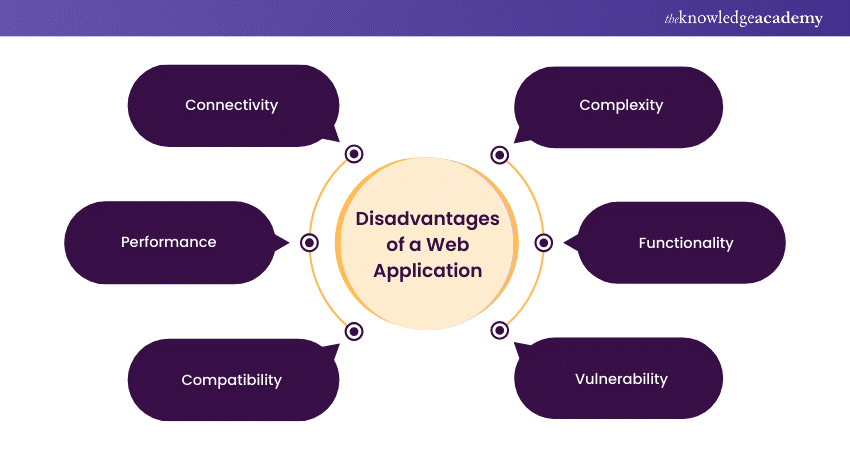
a) Requires continuous internet connection to function, which can be a significant drawback in areas with unstable or unavailable internet access.
b) Performance depends on the speed and reliability of the user’s internet connection, which can affect the loading time and responsiveness of the Web Application.
c) Browser compatibility issues, as they need to function correctly across various web browsers, which can differ in how they interpret code.
d) Extra development effort to ensure compatibility and consistent user experience across all browsers, which can increase the complexity and cost of the Web Application.
e) Less powerful in terms of functionality compared to native Applications, particularly in areas like graphics, speed, and overall performance.
f) More susceptible to security risks from attacks like Cross-site Scripting (XSS) and SQL injection, as they rely on the internet and web servers to function.
Start building amazing Apps with Our Mobile App Development Training Using Flutter Course – join now!
What is a Mobile Application?
A Mobile Application, or App, is a software program designed to run on a mobile device, such as a smartphone or tablet. Mobile Applications differ from traditional software Applications that must be downloaded and installed on each device.
They can be accessed from any device with an internet connection and a web browser without requiring installation. Mobile Applications are also easier and cheaper to develop and maintain, as they only need a single version that works across all platforms and devices. Moreover, these Applications can provide dynamic and interactive user experiences, collaboration, and data-sharing features.
How does a Mobile Application function?
A mobile Application functions using a combination of server-side and client-side scripts to process and present data to the user. Server-side scripts, written in languages like PHP or ASP.NET, manage the storage and retrieval of data, ensuring that the Mobile Application’s core functions are executed on the server. Client-side scripts, typically written in HTML, CSS, and JavaScript, handle the presentation of the information from the server, creating the user interface.
When users interact with a Mobile Application, their browser sends requests to the server, which processes them and returns the necessary data to the browser. The browser then uses client-side scripts to display this data in a readable and interactive format. This process allows Mobile Applications to provide dynamic content and interactive user experiences.
Advantages of a Mobile Application
The advantages of a Mobile Application are as follows:
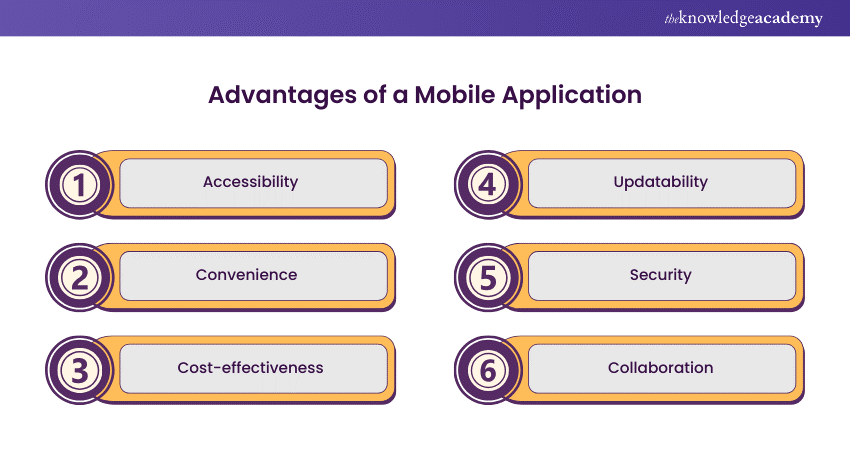
a) Universally accessible from any device with an internet connection and a web browser, which ensures broad accessibility and ease of use.
b) No need to download or install software, which saves time and storage space.
c) Easier and cheaper to develop and maintain compared to traditional software Applications. It is because they require a single version that works across all platforms and devices.
d) Updates and maintenance are simple and instant, as developers can deploy updates directly on the server. This makes the changes available to all users without requiring them to update any software on their devices.
e) Simplifies version control and bug fixes, enhancing overall user experience and security.
f) It can provide collaboration and data-sharing features, as they can connect to databases and web services.
Disadvantages of a Mobile Application
The disadvantages of a Mobile Application are as follows:
a) Requires continuous internet connection to function, which can be a significant drawback in areas with unstable or unavailable internet access.
b) Performance depends on the speed and reliability of the user’s internet connection, which can affect the loading time and responsiveness of the Mobile Application.
c) Browser compatibility issues, as they need to function correctly across various web browsers, which can differ in how they interpret code.
d) Extra development effort to ensure compatibility and consistent user experience across all browsers, which can increase the complexity and cost of the Mobile Application.
e) Less powerful in terms of functionality compared to native Applications, particularly in areas like graphics, speed, and overall performance.
f) More susceptible to security risks from attacks like Cross-site Scripting (XSS) and SQL injection, as they rely on the internet and web servers to function.
Unlock your digital potential – join our App & Web Development Training today!
What is the difference between Mobile Apps and Web Apps?
Web App vs Mobile App have some key differences in how they are built, accessed, and used. Here are some of the main differences between Web Applications and Mobile Applications:
|
Aspect |
Web Application |
Mobile Application |
|
Access |
Runs in a web browser and can be accessed from any device with an internet connection and a web browser |
Designed for specific platforms and must be downloaded and installed on the device before use |
|
Development |
Uses a combination of server-side and client-side scripts to process and present data to the user |
Uses server-side and client-side scripts as well as native code to access the device’s features |
|
Cost |
Easier and cheaper to develop and maintain, as it requires a single version that works across all platforms and devices |
More complex and expensive to develop and update, as it needs to be developed for each platform separately |
|
Convenience |
Universally accessible and does not need to be downloaded or installed, which saves time and storage space for the user |
Needs to be downloaded and installed, which can take time and consume storage space on the device |
|
Performance |
Depends on the speed and reliability of the user’s internet connection and web browser |
Offers offline access and faster performance, which can enhance the user experience |
|
Compatibility |
Faces browser compatibility issues, as it needs to function correctly across various web browsers |
Does not face browser compatibility issues, as it is built for specific platforms and devices |
|
Security |
More susceptible to security risks from attacks like XSS and SQL injection, as it relies on the internet and web servers to function |
More secure, as it stores data on the device and uses encryption and authentication methods to protect the data |
1) Definition and scope
Web Applications run in a web browser and can be accessed from any device with an internet connection and a web browser, such as a laptop, a smartphone, or a tablet. On the other hand, Mobile Applications are designed for specific platforms, such as iOS or Android, and must be downloaded and installed on the device before they can be used.
2) Development and maintenance
Web Applications use a combination of server-side and client-side scripts to process and present data to the user. Server-side scripts, written in languages like PHP or ASP.NET, manage the storage and retrieval of data, ensuring that the Web Application’s core functions are executed on the server. Client-side scripts, typically written in HTML, CSS, and JavaScript, handle the presentation of the information from the server, creating the user interface.
Mobile applications can utilise both server-side and client-side scripts; however, they also depend on native code—written in languages like Swift or Java—to access various device features, such as the camera, GPS, or accelerometer. Exploring App Ideas can help developers understand this distinction, as web apps primarily rely on browser-based technologies without direct access to native device functionalities. This distinction highlights a key difference between mobile app and web development, as web apps primarily rely on browser-based technologies without direct access to native device functionalities.
Web Applications are easier and cheaper to develop and maintain compared to Mobile Applications, as they require a single version that works across all platforms and devices. In contrast, Mobile Applications need to be developed and updated for each platform separately, which can increase the complexity and cost of the development process.
3) Accessibility and performance
Web Applications are universally accessible and do not need to be downloaded or installed, which saves time and storage space for the user. At the same time, Mobile Applications need to be downloaded and installed, which can take time and consume storage space on the device. However, Mobile Applications can also offer offline access and faster performance, which can enhance the user experience.
4) Compatibility and consistency
Web Applications face browser compatibility issues, as they need to function correctly across various web browsers, which can differ in how they interpret code. This necessitates extra development effort to ensure compatibility and consistent user experience across all browsers.
In comparison, Mobile Applications do not face browser compatibility issues, as they are built for specific platforms and devices. However, Mobile Applications face device compatibility issues, as they need to adapt to different screen sizes, resolutions, and orientations.
5) Security and privacy
Web Applications are more susceptible to security risks from attacks like Cross-site Scripting (XSS) and SQL injection, as they rely on the internet and web servers to function. Mobile Applications are more secure, as they store data on the device and use encryption and authentication methods to protect the data. However, Mobile Applications can also be vulnerable to security breaches if the device is lost, stolen, or hacked.
Transform your ideas into Apps – join our Mobile App Development Course today!
Conclusion
Web Apps and Mobile Apps are both viable options for delivering digital services and products to users. However, they have different strengths and weaknesses, and they suit different needs and scenarios. Therefore, before choosing between Web App vs Mobile App, one should consider the factors mentioned in this blog. By weighing these factors, one can make an informed decision and choose the best option for their App.
Transform your vision into Apps – join our Android Development Course now!
Frequently Asked Questions
Which is easier: Web App or Mobile App?

There is no definitive answer to this question, as it depends on the App's complexity and scope, the developers' skills and experience, and the tools and technologies used. However, in general, Web Apps are easier to develop and deploy than Mobile Apps, as they use web technologies that are widely available and standardised, and they do not require different versions for different platforms.
Which is a more expensive website or Mobile App?
Again, this depends on the App's complexity and scope, the developers' skills and experience, and the tools and technologies used. However, Mobile Apps are generally more expensive than websites, as they require more development time and resources, testing and debugging, and maintenance and updates. Mobile Apps also have additional costs, such as App store fees and marketing expenses.
What are the other resources and offers provided by The Knowledge Academy?
The Knowledge Academy takes global learning to new heights, offering over 3,000+ online courses across 490+ locations in 190+ countries. This expansive reach ensures accessibility and convenience for learners worldwide.
Alongside our diverse Online Course Catalogue, encompassing 19 major categories, we go the extra mile by providing a plethora of free educational Online Resources like Blogs, eBooks, Interview Questions and Videos. Tailoring learning experiences further, professionals can unlock greater value through a wide range of special discounts, seasonal deals, and Exclusive Offers.
What is Knowledge Pass, and how does it work?
The Knowledge Academy’s Knowledge Pass, a prepaid voucher, adds another layer of flexibility, allowing course bookings over a 12-month period. Join us on a journey where education knows no bounds.
What are App & Web Development Training related courses and blogs provided by The Knowledge Academy?
The Knowledge Academy offers various App & Web Development Training, including Mobile Apps development and Web Apps Development Courses. These courses cater to different skill levels, providing comprehensive insights into Web Application Penetration Testing methodologies.
Our Business Analysis blogs cover a range of topics related to Mobile Apps development, offering valuable resources, best practices, and industry insights. Whether you are a beginner or looking to advance your App & Web Development skills, The Knowledge Academy's diverse courses and informative blogs have you covered.

Richard Harris


Senior Full Stack Developer and Technology Educator
Richard Harris is a highly experienced full-stack developer with deep expertise in both frontend and backend technologies. Over his 12-year career, he has built scalable web applications for startups, enterprises and government organisations. Richard’s writing combines technical depth with clear explanations, ideal for developers looking to grow in modern frameworks and tools.

Upcoming Programming & DevOps Resources Batches & Dates
Date
 Mobile App Development Course
Mobile App Development Course
Fri 31st Jul 2026
Mobile App Development Course
Fri 30th Oct 2026

 If you wish to make any changes to your course, please


