


 Top Rated Course

We may not have the course you’re looking for. If you enquire or give us a call on +49 8000101090 and speak to our training experts, we may still be able to help with your training requirements.
What is Tableau Prep? A Full Guide to Data Preparation
Richard Harris 27 April 2026Tableau Prep is a visual data preparation tool from Tableau that helps users combine, shape, and clean data for analysis without needing to write code. It simplifies data preparation with easy drag-and-drop tools that save time. Users can explore, filter, and transform data interactively, ensuring cleaner, reliable data for Tableau visualisations.

Training Outcomes Within Your Budget!
We ensure quality, budget-alignment, and timely delivery by our expert instructors.
Table of Contents

Tableau Prep is a reliable and excellent data preparation tool that clarifies and makes it easier to clean, combine, and organise the data for analysis. It provides a visual interface that allows users to get the best out of the data without the use of coding. By means of interactive workflows, it minimises the time required for manual data cleaning. Let's take a look at its functioning and its significance for professionals who rely on data.
Table of Contents
1) What is Tableau Prep?
2) Key Features and Functionalities of Tableau Prep
3) Tableau Prep Limitations
4) Tableau Prep vs. Tableau Desktop
5) Tableau Prep Alternatives
6) Data Transformation and Preparation in Tableau Prep
7) Is Tableau Prep an ETL tool?
8) Conclusion
What is Tableau Prep?
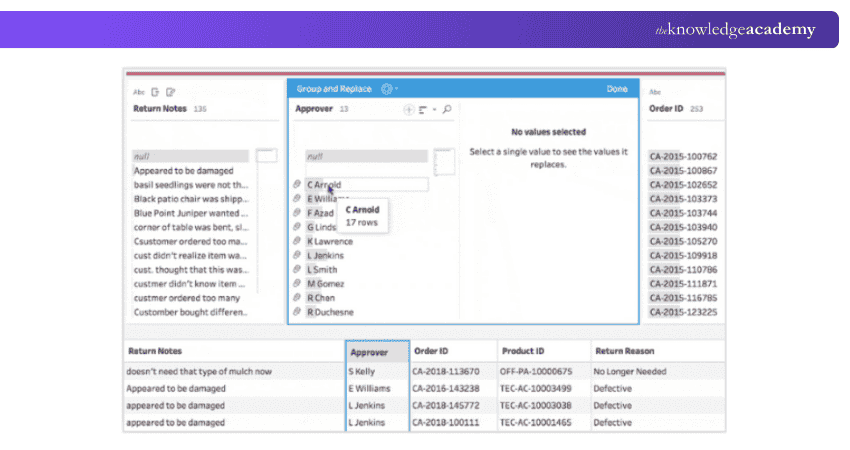
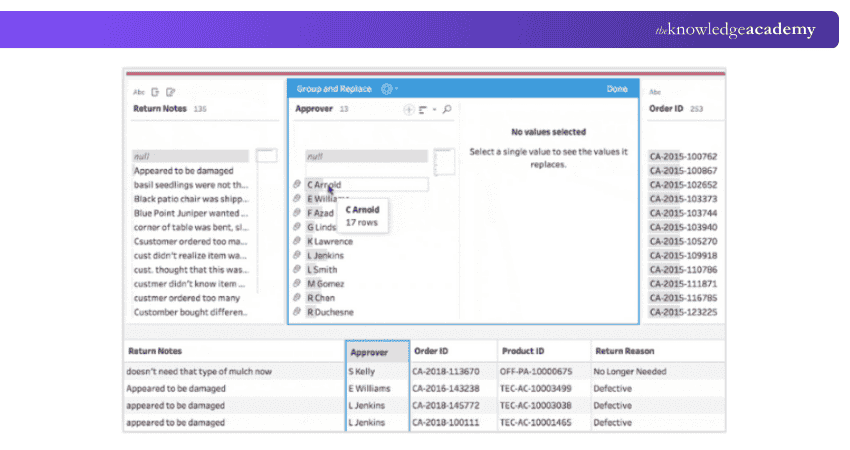
Tableau Prep is an up-to-date data preparation application that offers users a chance to visually connect, merge, and clean data through the workflow. The users are always aware of the process happening through the interface as the data is being transformed, and the modifications are applied.
The moment the data is cleaned, and properly organised, analytical results can either be output or published for others’ access. Data sources can be connected to start developing flows, then, with simple drag-and-drop tools, the process of joining, uniting, and cleaning can be carried out. Moreover, the scheduling and sharing of flows are other ways to ensure that the cleaned data is always current and thus ready for making decisions.

Key Features and Functionalities of Tableau Prep
Tableau Prep makes the process of preparing data easier and faster by assisting users in cleaning, shaping, and organising data in an efficient way, even if they don't have advanced technical skill sets. The following are some of the major features of the application that contribute to its being a powerful tool in the Tableau ecosystem.
a) Charts: Tableau Prep has the functionality to provide users with data organisation and visualisation in the form of charts and summary reports. Such representations of data play a significant role in the process of quickly identifying trends, discovering mistakes, and having a clear view of data distributions.
b) Data Blending: By means of data blending, users are allowed to merge data from various sources into one single project. This capability not only facilitates data comparisons but also serves as a powerful tool in revealing relationships and insights quickly.
c) Sharing and Collaboration: Through Tableau Server, Tableau Cloud, or Tableau Public, securely shared prepared datasets are possible. The whole process of collaboration takes place in real time among teams, thus providing everyone with reliable and accessible data.
d) Augmented Analytics: The application of artificial intelligence (AI) and machine learning has made it easier for users to understand data. Natural language questions can be posed to the system, or visual stories can be created by the system, which will narrate data in a clear and precise manner.
Get ready for analytical and strategic roles with our Business Intelligence Reporting Course!
Tableau Prep Limitations
Even though Tableau Prep provides a user-friendly and visual approach to data preparation, it has a few drawbacks as well:
a) Scalability: Tableau Prep is designed primarily for small to medium-sized data preparation tasks. It may not be the right choice for large-scale data integration projects.
b) Limited output options: Directly exporting data to all data sources is not natively supported. Although it's improving with each new release, the typical outputs are CSVs and Tableau-specific file types like TDE and Hyper.
c) Cost: Tableau Prep is a commercial product. Therefore, it needs a Tableau Creator license, which may cost more than some alternative data preparation tools or open-source solutions.
d) Flow scheduling costs extra: This Data Management add-on is mandated for access to Tableau Prep Conductor. It allows the scheduling of published data prep flows on Tableau Cloud. Without this add-on, you must manually start each prep flow.
e) Ecosystem dependency: Tableau Prep is optimised for integration with the Tableau platform, which might be less appealing if you're not using Tableau for data analysis and visualisation.
Despite these drawbacks, Tableau Prep remains a powerful and user-friendly data preparation tool that can streamline the data preparation process and enhance the quality of data used for analysis.
Tableau Prep vs. Tableau Desktop
 Tableau Prep and Tableau Desktop serve complementary roles within the data analytics process. Tableau Prep focuses on data preparation, allowing users to clean, combine, and transform datasets from multiple sources efficiently. It ensures data accuracy and consistency before analysis.
In contrast, Tableau Desktop is used for creating interactive dashboards, reports, and visualisations. Once the data is refined in Tableau Prep, it can be seamlessly exported to Tableau Desktop for deeper insights and presentation. Together, they streamline the entire analytics workflow from raw data to meaningful visuals.
Enhance Data Modelling Skills with DAX Training – Join now!
Tableau Prep Alternatives
Tableau Prep is a great choice for data preparation and ETL tasks. However, there are many alternatives available that cater to various needs and preferences. Keeping in mind that Tableau Prep was designed to support a non-technical user who want to combine and prepare data sets before visualising in Tableau Desktop, it is worth exploring other options in the broader analytics industry. Some of them are mentioned below.
1) Microsoft Power Query
Power Query is a powerful data preparation tool that is available in Excel and Power BI. It integrates seamlessly with Microsoft's suite of productivity tools. It has a familiar interface for Excel users, strong data transformation abilities, and native integration with Power BI for data visualisation. This is a great choice for organisations already using Microsoft products.
2) Matillion
Matillion also known as the Data Productivity Cloud,is a cloud native ETL platform that excels in scalability and ease of use. It supports various data sources and is compatible with major cloud data warehouses like Amazon Redshift, Google BigQuery, and Snowflake. While it offers powerful transformation capabilities, it is a bit more technical than Tableau Prep and uses a pricing model based on environment runtimes.
3) Alteryx
This platform provides a comprehensive suite of tools for data integration, transformation, and analysis. While both Alteryx and Power BI offer advanced analytics, understanding the difference between Alteryx and Power BI can help you choose the right tool for your needs.
4) KNIME
An open-source data analytics platform, KNIME offers extensive data preparation, transformation, and analysis features. It is known for its flexibility, vast library of pre-built nodes, and community-driven development, making it a cost-effective option for customisable data workflows. Additionally, there are other tools like Fivetran (‘EL’) and dbt (‘T’) are worth considering for those seeking robust, specialised data management solutions.
Data Transformation and Preparation in Tableau Prep
Prep tool offers a wide range of data transformation capabilities that allow users to prepare their data for analysis. Some of the key data preparation tasks that it supports are:
a) Splitting and pivoting: You can split a column into multiple columns based on delimiters or patterns. Additionally, you can use prep tools to pivot data from one format to another, such as wide to long format or vice versa, enabling more efficient analysis and visualisation.
b) Calculated fields and conditional logic: Prep allows users to create calculated fields using formulas and functions. This feature enables users to derive new insights from existing data and perform conditional logic operations to categorise or filter data based on specific conditions.
c) Data sampling and filtering: You can sample data to work with a smaller subset of your dataset, which can be useful for quick data exploration or testing. Prep also provides powerful filtering options to remove irrelevant data, apply data quality rules, or focus on specific subsets of data.
Learn various visual data analysis skills with our Tableau Desktop Training!
Is Tableau Prep an ETL Tool?
Tableau Prep functions similarly to an ETL tool, focusing on data extraction, transformation, and loading processes. It enables users to prepare and structure data efficiently, ensuring it is clean, consistent, and ready for advanced analysis or visualisation.
Conclusion
Tableau Prep gives its users the power to convert untidy data into useful insights without any difficulty. Its graphical, user-friendly design allows data preprocessing to be quicker and more resourceful. By making easier intricate operations, it allows experts to concentrate on analytics and narratives that lead to significant business influence.
Learn how to handle data with our Microsoft BI Training today!
Frequently Asked Questions
What Skills are Required to use Tableau Prep Effectively?

To use Tableau Prep effectively, one should have a basic understanding of data handling, familiarity with ETL processes, and knowledge of Tableau's interface. Additionally, Analytical thinking and problem-solving skills are also crucial.
Is Tableau Prep Suitable for all Types of Data?
Tableau Prep is highly versatile and ideal for structured and semi-structured data. However, it may not be the best choice for very large datasets or unstructured data such as video or audio files.
What are the Other Resources and Offers Provided by The Knowledge Academy?
The Knowledge Academy takes global learning to new heights, offering over 3,000+ online courses across 490+ locations in 190+ countries. This expansive reach ensures accessibility and convenience for learners worldwide.
Alongside our diverse Online Course Catalogue, encompassing 17 major categories, we go the extra mile by providing a plethora of free educational Online Resources like Blogs, eBooks, Interview Questions and Videos. Tailoring learning experiences further, professionals can unlock greater value through a wide range of special discounts, seasonal deals, and Exclusive Offers.
What is The Knowledge Pass, and How Does it Work?
The Knowledge Academy’s Knowledge Pass, a prepaid voucher, adds another layer of flexibility, allowing course bookings over a 12-month period. Join us on a journey where education knows no bounds.
What are the Related Courses and Blogs Provided by The Knowledge Academy?
The Knowledge Academy offers various Business Intelligence Reporting Courses, including the Minitab Training, Business Intelligence Analyst Course, and Crystal Reports Training. These courses cater to different skill levels, providing comprehensive insights into Tableau vs Microstrategy.
Our Office Applications Blogs cover a range of topics related to Tableau Prep, offering valuable resources, best practices, and industry insights. Whether you are a beginner or looking to advance your Office Applications skills, The Knowledge Academy's diverse courses and informative blogs have got you covered.

Richard Harris


Senior Full Stack Developer and Technology Educator
Richard Harris is a highly experienced full-stack developer with deep expertise in both frontend and backend technologies. Over his 12-year career, he has built scalable web applications for startups, enterprises and government organisations. Richard’s writing combines technical depth with clear explanations, ideal for developers looking to grow in modern frameworks and tools.

Upcoming Office Applications Resources Batches & Dates
Date
 Tableau Desktop Training
Tableau Desktop Training
Fri 14th Aug 2026
Tableau Desktop Training
Fri 13th Nov 2026

 If you wish to make any changes to your course, please


