


 Top Rated Course


We may not have the course you’re looking for. If you enquire or give us a call on +49 8000101090 and speak to our training experts, we may still be able to help with your training requirements.
Qlik Sense Desktop Installation: A Hassle-Free Process
Richard Harris 23 April 2026This blog will explore Qlik Sense Desktop Installation, troubleshooting techniques and best practices for optimising Qlik Sense performance. You will gain insights into common installation challenges and how to overcome them effectively, ensuring a hassle-free experience from setup to utilisation.

Training Outcomes Within Your Budget!
We ensure quality, budget-alignment, and timely delivery by our expert instructors.
Table of Contents
In today's data-driven world, having access to powerful analytics tools is essential for businesses to succeed. Qlik Sense Desktop offers a user-friendly and robust Data Analysis and Visualisation solution, empowering users to make informed decisions. For simplified Qlik Sense Desktop Installation guidance and its optimal utilisation, dive into this informative blog!
This blog provides clear instructions and tips for a smooth Qlik Sense Desktop Installation, empowering users to maximise its capabilities. Let's delve in deeper to learn more!
Table of Contents
1) System prerequisites
2) Components of Qlik Sense Desktop package
3) Acquiring the installation file
4) Deployment of Qlik Sense Desktop
5) Conclusion
System prerequisites
Before installation, ensure your system meets Qlik Sense Desktop's prerequisites for smooth operation. These prerequisites typically include operating system compatibility, sufficient disk space, and hardware requirements such as RAM and CPU specifications. By verifying these prerequisites upfront, you can avoid installation issues and ensure optimal performance.

Components of Qlik Sense Desktop package
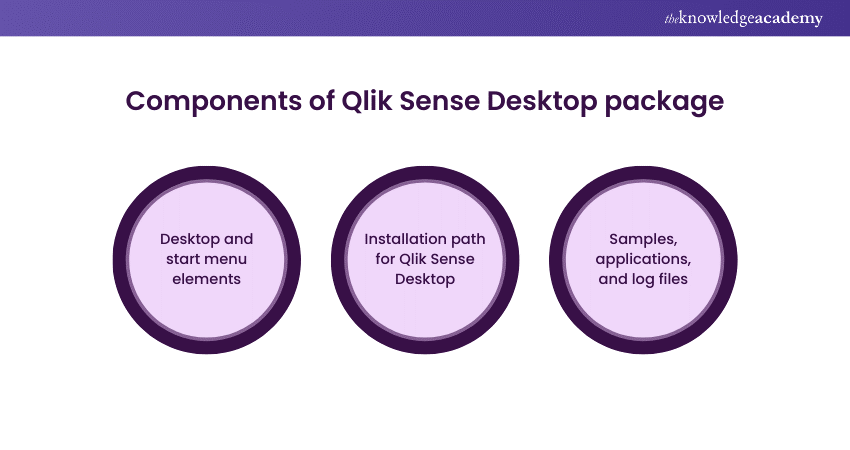
Upon downloading the Qlik Sense Desktop package, you'll find various components designed to enhance your Data Analysis experience. Each component, from desktop elements to installation paths, is crucial for Qlik Sense Desktop's functionality. Familiarising yourself with these components will give you an understanding of the software's operations and the locations of essential files.
Desktop and start menu elements
Qlik Sense Desktop integrates seamlessly into your system, providing convenient desktop shortcuts and start menu entries for quick access. These elements are gateways to launch the software effortlessly, ensuring a smooth user experience from installation. Familiarising yourself with these desktops and start menu elements will streamline your interaction with Qlik Sense Desktop. This saves you time and effort when navigating the software.
Installation path for Qlik Sense Desktop
During the installation process, you'll be prompted to specify the installation path for Qlik Sense Desktop. This path determines where the software files, including samples, applications, and log files, will be stored on your system. Choosing an appropriate installation path ensures the proper organisation of Qlik Sense Desktop resources. It facilitates easy access to essential files for analysis and troubleshooting purposes.
Samples, applications, and log files
Qlik Sense Desktop comes bundled with sample data, applications, and log files to help users explore its features and capabilities. These resources offer valuable insights into data visualisation techniques, dashboard creation, and analysis workflows. Users can leverage the samples and applications provided with Qlik Sense Desktop, quickly grasping the software's functionalities and deriving actionable insights from their data.
Unlock actionable insights with our Business Intelligence Reporting Courses - Sign up now!
Acquiring the installation file
The Qlik Sense Desktop Installation file must be obtained before installation. You can acquire this file from the official Qlik website or from authorised resellers. It is crucial to get the installation file from a trusted source. This guarantees that a legitimate version of Qlik Sense Desktop will be installed free from security risks and vulnerabilities.
Deployment of Qlik Sense Desktop
Once you've gathered the necessary prerequisites and obtained the installation file, it's time to deploy Qlik Sense Desktop on your system. The installation process offers two deployment options: standard setup and tailored installation.
Master Business Objects Reporting with our Business Objects Reporting Course – sign up today!
Standard setup for Qlik Sense Desktop
The standard setup option offers a straightforward installation process. It guides users through configuring Qlik Sense Desktop on their system. This option is perfect for users who want a fast start with minimal customisation, making it easy to dive into the software.
Tailored installation for Qlik Sense Desktop
The tailored installation option offers flexibility and customisation capabilities for users seeking more control over the installation process. This option allows users to specify installation preferences, such as choosing specific components to install or customising installation paths. Customising the installation optimises Qlik Sense Desktop for your needs, ensuring it performs at its best for your particular use.
Conclusion
Our step-by-step guide simplifies the process for Qlik Sense Desktop Installation. Ensure your system meets prerequisites, get the file from a trusted source, and choose your deployment option. Whether standard or tailored, Qlik Sense Desktop empowers you to unleash your data's potential for confident decision-making. For those preparing for interviews, reviewing Qlik Sense Interview Questions and Answers can further enhance your understanding and readiness to showcase your expertise.
Frequently Asked Questions
What are the system prerequisites for installing Qlik Sense Desktop?

To Install Qlik Sense Desktop smoothly, ensure your system meets prerequisites like operating system compatibility and ample disk space. Verify these requirements beforehand to avoid installation issues and guarantee optimal software performance on your device.
How can I acquire the Qlik Sense Desktop Installation file?
You can download the Qlik Sense Desktop Installation file directly from the official Qlik website or through authorised resellers. Get the file from a reputable source for a secure installation process, avoiding potential security risks or vulnerabilities.
What are the other resources and offers provided by The Knowledge Academy?
The Knowledge Academy takes global learning to new heights, offering over 3,000+ online courses across 490+ locations in 190+ countries. This expansive reach ensures accessibility and convenience for learners worldwide.
Alongside our diverse Online Course Catalogue, encompassing 17 major categories, we go the extra mile by providing a plethora of free educational Online Resources like Blogs, eBooks, Interview Questions and Videos. Tailoring learning experiences further, professionals can unlock greater value through a wide range of special discounts, seasonal deals, and Exclusive Offers.
What is the Knowledge Pass, and how does it work?
The Knowledge Academy’s Knowledge Pass, a prepaid voucher, adds another layer of flexibility, allowing course bookings over a 12-month period. Join us on a journey where education knows no bounds.
What are the related courses and blogs provided by The Knowledge Academy?
The Knowledge Academy offers various Business Intelligence Reporting, including Microsoft Power BI Course, QlikView Training, Tableau Desktop Training and Qlik Sense Training. These courses cater to different skill levels, providing comprehensive insights into Qlik Sense.
Our Office Applications Blogs cover a range of topics related to Business Intelligence Reporting, offering valuable resources, best practices, and industry insights. Whether you are a beginner or looking to advance your Business Intelligence Reporting skills, The Knowledge Academy's diverse courses and informative blogs have you covered.

Richard Harris


Senior Full Stack Developer and Technology Educator
Richard Harris is a highly experienced full-stack developer with deep expertise in both frontend and backend technologies. Over his 12-year career, he has built scalable web applications for startups, enterprises and government organisations. Richard’s writing combines technical depth with clear explanations, ideal for developers looking to grow in modern frameworks and tools.


 If you wish to make any changes to your course, please


