


 Top Rated Course


We may not have the course you’re looking for. If you enquire or give us a call on +49 8000101090 and speak to our training experts, we may still be able to help with your training requirements.
PHP Function Explained: Syntax, Parameters, and Return Values
Richard Harris 21 November 2025A PHP Function is a named code block that performs tasks. Built-in or custom, it improves code structure, reuse, and overall maintainability. Functions help reduce repetition, simplify logic, and make debugging easier and faster. They also allow developers to write cleaner, more modular, scalable, and efficient code.

Training Outcomes Within Your Budget!
We ensure quality, budget-alignment, and timely delivery by our expert instructors.
Table of Contents

Functions are essential building blocks in PHP programming. They help organise code, reduce repetition, and improve readability. This blog provides an in-depth exploration of the PHP Function, covering its syntax, parameters, and return values. Let’s start by looking at how a function is structured.
Table of Contents
1) What are PHP Functions?
2) Types of Functions in PHP
3) PHP Function Parameters and Arguments
4) PHP Function That Returns Value
5) What are the Advantages of PHP Function?
6) Anonymous Functions (Closures)
7) Recursion in PHP
8) Common Errors in PHP Function
9) Conclusion
What are PHP Functions?
In the PHP language, a function is a re-usable code that is a block of code intended to accomplish a particular task. If you're wondering what is a PHP function, they assist in making code more modular, readable and maintainable as they contain encapsulated logic, which is run more than once during a program. PHP also has built-in functions (such as strlen () or date ()) as well as user-defined functions that the developer has created to fit a particular need.
Functions can:
1) Accept parameters (inputs)
2) Execute a set of statements
3) And optionally return a value
They are essential for structuring code efficiently and reducing repetition.

Syntax
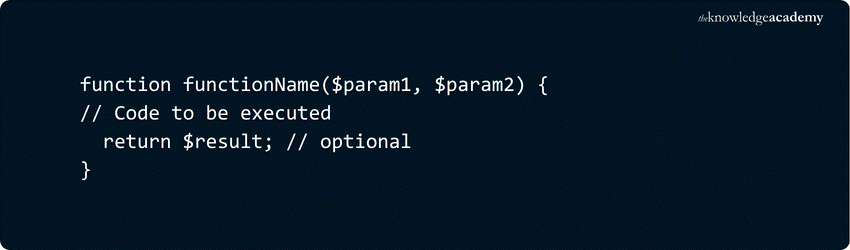
To define PHP function syntax, use the function keyword followed by the function name, parameters, and a code block.
1) A function name
2) A pair of parentheses (which may include parameters)
3) And a code block enclosed in curly braces {}
Basic Syntax:
Example:
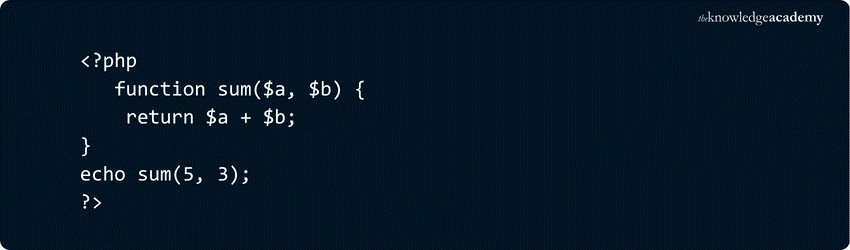
In this example:
1) sum() is a user-defined function that takes two parameters and returns their sum.
The function is called with arguments 5 and 3, and it returns 8.
Types of Functions in PHP
There are two categories of functions as supported by PHP; User-Defined Functions, and Built-in Functions. These enable what developers do, so that they can either develop their own logic or make use of already existing functionality in the language.

User-defined Functions
User-defined functions are created by developers to perform specific tasks. These functions can accept parameters, execute a block of code, and return a result.
Example:

Output:

In this example, the function addNumbers() takes two parameters, adds them, and returns the result.
Built-in Functions
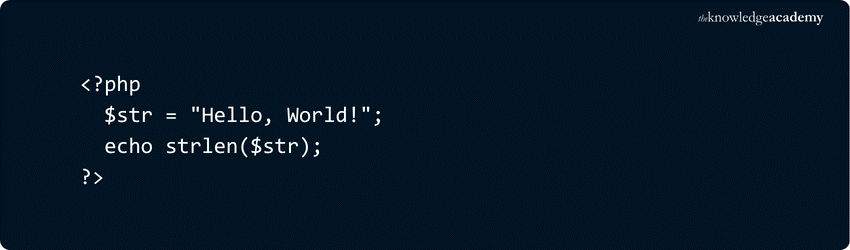
PHP is also equipped with many built in functions that ease the execution of such common tasks as manipulating of strings, working with arrays, and manipulating of dates.
Example:
Output:

Here, strlen() is a built-in function that returns the length of the string $str.
PHP Function Parameters and Arguments
Parameters (function definition) and arguments (actual values during function calls) will be described as input values that may be passed to a function in PHP. These inputs enable functions to be used dynamically depending on the data that has been provided.
Arguments passed to a function in PHP can be of two main forms:
1) Passing by Value
In case an argument is passed by value, a duplicate of the value is passed to the function. The changes that take place within the function have no effect on the original variable outside of the function.
Example:

Output:

In this example, the function add() takes two parameters, adds them, and returns the result. The original values remain unchanged outside the function.
2) Passing by Reference
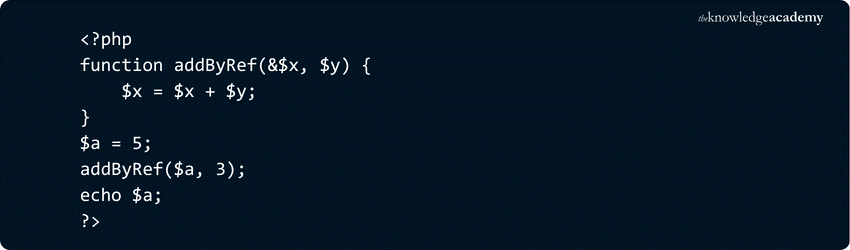
On passing by reference, the function is given a reference to the original variable. It implies that whatever changes are done within the function will impact on the original variable.
Example:
Output:

Here, the & symbol before $x indicates that it is passed by reference. The function modifies $ a$ directly, so the change is reflected outside the function.
PHP Function That Returns Value
In PHP, you can create functions that return values. When a function returns a value, it means that the function computes a result and sends that result back to the part of the code that called the function. This allows you to use the result of the function in other parts of your program.
Here's how to create a function that returns a value in PHP:
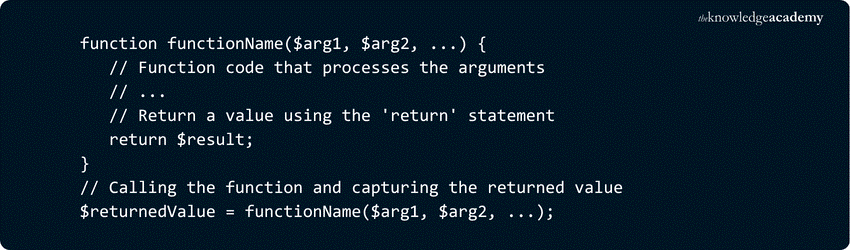
1) functionName: This is the name of the function you are defining.
2) $arg1, $arg2, ...: These are the parameters (arguments) that the function accepts, just like in functions without a return value. These parameters can be used within the function to perform calculations.
3) Return statement: To send a value back to the calling code, you use the return statement. This statement is followed by the value you want to return. The returned value can be of any data type.
4) Calling the function: When you call the function, you can capture the returned value in a variable, which can then be used in your program.
Here's an example of a function that returns a value:

What are the Advantages of PHP Function?

The following are the advantages of PHP Functions:
1) Code Reusability: In contrast to many other programming languages, PHP offers the advantage of defining functions just once, enabling them to be invoked multiple times for various purposes.
2) Efficiency in Code: PHP streamlines code development by reducing the need for redundant logic. Rather than rewriting the same logic repeatedly, you can create functions once and use them as needed. Additionally, incorporating the PHP for Loop within functions allows for efficient iteration, resulting in concise and optimised code.
3) Enhanced Readability: PHP's division of programming logic into functions enhances the clarity of application flow. By isolating each piece of logic within its function, it becomes more straightforward to comprehend the overall structure of the application.
4) Time Savings: Reusing code through functions saves a substantial amount of time during the development process. Developers can focus on creating new functionality rather than reinventing the wheel for common tasks.
5) Scalability: As your project grows, the ability to reuse code becomes increasingly valuable. Functions can be expanded and modified as needed, allowing your codebase to scale without becoming overly complex.
6) Testing Efficiency: Testing individual functions is more straightforward than testing an entire application. This granularity in testing allows for the identification and resolution of issues in specific components, facilitating the debugging process.
Build smarter coding solutions with our Python Scripting Training – Get Started Today!
Anonymous Functions (Closures)
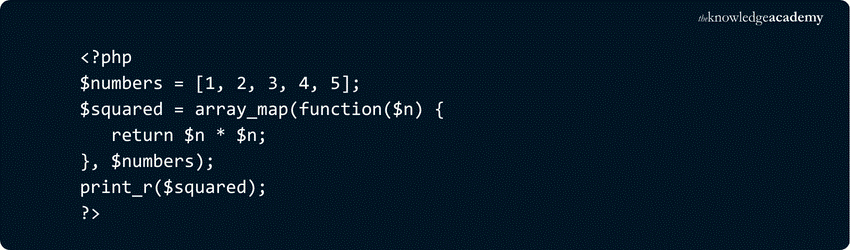
Anonymous functions, also known as closures, are functions without a name. They are typically used when a function is needed only once or for a short scope, such as in callbacks or inline operations.
Example – Using as a Callback:
Output:

Example – Capturing External Variables:

Output:

In this case, the use keyword allows the function to access $multiplier from the outer scope.
Recursion in PHP
Recursion is a programming method when a method invokes itself to address an issue. It is particularly handy when the task at hand could be reduced into smaller similar sub-tasks.
Example calculating Factorial:

Output:

Here, the function factorial() keeps calling itself with a smaller value until it reaches the base case ($n <= 1), then returns the result step by step.
Common Errors in PHP Function
Understanding common PHP errors can help you debug faster and write more reliable code. Here are five frequent issues developers face when working with PHP functions, along with how to fix them:

1) Syntax Error
a) Error Message: Parse error: syntax error, unexpected.
b) Cause: Usually triggered by missing semicolons, brackets, or incorrect punctuation.
c) Solution: Review your code carefully for syntax mistakes. Check for missing or misplaced semicolons, brackets, and quotation marks.
2) Incorrect Database Credentials
a) Error Message: Warning: mysql_connect(): Access denied for user.
b) Cause: Happens when the script fails to connect to the database due to wrong username, password, or host.
c) Solution: Double-check your database credentials in the configuration file. Also, ensure the database server is running and accessible.
3) White Screen of Death
a) Error Message: A blank screen with no visible error.
b) Cause: A fatal error may have occurred, but error reporting is disabled.
c) Solution: Enable error reporting at the top of your PHP file: PHPerror_reporting(E_ALL);ini_set('display_errors', 1); Show more lines. This will help reveal the actual issue behind the blank screen.
4) Header Already Sent
a) Error Message: Warning: Cannot modify header information – headers already sent by.
b) Cause: Output (like HTML or whitespace) was sent before calling functions like header(), setcookie(), or session_start().
c) Solution: Make sure there is no output before your PHP opening tag (
5) Undefined Function
a) Error Message: Fatal error: Call to undefined function.
b) Cause: The function being called hasn’t been defined or is misspelled.
c) Solution: Check for typos in the function name and ensure the file containing the function is properly included using require or include.
Level up your coding skills today – Join our Programming Training today!
Conclusion
In writing clean and efficient code, a PHP Function is necessary. They assist in structuring logic, minimise redundancy and simplify your applications. Regardless of your work, it is important to know how they function so that you can be better equipped as a developer. Continue practising and investigating so that you can gain knowledge in the field of codifying.
Master coding fundamentals with our Introduction To Programming With Python And Java Training – Join Today!
Frequently Asked Questions
Can we Overload Functions in PHP?

PHP does not support traditional function overloading like Java or C++. Instead, it uses magic methods such as __call() and __callStatic() to handle calls to undefined or inaccessible methods. This allows developers to simulate overloading dynamically at runtime.
What is the Difference Between a Function and a Method in PHP?
A function is a code that can be used on its own, while a method is a function that belongs to a class and is used with an object.
What are the Other Resources and Offers Provided by The Knowledge Academy?
The Knowledge Academy takes global learning to new heights, offering over 3,000 online courses across 490+ locations in 190+ countries. This expansive reach ensures accessibility and convenience for learners worldwide.
Alongside our diverse Online Course Catalogue, encompassing 19 major categories, we go the extra mile by providing a plethora of free educational Online Resources like Blogs, eBooks, Interview Questions and Videos. Tailoring learning experiences further, professionals can unlock greater value through a wide range of special discounts, seasonal deals, and Exclusive Offers.
What is The Knowledge Pass, and How Does it Work?
The Knowledge Academy’s Knowledge Pass, a prepaid voucher, adds another layer of flexibility, allowing course bookings over a 12-month period. Join us on a journey where education knows no bounds.
What are the Related Courses and Blogs Provided by The Knowledge Academy?
The Knowledge Academy offers various Programming Training, including the Python Course, Visual Basic Course, and Bootstrap Training. These courses cater to different skill levels, providing comprehensive insights into Python Operators.
Our Programming & DevOps Blogs cover a range of topics related to PHP Function, offering valuable resources, best practices, and industry insights. Whether you are a beginner or looking to advance your Programming & DevOps skills, The Knowledge Academy's diverse courses and informative blogs have got you covered.

Richard Harris


Senior Full Stack Developer and Technology Educator
Richard Harris is a highly experienced full-stack developer with deep expertise in both frontend and backend technologies. Over his 12-year career, he has built scalable web applications for startups, enterprises and government organisations. Richard’s writing combines technical depth with clear explanations, ideal for developers looking to grow in modern frameworks and tools.


 If you wish to make any changes to your course, please


