


 Top Rated Course

We may not have the course you’re looking for. If you enquire or give us a call on +49 8000101090 and speak to our training experts, we may still be able to help with your training requirements.
Animation Process: Key Stages, Tools and Future Trends
Richard Harris 04 March 2026The Animation Process is a step-by-step workflow that transforms ideas into motion through stages like storyboarding, Animation, rendering, and final editing. It helps creators plan visuals, timing, and movement clearly before production begins. This structured approach ensures smooth flow, consistency, and high-quality results.

Training Outcomes Within Your Budget!
We ensure quality, budget-alignment, and timely delivery by our expert instructors.
Table of Contents
Animation is part of our everyday life, often without us even realising it. From the videos we scroll past on social media to the films, games, and apps we enjoy, the Animation Process works quietly behind the scenes. It brings movement, emotion, and energy to visuals, transforming simple images into engaging and unforgettable experiences. In this blog, we will explain what Animation is, outline the Animation Process step by step, explore key tools, highlight important tips, and discuss future trends in Animation.
Table of Contents
1) What is Animation?
2) Animation Process: Step-by-step Guide
3) Tools Used in the Animation Process
4) Things to Keep in Mind During the Animation Process
5) Future Trends of Animation
6) Conclusion
What is Animation?
Animation is the process of creating the illusion of movement by displaying a series of still images in quick succession. These images can be drawings, photographs, or digital graphics that change slightly from one frame to the next, making objects or characters appear to move.
This effect works because of how the human eye and brain process visuals. When images are shown rapidly, usually 12 to 24 frames per second, the brain blends them together into smooth motion, bringing stories, ideas, and characters to life.

Animation Process: Step-by-step Guide
Animation is an artistic technique that brings static images to life through rapid changes, guided by the Animation Process. By creating a series of individual frames and playing them quickly, it creates the illusion of movement that captures viewers’ senses and imagination, ranging from traditional hand-drawn art to modern computer-generated graphics.

Animation, including 2D Animation, is not limited to entertainment; it is a powerful tool for storytelling, education, and communication. Through careful manipulation of visuals, timing, and sound, Animators craft characters, scenes, and narratives that evoke emotions, convey messages, and transport audiences to fictional worlds, making it a timeless and enchanting art form. The following are the various steps and stages of the Animation Process.
Research
The first step in the Animation Process is "Research," a stage that lays the groundwork for the entire project. This phase involves meticulous research, brainstorming, and creativity to shape the direction and essence of the project.
a) Objective and Audience: Define your purpose, whether educational, promotional, or entertainment. Understand your target audience's preferences and demographics to tailor your approach.
b) Research and Inspiration: Study successful Animations in your genre to gather insights into narrative structures and engagement strategies. Use this research for inspiration.
c) Conceptualisation: Brainstorm and refine unique ideas that align with your goals. Craft a central concept or theme that forms the core of your Animation.
d) Storyboard Blueprint: Create rough storyboard frames to visualise scene flow and transitions. This early sketching helps outline the Animation's structure.
e) Resource Collection: Gather reference materials like images and videos to ensure accurate depictions of characters, settings, and contexts.
f) Feedback Loop: Seek input from peers or mentors to refine your concept and sketches. Incorporate valuable feedback to enhance your project's quality.
Concept and Script
The "Concept and Script" phase is a creative part where your Animation's brainstorming and writing stage takes place. It involves shaping abstract ideas into a tangible narrative structure that will guide the Animation's storyline and characters.
a) Idea Refinement: Building upon the gathered information, dig into your chosen concept more extensively. Refine the central theme, message, and emotional resonance you want your Animation to convey.
b) Character Development: Craft compelling characters that are relatable and multi-dimensional. Define their personalities, motivations, and arcs, breathing life into them before they even hit the screen.
c) Script Crafting: Translate your refined concept into a well-structured script. Outline scenes, dialogue, and pacing, ensuring a coherent and engaging narrative flow.
d) Visualising Scenes: Collaborate with storyboard artists to visualise the script through rough sketches. This collaboration between writing and visuals enhances scene planning and paves the way for Animation.
e) Balancing Dialogue and Action: Aim for a balanced mix of dialogue, character interactions, and visual storytelling. Each element should complement the other, enriching the viewer's experience.
f) Iterative Process: Expect multiple script iterations, refining dialogues, and interactions to capture the desired emotions and nuances.
Unlock your creative potential with our Animation and Design Training – Join now to bring your imagination to life!
Storyboard
The "Storyboard" phase is an art that embodies the Characteristics of Animation, bridging imagination and visualisation to transform the script's words into a visual roadmap. It serves as the foundation for your Animation, offering a clear and organised blueprint for every scene and camera angle.
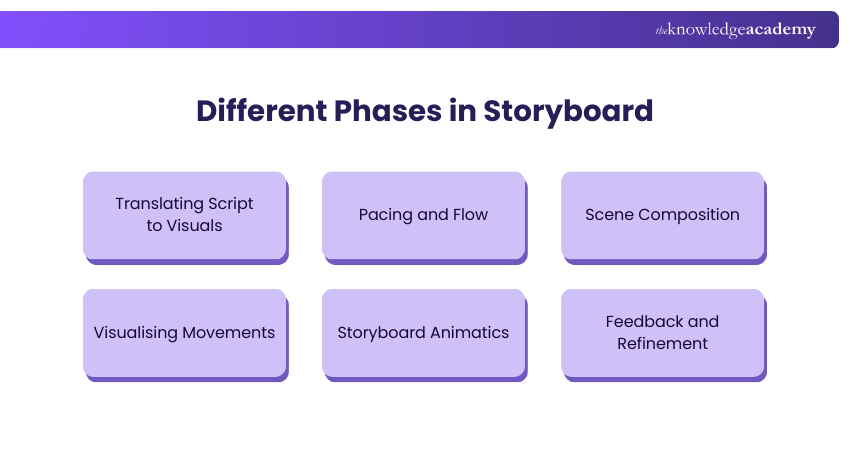
a) Translating Script to Visuals: Collaborate with artists to translate the script's essence into rough sketches. Each frame captures a moment, depicting the character’s expressions, actions, and settings.
b) Pacing and Flow: Arrange the storyboard panels to ensure smooth pacing and narrative flow. The placement of each shot contributes to the Animation's rhythm and emotional impact.
c) Scene Composition: Determine camera angles, compositions, and shot sizes to enhance storytelling. The arrangement of elements within each frame guides viewers' focus and emotions.
d) Visualising Movements: Showcase character movements through a sequence of frames. This visual progression guides Animators in creating fluid and coherent motion.
e) Storyboard Animatics: Animate the storyboard frames, creating a rough animatic that simulates the Animation's timing and visual dynamics. This pre-visualisation aids in identifying potential issues before total production.
f) Feedback and Refinement: Share the storyboard with collaborators to gather feedback and insights. Refine the panels based on suggestions, ensuring a cohesive and compelling visual narrative.
Style Frames
The "Style Frames" phase is where the Animation's aesthetics and atmosphere come into play, giving form to the characters and world you have envisioned. It is a creative playground where artistic choices define its look, tone, and emotional impact.
a) Designing Characters: Create detailed character designs that embody their personalities and traits. Consider their proportions, facial expressions, and attire, ensuring visual consistency throughout.
b) Background Art: Develop captivating backgrounds that immerse viewers in the Animation's setting. Whether fictional or mundane, backgrounds affect mood and context, enriching the storytelling.
c) Colour Palette: Choose a colour palette that resonates with the Animation's theme and emotions. Colours affect feelings and set the tone, influencing how audiences perceive and connect with the narrative.
d) Visual References: Gather visual references to ensure accuracy and authenticity in depicting real-world elements. Reference materials enhance the Animation's realism and credibility.
e) Textures and Details: Add textures and intricate details to characters, props, and environments. These visual nuances breathe life into the Animation, enhancing its tactile and sensory appeal.
f) Stylistic Choices: Embrace a specific visual style, photorealism, minimalism, or a unique hybrid. Consistency in style reinforces the Animation's identity and captivates audiences with its distinctiveness.
Understand the use of special effects and Visual Effects (VFX) in motion graphics. Join our Motion Graphics Course now!
Voice-over Recording
The recording through Voice Over is a step that adds a soulful dimension to your Animation, giving voice and personality to the characters you've meticulously crafted. This auditory layer includes emotions, nuances, and authenticity in the narrative fabric.
a) Casting the Right Voices: Carefully select voice actors whose vocal qualities align with the character’s traits and personalities. A distinct voice can make characters relatable and unforgettable.
b) Directing the Performance: Collaborate closely with voice actors, guiding them to capture the desired emotional range and nuances. Directing ensures the characters' voices resonate authentically.
c) Recording Environment: Create an acoustically controlled environment to ensure clean and high-quality recordings. This step is vital to maintain audio clarity and eliminate unwanted noise.
d) Lip-sync Considerations: If applicable, synchronise dialogue with character movements to achieve realistic lip movements. This synchronisation adds a layer of believability to the characters' interactions.
e) Emotional Resonance: Encourage voice actors to infuse their performances with the emotions required for each scene. Voice Over vs Voice Acting highlights this distinction, as a skilful voice actor can convey a character's feelings, enhancing audience connection.
f) Sound Engineering: post-recording, engage in sound engineering to balance audio levels, remove imperfections, and optimise the voice track for seamless integration into the Animation.
Animation
Animation is the art of adding life to static images through a sequence of rapid visuals. It encompasses an array of techniques, from traditional hand-drawn frames to cutting-edge CGI and 2D Animation Software, each contributing to its diverse and captivating nature. Through it, characters gain emotions and personalities, becoming conduits for storytelling and universal messages.

a) Movement Illusion: Animation is creating the illusion of movement through a series of images displayed in rapid succession.
b) Diverse Techniques: From classic hand-drawn frames to cutting-edge computer-generated imagery (CGI), it spans a broad spectrum of techniques, each offering unique visual appeal.
c) Character Evolution: Through Animation, characters evolve from sketches to vibrant personas, capable of expressing emotions, thoughts, and narratives.
d) Narrative Magic: It is a powerful storytelling medium, crafting intricate plots and evoking emotions through visually captivating sequences.
e) Aesthetic Versatility: Animators harness various visual styles, ranging from realistic to abstract, allowing them to adapt aesthetics to the project's theme and mood.
f) Universal Language: Crossing cultural and linguistic barriers, Animation's emotive visuals forge connections and resonate with diverse audiences.
Understand how to create 3D models in Blender with our comprehensive Blender Creator Training. Join now!
Audio Mix
Sound effects or Audio Mix, an integral part of Animation, breathe life into visuals, enriching the viewer's experience through auditory immersion. This intricate audio layer enhances storytelling and adds depth to characters and scenes, creating a multi-sensory journey.
a) Atmospheric Ambience: Sound effects establish the ambience of a scene, whether it is the rustling leaves of a forest or the bustling streets of a city, drawing audiences deeper into the Animation's world.
b) Character Identity: Every footstep, giggle, or sigh lends a distinct identity to characters, conveying emotions and personalities that complement their visual depiction.
c) Action Intensity: The swoosh of a cape or the clang of swords intensifies action sequences, creating suspense and lending realism to animated battles.
d) Environmental Realism: Sound effects mirror real-world intricacies, from the crunch of snow underfoot to the gentle lapping of waves, creating a sense of authenticity.
e) Emotional Resonance: Whispers, laughter, or heartbeats evoke emotions, bridging the emotional gap between the animated world and the audience's hearts.
f) Narrative Enhancement: Sound effects synchronise with visuals, underscoring pivotal moments, building tension, and highlighting plot twists, enhancing the storytelling arc.
Tools Used in the Animation Process
Tools used in the Animation Process help bring ideas to life by supporting modelling, Animation, effects, and editing. Some of the most widely used tools are explained below.
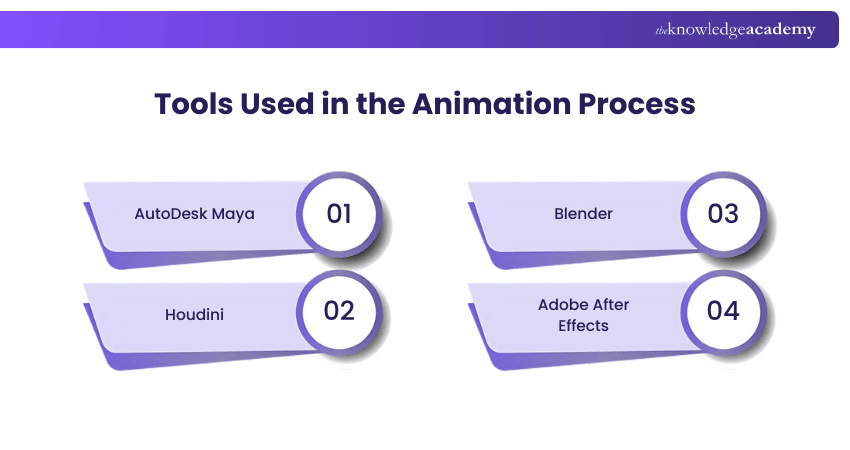
1) AutoDesk Maya
AutoDesk Maya is widely used for 3D Animation, modelling, and rendering. It helps Animators create detailed characters, realistic movements, and high-quality visual effects for films, games, and TV.
2) Houdini
Houdini is known for creating advanced visual effects and simulations. It is often used for effects like smoke, fire, water, and explosions, giving Animations a realistic and dynamic look in films and games.
3) Blender
Blender is a free, open-source Animation tool used for 3D modelling, Animation, rendering, and compositing. It is popular with beginners and professionals for creating full Animation projects at no cost.
4) Adobe After Effects
Adobe After Effects is mainly used for motion graphics and visual effects. It helps add Animations, transitions, text effects, and final touches to videos, making them more engaging and polished.
Acquire necessary skills in creating, duplicating, and transforming objects with our Architectural Design And Animation In Blender Training - Join now!
Things to Keep in Mind During the Animation Process
As you start your journey into Animation, several vital considerations can elevate your creative process and ensure a successful outcome. From conceptualisation to finishing touches, these insights provide a compass to navigate the intricate realm of Animation:

a) Consistent Visual Language: Maintain a cohesive visual style throughout to enhance immersion and coherence.
b) Emotion-driven Movements: Infuse character actions with genuine emotions to forge stronger connections with the audience.
c) Pacing and Timing: Carefully calibrate timing between frames for smooth motion and impactful storytelling.
d) Sound Synchronisation: Ensure sound effects and dialogue align seamlessly with visual cues to enhance realism and engagement.
e) Iterative Refinement: Embrace an iterative approach, welcoming feedback and making necessary adjustments to enhance quality.
f) Attention to Detail: Pay meticulous attention to minute details, as they contribute to authenticity and believability.
g) Storyboard as a Guide: Rely on the storyboard as your visual roadmap, to maintain consistency and narrative flow.
h) Test and Iterate: Regularly test Animation sequences to identify any glitches or improvements needed for a polished result.
Future Trends of Animation
The future of Animation is evolving with advanced technologies that enhance creativity, realism, and efficiency. Key trends shaping this future include:
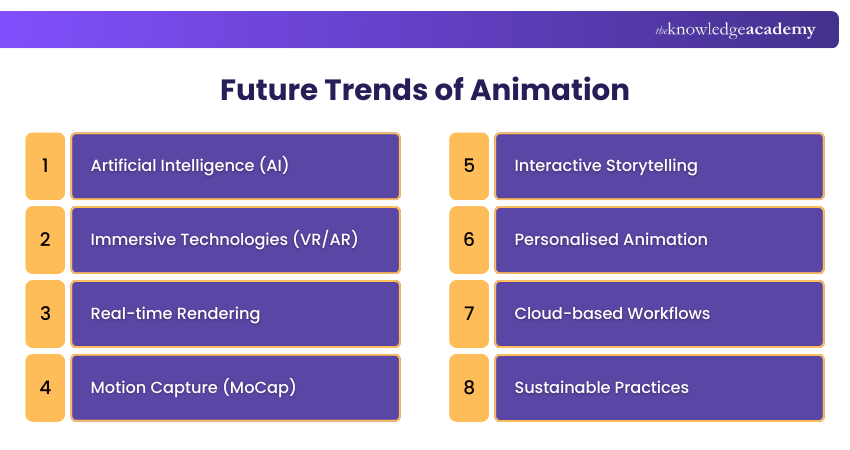
1) Artificial Intelligence (AI): Automates tasks like frame generation, lip-syncing, and motion prediction, allowing Animators to focus on creative work.
2) Immersive Technologies (VR/AR): Creates interactive experiences where users can engage directly with animated worlds.
3) Real-time Rendering: Uses game engine technology to produce instant visuals and speed up production.
4) Motion Capture (MoCap): Improves realism and efficiency in character movements.
5) Interactive Storytelling: Allows audiences to influence story outcomes, especially in games and digital media.
6) Personalised Animation: Delivers content tailored to individual user preferences.
7) Cloud-based Workflows: Supports global collaboration and remote Animation teams.
8) Sustainable Practices: Encourages eco-friendly production methods and environmental storytelling.
Conclusion
Understanding what is Animation Process helps you see how creative ideas turn into engaging motion visuals. From planning and design to movement and final polish, each stage plays a vital role. With the right tools and trends, Animation continues to evolve, offering exciting opportunities for storytellers, designers, and creators worldwide.
Learn how to write articulate stories with our comprehensive Articulate Storyline Training. Join today!
Frequently Asked Questions
What is an Animatic?

An Animatic is an early preview of an Animation created by adding simple movement, timing, and temporary sound to storyboard images. It helps creators review the flow, pacing, and clarity of the story before investing time and resources in full production.
What is Rigging in Animation?
Rigging in Animation is the process of creating a digital skeleton for a character or object. This skeleton allows Animators to move, bend, and control characters naturally, making their movements look realistic and smooth during Animation.
What are the Other Resources and Offers Provided by The Knowledge Academy?
The Knowledge Academy takes global learning to new heights, offering over 3,000+ online courses across 490+ locations in 190+ countries. This expansive reach ensures accessibility and convenience for learners worldwide.
Alongside our diverse Online Course Catalogue, encompassing 17 major categories, we go the extra mile by providing a plethora of free educational Online Resources like Blogs, eBooks, Interview Questions and Videos. Tailoring learning experiences further, professionals can unlock greater value through a wide range of special discounts, seasonal deals, and Exclusive Offers.
What is The Knowledge Pass, and How Does it Work?
The Knowledge Academy’s Knowledge Pass, a prepaid voucher, adds another layer of flexibility, allowing course bookings over a 12-month period. Join us on a journey where education knows no bounds.
What are the Related Courses and Blogs Provided by The Knowledge Academy?
The Knowledge Academy offers various Animation and Design Training, including the Animation Course, Video Editing Training, and the Blender 3D Modeling for Unity Course. These courses cater to different skill levels, providing comprehensive insights into Animator Salary.
Our Office Applications Blogs cover a range of topics related to Animation Process, offering valuable resources, best practices, and industry insights. Whether you are a beginner or looking to advance your Animation skills, The Knowledge Academy's diverse courses and informative blogs have got you covered.

Richard Harris


Senior Full Stack Developer and Technology Educator
Richard Harris is a highly experienced full-stack developer with deep expertise in both frontend and backend technologies. Over his 12-year career, he has built scalable web applications for startups, enterprises and government organisations. Richard’s writing combines technical depth with clear explanations, ideal for developers looking to grow in modern frameworks and tools.

Upcoming Office Applications Resources Batches & Dates
Date
 Maxon Cinema 4D Training
Maxon Cinema 4D Training
Fri 24th Jul 2026
Maxon Cinema 4D Training
Fri 23rd Oct 2026

 If you wish to make any changes to your course, please


