


 Top Rated Course


We may not have the course you’re looking for. If you enquire or give us a call on +44 1344 203999 and speak to our training experts, we may still be able to help with your training requirements.
UML Use Case Diagram: Simplified Steps for Beginners
The Knowledge Academy 13 February 2026Unified Modeling Language (UML) is a standard way to visualise and design systems through structured diagrams and clear communication. Master UML Use Case Diagrams to understand how users interact with systems and easily create professional diagrams for any use case using our powerful tool. Read on to learn more.

Training Outcomes Within Your Budget!
We ensure quality, budget-alignment, and timely delivery by our expert instructors.
Table of Contents

Have you ever struggled to explain how users interact with a system? Whether you're planning a new app or improving a business process, clarity is everything. That’s where UML Use Case Diagrams come in. They turn complex user-system interactions into simple visuals. These diagrams don’t just help teams stay on the same page; they also speed up planning and design. In this blog, we’ll walk you through the basics of Use Case Diagrams, their benefits, and how to create them with ease using our UML guide, even if you're just starting out.
Table of Contents
1) What is a UML Use Case Diagram?
2) Purpose and Benefits of Use Case Diagrams
3) Components of a Use Case Diagram
4) Use Case Diagram Symbols and Notation
5) How to Draw a Use Case Diagram in UML?
6) When to Apply Use Case Diagrams?
7) Example of a Use Case Diagram
8) Best Practices for Use Case Diagrams
9) What are UML Diagrams Good for?
10) How to Identify Actors in a Use Case Diagram?
11) Conclusion
What is a UML Use Case Diagram?
A UML Use Case Diagram is a crucial tool in UML Software Engineering. It is used to visualise a system's functional requirements and interactions. It depicts various users (actors) and their interactions with the system to achieve specific objectives (use cases). This diagram includes elements like actors, use cases, and the system boundary, highlighting how users engage with system functionalities.
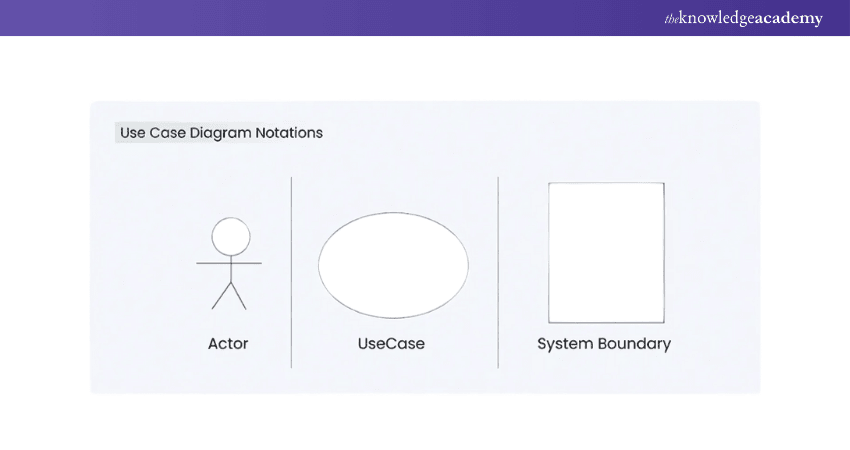
By providing a clear and structured overview of system behaviour from a user-centric perspective, Use Case Diagrams facilitate better communication among stakeholders. They help in validating requirements and aid in planning and designing the system effectively. This ensures that all user needs are addressed.

Purpose and Benefits of Use Case Diagrams
Use Case Diagrams, a subset of UML diagrams, are particularly valuable for capturing functional requirements of a system. They illustrate the interactions between users (actors) and the system itself, showcasing the different ways users can achieve specific goals.
This clear representation helps stakeholders understand system functionality from a user's perspective. Here are the benefits of Using Use Case Diagrams:
1) Visualisation of System Functionality:
a) Use Case Diagrams visually to represent the system’s functionalities and interactions with external entities.
b) This helps stakeholders, including non-technical ones, to grasp the system’s high-level behaviour.
2) Enhanced Communication:
a) They serve as a powerful communication tool, fostering conversations between stakeholders, developers, and designers.
b) Use Case Diagrams provide a common language for discussing system requirements, ensuring a shared understanding among diverse team members.
3) Requirement Analysis:
a) During the requirements analysis phase, these diagrams help in identifying, clarifying, and documenting user requirements.
b) They capture the various ways users interact with the system, aiding in a comprehensive understanding of system functionality.
4) Focus on User Goals:
a) Use Case Diagrams centre around user goals and scenarios, emphasising the perspective of external entities (actors).
b) This focus ensures that the system is designed to meet user needs and expectations.
5. System Design:
a) In the system design phase, these diagrams aid in designing how users (actors) will interact with the system.
b) They contribute to the planning of the user interface and help in organising system functionalities.
6) Testing and Validation:
a) Use Case Diagrams are valuable for deriving test cases and validating system behaviour.
b)Testers can use the diagrams to ensure that all possible scenarios, including alternative and exceptional paths, are considered during testing.
Elevate your skills in analysis and design with Analysis & Design Using UML Course to build robust, comprehensive, and professional systems!
Components of a Use Case Diagram
To understand what a Use Case Diagram is, it’s essential to know its fundamental components. These include:

1) Actors
a) The users that interact with the system.
b) An actor can be a person, an organisation, or an external system that interacts with your application.
c) They must be external entities that produce or consume data.
2) System
a) Represents a specific sequence of actions and interactions between actors and the system.
b) It may also be referred to as a scenario.
3) Goals
a) The desired outcomes of use cases.
b) A successful diagram should describe the activities and variations used to achieve the goal.
chieve excellence in modelling and Project Management with our hands-on UML Training, designed for all experience levels!
Use Case Diagram Symbols and Notation
Use Case Diagrams are simple and easy to understand. They help show how people (actors) interact with a system. Below are the main symbols used in a Use Case Diagram and what each one means:
Use Cases
a) Shown as horizontal ovals
b) Each oval represents one task or action
c) Named using simple action words (e.g., “Login”, “Search”)
d) Connected to actors with straight lines
Actors
a) Drawn as stick figures
b) Can be a person or another system
c) Represent users outside the system
d) Connected to the use cases they use
Associations
a) Drawn as straight lines
b) Each line connects one actor to one or more use cases
c) Shows who does what in the system
d) Helps to avoid confusion in big diagrams
System Boundary Boxes
a) Drawn as a large rectangle around use cases
b) Shows the scope of the system
c) Everything inside is part of the system
d) Use cases outside are not included in the system’s work
Packages
a) Shown as folder-shaped icons
b) Helps organise large diagrams
c) Groups of similar use cases or parts
d) Makes complex systems easier to read
How to Draw a Use Case Diagram in UML?
Creating a Unified Modeling Language Use Case Diagram involves several steps, each essential for accurately capturing the system's functional requirements.

Step 1: Identify Actors
The first step is to identify all the actors that will interact with the system. Actors can be human users, other systems, or external entities that influence the system's operations. It's important to thoroughly analyse and list all possible actors to ensure comprehensive coverage of system interactions.
Step 2: Identify Use Cases
Next, identify the use cases for each actor. A use case represents a specific interaction or functionality that the actor needs to achieve their goal. Each use case should be named clearly and concisely to reflect the associated functionality.
Step 3: Connect Actors and Use Cases
After identifying the actors and use cases, the next step is to connect them. This involves drawing lines between actors and the use cases they interact with. This step visually represents the relationships and interactions between actors and the system functionalities.
Step 4: Add System Boundary
The system boundary is added to encapsulate all the use cases, defining the scope of the system. It is represented by a rectangle that encloses all the use cases, with the system name usually placed at the top of the rectangle.
Step 5: Define Relationships
Defining relationships between use cases is essential for capturing dependencies and interactions. There are several types of relationships:
a) Association: A simple line connecting an actor to a use case, indicating interaction.
b) Include: A dashed arrow pointing from one use case to another, indicating that the functionality of one use case is included in another.
c) Extend: A dashed arrow pointing to a use case, indicating optional or conditional functionality that extends the base use case.
d) Generalisation: A solid line with a hollow arrowhead, indicating inheritance between use cases or actors.
Step 6: Review and Refine
Once the initial diagram is created, review it to ensure all actors, use cases, and relationships are accurately represented. Refine the diagram by adding any missing elements and removing any redundant or irrelevant information.
Step 7: Validate
Finally, validate the Use Case Diagram with stakeholders to ensure it accurately represents the system's requirements. This step is important for gaining consensus and approval before proceeding with further development.
Join our App & Web Development Training- gain the knowledge and tools to develop high-quality, professional applications!
When to Apply Use Case Diagrams?
Use Case Diagrams are best used during the early stages of a project. They help teams and stakeholders understand what the system will do and how users will interact with it. Here are the most common situations where Use Case Diagrams are useful:
a) During Requirements Gathering: To show what features the system should support.
b) Before Designing the System: To visualise how users will use the system.
c) When Presenting to Stakeholders: To explain system functionality in a simple, visual way.
d) For Planning Development: To break down features into manageable parts.
e) In Agile Projects: To create user stories and plan sprints based on use cases.
Example of a Use Case Diagram
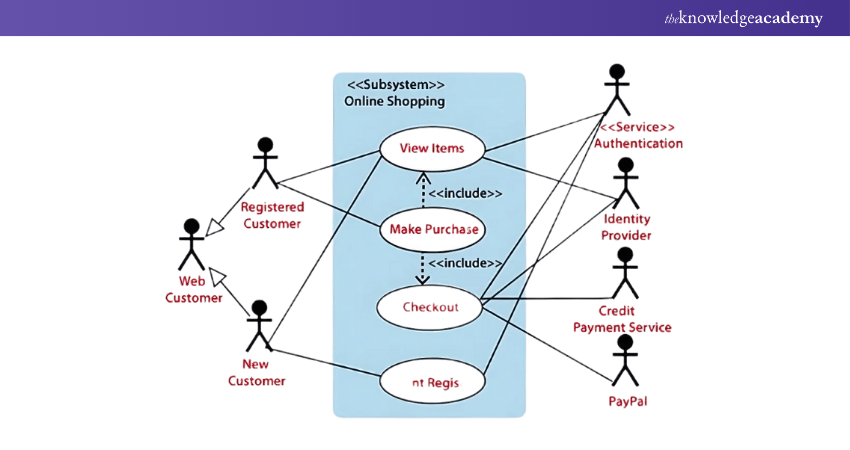
Below is an UML Use Case Diagram example for an online shopping website.
In this scenario, the Web Customer actor interacts with the online shopping website to make purchases. The primary use cases include View Items, Make Purchase, Checkout, and Client Register. The View Items use case allows customers to search for and view products.
The Client Register use case enables customers to register on the website to receive benefits such as gift vouchers, coupons, or private sale invitations. Notably, the Checkout use case is part of the Make Purchase use case and cannot be accessed independently.
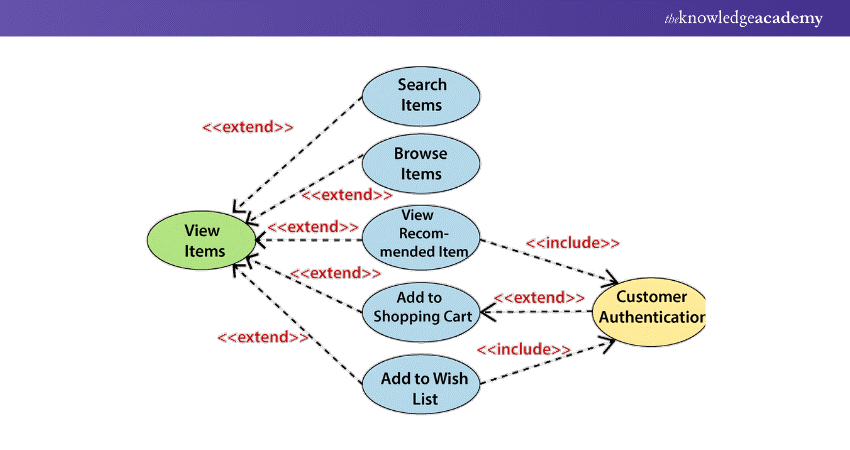
The View Items use case is extended by several other use cases: Search Items, Browse Items, View Recommended Items, Add to Shopping Cart, and Add to Wishlist. These extended use cases offer various functionalities that allow customers to find items.
Both Views Recommended Items and Add to Wishlist include the Customer Authentication use case, as they require authenticated customers. In contrast, items can be added to the shopping cart without user authentication.
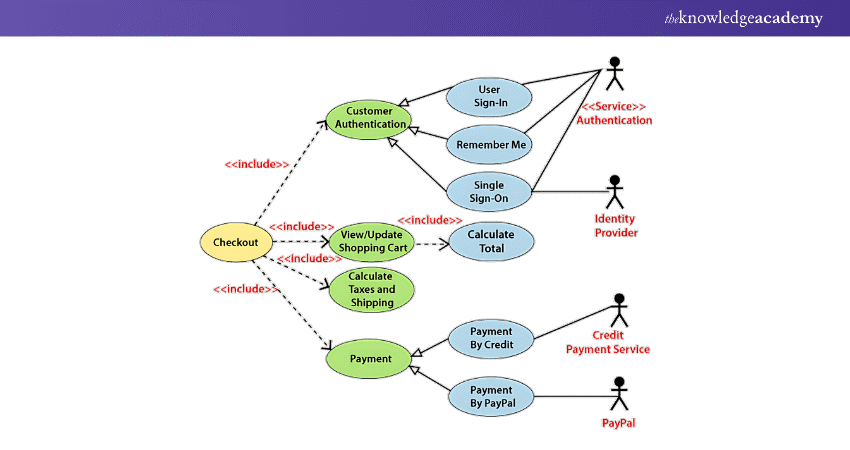
Similarly, the Checkout use case encompasses several other use cases, as illustrated below. An authenticated Web Customer is required, which can be achieved through a login page, user authentication cookies ("Remember me"), or Single Sign-On (SSO). SSO involves an external identity provider, while the website's authentication service is used for all these use cases.
The Checkout use case also includes the Payment use case, which can be completed using credit cards or external credit payment services.
Jumpstart your career in UX/UI Design with our comprehensive UI UX Design Course - master essential skills and tools today!
Best Practices for Use Case Diagrams
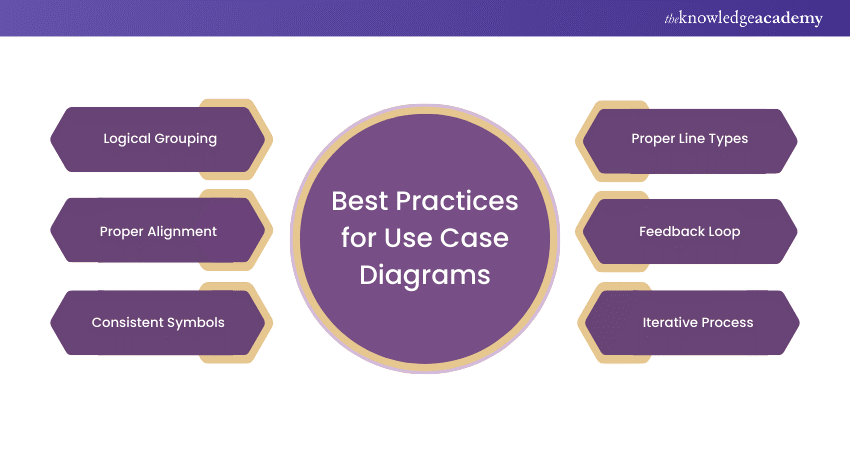
The following are the best practices for Use Case Diagrams:
1) Organise and Align
a) Logical Grouping: Organise use cases into logical groups to represent different modules or subsystems within the system.
b) Alignment: Maintain proper alignment of elements to make the diagram visually appealing and easy to follow.
2) Use Proper Notation
a) Consistent Symbols: Adhere to standard symbols for actors (stick figures), use cases (ovals), and relationships to ensure understanding.
b) Proper Line Types: Clearly distinguish between association, include, extend, and generalisation relationships using appropriate line types.
3) Review and Iterate
a) Feedback Loop: Regularly review the diagram with stakeholders to ensure accuracy and completeness.
b) Iterative Process: Use an iterative process, updating the diagram as the system evolves or more information becomes available.
Discover the fundamentals of UML and enhance your modelling skills with our comprehensive to Introduction To UML Course – sign up now!
What are UML Diagrams Good for?
Unified Modeling Language (UML) diagrams help you understand how a system works. They show how different parts of a system connect and interact. These diagrams are useful for planning, designing, and explaining software systems. They make it easier to spot issues and improve designs early.
How to Identify Actors in a Use Case Diagram?
Actors are usually people or systems that interact with your software. To find them, think about who will use the system and what they need to do. Each actor has a goal or task they want to complete using the system. These users become the stick figure symbols in your diagram.
Conclusion
UML Use Case Diagrams are essential for mastering system design and enhancing communication between stakeholders. By leveraging these diagrams, you can effectively capture requirements, streamline workflows, and ensure all user needs are addressed. However, it’s also important to understand the Pros and Cons of UML in order to fully utilise its potential. Start incorporating Use Case Diagrams into your projects today and experience the transformation firsthand!
Join our UX Design Course to master User Experience design and create engaging user-friendly digital interfaces!
Frequently Asked Questions
What is the Most Important Rule for Use Case Diagrams?

The most important rule is to keep it simple and clear. Focus only on what the user needs from the system. Don’t include system details that users don’t interact with directly. The goal is to show how users connect with the system, not how it works internally.
What are the Limitations of the Use Case Diagram?
Use Case Diagrams don’t show how the system actually works behind the scenes. They also don’t explain the order of steps or data flow in detail. These diagrams are great for overviews but not for technical design. You’ll need other Unified Modeling Language (UML) diagrams for deeper details.
What are the Other Resources and Offers Provided by The Knowledge Academy?
The Knowledge Academy takes global learning to new heights, offering over 3,000+ online courses across 490+ locations in 190+ countries. This expansive reach ensures accessibility and convenience for learners worldwide.
Alongside our diverse Online Course Catalogue, encompassing 19 major categories, we go the extra mile by providing a plethora of free educational Online Resources like Blogs, eBooks, Interview Questions and Videos. Tailoring learning experiences further, professionals can unlock greater value through a wide range of special discounts, seasonal deals, and Exclusive Offers.
What is The Knowledge Pass, and How Does it Work?
The Knowledge Academy’s Knowledge Pass, a prepaid voucher, adds another layer of flexibility, allowing course bookings over a 12-month period. Join us on a journey where education knows no bounds.
What are the Related Courses and Blogs Provided by The Knowledge Academy?
The Knowledge Academy offers various UML Training, including Introduction to UML and Analysis & Design Using UML. These courses cater to different skill levels, providing comprehensive insights into UML Diagram Tools.
Our Programming & DevOps Blogs cover a range of topics related to UML, offering valuable resources, best practices, and industry insights. Whether you are a beginner or looking to advance your Programming skills, The Knowledge Academy's diverse courses and informative blogs have got you covered.

The Knowledge Academy


Global Training Provider
The Knowledge Academy is a world-leading provider of professional training courses, offering globally recognised qualifications across a wide range of subjects. With expert trainers, up-to-date course material, and flexible learning options, we aim to empower professionals and organisations to achieve their goals through continuous learning.


 If you wish to make any changes to your course, please


