


 Top Rated Course

We may not have the course you’re looking for. If you enquire or give us a call on +44 1344 203999 and speak to our training experts, we may still be able to help with your training requirements.
How to Create a Gmail Account in 2026: A Step-by-step Guide
James Smith 22 April 2026Creating a Gmail account is easy. Visit Gmail, enter your details, verify your phone, accept terms, and start using instantly. Gmail helps you stay connected, manage messages, and access Google services. It’s a fast, reliable, and secure email platform for personal or professional use, accessible anytime and anywhere on any device.

Training Outcomes Within Your Budget!
We ensure quality, budget-alignment, and timely delivery by our expert instructors.
Table of Contents
Still sending emails like it's 2010? Step into the future! In 2025, your inbox is more dynamic, natural, and pleasing. Bid goodbye to boring email settings, confusing interfaces, and stuffed inboxes. Gmail has evolved with time and offers powerful tools right at your fingertips. It's your ticket to a stress-free digital life!
Let’s find out How to Create a Gmail Account in today’s world. In this blog, you will come across the steps and beginner tips to create a Gmail account. It can help you turn email into your favourite productivity tool. Create an account in minutes!
Table of Contents
1) Understanding Gmail
2) How to Create a Gmail Account?
3) How to Sign Out of Your New Gmail Account
4) Best Gmail Alternatives 2025
5) Level Up Your Gmail Account
6) Gmail Account Benefits
7) Beginner Tips for Using a Gmail Account
8) Conclusion
Understanding Gmail
Gmail, developed by Google, is one of the most popular email platforms in the world. Launched in 2004, it has revolutionised communication by offering a clean interface, large storage space, and seamless integration with Google Workspace tools like Drive, Meet, Docs, and Calendar.
Over the years, Gmail has evolved from being just an email platform to becoming a complete digital communication hub. It now uses AI to categorise emails, detect spam, and even draft smart replies. Whether you’re managing personal tasks or professional projects, Gmail offers the reliability and efficiency needed in today’s fast-paced digital world.
How to Create a Gmail Account?
Here are some steps you can follow to create a Gmail Account quickly and securely:
Step 1: Go to the Gmail Website
1) Visit www.gmail.com
2) Click “Create account”
3) Choose whether it’s for yourself, your child, or your business
Step 2: Enter Your Personal Information
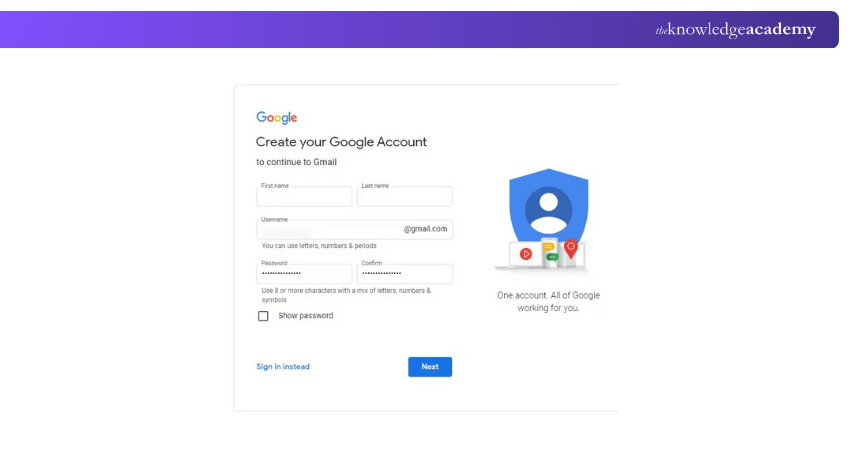
1) Type your first and last name
2) Choose a unique username (this will be your email address)
3) Create a strong password using numbers, letters, and symbols
Step 3: Verify Your Phone Number

1) Enter your mobile number for verification
2) You’ll get a code via SMS, enter it to confirm your identity
Step 4: Add Basic Details
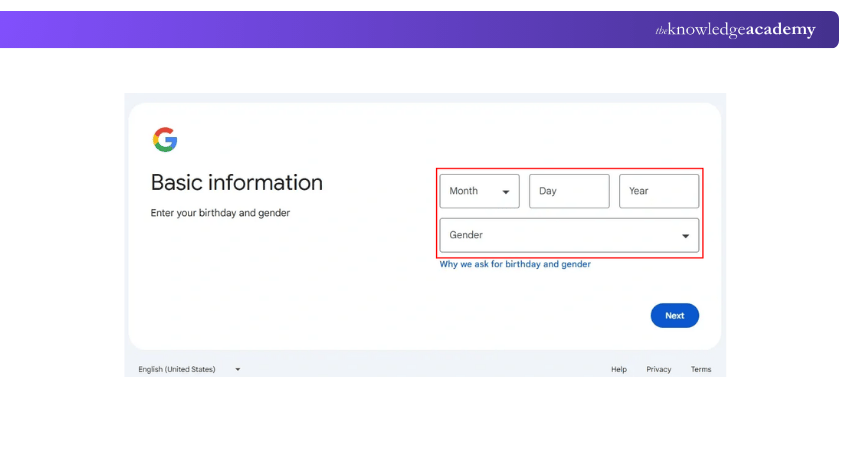
1) Provide a recovery email address (optional)
2) Enter your date of birth and gender
3) These details help recover your account if you forget your password
Step 5: Accept Google’s Terms
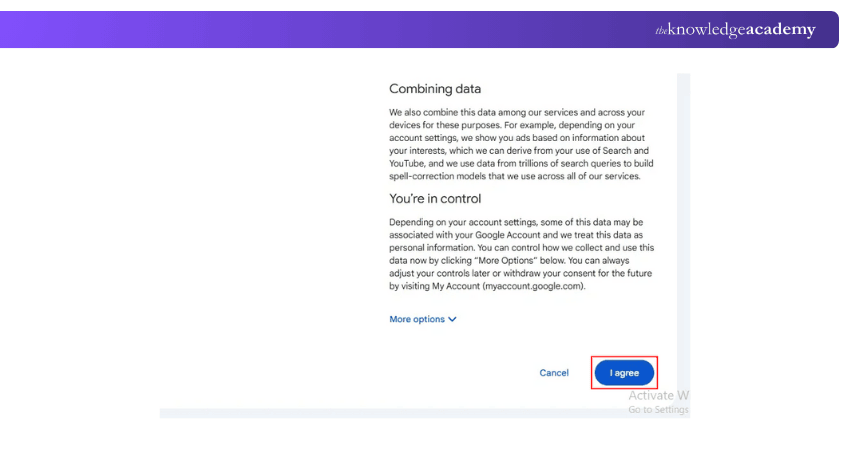
1) Review the Privacy Policy and Terms of Service
2) Click “I agree” to proceed
Step 6: Start Using Gmail
1) Your account is now ready
2) Go to www.gmail.com anytime to send and receive emails
How to Sign Out of Your New Gmail Account?
If you’re using a shared device or a public computer, signing out of Gmail is essential for privacy. Here’s how you can do it:
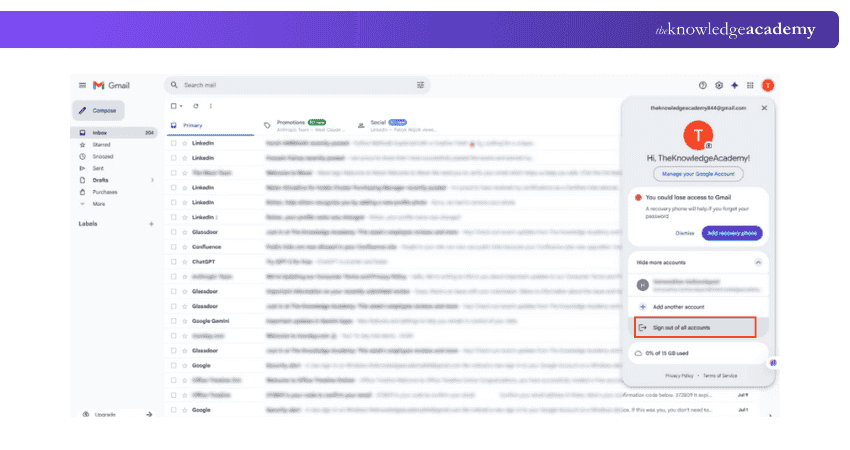
1) Tap profile icon in the top-right corner of the Gmail page
2) Select “Sign out” from the dropdown menu
3) On mobile, go to your Google account settings and tap “Remove account”
Transform your campaigns – join the Email Marketing Course and captivate your audience.
Best Gmail Alternatives 2025
There is no doubt that Gmail is popular in 2025, but here are other email platforms worth exploring. If you are looking for privacy, security, or unique features, here are some alternatives:
Neo
1) Designed specifically for small business owners and freelancers
2) Offers AI-powered productivity tools for smarter communication
3) Allows creation of custom domain-based email addresses
4) Let's users schedule messages and integrate calendars effortlessly
5) Provides a clean, modern interface that enhances your brand identity
Zoho Mail
1) A feature-rich, ad-free email service ideal for professionals
2) Integrated with Zoho Workplace, enabling team collaboration and file sharing
3) Includes CRM integration for better client communication management
4) Ensures top-level security and privacy with no ads or distractions
5) Offers custom domain support, perfect for business use
Proton Mail
1) Based in Switzerland, known for its strict data privacy laws
2) Provides end-to-end encryption for complete message protection
3) Uses a zero-access architecture, ensuring even ProtonMail can’t read your emails
4) Ideal for users who value security, anonymity, and confidentiality
5) It provides both free and premium plans with additional privacy-focused tools
Learn to create concise and effective subject lines with our E-mail Etiquette Training – Join now!
Level Up Your Gmail Account
Here are some ways to advance your Gmail account:
1) Enable Two-Factor Authentication: Strengthen your account security by requiring a verification code each time you log in.
2) Use Gmail Shortcuts: Save time by learning and using keyboard shortcuts to manage emails more efficiently.
3) Explore Google Integrations: Connect Gmail seamlessly with other Google services like Meet, Calendar, and Drive for better productivity.
4) Use AI-Powered Tools: Take advantage of smart writing suggestions, follow-up reminders, and automated formatting options to enhance efficiency.
Gmail Account Benefits
Let’s explore some of the major benefits of using Gmail:
1) Enjoy ample free storage across Gmail, Google Drive, and Google Photos for emails, files, and media.
2) Stay organised with automatic email categorisation into Primary, Promotions, and Social tabs for easy navigation.
3) Access Google’s integrated apps such as Docs, Sheets, Calendar, and Meet directly from your Gmail account.
4) Stay protected with advanced security features, including spam filters, phishing detection, and two-step verification.
5) Experience a clean and user-friendly design optimised for both smartphones and tablets.
Beginner Tips for Using a Gmail Account
If you are setting up your Gmail Account for the first time, here are some beginner tips for your convenience:
Send the First Email
Here’s how to compose and send your first email:
1) Click the “Compose” icon in the top-left corner of your inbox
2) Enter the recipient’s email address in the “To” field
3) Add a subject line and type your message in the main body
4) Click “Send” to deliver your message instantly
Read the Emails
Reading and managing emails helps you stay informed and organised:
1) Log in to your Gmail account and open your inbox
2) Click on any email to open and read it
3) To answer the sender, press the "Reply" button
4) Click “Forward” if you want to share the message with someone else
Stay Organised
Keeping your Gmail organised makes communication smoother:
1) Label emails into categories such as work, personal, or promotions
2) Create folders to manage projects or ongoing tasks
3) Use the search bar at the top to find specific messages quickly
Conclusion
Creating a Gmail account is more than just setting up an email; it’s opening a gateway to smarter communication and productivity. Now that you know How to Create a Gmail Account, you can connect, organise, and collaborate effortlessly across all your devices. Stay updated, stay secure, and make every email count.
Master modern marketing skills and accelerate your career success with expert-led Marketing Courses today.
Frequently Asked Questions
What is the Best Username for Gmail?

The best username for Gmail is simple, professional, and easy to remember. Use your real name or a combination of your first and last names. Avoid numbers, special characters, or random words to keep it clean and credible.
What is the Unique ID of Gmail?
A Gmail ID, also known as your Gmail address, is your unique identifier used to access Google services. It's the email address you create, like "yourname@gmail.com," that acts as your personal digital mailbox.
What are the Other Resources and Offers Provided by The Knowledge Academy?
The Knowledge Academy takes global learning to new heights, offering over 3,000+ online courses across 490+ locations in 190+ countries. This expansive reach ensures accessibility and convenience for learners worldwide.
Alongside our diverse Online Course Catalogue, encompassing 17 major categories, we go the extra mile by providing a plethora of free educational Online Resources like Blogs, eBooks, Interview Questions and Videos. Tailoring learning experiences further, professionals can unlock greater value through a wide range of special discounts, seasonal deals, and Exclusive Offers.
What is The Knowledge Pass, and How Does it Work?
The Knowledge Academy’s Knowledge Pass, a prepaid voucher, adds another layer of flexibility, allowing course bookings over a 12-month period. Join us on a journey where education knows no bounds.
What are the Related Courses and Blogs Provided by The Knowledge Academy?
The Knowledge Academy offers various Marketing Courses, including Gmail Course for Productive Email Management Training, WhatsApp Marketing Training, and Pay Per Click (PPC) Training. These courses cater to different skill levels, providing comprehensive insights into Email Encryption.
Our Digital Marketing Blogs cover a range of topics related to Email Marketing, offering valuable resources, best practices, and industry insights. Whether you are a beginner or looking to advance your Digital Marketing skills, The Knowledge Academy's diverse courses and informative blogs have got you covered.

James Smith


Digital Marketing Manager and Trainer
James Smith is a digital marketing professional with over a decade of experience in SEO, content strategy, paid media and analytics. He has supported both SMEs and global brands in transforming their digital presence. James’s writing and training are rooted in results-driven tactics and the latest marketing trends.
View Detail
Upcoming Digital Marketing Resources Batches & Dates
Date
 Gmail Course for Productive Email Management Training Course
Gmail Course for Productive Email Management Training Course
Fri 24th Jul 2026
Gmail Course for Productive Email Management Training Course
Fri 27th Nov 2026

 If you wish to make any changes to your course, please


