


 Top Rated Course

We may not have the course you’re looking for. If you enquire or give us a call on +1800812339 and speak to our training experts, we may still be able to help with your training requirements.
CompTIA Interview Questions And Answers For IT Roles
The Knowledge Academy 22 April 2026The most frequently asked CompTIA interview questions encompass topics like hardware, networking, OS, security, and troubleshooting to showcase your skills. The vendor-neutral aspect of CompTIA means that these certifications are applicable across different technology platforms, making them a versatile credential for IT professionals.
Training Outcomes Within Your Budget!
We ensure quality, budget-alignment, and timely delivery by our expert instructors.
Table of Contents
CompTIA is the powerhouse that serves as the backbone of IT certifications. It's the global leader in vendor-neutral tech credentials. From networking to Cyber Security, it sets the standard for skills that drive the digital world forward. This also means that if you are looking for career in as a CompTIA-certified professional, there's a lot of technical areas to cover. But don't worry, our selection of CompTIA Interview Questions got you covered.
This blog has assembled the top 40 CompTIA Interview Questions and answers to help you understand exactly what employers look for. From core concepts to tricky scenarios, these questions will help you level up your IT career. So read on!
Table of Contents
1) CompTIA Interview Questions and Answers
a) What is a Personal Computer (PC)?
b) What are the key components of a PC?
c) Define a Storage Device.
d) What is a Gateway?
e) What is your experience with different operating systems?
f) What is a System Board (Motherboard)?
g) How does a Gateway differ from a Router?
h) How would you rate your ability to communicate with end users?
i) What are the different CPU technologies?
j) What are the types of Hard Disk Drive (HDD) connectors?
2) Conclusion
CompTIA Interview Questions and Answers
When preparing for an IT role, these CompTIA Interview Questions and answers will help you strengthen your fundamentals and boost your confidence. These questions will help you gauge the employers' expectations from entry-level and experienced candidates. Let's dive in:
What is a Personal Computer (PC)?

“A personal computer is a general-purpose device designed for individual use. It lets us perform everyday tasks like browsing, working, gaming, and communicating. It’s made to be easy to operate and flexible enough to handle different applications. That's why it's ideal for both home and office environments.”
What are the key components of a PC?
“A PC mainly includes:
1) Central Processing Unit (CPU)
2) Random Access Memory (RAM)
3) Storage drive
4) Motherboard
5) Power supply
6) Input devices
7) Output devices
These components work together to process data, run applications, and produce results you interact with. Without any one of them, the system wouldn’t function properly.”
Define a Storage Device
“A storage device is hardware that saves data permanently or temporarily. It includes hard drives, SSDs, USB flash drives and memory cards. These devices can store Operating Systems, applications, documents and user files so that the computer can access them whenever needed. It’s essential for system operation.”
What is a Gateway?
“A gateway is a network device that connects two different networks and translates data between them. It acts like a bridge, ensuring proper communication between systems that may use different protocols or architectures. Gateways are essential for large networks and internet connectivity.”
What is your experience with different Operating Systems?
“I’ve worked with Windows, macOS, and various Linux distributions. Each has its own strengths, and I am comfortable installing, configuring, troubleshooting, and navigating them. This range of experience helps me adapt to different user environments and solve issues more efficiently.”
What is a System Board (Motherboard)?
“A motherboard is the main circuit board connecting all the PC components together. It houses the following:
1) CPU socket
2) RAM slots
3) Expansion ports
4) Chipset
5) Connectors
It basically acts as the communication hub, making sure all hardware components work together smoothly.”
How does a Gateway differ from a Router?
“A router directs traffic between networks using IP addresses, while a gateway connects networks that use different protocols. In simple terms, all gateways can act like routers, but not all routers can perform gateway-level protocol conversion.”
How would you rate your ability to communicate with end users?
“I’d rate it as strong. I focus on keeping explanations simple, avoiding jargon and checking their understanding as I go. I try to make users feel comfortable, especially when they’re stressed about technical issues, so they get the help they need quickly.”
What are the different CPU technologies?
“CPUs use technologies like multi-core processing, hyper-threading, cache memory, integrated graphics and various instruction sets. These technologies help the CPU perform tasks faster and manage workloads better, thus improving overall system performance.”
What are the types of Hard Disk Drive (HDD) connectors?
The main HDD connectors are SATA, IDE and SCSI:
1) Serial Advanced Technology Attachment (SATA): This is the most common HDD connector, offering faster speeds and simple, reliable installation.
2) Integrated Drive Electronics (IDE): This is an older connector type with slower performance, mainly found in legacy systems.
3) Small Computer System Interface (SCSI): This is a high-performance connector traditionally used in servers and enterprise environments.
Turn every plan into unstoppable progress. Sign up for our CompTIA Project+ Certification today!
How do you anticipate using your CompTIA A+ certification in this role?
“CompTIA A+ gives me a solid foundation in troubleshooting, hardware, networking, and security basics. I expect to use it daily to diagnose issues faster, communicate clearly with users and follow best practices when supporting or maintaining systems.”
What are the functions of an Operating System?
An operating system handles functions such as:
1) Managing hardware
2) Running applications
3) Handling memory and processes
4) Providing security
5) Offering a user interface
It basically acts as the middle layer that lets users interact with the computer without needing to understand the hardware directly.
What essential hardware components are required to make a personal computer operational?
A functional PC needs the following hardware components:
1) CPU
2) RAM
3) Motherboard
4) Storage device
5) Power supply
6) Input and output hardware
These components work together to run the operating system and applications so the user can interact with the system.
How do you approach troubleshooting software or hardware issues?
“I start by identifying the symptoms and asking clarifying questions. Then I isolate the variables, test possible causes one by one, apply fixes and confirm the problem is resolved. Finally, I document the solution so it’s easier next time.”
What are System Files?
“System files are essential Operating System files that help the computer boot, run and manage hardware. They include drivers, configuration files, and core OS components. Damaging these files can cause serious issues, so they’re usually protected.”
What is a graphics card or graphics driver?
“A graphics card is responsible for processing and displaying visual output on the monitor. A graphics driver is the software that allows the operating system to communicate with the graphics hardware. Together, they enable smooth visuals, gaming performance, rendering, and video playback.”
What is cache RAM?
“Cache RAM refers to high-speed memory built into or near the CPU. It stores frequently used instructions so the processor doesn’t have to fetch them from slower main memory. This improves their speed and responsiveness during intensive tasks.”
Define FireWire
“FireWire is a high-speed connection standard used for transferring data between devices like cameras, external drives and audio equipment. It was popular before USB 3.0 because of its fast, reliable performance, especially for media-related tasks.”
Explain RAID and its different levels
RAID combines multiple drives for performance, redundancy, or both. Here are its various levels:
1) RAID 0: It stripes data across drives to boost speed but provides no redundancy.
2) RAID 1: It mirrors data across drives, offering strong redundancy and reliability.
3) RAID 5: It uses parity to deliver a balance of performance, storage efficiency, and fault tolerance.
4) RAID 10: It combines striping and mirroring for high speed and excellent data protection.
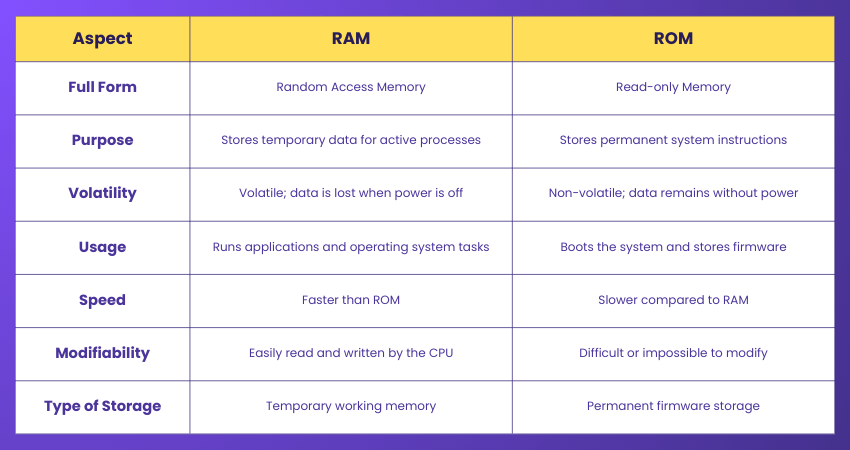
How do ROM and RAM differ?
Here are the key differences between RAM and ROM:
What is a modem?
“The term 'Modem' stands for MOdulator-DEModulator. A modem converts digital signals to analogue signals and back, thus allowing computers to communicate over telephone or cable lines. It essentially connects you to the internet by translating data into a form your ISP can understand.”
What does GUI stand for?
“GUI stands for Graphical User Interface. It’s the visual layout that lets users interact with applications using icons, windows, menus and buttons instead of typing commands manually. It makes software more intuitive and accessible to users of all skill levels.”
If you are looking to future-proof your IT skills, the Cloud holds the solution. Sign up for our CompTIA Cloud+ Certification now!
What experience do you have with installing and maintaining printers?
"I’ve installed printers through USB, Wi-Fi and network setups. I’ve handled driver updates, cleared print queues, solved paper jams, replaced cartridges and configured shared printing. I try to keep the process simple for end users."
How do you plan to stay updated with new technologies?
"I stay updated by following tech blogs, watching tutorials, experimenting with new tools, and completing short courses. Technology changes quickly, so continuous learning keeps my skills relevant and sharp."
How do you set up a wireless network?
I take the following steps to set up a wireless network:
1) Configure the router
2) Set SSID and password
3) Choose security settings like WPA2 or WPA3
4) Connect the devices
5) Adjust placement for better coverage
6) Test the network to ensure stable performance
How would you explain DRAM?
“Dynamic Random Access Memory (DRAM) is a common type of system memory that stores data temporarily while the computer is running. It needs constant refreshing to hold information, but it’s fast and essential for multitasking and running applications smoothly.”
Explain the OSI model
The Open Systems Interconnection (OSI) model is a seven-layer framework explaining how data moves across networks. It includes the following layers:
1) Physical Layer: It deals with hardware and transmission of raw bits.
2) Data Link Layer: It handles error detection and frames.
3) Network Layer: It manages routing and addressing (e.g., IP).
4) Transport Layer: It ensures reliable data transfer (e.g., TCP).
5) Session Layer: It manages sessions between applications.
6) Presentation Layer: It translates data formats (e.g., encryption).
7) Application Layer: It interfaces with end-user applications (e.g., HTTP).
How does DRAM affect PC performance?
“More DRAM means the system can run more applications at once and handle heavier workloads without slowing down. If there’s too little memory, the PC relies on slower virtual memory, which reduces its performance noticeably.”
How many bytes are in 1 kilobyte?
“Traditionally, one kilobyte equals 1,024 bytes in computing. But for storage manufacturers, it’s sometimes defined as 1,000 bytes. In most technical contexts, 1,024 bytes is the standard.”
Explain IP addresses
“An Internet Protocol (IP) address is a unique numerical label assigned to each device on a network. It helps identify the device and ensures data is routed to the correct destination. There are two main versions: IPv4 and IPv6, both used for network communication.”
What is a VPN, and what does it stand for?
“A Virtual Private Network (VPN) facilitates an encrypted, secure connection over the internet. It protects our data, hides our IP address, and lets us safely access remote networks like any company’s systems.”
How do you recover data from a virus-infected system?
I take the following steps to recover data from a virus-infected system:
1) Isolate the system
2) Run antivirus scans
3) Remove malicious files
4) Recover data using backups or recovery tools
If necessary, I boot from external media to access files safely without spreading the infection
Defend the digital world with our comprehensive CompTIA Security+ Certification - Register now!
What is RIP?
“RIP stands for Routing Information Protocol. It’s an older distance-vector routing protocol that uses hop counts to determine the best path. It’s simple but mainly used in small networks today.”
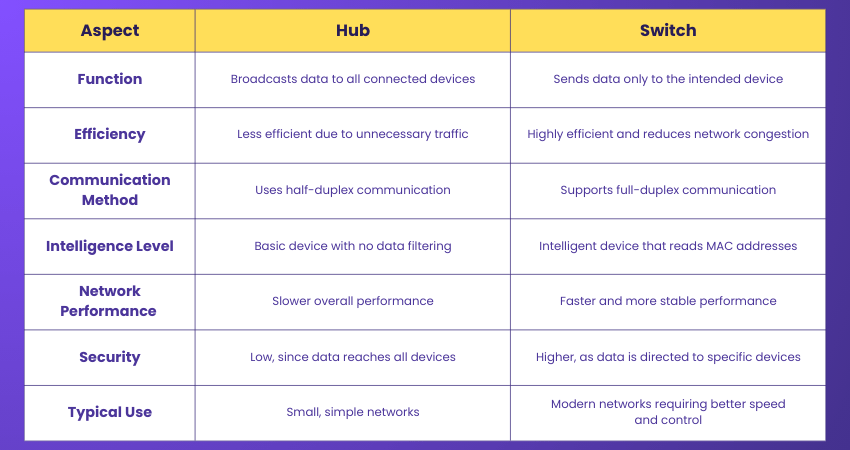
What is the difference between a hub and a switch?
Here are the key differences between a hub and switch:
Define VLAN and explain how to set one up
A VLAN is a virtual network created within a physical network to improve security and organisation. You set it up with the following steps:
1) Access the Switch Configuration: Log in to the managed switch through the web interface, CLI, or console port.
2) Create a New VLAN: Define a VLAN by assigning it a unique VLAN ID (like 10, 20, or 30).
3) Assign Ports to the VLAN: Select the switch ports you want to include and tag or untag them based on device requirements.
4) Configure Trunk Ports: Set specific ports as trunk ports to carry multiple VLANs between switches.
5) Set Up Inter-VLAN Routing: Use a Layer 3 switch or router to allow communication between different VLANs.
6) Apply Security Policies: Configure access control, DHCP scopes, or firewall rules for each VLAN.
7) Test Connectivity: Connect devices, verify IP assignments, and check if each VLAN isolates or communicates as intended.
Differentiate a domain from a workgroup
“A domain centralises control with servers that manage users and permissions. A workgroup is decentralised, with each computer managing its own resources. Domains are well-suited for larger organisations.”
Differentiate attenuation, distortion, and noise
Here are the key differences:
1) Attenuation is the gradual weakening of a signal as it travels over a long distance. This makes it harder for the receiver to interpret the data accurately.
2) Distortion occurs when the original shape or form of the signal is altered during transmission. This causes the data to arrive differently than it was sent.
3) Noise is any unwanted electrical or electromagnetic interference that mixes with the signal. It reduces clarity and causing errors.
All three reduce communication quality and must be managed through proper cabling, amplification and signal-conditioning techniques.
What is DHCP?
“Dynamic Host Configuration Protocol (DHCP) automatically assigns the IP addresses and network configurations to devices. It saves time, reduces manual errors and ensures smooth network connectivity. It also manages lease durations so that the addresses are reused. By centralising IP assignment, DHCP makes network administration far easier and more reliable.”
What is the function of Active Directory?
“Active Directory manages users, devices, permissions, and security within a Windows domain. It centralises authentication and access control, helping organisations manage large networks efficiently. It also supports Group Policies to enforce consistent settings across users and machines.”
Explain netstat and its uses
“Netstat is a command-line tool that shows the active network connections, ports and routing tables. It helps diagnose network issues, check open ports, monitor traffic, etc. It’s especially useful for spotting suspicious connections or verifying service activity. Administrators rely on it to troubleshoot connectivity problems and analyse network performance.”

The Knowledge Academy


Global Training Provider
The Knowledge Academy is a world-leading provider of professional training courses, offering globally recognised qualifications across a wide range of subjects. With expert trainers, up-to-date course material, and flexible learning options, we aim to empower professionals and organisations to achieve their goals through continuous learning.


 If you wish to make any changes to your course, please


